



Simple Post Notes
Adds simple notes to post, page and custom post type edit screen.

Use with caution
Simple Post Notes works, but test it on a staging site before relying on it in 2026. It runs on 9K+ sites, is rated 5/5 and was last updated 1 year ago, and scores 44/100 on our health check.
- Loved by users — 5/5 from 24 reviews
- No update in over a year
- Only tested up to WordPress 6.8 (latest is 7.1)
How does it stack up?
Side-by-side on installs, updates, ratings & support



Daily downloads
Download spikes usually follow a new release — each site that auto-updates counts as a download.
Rankings
Where Simple Post Notes stands todayWordPress.org search rankings
Live position in the plugin search, top 100| Keyword | Position |
|---|---|
| info | #81 |
| note | #19 |
| notes | #14 |
| post info | #16 |
| post notes | #5 |
Version adoption
Share of active sites per release.
Rating breakdown
★★★★★★★★★★ 5 from 24 reviews
About Simple Post Notes
From the official readme · v1.8.1Description
Features
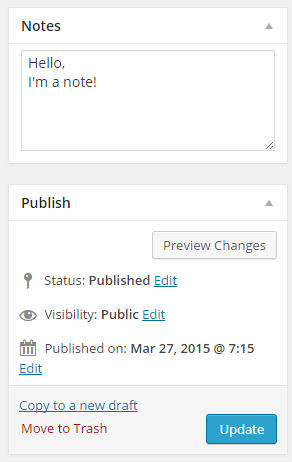
- Simple note section on the post edit screen
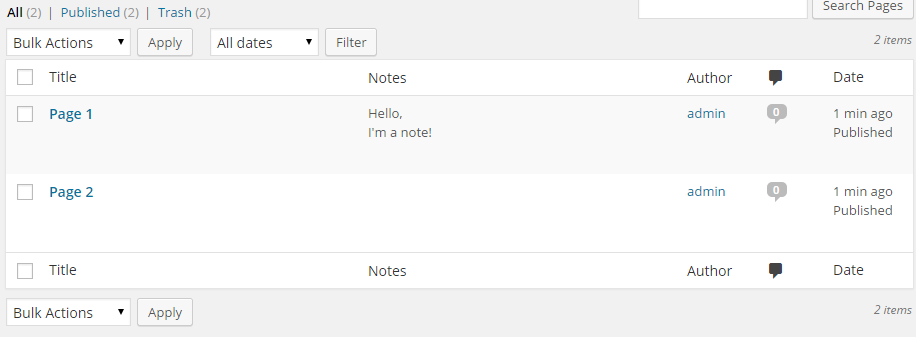
- Sortable note column in posts table
- Bulk / Quick edit support
- Shortcode which will display the note on the front end
- Ability to change the “Note” title and add a help text for editors
Our other plugins
Custom development
BracketSpace – the company behind this plugin provides custom WordPress plugin development services. We can create any custom plugin for you.
Cover photo designed by Freepik
Frequently asked questions
Is this plugin compatible with Gutenberg?
Yes, it is!
Custom post type are supported?
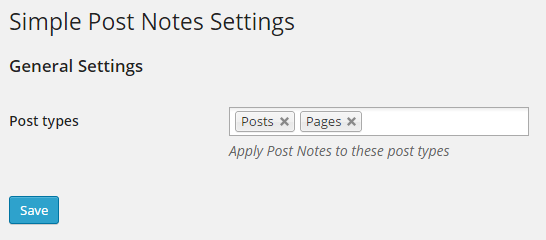
Yes! Enable them on the plugin settings screen.
Can I display my note on the front-end?
Yes. Use the [spnote] shortcode. You can also pass optional parameter with post ID: [spnote id="123"] to display note from other post. By default it’s grabbing current post.
Can I disable display of admin column?
Yes, by a simple filter. Use: add_filter( ‘spn/columns-display’, ‘__return_false’ ); To disable SPN column for all post types Or use add_filter( ‘spn/columns-display/POST_TYPE_SLUG’, ‘__return_false’ ); To disable SPN column only for specific post type
Can you create a plugin for me?
Yes! We’re offering a custom plugin development services. Feel free to contact us to find out how we can help you.
Changelog
Release
1.8.1
- [Fixed] Added null coalescing operators to prevent PHP warnings when settings array keys don’t exist.
1.8.0
- [Changed] Removed local translation files in favor of GlotPress repository.
- [Changed] Coding standards to PSR-12.
- [Changed] Plugin requirements to WordPress >=6.0 and PHP >=7.0.
1.7.8
- [Fixed] Security issue – missing proper user data sanitization for notes placeholder and label.
- [Changed] Multiple escaping missing.
1.7.7
- [Fixed] Notes bulk edit which didn’t save the note.
- [Fixed] PHP notice_placeholder not defined notice.
- [Fixed] Security patch.
1.7.6
- [Added] Sanitization for better security.
1.7.5
- [Fixed] PHP warning.
Screenshots
For developers
Is this your plugin? Show off the numbers.
Add a live badge to your site, docs or GitHub README. It updates on its own — no account needed.
Best Simple Post Notes alternatives
All info plugins →





FAQ
Simple Post Notes: quick answers
Straight answers, pulled from live WordPress.org data.
Live data from WordPress.org · checked Sep 26, 2026
Is Simple Post Notes free?
Yes. Simple Post Notes is free to download and use from the official WordPress.org plugin directory.
Is Simple Post Notes safe to use in 2026?
Simple Post Notes works, but test it on a staging site before relying on it in 2026. It runs on 9K+ sites, is rated 5/5 and was last updated 1 year ago, and scores 44/100 on our health check.
How many websites use Simple Post Notes?
Simple Post Notes is active on 9K+ WordPress websites and has been downloaded 88,632 times since it launched in March 2015. It was downloaded 484 times in the last 30 days.
Does Simple Post Notes work with WordPress 7.1?
Simple Post Notes is officially tested up to WordPress 6.8.10, while the latest release is 7.1.2. It may still work, but try it on a staging site first.
What PHP version does Simple Post Notes need?
Simple Post Notes requires PHP 7.0 or higher. Most hosts run PHP 8.x today, so it works on any modern WordPress hosting.
When was Simple Post Notes last updated?
The latest version, 1.8.1, was released on September 4, 2025 (1 year ago).
Who makes Simple Post Notes?
Simple Post Notes is developed and maintained by Kuba Mikita.
What are the best alternatives to Simple Post Notes?
The most popular alternatives to Simple Post Notes are Info Cards (2K+ installs), Special Text Boxes (1K+ installs) and AWEOS PHP Server Info (1K+ installs).
Powered by PageForge
Want thousands of pages that rank like these? Build them in an afternoon.
This directory runs on the same engine as PageForge. Turn any spreadsheet, CSV or API into thousands of fast, SEO-ready WordPress pages — with schema, internal links and AI-written copy baked in.
- CSV, Google Sheets & API data sources
- AI content, schema & internal links per page
- Works with Elementor, Gutenberg, Yoast & Rank Math
- Free on WordPress.org — no credit card


