


Simple File Upload Limiter
Set maximum upload sizes for different file types in WordPress: images, documents, audio, video and everything else.

Solid choice
Simple File Upload Limiter is a solid plugin choice in 2026, with a few things worth checking first. It runs on 20+ sites and was last updated 3 weeks ago, and scores 67/100 on our health check.
- Actively developed — last update 3 weeks ago
- Tested with the latest WordPress (7.1)
- Small user base (20+ active installs)
- Very few reviews so far
How does it stack up?
Side-by-side on installs, updates, ratings & support



Daily downloads
Download spikes usually follow a new release — each site that auto-updates counts as a download.
Rankings
Where Simple File Upload Limiter stands todayWordPress.org search rankings
Live position in the plugin search, top 100| Keyword | Position |
|---|---|
| file | >100 |
| limit | >100 |
| restrict | >100 |
| size | >100 |
| upload | >100 |
Version adoption
Share of active sites per release.
About Simple File Upload Limiter
From the official readme · v1.1.0Description
Simple File Upload Limiter lets you set a different maximum upload size for each kind of file, right from the WordPress admin. Users can’t upload files that exceed the limits you define, which helps you keep your server resources and media library under control.
Features:
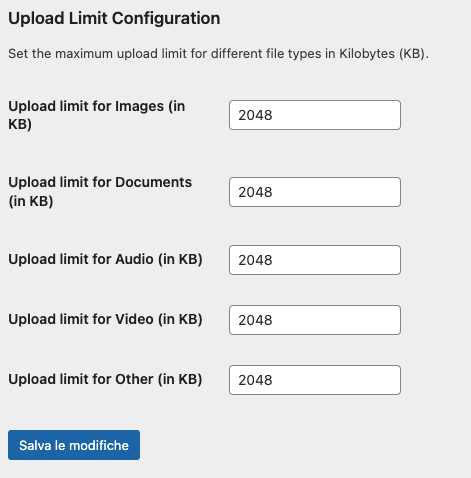
- Separate limits for images, documents, audio, video and other file types.
- Limits defined in kilobytes (KB).
- One simple settings page under Settings > File Upload Limiter.
- A clear error message tells the user which limit was exceeded.
Looking to limit uploads by user role instead of by file type? Take a look at Simple Upload Weight Limit.
Installation
- Upload the
simple-file-upload-limiterfolder to the/wp-content/plugins/directory. - Activate the plugin through the ‘Plugins’ menu in WordPress.
- Go to Settings > File Upload Limiter to configure the upload limits.
Frequently asked questions
Can I set different limits for different file types?
Yes. You can set individual upload limits for images, documents, audio, video, and other file types from the plugin’s settings page.
What happens if a user tries to upload a file that exceeds the limit?
The upload is refused and the user sees an error message that includes the file type and the allowed limit.
Does this raise my server’s upload limit?
No. The limits set here can only be lower than or equal to the maximum your hosting allows (upload_max_filesize and post_max_size in PHP). They can’t raise it.
Changelog
Maintenance release: input sanitization, compatibility with WordPress 7.1.
1.1.0
- Saved limits are now sanitized: one positive whole number per file type.
- Removed the manual translation loading, which WordPress handles automatically for plugins hosted on WordPress.org.
- Added the missing license URI and minimum-version headers.
- Added a gentle, dismissible review request on the settings page (shown after a week).
- Tested with WordPress 7.1.
1.0.0
- Initial release.
Screenshots
For developers
Is this your plugin? Show off the numbers.
Add a live badge to your site, docs or GitHub README. It updates on its own — no account needed.
Best Simple File Upload Limiter alternatives
All file plugins →





FAQ
Simple File Upload Limiter: quick answers
Straight answers, pulled from live WordPress.org data.
Live data from WordPress.org · checked Oct 12, 2026
Is Simple File Upload Limiter free?
Yes. Simple File Upload Limiter is free to download and use from the official WordPress.org plugin directory.
Is Simple File Upload Limiter safe to use in 2026?
Simple File Upload Limiter is a solid plugin choice in 2026, with a few things worth checking first. It runs on 20+ sites and was last updated 3 weeks ago, and scores 67/100 on our health check.
How many websites use Simple File Upload Limiter?
Simple File Upload Limiter is active on 20+ WordPress websites and has been downloaded 1,758 times since it launched in August 2024. It was downloaded 165 times in the last 30 days.
Does Simple File Upload Limiter work with WordPress 7.1?
Yes. The developer has tested Simple File Upload Limiter up to WordPress 7.1.3, the latest release. It requires WordPress 5.0 or newer.
What PHP version does Simple File Upload Limiter need?
Simple File Upload Limiter requires PHP 7.0 or higher. Most hosts run PHP 8.x today, so it works on any modern WordPress hosting.
When was Simple File Upload Limiter last updated?
The latest version, 1.1.0, was released on September 24, 2026 (3 weeks ago).
Who makes Simple File Upload Limiter?
Simple File Upload Limiter is developed and maintained by Alberto Reineri.
What are the best alternatives to Simple File Upload Limiter?
The most popular alternatives to Simple File Upload Limiter are Phoenix Media Rename (50K+ installs), Theme Editor (50K+ installs) and What The File (40K+ installs).
Powered by PageForge
Want thousands of pages that rank like these? Build them in an afternoon.
This directory runs on the same engine as PageForge. Turn any spreadsheet, CSV or API into thousands of fast, SEO-ready WordPress pages — with schema, internal links and AI-written copy baked in.
- CSV, Google Sheets & API data sources
- AI content, schema & internal links per page
- Works with Elementor, Gutenberg, Yoast & Rank Math
- Free on WordPress.org — no credit card


