



What The File
What The File is the best tool to find out what template parts are used to display the page you're currently viewing!

Solid choice
What The File is a solid plugin choice in 2026, with a few things worth checking first. It runs on 40K+ sites, is rated 4.9/5 and was last updated 7 months ago, and scores 63/100 on our health check.
- Proven at scale on 40K+ active sites
- Loved by users — 4.9/5 from 882 reviews
- Only tested up to WordPress 6.9 (latest is 7.1)
How does it stack up?
Side-by-side on installs, updates, ratings & support



Daily downloads
Download spikes usually follow a new release — each site that auto-updates counts as a download.
Rankings
Where What The File stands todayWordPress.org search rankings
Live position in the plugin search, top 100| Keyword | Position |
|---|---|
| development | #28 |
| file | #10 |
| template | #94 |
| template editing | #7 |
| toolbar | #31 |
Version adoption
Share of active sites per release.
Rating breakdown
★★★★★★★★★★ 4.9 from 882 reviews
About What The File
From the official readme · v1.6.1Description
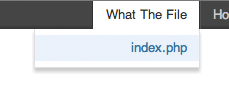
What The File adds an option to your toolbar showing what file and template parts are used to display the page you’re currently viewing.
You can click the file name to directly edit it through the theme editor, though I don’t recommend this for bigger changes.
What The File supports BuddyPress and Roots Theme based themes.
More information can be found here.
Looking for a great related posts plugin for WordPress?
Another plugin I’ve built, that I’m very proud of is Related Posts for WordPress. Related Posts for WordPress offers you the ability to link related posts to each other with just 1 click! And it’s 100% free! Check it out on the WordPress repository.
Installation
- Upload
what-the-fileto the/wp-content/plugins/directory - Activate the plugin through the ‘Plugins’ menu in WordPress
Frequently asked questions
Where can I see what template file is used?
In the toolbar you will find the “What The File” option. Hovering this option will display the currently used template file, clicking the template file name will allow you to edit the template file with the WordPress file editor. Please note that some BuddyPress files can’t be edited in the WordPress editor.
I can’t find the “What The File” option in the toolbar
You have to be an Administrator to see the “What The File” option.
What PHP version are supported / tested?
What The File works supports starts at PHP 5.3 and is tested on every major release up until PHP 8.1.
Does What The File supports BuddyPress
Yes it does.
Does What The File supports Roots Theme
Yes it does.
You saved me so much time, is there any way I can thank you?
Glad to hear I could help you! You can thank me in various ways, please see my donation page to find out more.
Changelog
1.6.1: December 19, 2025
- Tweak: Tested with the latest version of WP and meta update.
1.6.0: September 19, 2022
- Feature: Now correctly working with the wp_body_open tag. Full template part support is back.
- Tweak: Used proper add_site_option argument count. props @szepeviktor
- Tweak: Optimized file editing allowed function. props @szepeviktor
- Tweak: Change template_include priority from 1000 to PHP_INT_MAX for wider support. props @greenshady
- Tweak: Version and meta update.
1.5.4: October 8, 2017
- Version and meta update.
1.5.3: May 2, 2016
- Appended an extra check for the Sage starter theme, props remyvv.
1.5.2
- Fixed a CSS bug with admin bar.
1.5.1
- Fixed a bug where some themes make all images display block.
Screenshots
For developers
Is this your plugin? Show off the numbers.
Add a live badge to your site, docs or GitHub README. It updates on its own — no account needed.
Best What The File alternatives
All development plugins →



FAQ
What The File: quick answers
Straight answers, pulled from live WordPress.org data.
Live data from WordPress.org · checked Sep 26, 2026
Is What The File free?
Yes. What The File is free to download and use from the official WordPress.org plugin directory.
Is What The File safe to use in 2026?
What The File is a solid plugin choice in 2026, with a few things worth checking first. It runs on 40K+ sites, is rated 4.9/5 and was last updated 7 months ago, and scores 63/100 on our health check.
How many websites use What The File?
What The File is active on 40K+ WordPress websites and has been downloaded 613,113 times since it launched in August 2012. It was downloaded 3,883 times in the last 30 days.
Does What The File work with WordPress 7.1?
What The File is officially tested up to WordPress 6.9.9, while the latest release is 7.1.2. It may still work, but try it on a staging site first.
What PHP version does What The File need?
What The File requires PHP 5.3 or higher. Most hosts run PHP 8.x today, so it works on any modern WordPress hosting.
When was What The File last updated?
The latest version, 1.6.1, was released on February 19, 2026 (7 months ago).
Who makes What The File?
What The File is developed and maintained by Barry Kooij.
What are the best alternatives to What The File?
The most popular alternatives to What The File are Query Monitor (200K+ installs), Yoast Test Helper (60K+ installs) and Stop Emails (5K+ installs).
Powered by PageForge
Want thousands of pages that rank like these? Build them in an afternoon.
This directory runs on the same engine as PageForge. Turn any spreadsheet, CSV or API into thousands of fast, SEO-ready WordPress pages — with schema, internal links and AI-written copy baked in.
- CSV, Google Sheets & API data sources
- AI content, schema & internal links per page
- Works with Elementor, Gutenberg, Yoast & Rank Math
- Free on WordPress.org — no credit card


