



SEOJuice
Increase your website visibility across Google, ChatGPT, Claude, Gemini, and Perplexity with automated SEO optimization. Free plan available.

Solid choice
SEOJuice is a solid plugin choice in 2026, with a few things worth checking first. It runs on 90+ sites and was last updated 1 week ago, and scores 63/100 on our health check.
- Actively developed — last update 1 week ago
- Momentum — downloads up 57.4% vs the previous 30 days
- Small user base (90+ active installs)
- Very few reviews so far
How does it stack up?
Side-by-side on installs, updates, ratings & support



Daily downloads
Download spikes usually follow a new release — each site that auto-updates counts as a download.
Rankings
Where SEOJuice stands todayWordPress.org search rankings
Live position in the plugin search, top 100| Keyword | Position |
|---|---|
| ai search | >100 |
| internal links | >100 |
| meta tags | >100 |
| seo | >100 |
| visibility tracking | >100 |
Version adoption
Share of active sites per release.
About SEOJuice
From the official readme · v2.7.5Description
SEOJuice helps you monitor and improve your website visibility across traditional search engines and AI platforms. Track your presence in ChatGPT, Claude, Gemini, and Perplexity while automating on-page SEO optimization.
Start for free. Add a “Powered by SEOJuice” link to your site footer (one click, opt-in) and keep your core optimizations running at no cost — no payment required. Paid plans drop the footer-link requirement and add higher page limits and the full feature set.
Version 2.2: Your approved SEO improvements can now be saved as real, lasting edits to your content — visible in your editor and kept even if you remove the plugin — instead of being applied only at page render. Opt-in, and fully reversible: revert any change in one click, or restore your original content on disconnect.
Version 2.4 & 2.5: Approved accessibility fixes (alt text, ARIA labels, roles, language attributes) now apply automatically to your live content — safe, invisible-only, and fully reversible. Connecting from your SEOJuice dashboard sets up the plugin’s delivery key automatically, with no manual API key entry.
Core Features
AI Visibility Tracking
* Monitor your presence in ChatGPT, Claude, Gemini, and Perplexity
* Track AI citations and mentions
* Real-time prompt analysis
Search Engine Visibility
* Google Search Console integration
* Traffic and ranking monitoring
* Performance benchmarks
Automated On-Page SEO
* Smart internal linking with contextual suggestions
* Meta tags and structured data optimization
* AI-generated image alt text
* 95+ language support
* Optional opt-in “Powered by SEOJuice” footer link to keep the free plan
Technical SEO Audits
* Core Web Vitals monitoring
* Broken link detection
* Comprehensive site analysis
Analytics & Reports
* Detailed visibility metrics
* PDF reports with whitelabel support
* Competitor tracking
How It Works
- Connect your WordPress site to SEOJuice
- Automatic analysis of your content and optimization opportunities
- Monitor your visibility across search engines and AI platforms
- Receive actionable insights and automated improvements
Compatibility
Works with any WordPress theme, page builders (Elementor, Divi, Beaver Builder), caching plugins (WP Rocket, LiteSpeed, SG Optimizer), and SEO plugins (Yoast, Rank Math).
External Services
This plugin connects to SEOJuice services:
Services Used:
* API: smart.seojuice.io – SEO optimization data
* CDN: cdn.seojuice.io – Tracking script
Data Processing:
* Page URLs sent for analysis
* Content analyzed via crawlers
* No personal user data collected
* GDPR compliant
Links:
* Terms: https://seojuice.io/terms
* Privacy: https://seojuice.io/privacy-policy/
* DPA: https://seojuice.io/data-processing-agreement/
Support
Need help? Contact hello@seojuice.io or visit https://help.seojuice.io
Built to help you increase visibility across search engines and AI platforms. Learn more at https://seojuice.io
Installation
- Install via WordPress plugin directory or upload to
/wp-content/plugins/seojuice/ - Activate the plugin
- Sign up at https://seojuice.io (start for free, or choose a paid plan)
- Add your WordPress site in your SEOJuice dashboard
- Optimizations start automatically
Optional Configuration:
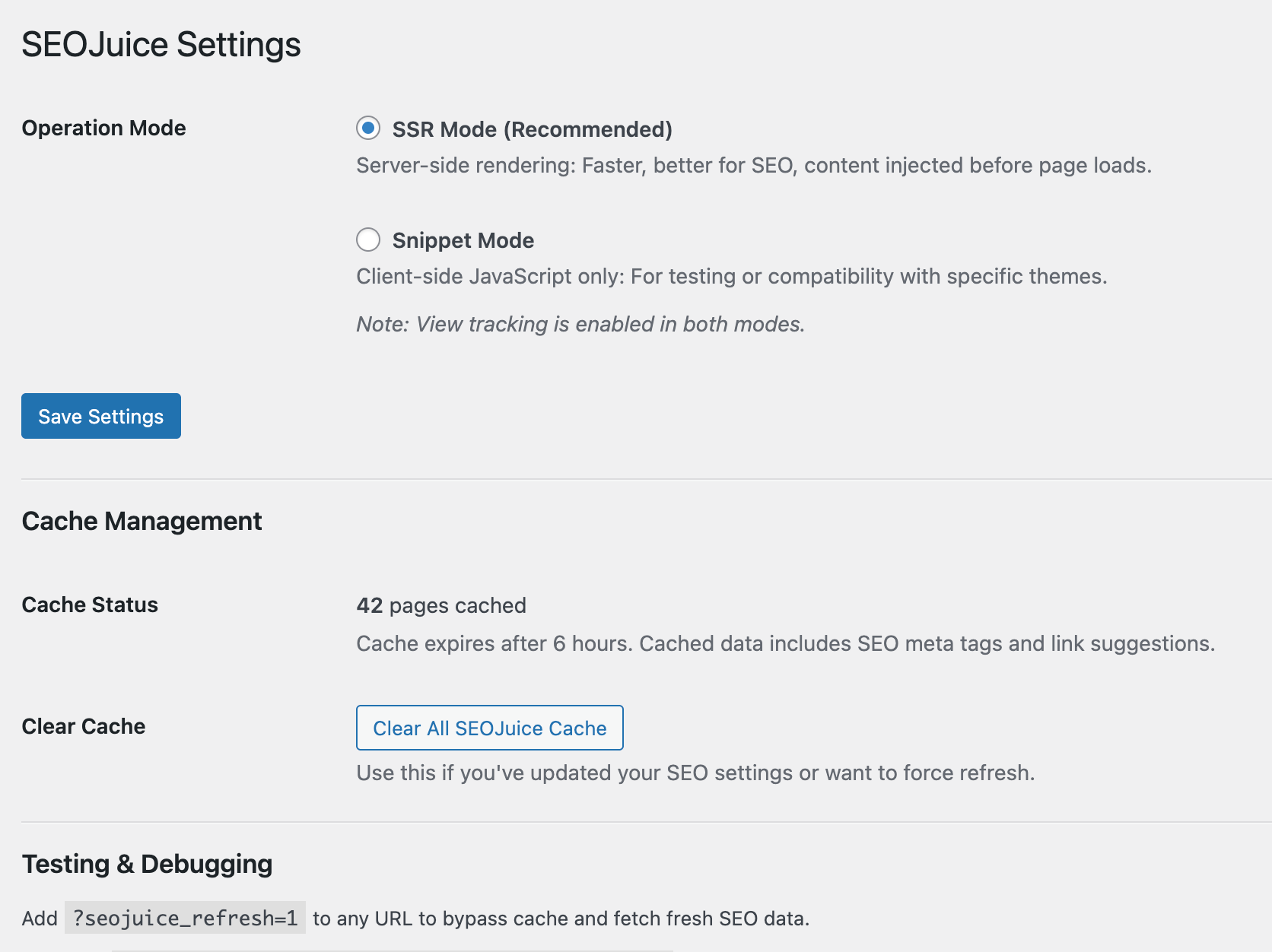
Go to Settings > SEOJuice to switch modes or manage cache.
Frequently asked questions
Do I need a SEOJuice account?
Yes. Sign up at https://seojuice.io — you can start on the free plan (see “Is there a free plan?” below) or choose a paid plan.
Will this slow down my website?
No. The plugin uses intelligent caching and asynchronous loading. Optimizations are delivered efficiently with minimal overhead (
How are optimizations applied?
The plugin offers two modes: server-side (default) for maximum compatibility with search engines and AI crawlers, or client-side for specific theme requirements. Both modes track your visibility metrics.
Is this compatible with caching plugins?
Yes. Fully compatible with NitroPack, WP Rocket, LiteSpeed Cache, W3 Total Cache, WP Super Cache, SiteGround Optimizer, Autoptimize, Hummingbird, WP Fastest Cache, Cache Enabler, and more. SEOJuice automatically detects and adjusts to work seamlessly with your caching setup.
Does SEOJuice modify my content?
By default, no — optimizations are applied dynamically at page render and your stored content stays untouched. If you opt in to persistent edits, approved changes are written into your posts, but every change is reversible: revert any edit with one click, or restore all your original content when you disconnect. Safe to deactivate anytime.
Is there a free plan?
Yes — you can start for free. Keep your core SEOJuice optimizations active at no cost by adding a “Powered by SEOJuice” link to your site footer (one click from your dashboard); no payment required. Paid plans remove the footer-link requirement and unlock higher page limits and additional features.
Does the plugin add a link to my site?
Only if you opt in. SEOJuice’s free plan lets you keep your optimizations active by adding a “Powered by SEOJuice” link to your site footer. This is a visible, dofollow link to seojuice.com shown in the footer of every page, and it is OFF by default — it is added only when you choose to enable it from your SEOJuice dashboard, in exchange for the free plan. You can remove it at any time: turn it off in your dashboard, use “Remove all SEOJuice changes”, or deactivate the plugin.
How do I verify it’s working?
Check your SEOJuice dashboard to see optimization statistics and visibility metrics. You can also view your page source to see optimized meta tags and internal links.
Does this work with multilingual sites?
Yes. Supports 95+ languages and works with WPML, Polylang, and TranslatePress.
Changelog
Reliability fix: undoing a broken-link removal now restores every affected link.
2.7.5
- Improved: approved changes now appear on your site right away instead of waiting for the plugin’s page cache to expire.
- Improved: homepage edits and page-level edits apply more reliably.
- Maintenance and security hardening.
2.7.2
- Fixed: a SEOJuice outage no longer disconnects your site. Previously, if the Connect button couldn’t reach SEOJuice — or got back a garbled response from a proxy or CDN — the plugin threw away its own delivery key, silently blocking every optimization until someone reconnected by hand. Being unreachable says nothing about whether your key is valid, so the key is now only cleared when you click Disconnect yourself.
- Improved: connection errors now say when a failure looks temporary and is worth retrying, and include the status code so support can diagnose it.
- Improved: if your site does lose its key, SEOJuice can tell that apart from a deliberate disconnect, so it will never reconnect a site you chose to disconnect.
- Note: now requires WordPress 6.1 or newer.
2.7.1
- Fixed: undoing a broken-link removal now restores every affected link, not just the first.
2.7.0
- Maintenance and reliability improvements.
2.6.0
- Improved: Editing an image’s alt text yourself after SEOJuice set it now always wins. Reverting a change or disconnecting never overwrites alt text you changed in the meantime — only the values SEOJuice still owns are restored.
- Improved: Self-hosted (“local”) delivery of the optimization script now serves the same up-to-date version as the CDN, including faster server-side-rendering awareness and cleaner URL handling.
- Improved: Stronger tenant isolation on multisite and agency installs — each connected site only ever sees and edits its own posts, and a post is scoped to its site on first delivery.
2.5.0
- Improved: One-click WordPress connection. When you connect your site from the SEOJuice dashboard, the plugin now sets up its own secure delivery key automatically — no copying or pasting an API key by hand. Existing connections keep their key on reconnect, so optimizations never break.
Screenshots
For developers
Is this your plugin? Show off the numbers.
Add a live badge to your site, docs or GitHub README. It updates on its own — no account needed.
Best SEOJuice alternatives
All ai search plugins →





FAQ
SEOJuice: quick answers
Straight answers, pulled from live WordPress.org data.
Live data from WordPress.org · checked Sep 29, 2026
Is SEOJuice free?
Yes. SEOJuice is free to download and use from the official WordPress.org plugin directory.
Is SEOJuice safe to use in 2026?
SEOJuice is a solid plugin choice in 2026, with a few things worth checking first. It runs on 90+ sites and was last updated 1 week ago, and scores 63/100 on our health check.
How many websites use SEOJuice?
SEOJuice is active on 90+ WordPress websites and has been downloaded 3,969 times since it launched in January 2025. It was downloaded 683 times in the last 30 days.
Does SEOJuice work with WordPress 7.1?
SEOJuice is officially tested up to WordPress 7.0.6, while the latest release is 7.1.2. It may still work, but try it on a staging site first.
What PHP version does SEOJuice need?
SEOJuice requires PHP 7.4 or higher. Most hosts run PHP 8.x today, so it works on any modern WordPress hosting.
When was SEOJuice last updated?
The latest version, 2.7.5, was released on September 20, 2026 (1 week ago).
Who makes SEOJuice?
SEOJuice is developed and maintained by Calm North Labs - SEOJuice Team.
What are the best alternatives to SEOJuice?
The most popular alternatives to SEOJuice are WP Search with Algolia (7K+ installs), AI Search for WooCommerce (200+ installs) and EZY.ai (100+ installs).
Powered by PageForge
Want thousands of pages that rank like these? Build them in an afternoon.
This directory runs on the same engine as PageForge. Turn any spreadsheet, CSV or API into thousands of fast, SEO-ready WordPress pages — with schema, internal links and AI-written copy baked in.
- CSV, Google Sheets & API data sources
- AI content, schema & internal links per page
- Works with Elementor, Gutenberg, Yoast & Rank Math
- Free on WordPress.org — no credit card


