



Sellinor Expiration Dates for WooCommerce
Track expiration, expiry and best before dates on WooCommerce products, and stop selling stock past its date automatically.

Solid choice
Sellinor Expiration Dates for W… is a solid plugin choice in 2026, with a few things worth checking first. Was last updated 3 days ago, and scores 64/100 on our health check.
- Actively developed — last update 3 days ago
- Tested with the latest WordPress (7.1)
- Small user base (<10 active installs)
- Very few reviews so far
How does it stack up?
Side-by-side on installs, updates, ratings & support

Daily downloads
Download spikes usually follow a new release — each site that auto-updates counts as a download.
Rankings
Where Sellinor Expiration Dates f… stands todayWordPress.org search rankings
Live position in the plugin search, top 100| Keyword | Position |
|---|---|
| best before | >100 |
| expiration date | #87 |
| expiry date | >100 |
| product expiry | >100 |
| shelf life | #6 |
About Sellinor Expiration Dates for WooCommer…
From the official readme · v1.7.4Description
Expired stock costs you twice: once when you throw it away, and again when a customer receives something past its date. Sellinor Expiration Dates for WooCommerce puts a date on every product that needs one, shows you what is about to run out, and takes expired products off sale on its own.
Call it an expiration date, an expiry date, a best before or use by date — it works the same way. It is made for grocery and food shops, bakeries and fresh produce, dairy and meat, drinks, supplements, cosmetics, pharmacy and medical supplies, and anything else with a shelf life.
How it works
- Set a date. Open a product’s Expiration tab — right after Inventory — pick a date, or tap +1 week, +1 month, +6 months or +1 year. Variations can each have their own date.
- Choose what happens. When a product expires, hide it from the shop, mark it out of stock, or both — on the day itself or a few days early.
- Let it run. The plugin checks every hour. Expired items are kept out of carts and removed at checkout, and every action is written to the activity log.
Features
Dates on every product
- Expiration dates on simple and variable products, with a separate date per variation or one default date for all of them.
- Quick-set buttons in the product editor, plus quick edit and bulk edit from the product list.
- A sortable, colour-coded Expiration column and an “Expired / No date” filter in the product list.
- Optionally show the date on the product page, with your own label (“Best before”, “Use by”, …) and only when it is getting close.
Automatic protection
- Hide expired products, set them out of stock, or both — with an optional number of days before the date.
- Cart and checkout protection: expired items cannot be added to the cart and are removed at checkout.
See what is coming
- An Expirations overview with Expiring soon and Expired lists, search, sorting, a value-at-risk column and an expiration calendar.
- A dashboard widget with the products that expire next.
- An activity log of every automatic action and date change, with filters, search and CSV export.
Bulk work and developers
- CSV import and export of expiration dates for every product and variation.
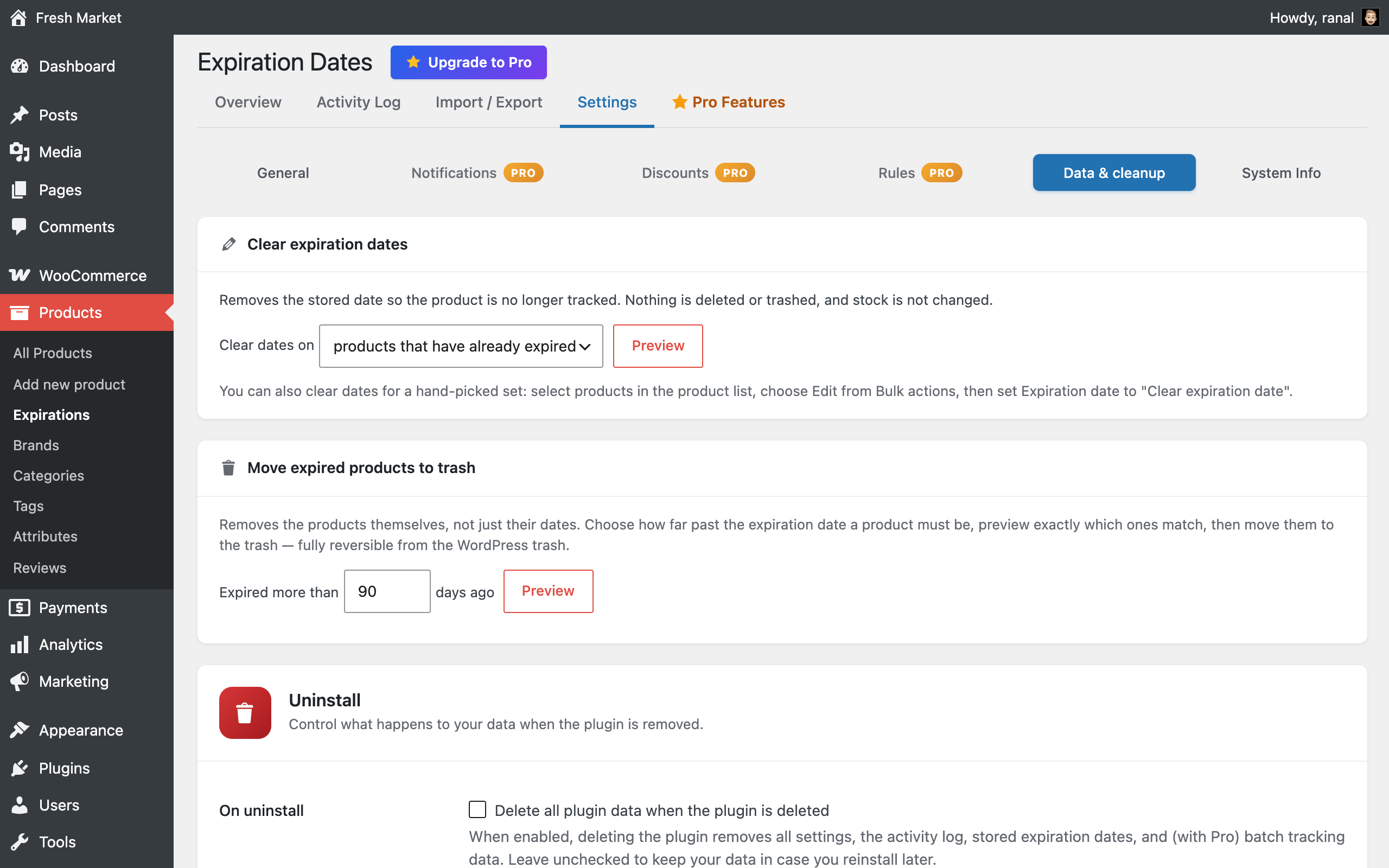
- Data & cleanup tools: clear dates in bulk, or move long-expired products to the trash — both preview exactly which products match first.
- REST API: an
edfw_expiration_datefield on WooCommerce products and variations, and filters to list products expiring within a date window — for syncing with an ERP, POS or warehouse system. - WP-CLI:
wp edfw get | set | clear | listfor scripts, scheduled jobs and migrations. - Compatible with WooCommerce High-Performance Order Storage (HPOS). Translation-ready.
Pro add-on
This plugin is complete on its own. For stores that manage a lot of perishable stock, a separate Pro add-on is available from sellinor.dev:
- Batch & lot tracking (FEFO) — several batches per product, each with its own date; orders take stock from the earliest-expiring batch first, and the lot number appears on orders and emails.
- Automatic expiry discounts — tiered discounts as the date gets closer, with an optional “Expiring soon” badge.
- Clearance category — short-dated, discounted products gather in a storefront category that keeps itself up to date.
- Per-category rules & shelf life — different actions and lead times per category, and a shelf life that dates restocked products automatically.
- Waste, recovery & forecast reports — value written off vs. recovered, trends by month and category, and what expires in the next 7, 30 and 60 days.
- One-click date changes & write-offs — select products on the Overview and extend, re-date or write them off in one go.
- Email alerts & digests, event webhooks (Slack, Zapier, Make or any URL), and an Expiration date column in WooCommerce’s own product import/export.
Pro is a separate plugin; nothing in this plugin is locked or time-limited.
Documentation
Guides for every feature: sellinor.dev/docs/product-expiration-dates/.
Installation
- Install the plugin from Plugins → Add New, or upload the
sellinor-expiration-dates-for-woocommercefolder to/wp-content/plugins/. - Activate it. WooCommerce must be installed and active.
- Go to Products → Expirations → Settings and choose what should happen when a product expires.
- Edit a product, open the Expiration tab and set a date.
Frequently asked questions
Can I use it for best before, use by or sell by dates?
Yes. The plugin stores one date per product or variation and acts on it — what you call that date is up to you. You can also set the label customers see on the product page, for example “Best before”.
What happens when a product expires?
You choose in the settings: hide it from the shop, set it out of stock, both, or do nothing and handle it yourself. You can also have the action run a number of days before the date. Hiding and out-of-stock also stop expired items from being bought: they cannot be added to the cart, and any already in a cart are removed at checkout.
Does it work with variable products?
Yes. Each variation can have its own date, or you set one default date on the parent that every variation without its own date uses. A variable product is only hidden once all of its variations have expired.
Can I import expiration dates in bulk?
Yes. Products → Expirations → Import / Export downloads every product with its current date; edit the file and upload it again. Developers can also use the REST API or WP-CLI.
Will it show the date to customers?
Only if you want it to. Turn on the product-page display in the settings, pick a label, and optionally show the date only when it is within a certain number of days.
Can I get an email when products are about to expire?
The free plugin shows everything expiring soon on the Expirations overview and in a dashboard widget. Scheduled email digests are part of the Pro add-on.
Does it support batches or lots with different dates?
The free plugin tracks one date per product or variation. If you receive the same product in batches with different dates, the Pro add-on tracks each batch separately and sells the earliest-expiring one first (FEFO).
Is it compatible with WooCommerce HPOS?
Yes. The plugin declares full compatibility with WooCommerce High-Performance Order Storage.
Does it work with WPML or Polylang?
Yes. Set the date on the original product and every translation uses it, so the date shown to customers and the expiry action apply in every language. The on-product label (for example “Best before”) can be translated with WPML String Translation or Polylang’s string translations.
What does the activity log record?
Every automatic action (a product hidden or set out of stock), date changes made in the editor, by bulk edit, import, the REST API or WP-CLI, and the cleanup tools. Entries older than 90 days are removed automatically.
Will my data be removed when I uninstall?
Only if you ask for it. By default your dates, settings and activity log are kept in case you reinstall. Turn on “Delete all plugin data” in Settings → Data & cleanup for a full cleanup.
Changelog
1.7.4 – 2026-10-17
- New: works with WPML and Polylang. Translated products use the original product’s expiration date, so the date is shown and the expiry action applies in every language.
- New: the on-product label (for example “Best before”) can be translated with WPML or Polylang.
- Tested up to WooCommerce 11.2.
1.7.3 – 2026-09-28
- Maintenance release alongside the Pro add-on; no changes to the free plugin.
1.7.2 – 2026-09-27
- Improved: the Pro Features page describes the Pro email digest’s 30-day summary as optional.
1.7.1 – 2026-09-27
- Improved: the Expiration column in the products list is wide enough for long dates such as “September 24, 2026” to stay on one line.
1.7.0 – 2026-09-27
- Improved: the product editor’s Expiration tab now sits right after Inventory, with the date and its quick-set buttons (+1 week, +1 month, +6 months, +1 year) together. “+1 month” is now a calendar month rather than 30 days.
- Improved: Expirations sits directly under “Add new product” in the Products menu.
- Improved: on the Overview, hovering a value shows how it is calculated (e.g. “48 × $10.39 (on sale, regular $12.99)”), and the search sits in its own toolbar row.
- Improved: status labels such as “7 days left” no longer wrap onto two lines on narrower screens.
- Added: a short, dismissible note on WooCommerce’s own Products → Export and Import screens about including expiration dates.
- Improved: the Import / Export button that downloads your products with their current dates is now labelled “Download template” (it said “empty template”).
- Improved: clearer wording and spacing on the Pro Features page.
- Improved: plugin description, FAQ and screenshots refreshed.
- Dev: new
edfw_page_header_actionsaction for adding buttons to the Expirations page header. - Fixed: a stray empty file was included in the 1.6.0 package.
1.6.0 – 2026-09-20
- Added: a “Data & cleanup” section in Settings gathering the tools that change your data in one place — clear expiration dates in bulk (every dated product, or only those already expired), and move expired products to the trash. Both preview how many products match and let you see exactly which ones before you commit.
- Added: an “Include out of stock” toggle on the Overview filter bar, carried across tabs.
- Added: a dismissible notice after activation pointing at the Expirations screen.
- Added: a link to the Pro features page from the plugin’s row on the Plugins screen.
- Improved: out-of-stock products are now treated the same way everywhere — the product list, the calendar, the counts and the dashboard widget no longer disagree with each other.
- Improved: a far-off expiration now reads “~8 months left” or “~2 years left” rather than a raw day count.
- Improved: Settings subsections no longer scroll off-screen when several add-ons are active; System Info stays last and Data & cleanup sits after any add-on sections.
- Improved: the settings-saved notice moved to WordPress’s standard position and can be dismissed.
- Improved: Overview layout — Recent activity above Plugin status, activity-log actions grouped, sentence-case headings and assorted spacing fixes.
- Fixed: an Overview calendar day could show a different count from the list it links through to.
- Fixed: report statistics are cached separately per out-of-stock filter, so switching the toggle no longer briefly shows the other filter’s numbers.
- Dev: translation template regenerated (409 strings).
Screenshots



For developers
Is this your plugin? Show off the numbers.
Add a live badge to your site, docs or GitHub README. It updates on its own — no account needed.
Best Sellinor Expiration Dates for… alternatives
All best before plugins →FAQ
Sellinor Expiration Dates for WooCo…: quick answers
Straight answers, pulled from live WordPress.org data.
Live data from WordPress.org · checked Oct 20, 2026
Is Sellinor Expiration Dates for W… free?
Yes. Sellinor Expiration Dates for W… is free to download and use from the official WordPress.org plugin directory.
Is Sellinor Expiration Dates for W… safe to use in 2026?
Sellinor Expiration Dates for W… is a solid plugin choice in 2026, with a few things worth checking first. Was last updated 3 days ago, and scores 64/100 on our health check.
How many websites use Sellinor Expiration Dates for W…?
Sellinor Expiration Dates for W… is active on <10 WordPress websites and has been downloaded 366 times since it launched in September 2026. It was downloaded 285 times in the last 30 days.
Does Sellinor Expiration Dates for W… work with WordPress 7.1?
Yes. The developer has tested Sellinor Expiration Dates for W… up to WordPress 7.1.3, the latest release. It requires WordPress 5.8 or newer.
What PHP version does Sellinor Expiration Dates for W… need?
Sellinor Expiration Dates for W… requires PHP 7.4 or higher. Most hosts run PHP 8.x today, so it works on any modern WordPress hosting.
When was Sellinor Expiration Dates for W… last updated?
The latest version, 1.7.4, was released on October 17, 2026 (3 days ago).
Who makes Sellinor Expiration Dates for W…?
Sellinor Expiration Dates for W… is developed and maintained by Sellinor.
What are the best alternatives to Sellinor Expiration Dates for W…?
The most popular alternatives to Sellinor Expiration Dates for W… are Super Duper MHD Assistant (<10 installs) and PluginCity Product Expiry D… (<10 installs).
Powered by PageForge
Want thousands of pages that rank like these? Build them in an afternoon.
This directory runs on the same engine as PageForge. Turn any spreadsheet, CSV or API into thousands of fast, SEO-ready WordPress pages — with schema, internal links and AI-written copy baked in.
- CSV, Google Sheets & API data sources
- AI content, schema & internal links per page
- Works with Elementor, Gutenberg, Yoast & Rank Math
- Free on WordPress.org — no credit card


