


Secure Downloads
Easy generate and distribute secure links for file downloads, that can expire, and track every download.

Use with caution
Secure Downloads works, but test it on a staging site before relying on it in 2026. It runs on 600+ sites, is rated 4.1/5 and was last updated 10 months ago, and scores 50/100 on our health check.
- Small user base (600+ active installs)
- Only tested up to WordPress 6.9 (latest is 7.1)
How does it stack up?
Side-by-side on installs, updates, ratings & support



Daily downloads
Download spikes usually follow a new release — each site that auto-updates counts as a download.
Rankings
Where Secure Downloads stands todayWordPress.org search rankings
Live position in the plugin search, top 100| Keyword | Position |
|---|---|
| digital downloads | #34 |
| downloads | #17 |
| file downloads | #27 |
| links | >100 |
| protected links | #21 |
Version adoption
Share of active sites per release.
Rating breakdown
★★★★★★★★★★ 4.1 from 10 reviews
About Secure Downloads
From the official readme · v1.2.5Description
Secure Downloads plugin generate secure download links for protected files and can send emails to your clients for downloading.
Links can expire after a predefined time, and you can set IP lock for specific download. Download links does not show real location of files at your server.
You can track every download of files by receiving email about file download with detailed info about download.
FEATURES
- Securely distribute your files and track every download.
- Upload your files via familiar WP interface.
- Define Title, Description and Version Number at “Attachment details” for your protected files
- Plugin upload files into secure, protected folder. Website visitors will not have direct access to such files.
- Generate secure links to your protected files, which does not show real location of file.
- Links can expire after specific time.
- Links can be locked to specific IP or IP mask (network).
- Configure email template with different parameters.
- Send emails to your customers with secure links for download your protected files.
- Monitor downloading of each file, by receiving email notification about file download with detailed info about download.
- Fast configure your protected files via CSV form. Useful for saving or editing list of files in one form.
- Easy reorder list of files via drag and drop interface.
- Configure URLs for pages with warning, like “link expired notice”.
- Mobile friendly.
SECURE DOWNLOADS IS GREAT FOR
- Distribute you files after purchase
- Delivery updates of your products to your customers
Installation
Automatic installation
To do an automatic install, log in to your WordPress admin panel, navigate to the Plugins menu and click Add New.
In the search field type “Secure Downloads” and click Search Plugins.
Once you’ve found the plugin you can view details about it such as the the point release, rating and description.
Now, you can install it by clicking “Install Now”.
Manual installation via WordPress admin panel
- Download plugin zip file to your computer
- In your WordPress admin panel, navigate to the Plugins menu and click Add New.
- Click “Upload Plugin” button and hit “Choose File” button
- When the popup appears select your downloaded zip file of plugin
- Follow the on-screen instructions and wait as the upload completes.
- When it’s finished, activate the plugin via the prompt. A message will show confirming activation was successful.
Manual installation via FTP
- Download plugin zip file to your computer and unzip it
- Using an FTP application, or your hosting control panel, upload the unzipped plugin folder to your WordPress installation’s
wp-content/plugins/directory. - In your WordPress admin panel, navigate to the Plugins menu and find your uploaded plugin
- Click on Activate link under the plugin. A message will show confirming activation was successful.
That’s it!
Frequently asked questions
Adding New Files
Open Secure Downloads > Files menu page in WordPress admin panel Click on “Add New” button and upload your files. Please note, you must to upload new files via menu of plugin, for saving these files secure. Do not use previously uploaded files via standard media/pages/posts uploader. Enter Title, Version Number and Description at “Attachment details” section. Select one or multiple files, click insert button and Save changes.
Configure Settings
Open Secure Downloads > Settings menu page in WordPress admin panel Configure different settings, like secret key for hash generating, warning URLs, default options, etc… At Secure Downloads > Settings > Emails menu page you can configure email templates that are sending to your customers and administrator
Secure Links for File Downloads
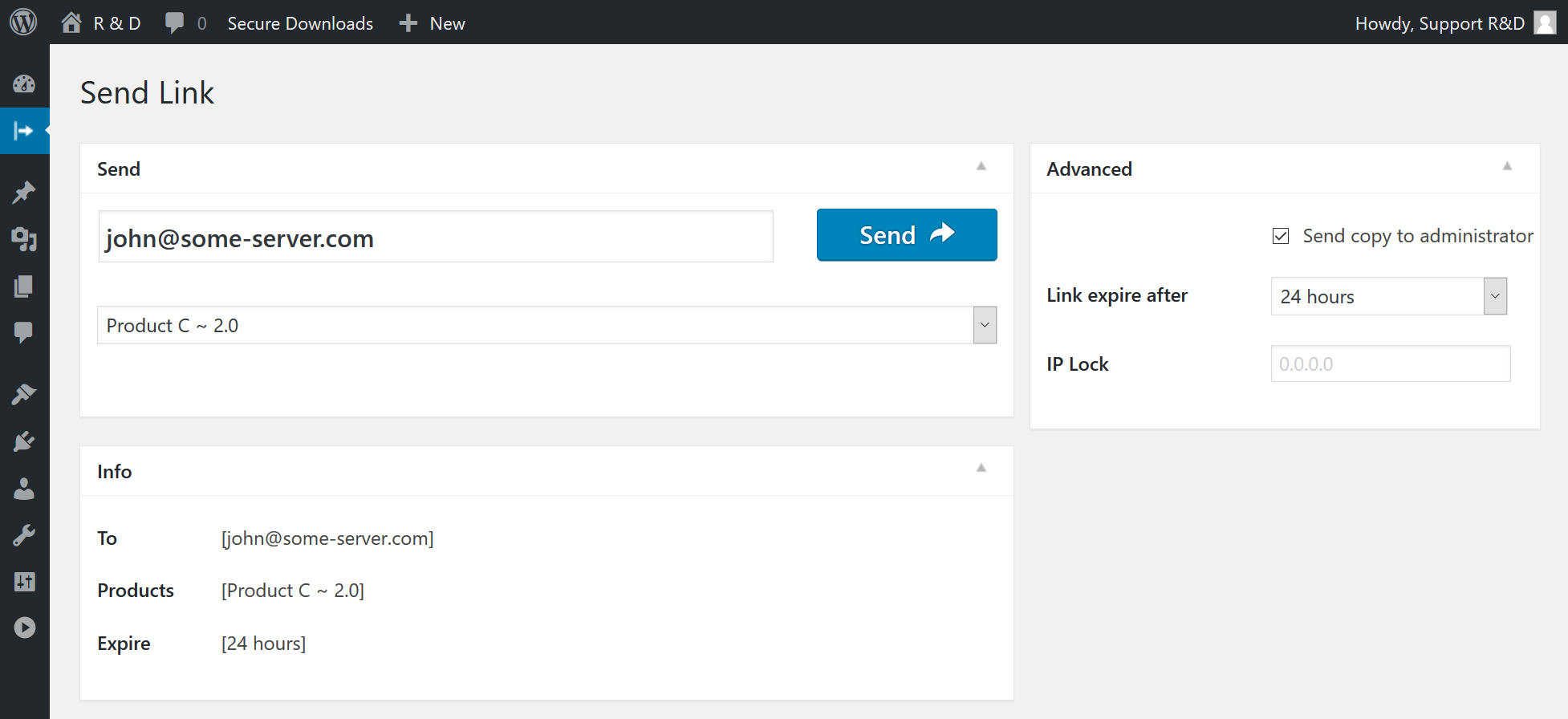
Open Secure Downloads menu page in WordPress admin panel Select specific file in selectbox Optionally enter email, if you need to send protected link to your customer Configure link expire time, optionally configure IP loc for file download, and activate option to send copy of email to administrator Click on Generate or Send button for generation or sending email with secure link to your protected file Check status of action
Languages
Plugin supports following languages: English
Requirements
PHP 5.2.4 or newer, MySQL version 5.0 or newer, WordPress 4.0 or newer, jQuery 1.7.1 or newer
Changelog
Latest WordPress version support. Minor fixes and improvements.
1.2.5
- Fix Notice: Function _load_textdomain_just_in_time was called incorrectly.
1.2.4
- Fixed Fatal error: Uncaught Error: Call to undefined function oper_plugin_url() in opsd-css.php
1.2.3
- Fixed a vulnerability that could occur if a WordPress user had access to the plugins menu (in the WordPress admin panel) and that user saved links that were not what they expected. The file link must contain a secret folder and no longer supports “up-leveling”.
- Updated UI of settings tabs with a modern design. (2.0.3.1)
- Removed premium addon links in admin panel.
1.2.2
- Added never expire products option (1.2.2.2)
- Load some CSS files only at admin panel (1.2.2.1)
1.2.1
- New. Icon for WordPress side menu. (2.0.1.2)
1.2
- Compatibility. Support WordPress 5.7 – update of admin panel styles. (1.2.1)
- Fix Warning Deprecated: The each() function is deprecated. (1.2.2)
- Fix Deprecated: Function get_magic_quotes_runtime() is deprecated(1.2.3)
Screenshots


For developers
Is this your plugin? Show off the numbers.
Add a live badge to your site, docs or GitHub README. It updates on its own — no account needed.
Best Secure Downloads alternatives
All digital downloads plugins →




FAQ
Secure Downloads: quick answers
Straight answers, pulled from live WordPress.org data.
Live data from WordPress.org · checked Sep 26, 2026
Is Secure Downloads free?
Yes. Secure Downloads is free to download and use from the official WordPress.org plugin directory.
Is Secure Downloads safe to use in 2026?
Secure Downloads works, but test it on a staging site before relying on it in 2026. It runs on 600+ sites, is rated 4.1/5 and was last updated 10 months ago, and scores 50/100 on our health check.
How many websites use Secure Downloads?
Secure Downloads is active on 600+ WordPress websites and has been downloaded 32,157 times since it launched in June 2017. It was downloaded 235 times in the last 30 days.
Does Secure Downloads work with WordPress 7.1?
Secure Downloads is officially tested up to WordPress 6.9.9, while the latest release is 7.1.2. It may still work, but try it on a staging site first.
What PHP version does Secure Downloads need?
Secure Downloads requires PHP 5.2.4 or higher. Most hosts run PHP 8.x today, so it works on any modern WordPress hosting.
When was Secure Downloads last updated?
The latest version, 1.2.5, was released on December 3, 2025 (10 months ago).
Who makes Secure Downloads?
Secure Downloads is developed and maintained by wpdevelop.
What are the best alternatives to Secure Downloads?
The most popular alternatives to Secure Downloads are Easy Media Download (9K+ installs), Premium Packages (2K+ installs) and PDF Ink Lite (2K+ installs).
Powered by PageForge
Want thousands of pages that rank like these? Build them in an afternoon.
This directory runs on the same engine as PageForge. Turn any spreadsheet, CSV or API into thousands of fast, SEO-ready WordPress pages — with schema, internal links and AI-written copy baked in.
- CSV, Google Sheets & API data sources
- AI content, schema & internal links per page
- Works with Elementor, Gutenberg, Yoast & Rank Math
- Free on WordPress.org — no credit card


