



Search & Replace Everything by WPCode – Find and Replace Media, Text, Links, and More
Search & Replace Everything by WPCode enables you to efficiently manage your website’s content directly from the WordPress admin. This tool is essential for site migrations, content updates, or any situation where batch…

Solid choice
Search & Replace Everything by… is a solid plugin choice in 2026, with a few things worth checking first. It runs on 20K+ sites, is rated 3.9/5 and was last updated 2 months ago, and scores 72/100 on our health check.
- Proven at scale on 20K+ active sites
How does it stack up?
Side-by-side on installs, updates, ratings & support



Daily downloads
Download spikes usually follow a new release — each site that auto-updates counts as a download.
Rankings
Where Search & Replace Everything… stands todayWordPress.org search rankings
Live position in the plugin search, top 100| Keyword | Position |
|---|---|
| database | >100 |
| media | #99 |
| replace | #5 |
| search | #35 |
| search replace | #3 |
Version adoption
Share of active sites per release.
Rating breakdown
★★★★★★★★★★ 3.9 from 7 reviews
About Search & Replace Everything by WPCode
From the official readme · v1.0.10Description
Powerful Search & Replace for WordPress
Search & Replace Everything by WPCode enables you to efficiently manage your website’s content directly from the WordPress admin. This tool is essential for site migrations, content updates, or any situation where batch find and replace text and image replacements are needed.
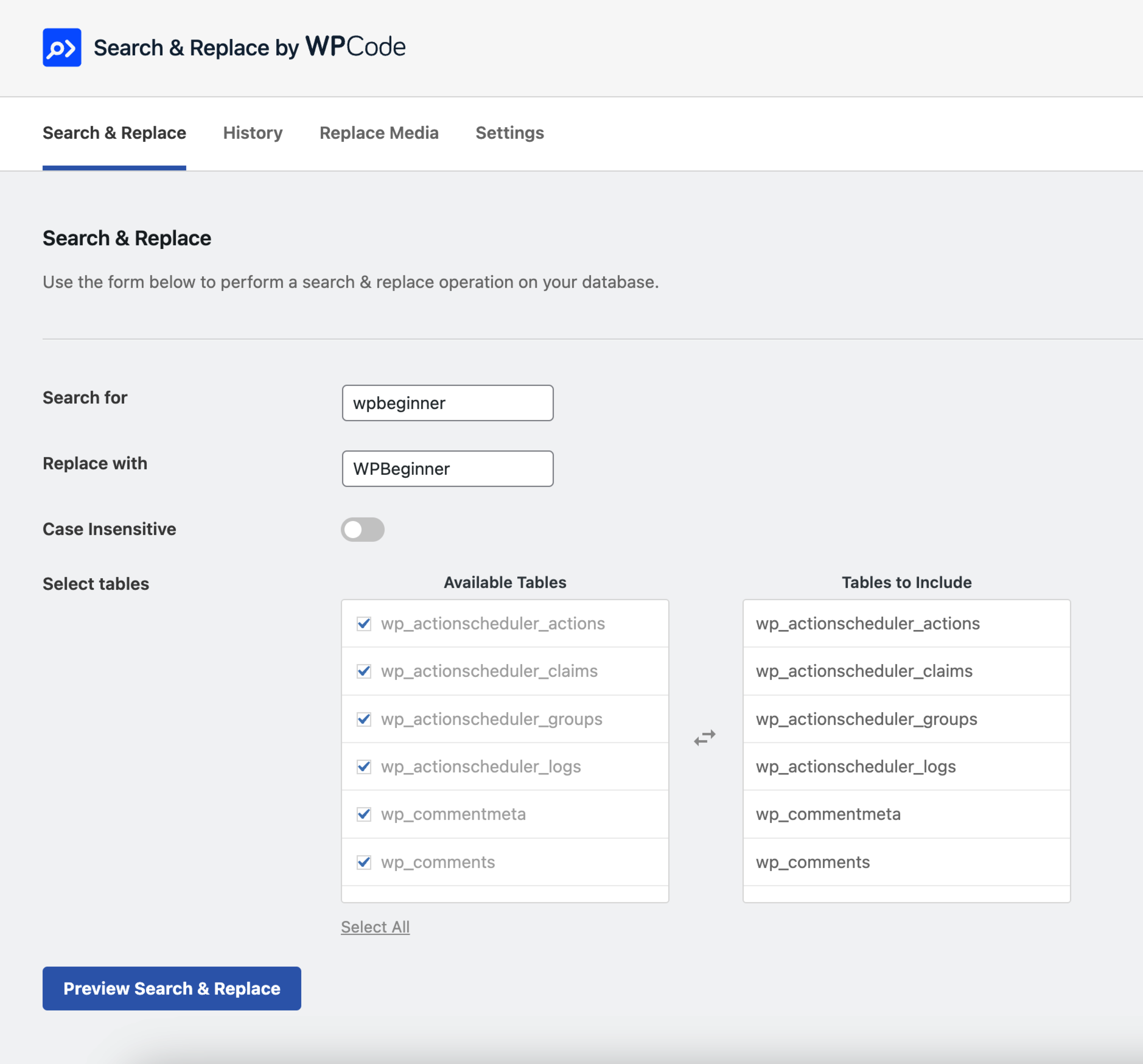
With an intuitive interface, you can perform detailed find and replace operations across your entire database. Select specific tables, toggle case sensitivity, and preview changes before committing. Serialized data is fully supported. Designed to handle large websites, this plugin operates smoothly without the need for external tools.
Features Include
- Text Replacement – Find and replace text across multiple database tables with support for serialized data and options for case-sensitive search.
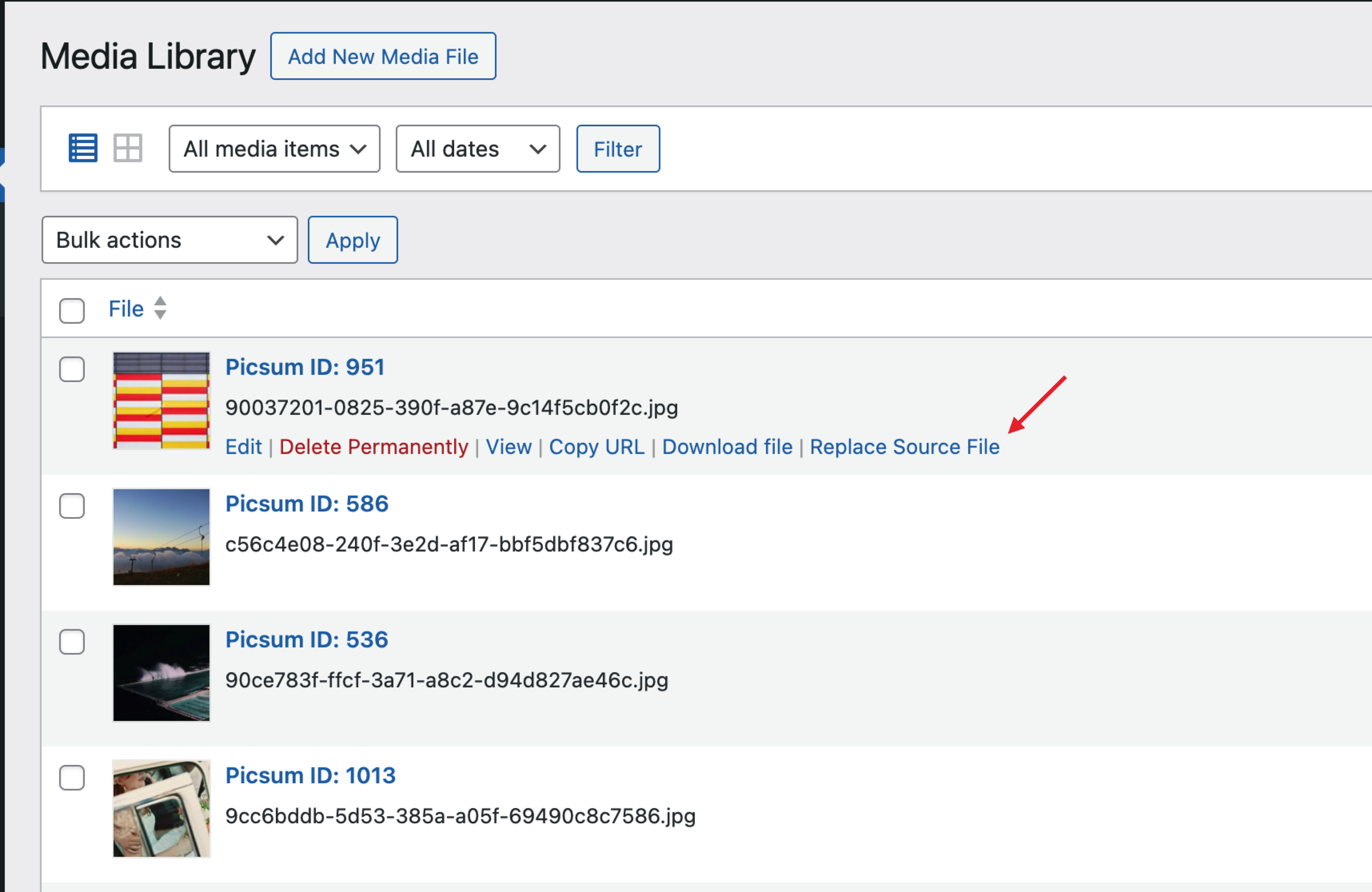
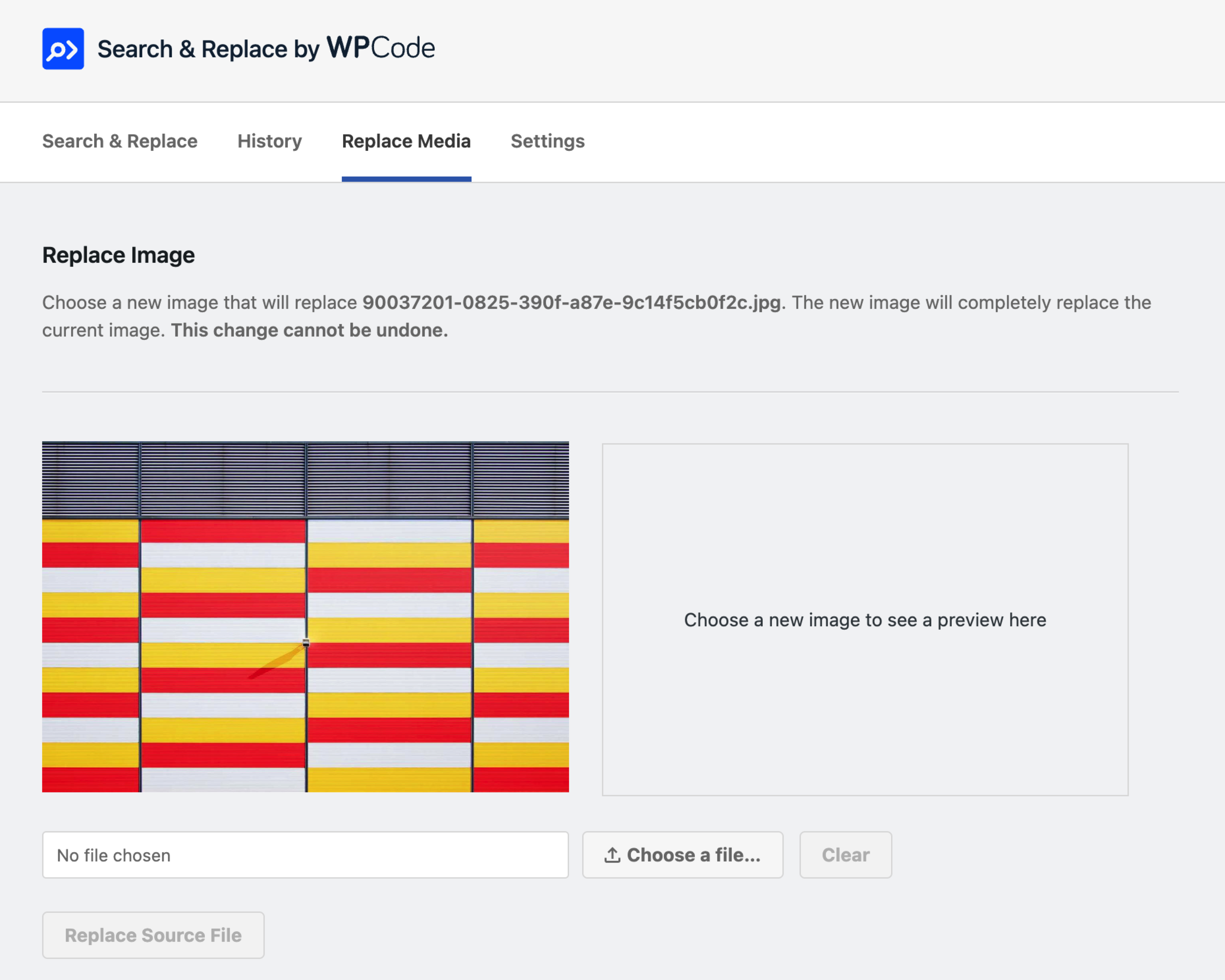
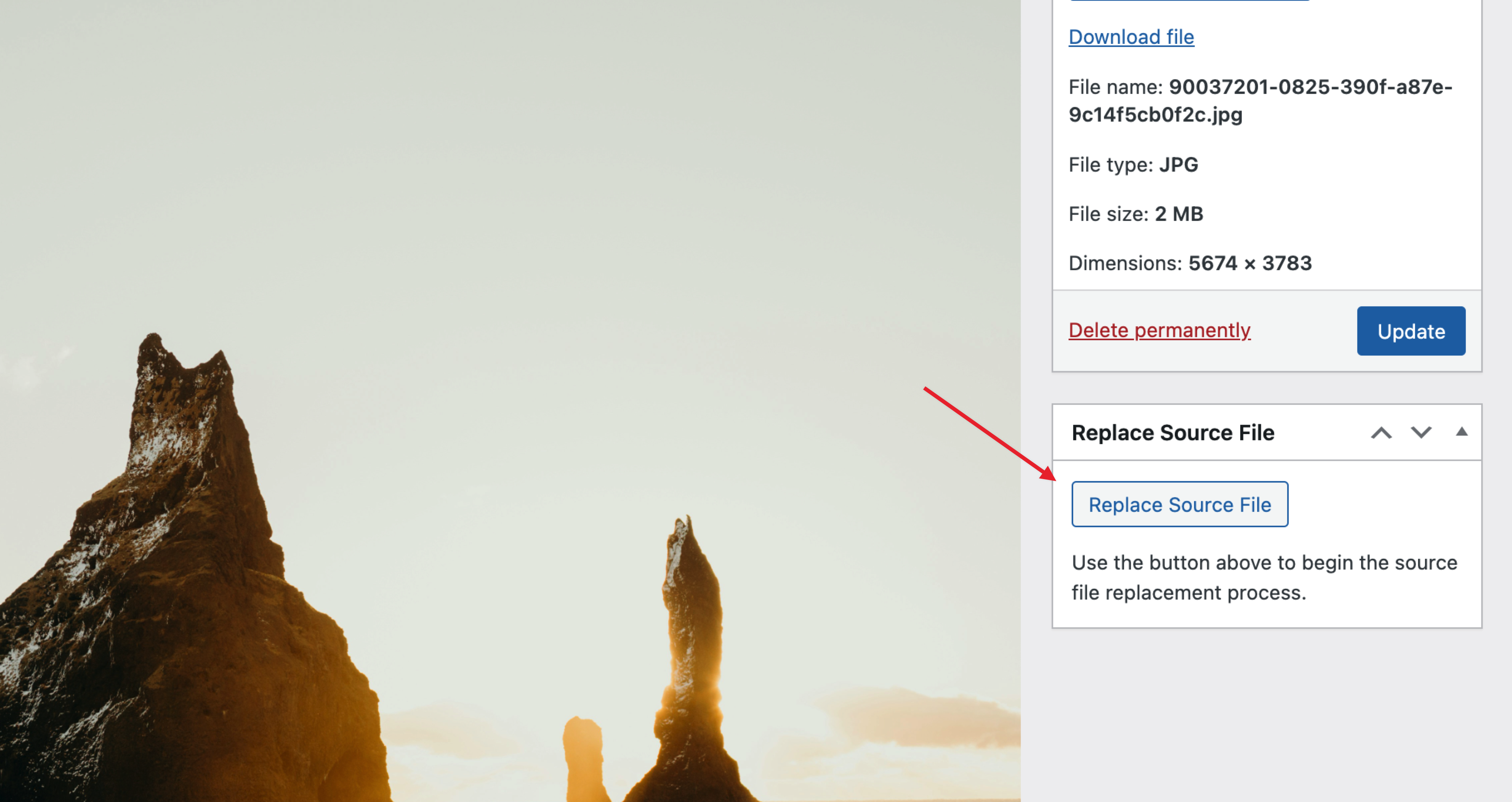
- Replace Image – Directly replace images from the media library, automatically regenerating thumbnails to ensure visual consistency.
- Replace Media – Manage and replace media files of various formats across your entire site.
- Preview Changes – Always see a “dry-run” preview of the changes to ensure accuracy before applying them.
- Large Sites Supported – Optimized for performance, capable of handling large databases efficiently.
- Table Selection – Choose specific tables to search and replace text, ensuring that only the necessary data is affected.
Introducing Search & Replace Everything Pro
While Search & Replace Everything offers many powerful features for free, we have also created a Pro version that includes advanced features to further improve your workflows like the ability to undo Search & Replace operations and replacing images directly from the Gutenberg editor. Click here to purchase Search & Replace Everything Pro now!
Use Cases
- Site Migrations – Quickly update URLs or any site data when moving your site.
- Content Updates – Easily replace outdated information or bulk update content across posts, pages, and custom post types.
- Image Management – Replace outdated images and avoid duplicate uploads.
- Media Updates – Replace media files in any format across your site.
Tips for Using Search & Replace
Backup Your Database – While the plugin is safe to use, it’s always a good idea to make a backup before making changes.
Common mistakes to avoid when replacing text:
- Partial Matches – Ensure that you’re not replacing partial matches that could affect unintended content. For example, replacing “cat” could affect “category” or “concatenate”.
- Case Sensitivity – Be mindful of case sensitivity when replacing text. If you’re looking to replace “Cat” with “Dog”, ensure that you’re not affecting “cat” or “CAT”.
- URL Replacements – Always use the same format for both the search and replace values. For example if your search term has a trailing slash, ensure that the replacement term also has a trailing slash. E.g., “example.com/” to “example.net/” instead of “example.com/” to “example.net”.
Getting Started
After installing Search & Replace Everything by WPCode, look for the new menu item under WP Admin > Tools > WP Search & Replace. From there, you can start managing your content and perform find and replace operations for text or images across your entire website.
Installation
- Upload the plugin files to the
/wp-content/plugins/search-replace-wpcodedirectory, or install the plugin through the WordPress plugins screen directly. - Activate the plugin through the ‘Plugins’ screen in WordPress.
- Use the interface under
WP Admin > Tools > WP Search & Replaceto start managing your content.
Frequently asked questions
Can I preview changes before applying them?
Yes, you can preview all changes before applying them in an intuitive interface that highlights the differences.
Do I need to make a backup before using this plugin?
While the plugin is designed to be safe, it’s always a good idea to make a backup before making any changes to your database.
Can I undo a replace operation?
Currently, all operations are final. Please ensure to review the changes preview carefully before applying changes, and it’s always useful to have a backup. In our Pro version, we offer an undo feature for operations made with the Pro plugin.
Can I replace text in specific tables only?
Yes, you can select specific tables to search and replace text before starting the operation.
Are large websites supported?
Yes, the plugin is optimized for large databases and provides a smooth experience without the need for external tools.
Can I replace images from the media library?
Yes, you can replace images from the media library and get a preview of the new image. Thumbnails are automatically regenerated to ensure visual consistency.
Can I replace any type of media files?
Yes, you can find and replace media files of various formats across your entire site.
Changelog
1.0.10
- Fix: Embedded image size URLs are now updated when replacing an image from the media library.
- Tweak: Compatibility with WordPress 7.0.
1.0.9
- New: Search terms and database table selections are now saved for quick reuse.
1.0.8
- Fix: We fixed an issue where a search & replace operation would generate notices in the logs.
1.0.7
- Tweak: You can now drag & drop files in the media replacement page.
- Tweak: We improved feedback for search & replace operations on large sites.
1.0.6
- Tweak: We improved the way we handle a search & replace operation that involves changing the site URL.
- Fix: We fixed some text-domains that were not correctly set for better translation support.
1.0.5
- Fix: Adjusted spacing for footer that was overlapping with the content on some browsers.
Screenshots


For developers
Is this your plugin? Show off the numbers.
Add a live badge to your site, docs or GitHub README. It updates on its own — no account needed.
Best Search & Replace Everything b… alternatives
All database plugins →




FAQ
Search & Replace Everything by WPCo…: quick answers
Straight answers, pulled from live WordPress.org data.
Live data from WordPress.org · checked Sep 27, 2026
Is Search & Replace Everything by… free?
Yes. Search & Replace Everything by… is free to download and use from the official WordPress.org plugin directory.
Is Search & Replace Everything by… safe to use in 2026?
Search & Replace Everything by… is a solid plugin choice in 2026, with a few things worth checking first. It runs on 20K+ sites, is rated 3.9/5 and was last updated 2 months ago, and scores 72/100 on our health check.
How many websites use Search & Replace Everything by…?
Search & Replace Everything by… is active on 20K+ WordPress websites and has been downloaded 146,694 times since it launched in June 2024. It was downloaded 6,412 times in the last 30 days.
Does Search & Replace Everything by… work with WordPress 7.1?
Search & Replace Everything by… is officially tested up to WordPress 7.0.6, while the latest release is 7.1.2. It may still work, but try it on a staging site first.
What PHP version does Search & Replace Everything by… need?
Search & Replace Everything by… requires PHP 7.0 or higher. Most hosts run PHP 8.x today, so it works on any modern WordPress hosting.
When was Search & Replace Everything by… last updated?
The latest version, 1.0.10, was released on July 28, 2026 (2 months ago).
Who makes Search & Replace Everything by…?
Search & Replace Everything by… is developed and maintained by WPCode.
What are the best alternatives to Search & Replace Everything by…?
The most popular alternatives to Search & Replace Everything by… are Search Regex (100K+ installs), WP-Sweep (100K+ installs) and Advanced Database Cleaner (100K+ installs).
Powered by PageForge
Want thousands of pages that rank like these? Build them in an afternoon.
This directory runs on the same engine as PageForge. Turn any spreadsheet, CSV or API into thousands of fast, SEO-ready WordPress pages — with schema, internal links and AI-written copy baked in.
- CSV, Google Sheets & API data sources
- AI content, schema & internal links per page
- Works with Elementor, Gutenberg, Yoast & Rank Math
- Free on WordPress.org — no credit card


