


BackUpWordPress
Simple automated backups of your WordPress-powered website.

Consider an alternative
BackUpWordPress shows warning signs in 2026 — compare the alternatives below before installing. It runs on 80K+ sites, is rated 4.7/5 and was last updated 2 years ago, and scores 37/100 on our health check.
- Proven at scale on 80K+ active sites
- Loved by users — 4.7/5 from 1,373 reviews
- No update in 2 years
- Only tested up to WordPress 6.5 (latest is 7.1)
How does it stack up?
Side-by-side on installs, updates, ratings & support



Daily downloads
Download spikes usually follow a new release — each site that auto-updates counts as a download.
Rankings
Where BackUpWordPress stands todayWordPress.org search rankings
Live position in the plugin search, top 100| Keyword | Position |
|---|---|
| back up | >100 |
| backup | >100 |
| backups | >100 |
| database | >100 |
| zip | >100 |
Version adoption
Share of active sites per release.
Rating breakdown
★★★★★★★★★★ 4.7 from 1,373 reviews
About BackUpWordPress
From the official readme · v3.14Description
BackupWordPress was created by our friends at Human Made but is now under new ownership. We’re committed to opensource and WordPress and will provide free support for the many BackupWordPress fans.
We’ll make occasional updates to the free software – please send us any patches you’d like to see released here: https://github.com/orgs/xibodevelopment/
However, we’ll no longer be selling or supporting the paid add-ons (e.g. for backups to Dropbox and Google Drive). It’s certainly a good idea to backup to cloud storage to protect against server-wide risks.
For this we recommend UpdraftPlus WordPress Backups which can do things for free BackupWordPress Premium could do on a paid basis. Click here for full comparison.
BackUpWordPress will back up your entire site including your database and all your files on a schedule that suits you. Try it now to see how easy it is!
This plugin requires PHP version 5.3.2 or later
Features
- Super simple to use, no setup required.
- Works in low memory, “shared host” environments.
- Manage multiple schedules.
- Option to have each backup file emailed to you.
- Uses
zipandmysqldumpfor faster backups if they are available. - Works on Linux & Windows Server.
- Exclude files and folders from your backups.
- Good support should you need help.
- Translations for Spanish, German, Chinese, Romanian, Russian, Serbian, Lithuanian, Italian, Czech, Dutch, French, Basque.
Translations
We’d also love help translating the plugin into more languages, if you can help then please visit https://translate.wordpress.org/projects/wp-plugins/backupwordpress/dev/ to start translating.
Installation
- Install BackUpWordPress either via the WordPress.org plugin directory, or by uploading the files to your server.
- Activate the plugin.
- Sit back and relax safe in the knowledge that your whole site will be backed up every day.
The plugin will try to use the mysqldump and zip commands via shell if they are available, using these will greatly improve the time it takes to back up your site.
Frequently asked questions
Where does BackUpWordPress store the backup files?
Backups are stored on your server in /wp-content/backups, you can change the directory. Important: By default BackUpWordPress backs up everything in your site root as well as your database, this includes any non WordPress folders that happen to be in your site root. This does mean that your backup directory can get quite large.
What if I want to back up my site to another destination?
We no longer be sell or support the paid add-ons (e.g. for backups to Dropbox and Google Drive). It’s certainly a good idea to backup to cloud storage to protect against server-wide risks. For this we recommend UpdraftPlus WordPress Backups which can do things for free BackupWordPress Premium could do on a paid basis. Click here for full comparison.
How do I restore my site from a backup?
You need to download the latest backup file either by clicking download on the backups page or via FTP. Unzip the files and upload all the files to your server overwriting your site. You can then import the database using your hosts database management tool (likely phpMyAdmin).
Does BackUpWordPress back up the backups directory?
No.
I’m not receiving my backups by email
Most servers have a filesize limit on email attachments, it’s generally about 10mb. If your backup file is over that limit, it won’t be sent attached to the email. Instead, you should receive an email with a link to download the backup. If you aren’t even receiving that, then you likely have a mail issue on your server that you’ll need to contact your host about.
How many backups are stored by default?
BackUpWordPress stores the last 10 backups by default.
How long should a backup take?
Unless your site is very large (many gigabytes) it should only take a few minutes to perform a backup. If your back up has been running for longer than an hour, it’s safe to assume that something has gone wrong. Try de-activating and re-activating the plugin. If it keeps happening, contact support.
What do I do if I get the wp-cron error message?
The issue is that your wp-cron.php is not returning a 200 response when hit with a HTTP request originating from your own server, it could be several things. In most cases, it’s an issue with the server / site. There are some things you can test to confirm this is the issue. * Are scheduled posts working? (They use wp-cron as well.) * Are you hosted on Heart Internet? (wp-cron may not be supported by Heart Internet, see below for work-around.) * If you click manual backup, does it work? * Try adding `define( 'ALTERNATE_WP_CRON', true );` to your `wp-config.php`. Do automatic backups work? *…
How to get BackUpWordPress working in Heart Internet
The script to be entered into the Heart Internet cPanel is: /usr/bin/php5 /home/sites/yourdomain.com/public_html/wp-cron.php (note the space between php5 and the location of the file). The file wp-cron.php chmod must be set to 711.
My backups seem to be failing?
If your backups are failing, it’s commonly caused by a lack of available resources on your server. To establish this is the case, exclude the complete (or parts of the) uploads folder and run a backup. If that succeeds, you know it’s probably a server issue. If it does not succeed, you can find further assistance on our support forums.
Further Support & Feedback
General support questions should be posted in the WordPress support forums, tagged with backupwordpress.
Changelog
Security fix for vulnerability through directory traversal on the exclusion feature WordPress 6.5 compatibility
3.14 / 2024-04-22
- Fixed security vulnerability through directory traversal while authenticated as admin
3.13 / 2022-02-23
- Security fix for heartbeat
- Correct spelling of Human Made
- PHP 8.0 compatibility
3.12 / 2022-01-27
- Updated to WP 5.9
3.11 / 2021-03-08
- Updated to WP 5.7
3.10 / 2019-06-12
- Fixed whitelist-html
3.9 / 2019-06-10
- Readme update
3.8 / 2018-11-01
- GNU Wording change
3.7.2 / 2018-10-29
- Check remove intercomm links
3.7.1 / 2018-09-11
- Fixed admin notices
3.7 / 2018-08-30
- Updated readme to reflect ownership changes
- Stripped out support and premium links
3.6.4 / 2016-06-02
- Various improvements to exclusion handling.
- i18n improvements.
- Misc. UI improvements.
3.6.3.1 / 2016-12-14
- Fix issue where low disk space caused the admin interface to be unavailable
- Fix issue where admin notices were causing databases and error logs to fill up
- Improves file size calculations
- Improves remaining disk space calculations
- Improves file exclusion methods
- Misc admin interface improvements
- Misc code quality improvements and bug fixes
3.6.2 / 2016-08-02
- Improves admin performance.
- Improves security in internationalised strings.
3.6.1 / 2016-04-26
- Bug fixes/improvements in disk space calculation
- Misc bug fixes
3.6.0 / 2016-03-31
- Fix a bug caused by using a function incompatible with min PHP version requirements
- Misc code quality improvements and bug fixes
- Fix bugs in the code responsible for admin notices
- Display disk space info
- Uninstall cleanup
- Introduce a dedicated extensions page
3.5 / 2016-03-10
- Reduce duplication and improve code readability when echoing filesizes
- Improve how filesizes are handled in the Your Site list
- Switch to storing site size data in a file, large sites could cause database errors when saving the option
- Re-remove the PHP User and Group Requirements
- Check that the backup file exists before attempting to check it’s contents
- Only call getPerms on readable files to ensure we avoid a fatal error
- Ensure error are correctly check in verify_backup
- Use Symfony Process instead of shell_exec for all our system calls
- More unit tests
- Update dependencies
- Detect disabled functions defined in php.ini, now accounts for different separators.
3.4.5 / 2016-02-23
- Fix fatal error on upgrade
3.4.4 / 2016-02-23
- Ensure temporary files are correctly cleaned up before and after running a backup.
- Avoid killing site if plugin is active on PHP 52
- Allow custom secure key using filter
- Fixes a bug which caused the root path to the WordPress install to be miscalulated in certain setups.
3.4.4-beta
- Fixes a bug which caused the root path to the WordPress install to be miscalulated in certain setups.
3.4.3
- Fix a bug where backups were not downloadable when WordPress installed in a subdirectory
3.4.2
- Remove the usage of
shell_execin two of our warning messages, fixes a PHP Warning on systems with it disabled. - Improve how we handle
open_basedirrestrictions, fixes a PHP Warning on some systems. Adds unit tests to coveropen_basedirhandling. - Show an error message if neither
mysqldumpnorPDO:mysqlare available. Database backups won’t work without at least one of them. - Improve our upgrade code for users upgrading from pre version 2.0. Fixes a possible fatal error and ensures backups and backup settings are correctly brought forward.
3.4.1
- Fix a possible
PHP Warningin the Schedule Sentence.
3.4 / 2016/01/20
- Introduces a major re-factor of the underlying backups engine, many bugs fixed and much improved unit test coverage.
- Vastly improved Windows Server support.
- We no longer write errors and warnings to files on disk.
- Update to the latest version of
symfony/finder. - Update to the latest version of
ifsnop/mysqldump-php.
3.3.4 / 2015-12-10
- Fixes styling issues with WordPress 4.4
3.3.3 / 2015-11-13
- Fix broken Intercom support window
- Fixes Typos in i18n strings
- Backups finish faster
- Fix an issue that caused the site size to report as twice as large as it should
- Adds PHP mysqldump fallback lib (
ifsnop/mysqldump-php)
3.3.2 / 2015-10-15
- Misc improvements
3.3.1 / 2015-10-12
- Fix false positive error message.
- Fix broken download links
3.3.0 / 2015-10-09
- Dropped support for PclZip
- Fixed duplicate cron schedule interval names ( props ucavus )
- Corrected some typos, grammar and punctuation ( props ucavus )
- Fixed a bug in the WP CLI command ( props duritong )
- Better message for wp-cron related errors
- Replace ‘bi-weekly’ with less confusing wording
- Fixed a few errors misc reported by code quality tool
- Total site size display now subtracts excludes
- Many general improvements and bug fixes
3.2.7 / 2015-07-27
- Pass schedule type instead of schedule id as context for the calculated sizes, it’s more useful
- Simply output arrays rather than trying to be too clever about it
- Start tracking PDO availability through Intercom
- Catch database and files shell_exec warnings
- Test under PHP 5.6 in Travis
- Use the new backupwordpress@hmn.md email address everywhere
- Clarify how people request access to Slack and GlotPress
- Rewrite our contributing guidelines to be more comprehensive
- Add instructions to contributing.md
- Revert plugin name as it doesn’t make a diff in search results
- Always return an integer
3.2.6 / 2015-06-09
- Fixes admin page slug for multisite
3.2.5 / 2015-04-29
- Fixes an issue when evaluating expression with empty
- Fixes a fatal error on PHP 5.3
- Displays other notices
- Updates stable tag
- Adds some escaping and sanitizing
- Defines plugins dir for different environments
- Adds tests for activation and deactivation hooks
- Adds a debugging function for tests
- Symlinks plugin into tests dir
- Splits out deactivation code into separate functions
- Fixes activation and deactivation hooks not being fired
- Exclude backups folder from size calculation
- Fixes a misplaced parenthesis
- Fixes how error messages are bubbled up
- get home path should return defined value
- Removes redundant exclude statement as CVS folders are excluded by default
- Adds a flag parameter to allow get_files to return all files including default excludes
3.2.4 / 2015-04-01
- Fixes default exclude pattern that was too greedy.
3.2.3 / 2015-04-01
- Fixes issue where files where ‘cache’ files were excluded by default.
- Updates brazilian portuguese translations.
- Fixes the issue with the ‘no thanks’ button in the Support modal and misc JS improvements. props SiamKreative.
3.2.2 / 2015-03-25
- Fixes error in manual backups, caused by incorrect plugin version number in class, which is used for the JS script version.
Screenshots

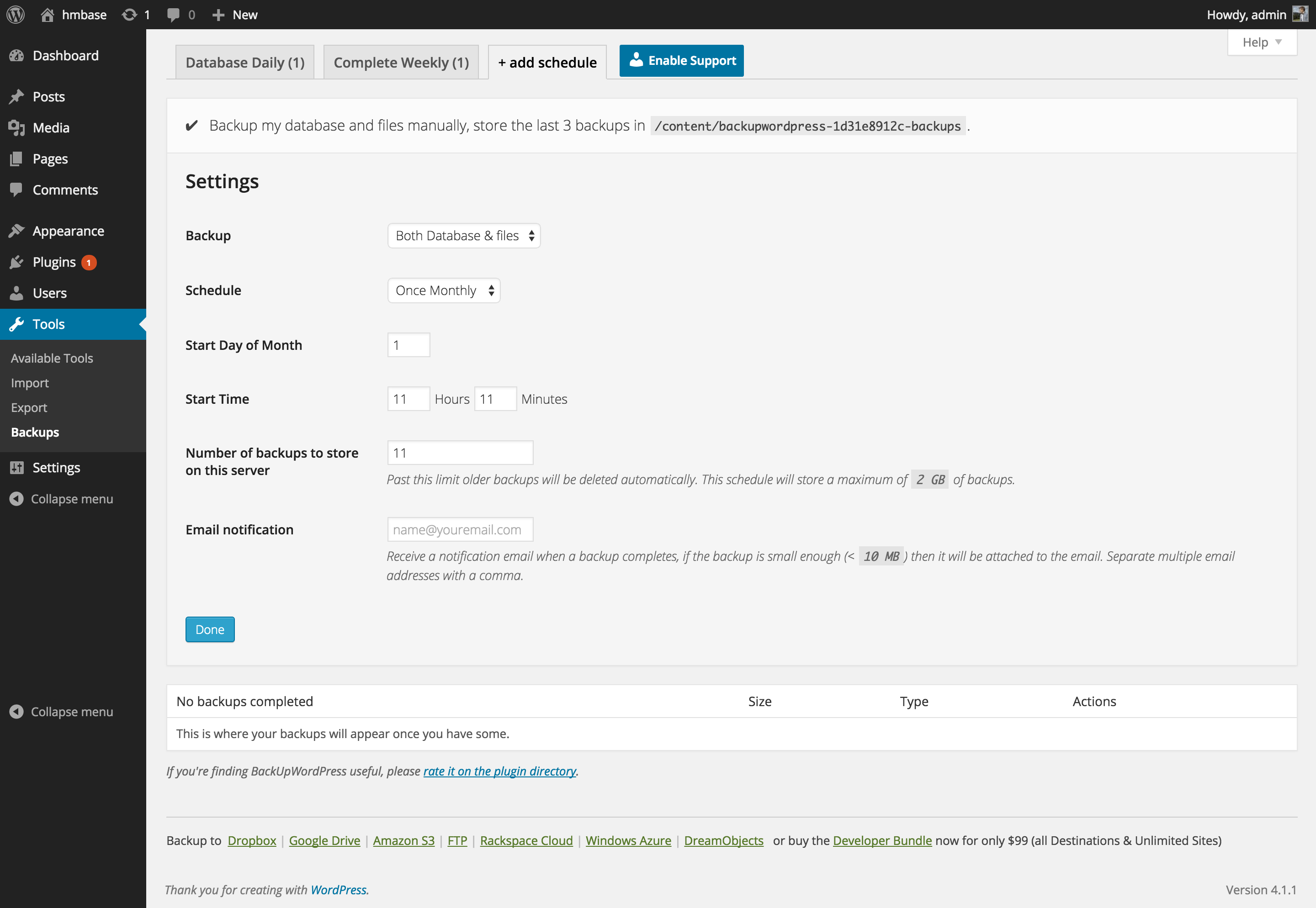

For developers
Is this your plugin? Show off the numbers.
Add a live badge to your site, docs or GitHub README. It updates on its own — no account needed.
Best BackUpWordPress alternatives
All back up plugins →FAQ
BackUpWordPress: quick answers
Straight answers, pulled from live WordPress.org data.
Live data from WordPress.org · checked Sep 26, 2026
Is BackUpWordPress free?
Yes. BackUpWordPress is free to download and use from the official WordPress.org plugin directory.
Is BackUpWordPress safe to use in 2026?
BackUpWordPress shows warning signs in 2026 — compare the alternatives below before installing. It runs on 80K+ sites, is rated 4.7/5 and was last updated 2 years ago, and scores 37/100 on our health check.
How many websites use BackUpWordPress?
BackUpWordPress is active on 80K+ WordPress websites and has been downloaded 4,918,021 times since it launched in September 2007. It was downloaded 2,370 times in the last 30 days.
Does BackUpWordPress work with WordPress 7.1?
BackUpWordPress is officially tested up to WordPress 6.5.12, while the latest release is 7.1.2. It may still work, but try it on a staging site first.
When was BackUpWordPress last updated?
The latest version, 3.14, was released on April 24, 2024 (2 years ago).
Who makes BackUpWordPress?
BackUpWordPress is developed and maintained by Tom Willmot.
What are the best alternatives to BackUpWordPress?
The most popular alternatives to BackUpWordPress are Jetpack VaultPress (10K+ installs), Back Top (10+ installs) and Backup by VOGA Press (10+ installs).
Powered by PageForge
Want thousands of pages that rank like these? Build them in an afternoon.
This directory runs on the same engine as PageForge. Turn any spreadsheet, CSV or API into thousands of fast, SEO-ready WordPress pages — with schema, internal links and AI-written copy baked in.
- CSV, Google Sheets & API data sources
- AI content, schema & internal links per page
- Works with Elementor, Gutenberg, Yoast & Rank Math
- Free on WordPress.org — no credit card


