



RioForms – Drag & Drop Contact Form Builder
Create stunning, responsive forms in minutes with the next-gen WordPress drag-and-drop contact form builder plugin.

Consider an alternative
RioForms shows warning signs in 2026 — compare the alternatives below before installing. Was last updated 10 months ago, and scores 30/100 on our health check.
- Small user base (<10 active installs)
- Very few reviews so far
- Only tested up to WordPress 6.7 (latest is 7.1)
How does it stack up?
Side-by-side on installs, updates, ratings & support



Daily downloads
Download spikes usually follow a new release — each site that auto-updates counts as a download.
Rankings
Where RioForms stands todayWordPress.org search rankings
Live position in the plugin search, top 100| Keyword | Position |
|---|---|
| block | >100 |
| contact form | >100 |
| form | >100 |
| form builder | >100 |
| gutenberg form | >100 |
About RioForms
From the official readme · v1.1.1Description
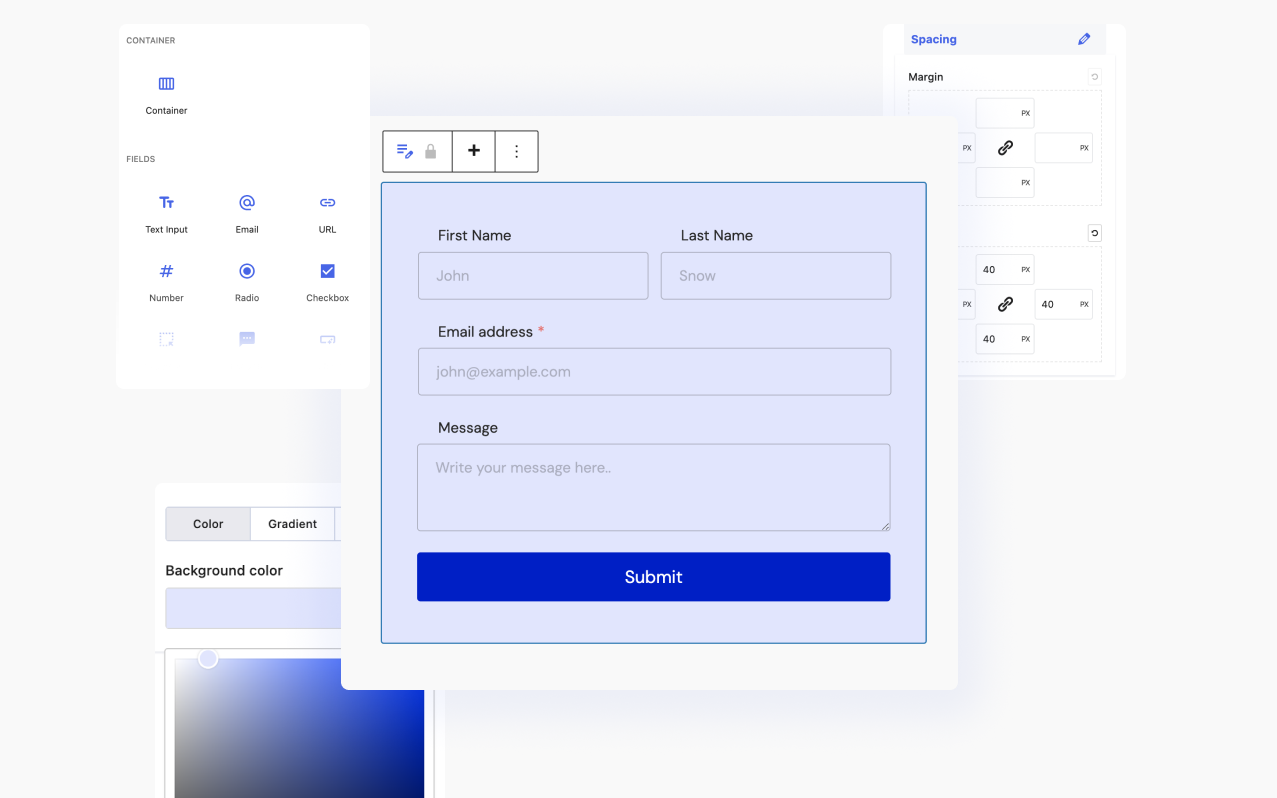
RioForms is the next generation WordPress contact form builder plugin, offering a seamless form creation experience powered by the lightning-fast Gutenberg block editor-based drag-and-drop builder. Say goodbye to learning new interfaces. Now you can build, customize, and style advanced custom forms all within a single intuitive interface.
Explore Live Demos | Read Documentation | Join Our Community
Key Features: Everything You Need to Build Amazing Forms
RioForms offers a comprehensive toolkit to create and manage forms seamlessly:
Gutenberg Integration
With the WordPress industry shifting towards Gutenberg, RioForms seamlessly integrates with the block editor, ensuring a familiar interface for users transitioning to Gutenberg. Whether creating forms from the RioForms dashboard or within the Gutenberg block editor, users can effortlessly bring their forms to life. Additionally, RioForms provides a dedicated contact form builder block for Gutenberg, offering unparalleled flexibility.
Compatibility with Any WordPress Editor
RioForms extends compatibility beyond Gutenberg, allowing users to create forms within the dashboard and embed them using shortcodes, similar to other popular WordPress form plugins.
14 Form Fields
RioForms offers a versatile selection of form fields, including:
- Text Input Field: Collects short text information.
- Email Field: Gathers email addresses.
- URL Field: Captures website URLs.
- Number Field: Allows input of numerical data or ranges.
- Radio Field: Presents a list of options for single selection.
- Checkbox Field: Enables selection of multiple options.
- Dropdown Field: Provides a dropdown list for selection.
- Textarea Field: Offers a multiline text input area.
- Phone Field: Captures phone numbers with optional validation.
- Heading Field: Adds a section title or heading to organize form content.
- Description Field: Provides instructional text or additional information for users.
- Address Field: Collects complete address details, including street, city, state, and postal code.
- Country Field: Offers a list of countries for users to select from.
- Submit Field: Adds a submission button to the form.
Post-Submit Actions
Choose from two available actions to perform after form submission: Send Email or Redirect to Page.
Drag-and-Drop Form Editor
Easily customize form layouts by dragging and dropping fields to desired locations.
Form Validation
Ensure data accuracy and control form submission with built-in validation options.
Full Customization
Create unlimited forms tailored to your needs and customize them to match your site’s design seamlessly.
Fully Responsive
RioForms ensures forms look flawless across all devices, including desktop, tablet, and mobile.
Lightning Fast Contact Forms
Built for speed, RioForms minimizes site load times, delivering a superior user experience.
Email Notification
Receive instant notifications upon form submission and send confirmation emails to users. Utilize conditional email notifications for advanced email management.
Installation
Installing the RioForms plugin is quick and easy. Follow these steps:
- Install the plugin using one of these options:
- From the WordPress Admin Panel: Go to Plugins -> Add New, search for “RioForms,” and click the Install button.
- Manually via WordPress Admin Panel: Download the ZIP file from the WordPress plugins repository. Go to Plugins -> Add New -> Upload Plugin, select the downloaded ZIP file, and upload it.
- Manually via FTP: Download the ZIP file, extract it, and upload the extracted folder to the /wp-content/plugins/ directory of your WordPress installation using an FTP client.
- Once installed, activate the plugin through the Plugins menu in WordPress.
- You’re all set! Begin creating forms with RioForms.
Frequently asked questions
How many forms can I build with RioForms?
RioForms allows unlimited form creation for your WordPress websites.
Is it compatible with all page builders?
RioForms is compatible with a wide range of WordPress page builders, including Elementor, Oxygen, Divi, Beaver Builder, and more.
Changelog
1.1.1 – 23 November 2024
- Added: Full Compatibility with the Latest Version of WordPress 6.7
- Fixed: Mixed Checkbox Value in Mail.
1.1.0 – 17 September 2024
- Introduced: Heading, Description, Phone Number, Country and Address Block.
- Added: Help Text Features with all Blocks.
- Added: Block Transform.
- Improved: Dropdown Block with Search and Multiple Select Item Features.
- Fixed: Responsive Device Control Issue.
- Fixed: Repeater Drag Scrollbar Issue.
1.0.0
- Initial release
Screenshots
For developers
Is this your plugin? Show off the numbers.
Add a live badge to your site, docs or GitHub README. It updates on its own — no account needed.
Best RioForms alternatives
All block plugins →





FAQ
RioForms: quick answers
Straight answers, pulled from live WordPress.org data.
Live data from WordPress.org · checked Oct 10, 2026
Is RioForms free?
Yes. RioForms is free to download and use from the official WordPress.org plugin directory.
Is RioForms safe to use in 2026?
RioForms shows warning signs in 2026 — compare the alternatives below before installing. Was last updated 10 months ago, and scores 30/100 on our health check.
How many websites use RioForms?
RioForms is active on <10 WordPress websites and has been downloaded 1,251 times since it launched in August 2024. It was downloaded 47 times in the last 30 days.
Does RioForms work with WordPress 7.1?
RioForms is officially tested up to WordPress 6.7.10, while the latest release is 7.1.3. It may still work, but try it on a staging site first.
What PHP version does RioForms need?
RioForms requires PHP 7.0 or higher. Most hosts run PHP 8.x today, so it works on any modern WordPress hosting.
When was RioForms last updated?
The latest version, 1.1.1, was released on December 21, 2025 (10 months ago).
Who makes RioForms?
RioForms is developed and maintained by wprio.
What are the best alternatives to RioForms?
The most popular alternatives to RioForms are Spectra Legacy (1M+ installs), Breadcrumb NavXT (800K+ installs) and PDF Embedder (300K+ installs).
Powered by PageForge
Want thousands of pages that rank like these? Build them in an afternoon.
This directory runs on the same engine as PageForge. Turn any spreadsheet, CSV or API into thousands of fast, SEO-ready WordPress pages — with schema, internal links and AI-written copy baked in.
- CSV, Google Sheets & API data sources
- AI content, schema & internal links per page
- Works with Elementor, Gutenberg, Yoast & Rank Math
- Free on WordPress.org — no credit card


