



Advanced Datepicker – Restricts Date for WPForms
Restrict Dates is a WPForms add-on that restricts users from selecting specific dates in your WPForms date picker field.

Solid choice
Advanced Datepicker is a solid plugin choice in 2026, with a few things worth checking first. It runs on 300+ sites, is rated 5/5 and was last updated 3 weeks ago, and scores 76/100 on our health check.
- Actively developed — last update 3 weeks ago
- Tested with the latest WordPress (7.1)
- Small user base (300+ active installs)
- Very few reviews so far
How does it stack up?
Side-by-side on installs, updates, ratings & support
Daily downloads
Download spikes usually follow a new release — each site that auto-updates counts as a download.
Rankings
Where Advanced Datepicker stands todayWordPress.org search rankings
Live position in the plugin search, top 100| Keyword | Position |
|---|---|
| Restrict filed | #3 |
| Restrict WPForms | #1 |
| restricts | #6 |
| WPForms | #20 |
| WPForms dates | #5 |
Version adoption
Share of active sites per release.
Rating breakdown
★★★★★★★★★★ 5 from 2 reviews
About Advanced Datepicker
From the official readme · v2.0.0Description
DEMO: https://demo.add-ons.org/demo-restrict-date-fields/
Pro version: https://add-ons.org/plugin/restrict-date-field-for-wpforms-pro/
Documentation: https://add-ons.org/document-wpform-restrict-dates-fields/
WPForms – Restrict Dates allows you to set specific date restrictions on date fields within your WPForms. It allows you with various settings to restrict the selected dates easily
You can set minimum and maximum dates, specify date ranges, and customize additional options to control the available choices for users.
Features
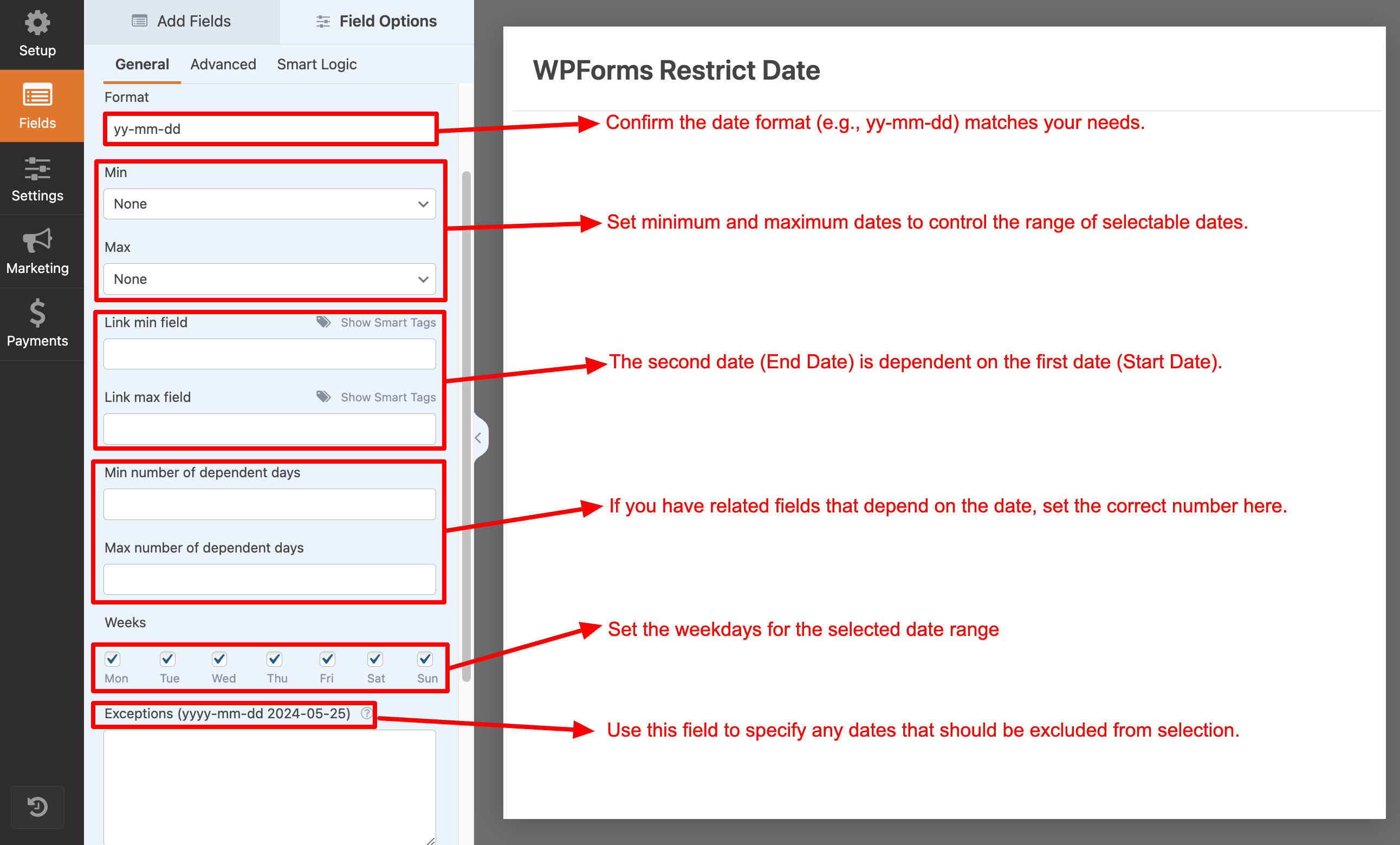
- Min days: Allow admin to set minimum restrict date range
- Max days: Allow admin to set maximum restrict date range
- Weeks: Allow admin to set weekend/weekdays for the selected date range
- Exceptions: Allow admin to add exception dates for the selected date range
- 2 dependent dates: With min and max date
Flexibility in Date Restrictions
Provides flexibility in defining date restrictions. You can set both the minimum and maximum dates, allowing you to create a specific range of selectable dates. This is beneficial for scenarios where you want to limit the date options based on specific requirements, such as event start and end dates or booking availability.
Minimum Date
Set the earliest date that users can select. For example, you can restrict the selection to dates starting from today or today +1 days or any specific date.
Maximum Date
Set the earliest date that users can select. For example, you can restrict the selection to dates starting from today or today +1 days or any specific date.
Exclusion Days
You can exclude specific days of the week from being selectable. For example, if your business is closed on Sundays, you can exclude that day from the available choices.
Relative Dates
You can utilize relative dates to set dynamic restrictions. For instance, you can specify a minimum date as “+2 weeks” from the current date, ensuring that users can only select dates at least two weeks in the future.
Improved User Experience
By implementing date restrictions in your WPForms, you enhance the user experience. Users will only see and be able to select valid and relevant dates, reducing confusion and potential errors.
PRO VERSION
- 2 dependent datepickers with min and max date
- Exclude disabled days & exceptions from offset calculation
WPForms Restrict Date
WPForms Date Restrictions, Restrict Dates WPForms, Date Picker Restrictions, Minimum Date, Maximum Date, Date Range Limitation, Disable Past Dates, Limit Days WPForms, Weekend/Weekday Restrictions, Exception Dates, Form Scheduling, Date/Time Field Customization, WPForms Pro, Conditional Logic Dates, Event Registration Forms, Appointment Scheduling, Booking Availability, Custom Date Picker, Date Dropdown, Dynamic Date Range
Installation
Normal installation
- Download the restrict-field-for-wpforms.zip file to your computer.
- Unzip the file.
- Upload the
restrict-field-for-wpformsdirectory to your/wp-content/plugins/directory. - Activate the plugin through the ‘Plugins’ menu in WordPress.
- Document: https://add-ons.org/restrict-dates-field/
Changelog
2.0.0
- Added: Offset calculation skipping disabled days & exceptions
1.1.7
- Fixed: Max year
1.1.6
- Added: Compatiblity with WPForms Calculations
1.1.3
- Fixed: trigger(“change”)
1.1.0
- Added: Divided into 2 versions: free and pro
1.0.7
- Fixed: Option curent min
Screenshots


For developers
Is this your plugin? Show off the numbers.
Add a live badge to your site, docs or GitHub README. It updates on its own — no account needed.
Best Advanced Datepicker alternatives
All Restrict filed plugins →FAQ
Advanced Datepicker: quick answers
Straight answers, pulled from live WordPress.org data.
Live data from WordPress.org · checked Oct 12, 2026
Is Advanced Datepicker free?
Yes. Advanced Datepicker is free to download and use from the official WordPress.org plugin directory.
Is Advanced Datepicker safe to use in 2026?
Advanced Datepicker is a solid plugin choice in 2026, with a few things worth checking first. It runs on 300+ sites, is rated 5/5 and was last updated 3 weeks ago, and scores 76/100 on our health check.
How many websites use Advanced Datepicker?
Advanced Datepicker is active on 300+ WordPress websites and has been downloaded 5,756 times since it launched in April 2024. It was downloaded 258 times in the last 30 days.
Does Advanced Datepicker work with WordPress 7.1?
Yes. The developer has tested Advanced Datepicker up to WordPress 7.1.3, the latest release. It requires WordPress 2.0 or newer.
What PHP version does Advanced Datepicker need?
Advanced Datepicker requires PHP 5.2 or higher. Most hosts run PHP 8.x today, so it works on any modern WordPress hosting.
When was Advanced Datepicker last updated?
The latest version, 2.0.0, was released on September 21, 2026 (3 weeks ago).
Who makes Advanced Datepicker?
Advanced Datepicker is developed and maintained by add-ons.org.
What are the best alternatives to Advanced Datepicker?
The most popular alternatives to Advanced Datepicker are Advanced Datepicker (900+ installs) and Advanced Datepicker (500+ installs).
Powered by PageForge
Want thousands of pages that rank like these? Build them in an afternoon.
This directory runs on the same engine as PageForge. Turn any spreadsheet, CSV or API into thousands of fast, SEO-ready WordPress pages — with schema, internal links and AI-written copy baked in.
- CSV, Google Sheets & API data sources
- AI content, schema & internal links per page
- Works with Elementor, Gutenberg, Yoast & Rank Math
- Free on WordPress.org — no credit card


