



Advanced Datepicker – Restricts Date for Contact Form 7
Restrict Dates is a Contact Form 7 add-on that restricts users from selecting specific dates in your Contact Form 7 date picker field.

Solid choice
Advanced Datepicker is a solid plugin choice in 2026, with a few things worth checking first. It runs on 500+ sites, is rated 5/5 and was last updated 2 months ago, and scores 77/100 on our health check.
- Tested with the latest WordPress (7.1)
- Small user base (500+ active installs)
- Very few reviews so far
Daily downloads
Download spikes usually follow a new release — each site that auto-updates counts as a download.
Rankings
Where Advanced Datepicker stands todayWordPress.org search rankings
Live position in the plugin search, top 100| Keyword | Position |
|---|---|
| cf dates | #1 |
| cf7 | >100 |
| Restrict 7 | #1 |
| Restrict filed | #1 |
| restricts | #3 |
Version adoption
Share of active sites per release.
Rating breakdown
★★★★★★★★★★ 5 from 3 reviews
About Advanced Datepicker
From the official readme · v2.0.4Description
DEMO: https://demo.add-ons.org/demo-restrict-date-fields/
Document: https://add-ons.org/document-contact-form-7-restrict-dates-2/
Pro version: https://add-ons.org/plugin/contact-form-7-restrict-dates-fields/
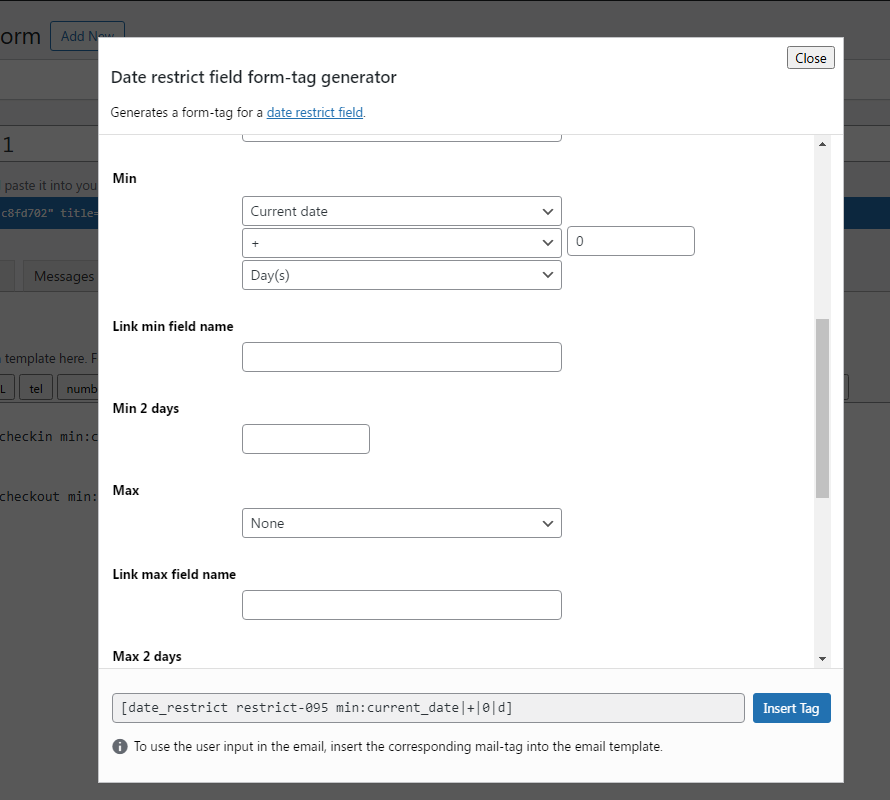
The Restrict Dates feature allows you to control the dates users can select when filling out a form using Contact Form 7.
This tool is ideal for limiting date selections in the Date Picker field based on specific conditions, ensuring the dates chosen align with your requirements.
It enhances user experience and prevents errors in data entry
check in
[date_restrict checkin min:current_date|+|0|d weekdays:1|2|3|4|5|6|0 sync_max:checkout sync_min_number:2 sync_max_number:5]

check out
[date_restrict checkout min:current_date|+|0|d weekdays:1|2|3|4|5|6|0 sync_min:checkin sync_min_number:2 sync_max_number:5]
Features
- Min days: Allow admin to set minimum restrict date range
- Max days: Allow admin to set maximum restrict date range
- Weeks: Allow admin to set weekend/weekdays for the selected date range
- Exceptions: Allow admin to add exception dates for the selected date range
- 2 dependent dates: With min and max date
Exclude Specific Dates
Block users from selecting specific dates, such as public holidays, company off-days, or other unavailable dates. This is especially useful for booking forms or appointment scheduling.
2025-11-20|2025-11-21
or
2025-11-20to2026-11-21
Limit Date Range
Set a date range to restrict users to only select dates within a specific timeframe. For instance, you can limit users to choose dates from January 1, 2025, to December 31, 2025.
Exclude Days of the Week
Combine multiple rules for more complex restrictions, such as excluding certain days of the week, blocking specific dates, and limiting the date range—all customizable through a shortcode for each form.
Improved User Experience
By implementing date restrictions in your WPForms, you enhance the user experience. Users will only see and be able to select valid and relevant dates, reducing confusion and potential errors.
PRO VERSION
- 2 dependent datepickers with min and max date
Installation
Normal installation
- Download the restrict-field-for-wpforms.zip file to your computer.
- Unzip the file.
- Upload the
restrict-field-for-wpformsdirectory to your/wp-content/plugins/directory. - Activate the plugin through the ‘Plugins’ menu in WordPress.
Changelog
2.0.4
- Added: Compatible with Elementor popup
2.0.3
- Added: special rand start to end date
1.1.4
- Version 1.0 Initial Release
Screenshots


For developers
Is this your plugin? Show off the numbers.
Add a live badge to your site, docs or GitHub README. It updates on its own — no account needed.
FAQ
Advanced Datepicker: quick answers
Straight answers, pulled from live WordPress.org data.
Live data from WordPress.org · checked Oct 14, 2026
Is Advanced Datepicker free?
Yes. Advanced Datepicker is free to download and use from the official WordPress.org plugin directory.
Is Advanced Datepicker safe to use in 2026?
Advanced Datepicker is a solid plugin choice in 2026, with a few things worth checking first. It runs on 500+ sites, is rated 5/5 and was last updated 2 months ago, and scores 77/100 on our health check.
How many websites use Advanced Datepicker?
Advanced Datepicker is active on 500+ WordPress websites and has been downloaded 3,372 times since it launched in January 2025. It was downloaded 233 times in the last 30 days.
Does Advanced Datepicker work with WordPress 7.1?
Yes. The developer has tested Advanced Datepicker up to WordPress 7.1.3, the latest release. It requires WordPress 2.0 or newer.
What PHP version does Advanced Datepicker need?
Advanced Datepicker requires PHP 5.2 or higher. Most hosts run PHP 8.x today, so it works on any modern WordPress hosting.
When was Advanced Datepicker last updated?
The latest version, 2.0.4, was released on August 21, 2026 (2 months ago).
Who makes Advanced Datepicker?
Advanced Datepicker is developed and maintained by add-ons.org.
Powered by PageForge
Want thousands of pages that rank like these? Build them in an afternoon.
This directory runs on the same engine as PageForge. Turn any spreadsheet, CSV or API into thousands of fast, SEO-ready WordPress pages — with schema, internal links and AI-written copy baked in.
- CSV, Google Sheets & API data sources
- AI content, schema & internal links per page
- Works with Elementor, Gutenberg, Yoast & Rank Math
- Free on WordPress.org — no credit card


