


REST XML-RPC Data Checker
REST XML-RPC Data Checker allow to check JSON REST and XML-RPC API requests and grant access permissions.

Consider an alternative
REST XML-RPC Data Checker shows warning signs in 2026 — compare the alternatives below before installing. It runs on 900+ sites, is rated 5/5 and was last updated 4 years ago, and scores 34/100 on our health check.
- Small user base (900+ active installs)
- Very few reviews so far
- No update in 4 years
- Only tested up to WordPress 6.0 (latest is 7.1)
How does it stack up?
Side-by-side on installs, updates, ratings & support



Daily downloads
Download spikes usually follow a new release — each site that auto-updates counts as a download.
Rankings
Where REST XML-RPC Data Checker stands todayWordPress.org search rankings
Live position in the plugin search, top 100| Keyword | Position |
|---|---|
| api | >100 |
| JSON | >100 |
| rest | >100 |
| security | >100 |
| xmlrpc | #59 |
Version adoption
Share of active sites per release.
Rating breakdown
★★★★★★★★★★ 5 from 3 reviews
About REST XML-RPC Data Checker
From the official readme · v1.4.0Description
JSON REST API and XML-RPC API are powerful ways to remotely interact with WordPress.
If you don’t have external applications that need to communicate with your WordPress instance using JSON REST API or XML-RPC API you should disable access to them for external requests.
In the standard WordPress installation JSON REST API and XML-RPC API are enabled by default.
In particular the REST API is turned on also for unlogged users. This means that your WordPress instance is potentially leaking data, for example anyone could be able to:
- copy easily your published contents natively with the REST API (and not with a web crawler);
- get the list of all users (with their ID, nickname and name);
- retrieve other information that you didn’t want to be public (such as an unlisted published page or a saved media not yet used).
Even if you could do the stuff by writing your own code using native filters, this plugin aims to help you to control JSON REST API and XML-RPC API accesses from the administration panel or programmatically by a simple API filter.
Basic Features
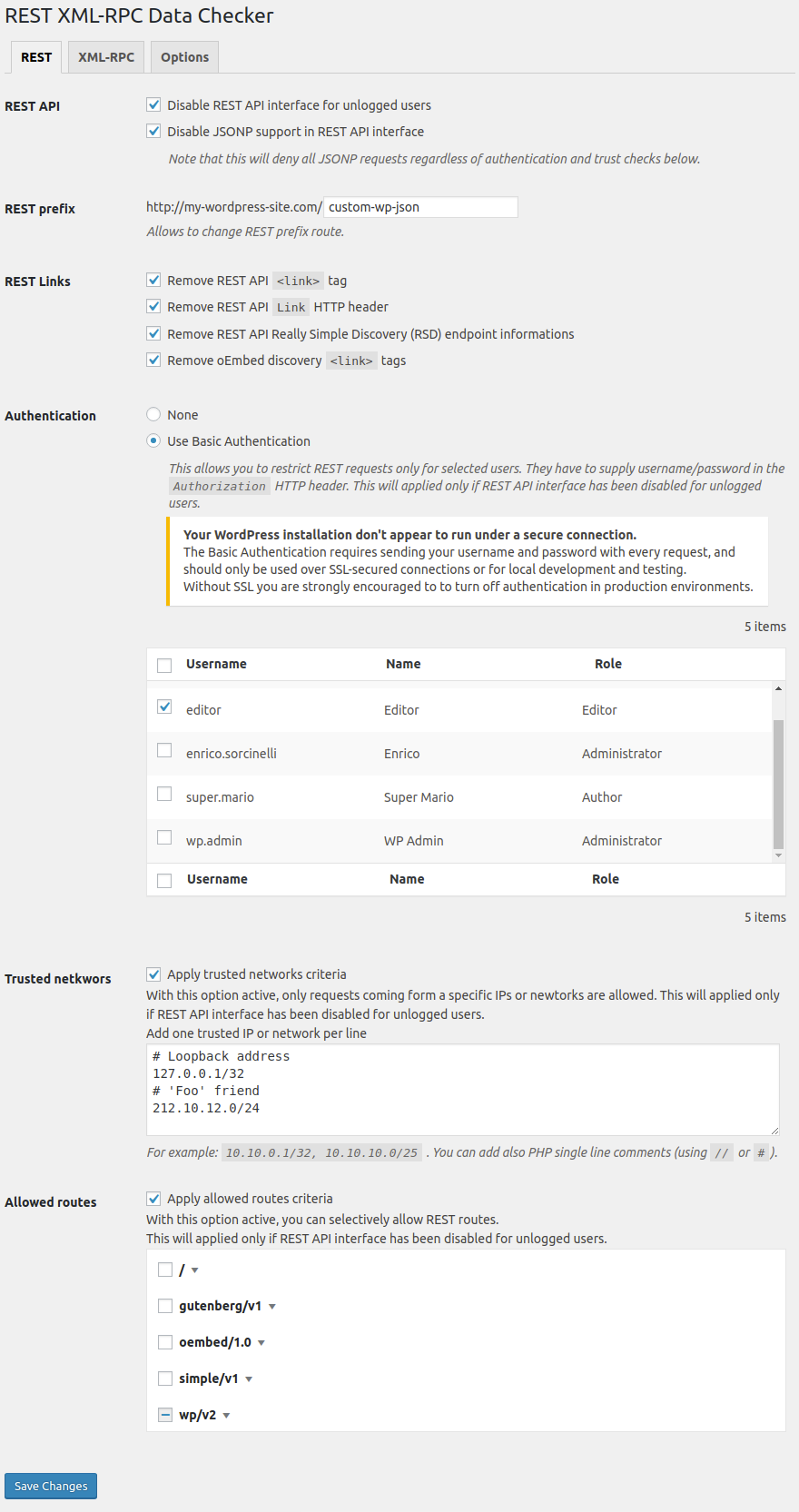
- Disable REST API interface for unlogged users.
- Disable JSONP support on REST API.
- Add Basic Authentication to REST API.
- Remove REST
<link>tags, RESTLinkHTTP header and REST Really Simple Discovery (RSD) informations. - Setup trusted users, IP/Networks and endpoints for unlogged users REST requests.
- Change REST endpoint prefix.
- Disable XML-RPC API interface.
- Remove
<link>to the Really Simple Discovery (RDS) informations. - Remove
X-PingbackHTTP header. - Setup trusted users, IP/Networks and methods for XML-RPC requests.
- Show user’s access informations in users list administration screen.
Usage
Once the plugin is installed you can control settings in the following ways:
- Using the Settings->REST XML-RPC Data Checker administration screen.
- Programmatically, by using
rest_xmlrpc_data_checker_settingsfilter (see below).
API
Hooks
rest_xmlrpc_data_checker_settings
Filters plugin settings values.
apply_filters( 'rest_xmlrpc_data_checker_settings', array $settings )
rest_xmlrpc_data_checker_admin_settings
Filter allowing to display or not the plugin settings page in the administration.
apply_filters( 'rest_xmlrpc_data_checker_admin_settings', boolean $display )
rest_xmlrpc_data_checker_rest_error
Filter JSON REST authentication error after plugin checks.
apply_filters( 'rest_xmlrpc_data_checker_rest_error', WP_Error|boolean $result )
xmlrpc_before_insert_post
Filter XML-RPC post data to be inserted via XML-RPC before to insert post into database.
apply_filters( 'xmlrpc_before_insert_post', array|IXR_Error $content_struct, WP_User $user )
Installation
This section describes how to install the plugin and get it working.
- Upload the plugin files to the
/wp-content/plugins/rest-xmlrpc-data-checkerdirectory, or install the plugin through the WordPress Plugins screen directly. - Activate the plugin through the Plugins screen in WordPress.
Frequently asked questions
Does it work with Gutenberg?
Yes
Does it work on Multisite?
Yes
How do I make REST requests using Basic Authentication?
In the REST tab of plugin settings page you have to: check Disable REST API interface for unlogged users option select Use Basic Authentication in the Authentication section select users whom you want to grant REST access save changes This way, in HTTP REST external requests, users have to add Authorization HTTP header. In order to generate the Authorization HTTP header to use with Basic Authentication you simply have to base64 encode the username and password separated by a colon. Here is an example in PHP: $header = 'Authorization: Basic ' . base64_encode( 'my-user:my-password' ); Here you…
Changelog
Multisite support improvement for superadmin plugin's caps. Tested to the latest WordPress release.
For REST XML-RPC Data Checker changelog, please see the Releases page on GitHub.
Screenshots


For developers
Is this your plugin? Show off the numbers.
Add a live badge to your site, docs or GitHub README. It updates on its own — no account needed.
Best REST XML-RPC Data Checker alternatives
All api plugins →





FAQ
REST XML-RPC Data Checker: quick answers
Straight answers, pulled from live WordPress.org data.
Live data from WordPress.org · checked Oct 4, 2026
Is REST XML-RPC Data Checker free?
Yes. REST XML-RPC Data Checker is free to download and use from the official WordPress.org plugin directory.
Is REST XML-RPC Data Checker safe to use in 2026?
REST XML-RPC Data Checker shows warning signs in 2026 — compare the alternatives below before installing. It runs on 900+ sites, is rated 5/5 and was last updated 4 years ago, and scores 34/100 on our health check.
How many websites use REST XML-RPC Data Checker?
REST XML-RPC Data Checker is active on 900+ WordPress websites and has been downloaded 11,849 times since it launched in November 2018. It was downloaded 154 times in the last 30 days.
Does REST XML-RPC Data Checker work with WordPress 7.1?
REST XML-RPC Data Checker is officially tested up to WordPress 6.0.16, while the latest release is 7.1.2. It may still work, but try it on a staging site first.
What PHP version does REST XML-RPC Data Checker need?
REST XML-RPC Data Checker requires PHP 5.2.4 or higher. Most hosts run PHP 8.x today, so it works on any modern WordPress hosting.
When was REST XML-RPC Data Checker last updated?
The latest version, 1.4.0, was released on August 4, 2022 (4 years ago).
Who makes REST XML-RPC Data Checker?
REST XML-RPC Data Checker is developed and maintained by Enrico Sorcinelli.
What are the best alternatives to REST XML-RPC Data Checker?
The most popular alternatives to REST XML-RPC Data Checker are WP Consent API (200K+ installs), Disable REST API (80K+ installs) and Mailgun for WordPress (80K+ installs).
Powered by PageForge
Want thousands of pages that rank like these? Build them in an afternoon.
This directory runs on the same engine as PageForge. Turn any spreadsheet, CSV or API into thousands of fast, SEO-ready WordPress pages — with schema, internal links and AI-written copy baked in.
- CSV, Google Sheets & API data sources
- AI content, schema & internal links per page
- Works with Elementor, Gutenberg, Yoast & Rank Math
- Free on WordPress.org — no credit card


