


REST API – Head Tags
This plugin adds all the tags in the head section of a website to WordPress REST API responses.

Consider an alternative
REST API – Head Tags shows warning signs in 2026 — compare the alternatives below before installing. It runs on 100+ sites, is rated 5/5 and was last updated 6 years ago, and scores 32/100 on our health check.
- Small user base (100+ active installs)
- Very few reviews so far
- No update in 5 years
- Only tested up to WordPress 5.7 (latest is 7.1)
How does it stack up?
Side-by-side on installs, updates, ratings & support



Daily downloads
Download spikes usually follow a new release — each site that auto-updates counts as a download.
Rankings
Where REST API – Head Tags stands todayWordPress.org search rankings
Live position in the plugin search, top 100| Keyword | Position |
|---|---|
| api | >100 |
| meta | >100 |
| rest | >100 |
| seo | >100 |
| Yoast | >100 |
Version adoption
Share of active sites per release.
Rating breakdown
★★★★★★★★★★ 5 from 2 reviews
About REST API – Head Tags
From the official readme · v1.2.1Description
This plugin adds all the tags in the head section of a website to WordPress REST API responses.
It is perfect if you are using WordPress for a headless set-up and would like to add the meta tags generated by your WordPress SEO plugin (like Yoast SEO or All-in-One SEO Pack) to the WordPress REST API output.
Requirements
This package depends on the PHP DOM library. Most PHP environments have it by default so you don’t have to worry about that.
In case you get some errors regarding this dependency make sure you have this library installed (you can take a look at this thread in the code repository).
Compatibility
This plugin is compatible and works out of the box with some of the most popular WordPress SEO plugins. These are the ones that we tested:
- Yoast SEO – (up to 13.5)
- All in One SEO Pack – (up to 3.4.2)
- WP SEO –
Are you using a different SEO plugin and want to know if it’s compatible? Feel free to ask in our community forum. If you tested any other plugin, please let us know as well so we can update the list.
How to use this plugin
Entities with head tags
The plugin has been developed to include the head_tags field to the REST API response of most of the WordPress core entities:
- Posts, pages, attachments and custom post types.
- Post types: for archive pages.
- Categories, tags and custom taxonomies.
- Authors.
In a Frontity project
If you are using Frontity, you just have to install the @frontity/head-tags package and it will work automatically.
In a different project
You need to understand better how it works and add the data manually.
How to fetch the head_tags field manually
You have to get each entity from its respective REST API endpoint. For example: for fetching the posts, you should go to /wp-json/wp/v2/posts&id=123 endpoint; for fetching the categories, you have to go to wp-json/wp/v2/categories&id=123, and for custom post types or custom taxonomies, it would be a different url in each case.
In the case of the homepage, it’s less intuitive and you should go to /wp-json/wp/v2/types/post. As previously said, each entity has a different endpoint so if you aren’t familiar with this, you should check out the WordPress REST API reference for more information.
Inside each endpoint, it will be a new field named head_tags, which will be an array of objects representing the tags that WordPress would normally include inside the html head element. These objects have the properties tag, attributes and content.
For example for these HTML tags:
<title>Hello wordl! - My Site</title>
<meta name="robots" content="max-snippet:-1, max-image-preview:large, max-video-preview:-1">
<link rel="canonical" href="<https://test.frontity.org/>" />
This would be the content of the head_tags field:
"head_tags": [
  {
    "tag": "title",
    "content": "Hello world! - My Site"
  },
  {
    "tag": "meta",
    "attributes": {
      "name": "robots",
      "content": "max-snippet:-1, max-image-preview:large, max-video-preview:-1"
    }
  },
  {
    "tag": "link",
    "attributes": {
      "rel": "canonical",
      "href": "<https://test.frontity.org/>"
    }
  }
]
Settings
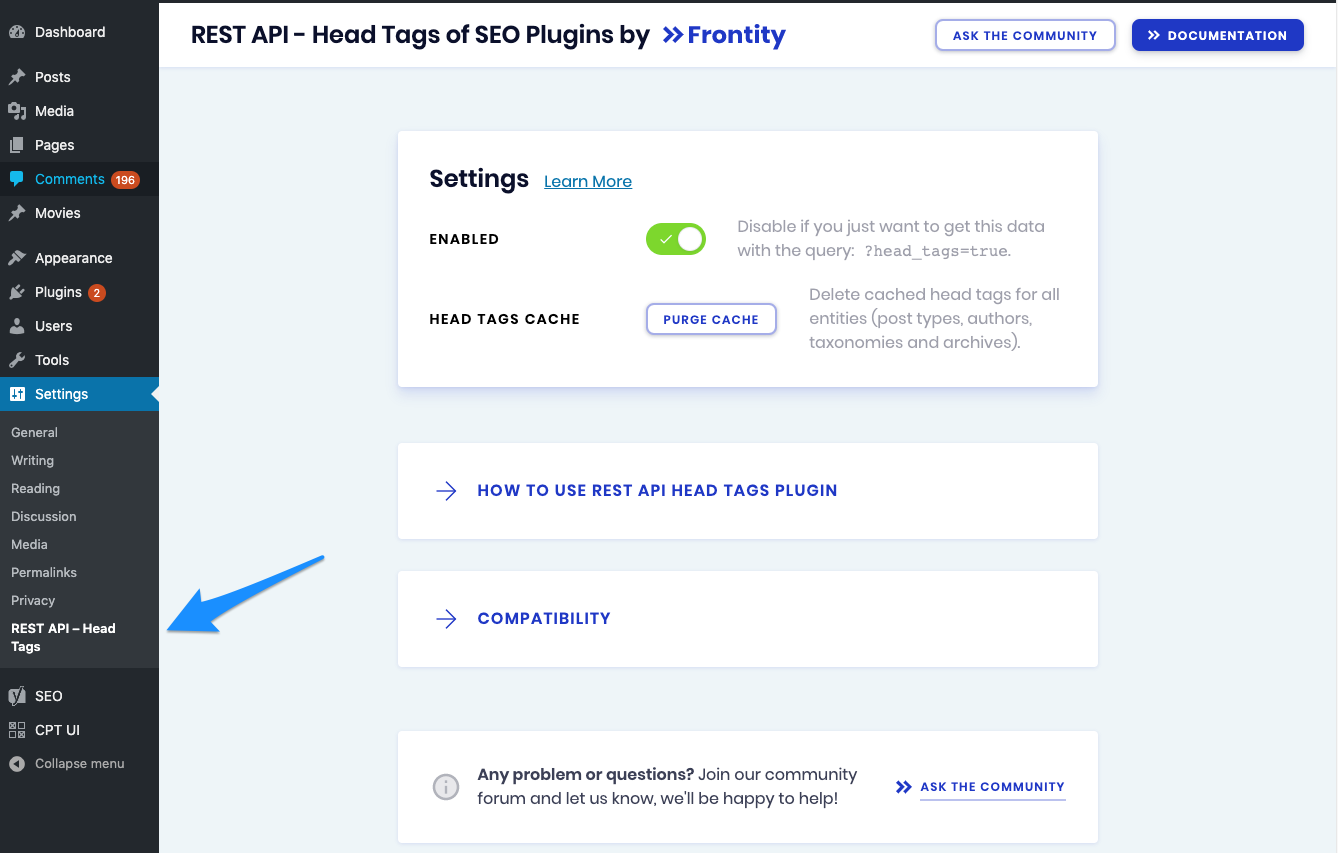
The settings of this plugin are really simple.
Purge cache
In order to not affect the performance of your site, the head_tags field is cached for all your responses. Each time you update a post/page/cpt or a taxonomy, the cache for that entity will be purged automatically. In case you make global changes (i.e. your permalinks or your global Yoast settings) use the Purge button to clean the whole cache.
Enable output
By default, the head_tags field is included in the common endpoint of each entity. You can configure it so it doesn’t appear by default and to be shown when you include the head_tags=true query.
For example, with the output disabled, https://test.frontity.org/wp-json/wp/v2/posts won’t show the head_tags field unless you have the query ?head_tags=true at the end.
Skip cache
In case you want to skip the cache, you can do so by adding to the query the parameter skip_cache.
There are some cache plugins for the REST API which also use the same parameter. In case you want to ignore the cache for the REST API call but not for the head tags, you can use skip_cache&head_tags_skip_cache=false.
Problems and Questions
If you have any trouble with the REST API – Head Tags, you can check out our docs or join our community forum and let us know. We’ll be happy to help!
Bug reports for REST API – Head Tags plugin are welcomed in our repository on GitHub. Before opening an issue, please be sure to review the contributing guidelines.
More Information
- About Frontity Framework
- Guide on SEO for Headless WordPress Themes
- Follow Frontity on Twitter and GitHub
- Get help on the Frontity Community Forum
Installation
-
First of all you have to install the plugin. You can do it:
- Automatic: from within WordPress dashboard go to Plugins, click Add New button, search for REST API – Head Tags by Frontity and click Install Now.
- Manual: this method requires to download the plugin and upload it to your web server via FTP. For a more detailed explanation, WordPress explains how to do this on this guide.
-
Once installed, you have to activate it and it will be running! The head_tags field is cached and enabled by default, but you can purge the cache or disable the output as explained on the Settings section.
Changelog
1.2.1
Patch Changes:
– Return an empty array when there is no <head> tag.
1.2.0
Minor Changes:
– Add support for the latest version of the All In One SEO plugin (^4.0.16).
1.1.4
Patch Changes:
– Remove warning messages from REST API responses when head’s HTML code is malformed.
1.1.3
Patch Changes:
– Fix redirects to images when making calls to the REST API in a site with Yoast installed.
– Also, refactor the code to prevent other redirections in the future.
1.1.2
Patch Changes:
– Fix the performance of the clear cache functionality.
– Fix the way admin hooks and rest api hooks are being registered.
1.1.1
Patch Changes: Fix redirects when making calls to the REST API.
Screenshots

For developers
Is this your plugin? Show off the numbers.
Add a live badge to your site, docs or GitHub README. It updates on its own — no account needed.
Best REST API – Head Tags alternatives
All api plugins →




FAQ
REST API – Head Tags: quick answers
Straight answers, pulled from live WordPress.org data.
Source: WordPress.org
Is REST API – Head Tags free?
Yes. REST API – Head Tags is free to download and use from the official WordPress.org plugin directory.
Is REST API – Head Tags safe to use in 2026?
REST API – Head Tags shows warning signs in 2026 — compare the alternatives below before installing. It runs on 100+ sites, is rated 5/5 and was last updated 6 years ago, and scores 32/100 on our health check.
How many websites use REST API – Head Tags?
REST API – Head Tags is active on 100+ WordPress websites and has been downloaded 19,562 times since it launched in January 2020. It was downloaded 284 times in the last 30 days.
Does REST API – Head Tags work with WordPress 7.1?
REST API – Head Tags is officially tested up to WordPress 5.7.22, while the latest release is 7.1.5. It may still work, but try it on a staging site first.
What PHP version does REST API – Head Tags need?
REST API – Head Tags requires PHP 5.6 or higher. Most hosts run PHP 8.x today, so it works on any modern WordPress hosting.
When was REST API – Head Tags last updated?
The latest version, 1.2.1, was released on March 26, 2021 (6 years ago).
Who makes REST API – Head Tags?
REST API – Head Tags is developed and maintained by frontity.
What are the best alternatives to REST API – Head Tags?
The most popular alternatives to REST API – Head Tags are WP Consent API (300K+ installs), Disable REST API (80K+ installs) and Mailgun for WordPress (80K+ installs).
Powered by PageForge
One template and a spreadsheet. A real page for every search.
PageForge turns each row of a CSV into a WordPress page with its own title, URL, SEO fields and schema, built on the layout you already designed. Free on WordPress.org.
- CSV and XLSX, plus Google Sheets on Professional and Enterprise
- Its own title, URL, SEO fields and schema for every page
- Works with the block editor, Elementor, Divi and Avada
- Free on WordPress.org, no credit card