



REST API blocks
Add gutenberg blocks data into the post / page REST API endpoints.

Use with caution
REST API blocks works, but test it on a staging site before relying on it in 2026. It runs on 200+ sites, is rated 5/5 and was last updated 9 months ago, and scores 48/100 on our health check.
- Small user base (200+ active installs)
- Very few reviews so far
- Only tested up to WordPress 6.9 (latest is 7.1)
How does it stack up?
Side-by-side on installs, updates, ratings & support



Daily downloads
Download spikes usually follow a new release — each site that auto-updates counts as a download.
Rankings
Where REST API blocks stands todayWordPress.org search rankings
Live position in the plugin search, top 100| Keyword | Position |
|---|---|
| api | #38 |
| blocks | >100 |
| gutenberg | >100 |
| rest-api | #19 |
| wp-json | >100 |
Version adoption
Share of active sites per release.
Rating breakdown
★★★★★★★★★★ 5 from 2 reviews
About REST API blocks
From the official readme · v2.0.0Description
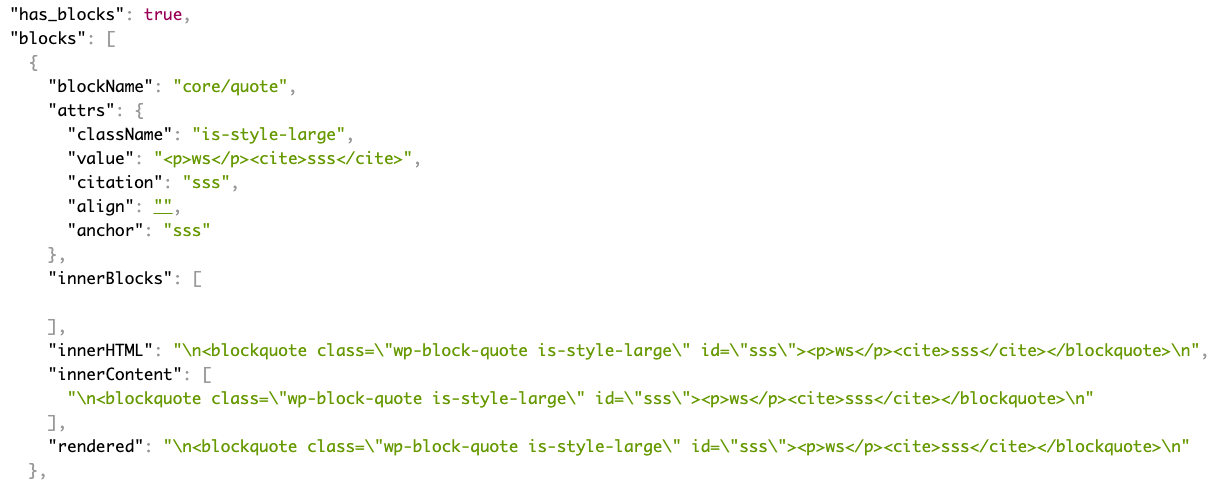
A simple plugin to add block data in json format into the rest api. Once installed, there will be two new fields added to the rest api, has_blocks and blocks.
For example output.
"has_blocks": true,

"block_data": [

  {

    "blockName": "core/image",

    "attrs": {

      "url": "https://www.spacedmonkey.com/wp-content/uploads/2018/12/test-image.jpg",

      "alt": "Terminal de aeropuerto",

      "caption": "fsfsdfdsfdssfd",

      "href": "https://www.spacedmonkey.com/test-image",

      "rel": "noreferrer noopener",

      "linkClass": "jonny-123",

      "linkTarget": "_blank",

      "id": 147355,

      "width": 582,

      "height": 327,

      "linkDestination": "attachment"

    },

    "innerBlocks": [

    ],

    "innerHTML": "\n<figure class=\"wp-block-image is-resized\"><a class=\"jonny-123\" href=\"https://www.spacedmonkey.com/test-image\" target=\"_blank\" rel=\"noreferrer noopener\"><img src=\"https://www.spacedmonkey.com/wp-content/uploads/2018/12/test-image.jpg\" alt=\"Terminal de aeropuerto\" class=\"wp-image-147355\" width=\"582\" height=\"327\"/></a><figcaption>fsfsdfdsfdssfd</figcaption></figure>\n",

    "innerContent": [

      "\n<figure class=\"wp-block-image is-resized\"><a class=\"jonny-123\" href=\"https://www.spacedmonkey.com/test-image\" target=\"_blank\" rel=\"noreferrer noopener\"><img src=\"https://www.spacedmonkey.com/wp-content/uploads/2018/12/test-image.jpg\" alt=\"Terminal de aeropuerto\" class=\"wp-image-147355\" width=\"582\" height=\"327\"/></a><figcaption>fsfsdfdsfdssfd</figcaption></figure>\n"

    ],

    "rendered": "\n<figure class=\"wp-block-image is-resized\"><a class=\"jonny-123\" href=\"https://www.spacedmonkey.com/test-image\" target=\"_blank\" rel=\"noreferrer noopener\"><img src=\"https://www.spacedmonkey.com/wp-content/uploads/2018/12/test-image.jpg\" alt=\"Terminal de aeropuerto\" class=\"wp-image-147355\" width=\"582\" height=\"327\"/></a><figcaption>fsfsdfdsfdssfd</figcaption></figure>\n"

  }

],
Technical Notes
- Requires PHP 5.6+.
- Requires WordPress 5.5+.
- Issues and Pull requests welcome on the GitHub repository: https://github.com/spacedmonkey/wp-rest-blocks
Development
This plugin uses @wordpress/env for local development and testing.
Prerequisites
- Node.js 20+ and npm
- Docker Desktop (must be installed and running)
Setup
- Clone the repository
-
Install dependencies:
bash

npm install

composer install -
Start the WordPress environment:
bash

npm run env:start
This will start a local WordPress instance at
http://localhost:8888(admin:http://localhost:8888/wp-adminwith usernameadminand passwordpassword)Note: Docker must be running for this to work. The first time you run this, it will download WordPress and set up the database, which may take a few minutes.
Available Commands
npm run env:start– Start the WordPress environmentnpm run env:stop– Stop the WordPress environmentnpm run env:reset– Reset the environment (clean database)npm run env:destroy– Destroy the environment completelynpm run test:php– Run PHPUnit testsnpm run test:php:multisite– Run PHPUnit tests in multisite modenpm run lint:php– Run PHP CodeSniffernpm run lint:php:fix– Fix PHP coding standards issues automatically
Running Tests
After starting the environment with npm run env:start, you can run the tests:
`bash
npm run test:php
`
For multisite tests:
`bash
npm run test:php:multisite
`
Accessing the Site
- Development site: http://localhost:8888
- Admin dashboard: http://localhost:8888/wp-admin (admin/password)
- Test site: http://localhost:8889
- Test admin: http://localhost:8889/wp-admin (admin/password)
Installation
Using The WordPress Dashboard
- Navigate to the ‘Add New’ in the plugins dashboard
- Search for ‘wp-rest-blocks’
- Click ‘Install Now’
- Activate the plugin on the Plugin dashboard
Uploading in WordPress Dashboard
- Navigate to the ‘Add New’ in the plugins dashboard
- Navigate to the ‘Upload’ area
- Select
wp-rest-blocks.zipfrom your computer - Click ‘Install Now’
- Activate the plugin in the Plugin dashboard
Using FTP
- Download
wp-rest-blocks.zip - Extract the
wp-rest-blocksdirectory to your computer - Upload the
wp-rest-blocksdirectory to the/wp-content/plugins/directory - Activate the plugin in the Plugin dashboard
Changelog
1.0.2
- Fix issue with WordPress 6.5
- Update coding standards to WP coding standards 3.1.0
- Mark tested up to WP 6.5
1.0.1
- Update coding standards to WP coding standards 3.0.1
- Mark tested up to WP 6.4
1.0.0
Breaking change!
The field in the REST API is changed from blocks to block_data.
0.5.0
- Add support for new post types added in WordPress 5.9.
0.4.0
- Added support for block based widget, added in WordPress 5.8. Block data is added to the /wp/v2/widgets endpoint.
0.3.2
- Update translations
0.3.1
- Hot fix.
0.3.0
- Improve support for block that have attributes that use query source type.
- Improve error handling for those that install this plugin without using composer.
0.2.1
- Update dependency.
0.2.0
- Breaking change. Field names have changed and required WordPress 5.5+
0.1.0
- First version.
Screenshots
For developers
Is this your plugin? Show off the numbers.
Add a live badge to your site, docs or GitHub README. It updates on its own — no account needed.
Best REST API blocks alternatives
All api plugins →





FAQ
REST API blocks: quick answers
Straight answers, pulled from live WordPress.org data.
Live data from WordPress.org · checked Oct 4, 2026
Is REST API blocks free?
Yes. REST API blocks is free to download and use from the official WordPress.org plugin directory.
Is REST API blocks safe to use in 2026?
REST API blocks works, but test it on a staging site before relying on it in 2026. It runs on 200+ sites, is rated 5/5 and was last updated 9 months ago, and scores 48/100 on our health check.
How many websites use REST API blocks?
REST API blocks is active on 200+ WordPress websites and has been downloaded 7,724 times since it launched in August 2021. It was downloaded 202 times in the last 30 days.
Does REST API blocks work with WordPress 7.1?
REST API blocks is officially tested up to WordPress 6.9.9, while the latest release is 7.1.2. It may still work, but try it on a staging site first.
What PHP version does REST API blocks need?
REST API blocks requires PHP 7.4 or higher. Most hosts run PHP 8.x today, so it works on any modern WordPress hosting.
When was REST API blocks last updated?
The latest version, 2.0.0, was released on January 3, 2026 (9 months ago).
Who makes REST API blocks?
REST API blocks is developed and maintained by Jonny Harris.
What are the best alternatives to REST API blocks?
The most popular alternatives to REST API blocks are WP Consent API (200K+ installs), Disable REST API (80K+ installs) and Mailgun for WordPress (80K+ installs).
Powered by PageForge
Want thousands of pages that rank like these? Build them in an afternoon.
This directory runs on the same engine as PageForge. Turn any spreadsheet, CSV or API into thousands of fast, SEO-ready WordPress pages — with schema, internal links and AI-written copy baked in.
- CSV, Google Sheets & API data sources
- AI content, schema & internal links per page
- Works with Elementor, Gutenberg, Yoast & Rank Math
- Free on WordPress.org — no credit card


