



Replai – Cookie Consent Banner for GDPR, CCPA & Google Consent Mode (self-hosted)
A self-hosted GDPR/CCPA cookie consent banner with prior blocking of third-party scripts, Google Consent Mode v2 and a local consent log.

Use with caution
Replai works, but test it on a staging site before relying on it in 2026. Was last updated 1 month ago, and scores 60/100 on our health check.
- Tested with the latest WordPress (7.1)
- Small user base (<10 active installs)
- Very few reviews so far
How does it stack up?
Side-by-side on installs, updates, ratings & support



Daily downloads
Download spikes usually follow a new release — each site that auto-updates counts as a download.
Rankings
Where Replai stands todayWordPress.org search rankings
Live position in the plugin search, top 100| Keyword | Position |
|---|---|
| consent | >100 |
| consent mode | >100 |
| cookie banner | >100 |
| cookies | >100 |
| GDPR | >100 |
About Replai
From the official readme · v1.3.7Description
Replai – Cookie Consent is a privacy-first cookie consent plugin — a self-hosted alternative to subscription-based consent services. The banner, the consent log and the prior blocking all run on your own WordPress by default: no external calls are made unless you explicitly connect the optional REPLAI service (see “External services”).
- Prior blocking (before consent): the most common third-party scripts (Google Analytics, Google Tag Manager, Meta Pixel, Google Ads, LinkedIn, TikTok, Hotjar, Microsoft Clarity, Matomo, YouTube, Vimeo, Google Maps…) are automatically neutralized until the visitor consents. Add extra domains with one line each.
- Google Consent Mode v2 (Basic or Advanced): consent state is set to “denied” by default and updated automatically when the visitor chooses, so Google Analytics 4 and Google Ads receive the correct signals. In Advanced mode (recommended) Google tags are allowed to load and send cookieless pings (with
url_passthroughandads_data_redaction), recovering anonymous data and modeling conversions even before consent, while every other tracker stays blocked. - Region-based consent: ask for prior consent everywhere, or opt-in only in the EU/EEA/UK/Switzerland and opt-out where the law allows it (more conversions outside the EU). Visitor country is detected from a hosting/CDN header (Cloudflare and others) with a filter to plug in your own GeoIP; if there is no signal, prior consent is applied for safety.
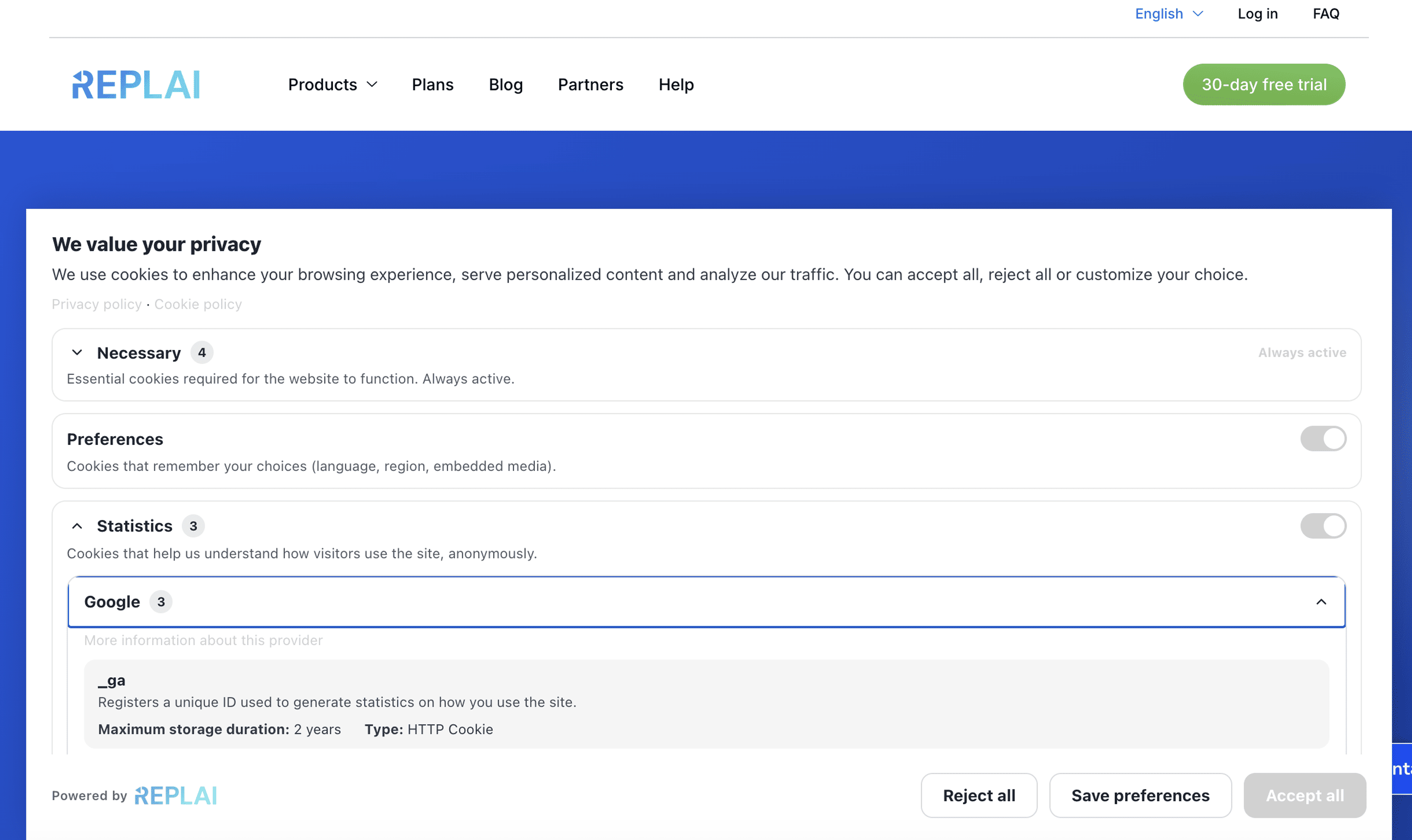
- Granular categories: Necessary (always on), Preferences, Statistics and Marketing, with an “Accept all”, “Reject all” and “Customize” flow.
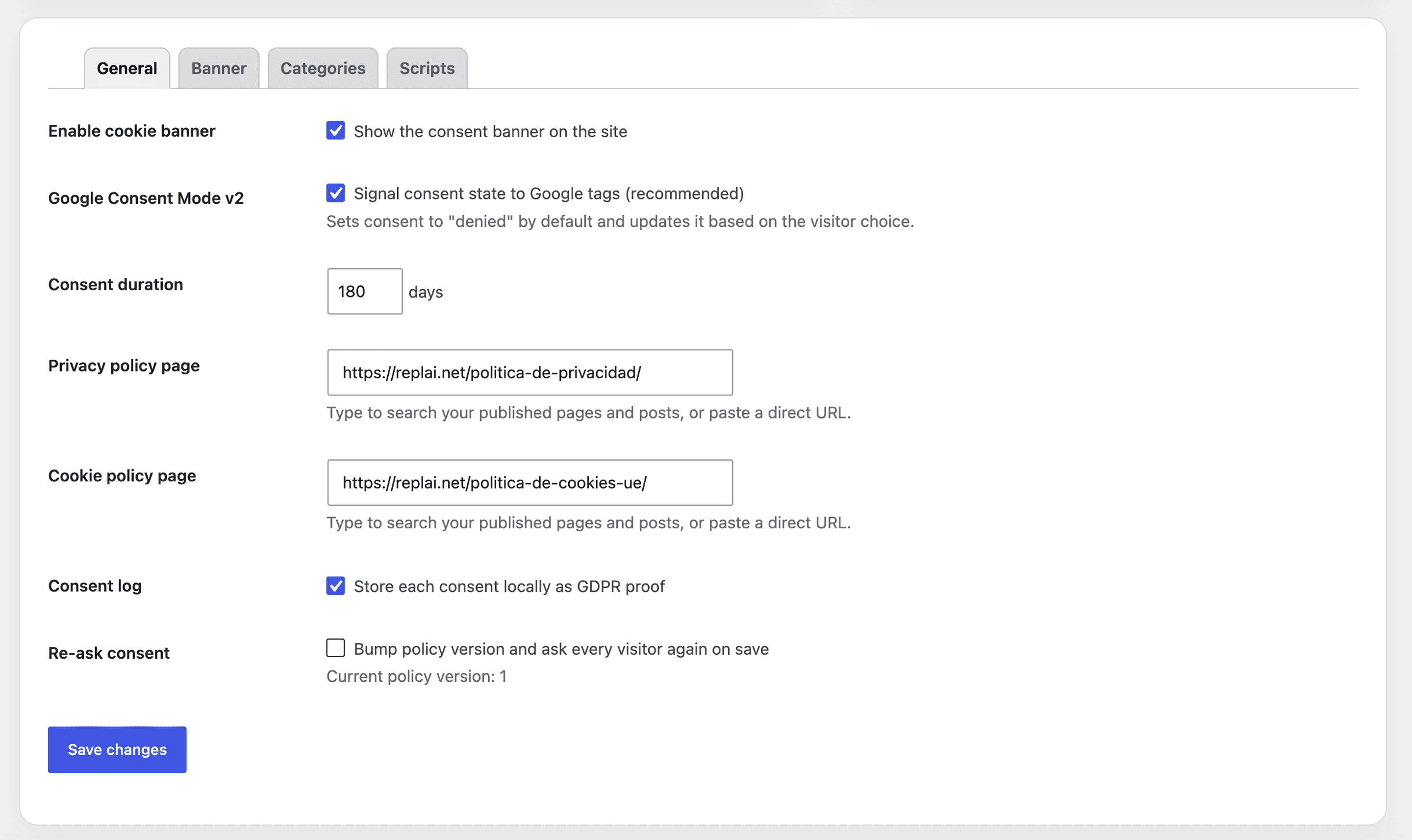
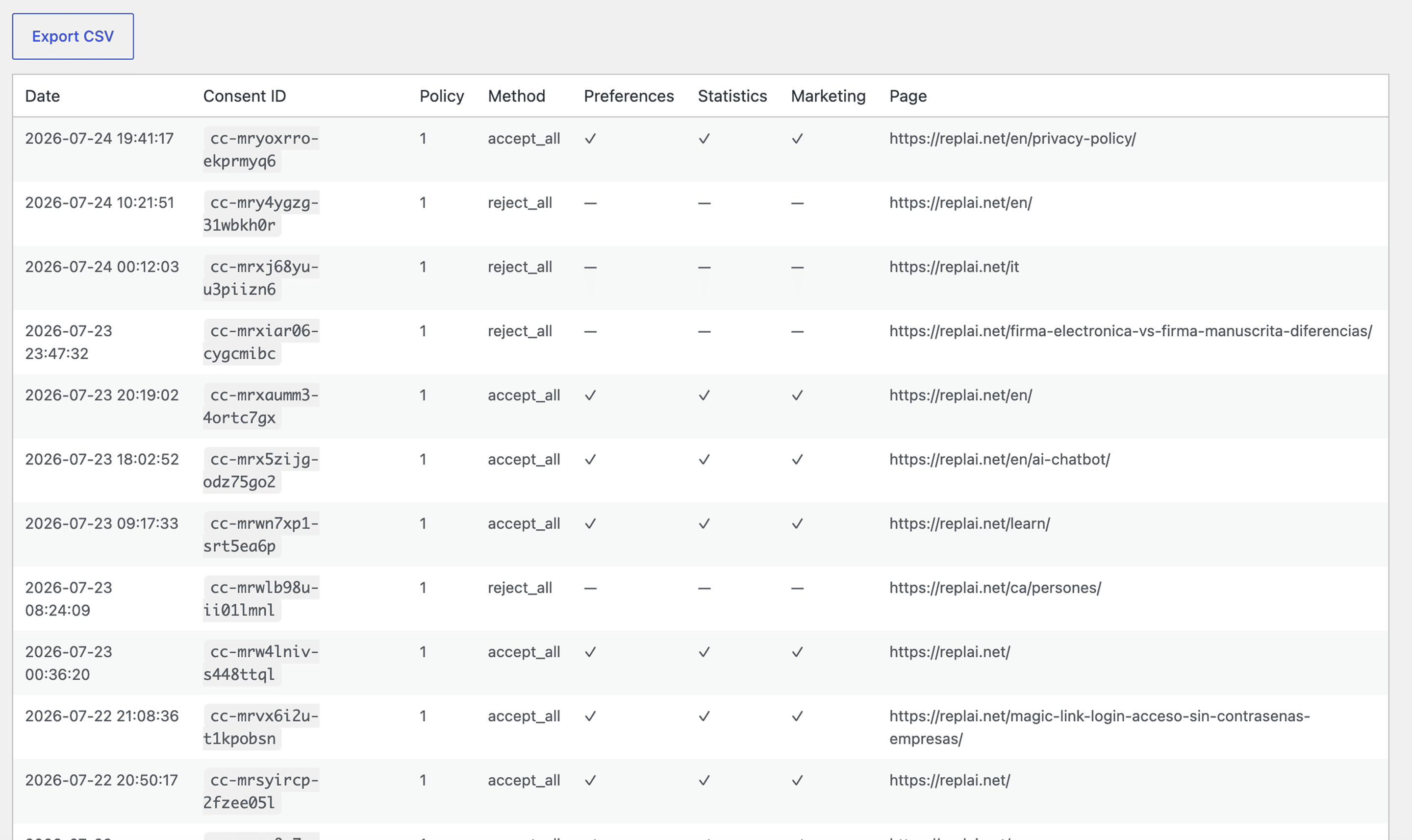
- Consent log (GDPR proof): every consent is stored locally (date, policy version, choices, hashed IP, page) and can be exported to CSV. IP addresses are never stored in plain text (hashed with a plugin-specific salt).
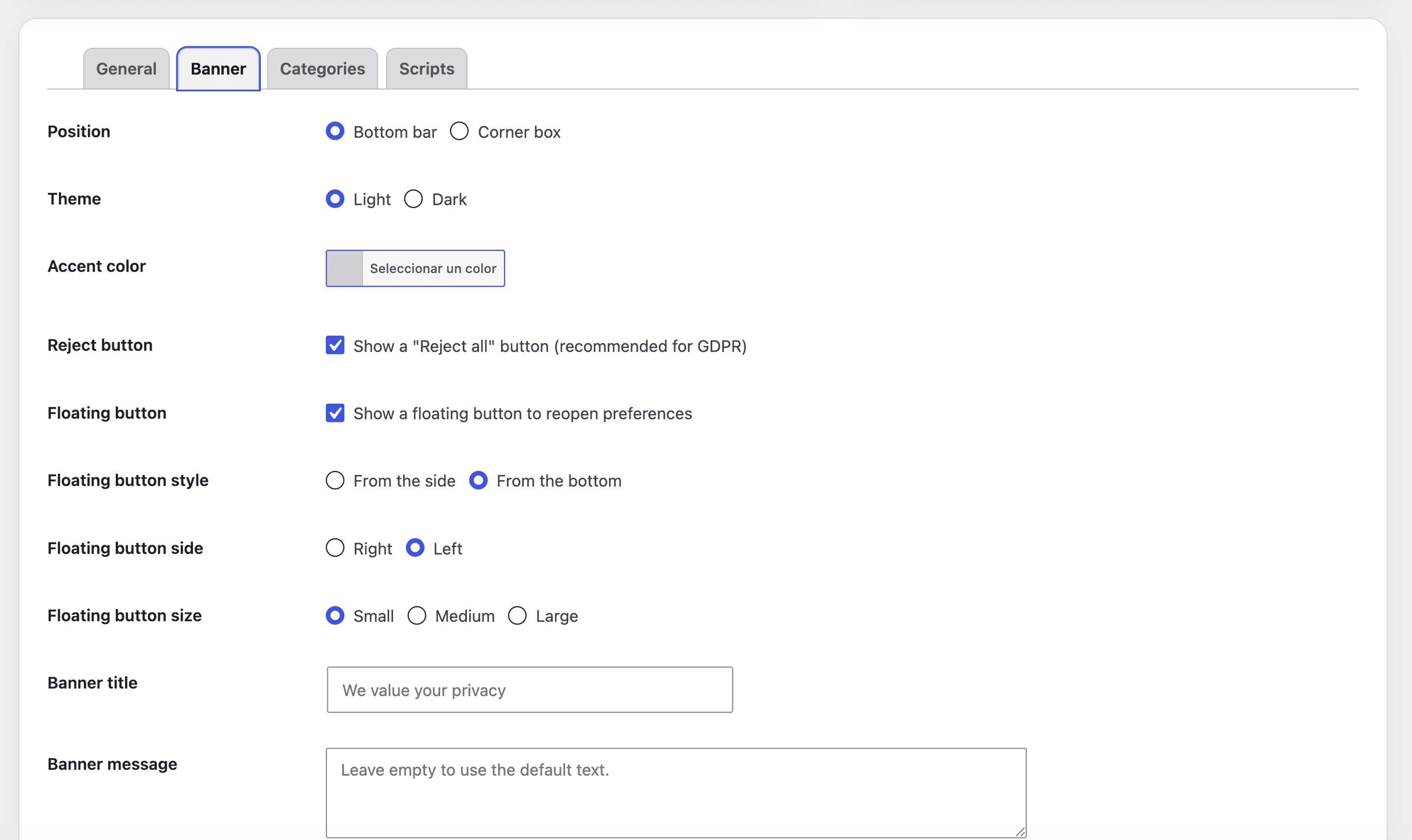
- Fully customizable banner: bottom bar or corner box, light/dark theme, accent color, custom title and message, links to your privacy and cookie policies.
- Embeddable cookie declaration: the
[replai_cookie_declaration]shortcode renders a ready-to-paste page for your cookie policy — a table per category with provider, purpose, duration and type for every declared cookie, plus the visitor’s current consent (per-category status, consent ID and date).[replai_cookie_settings]reopens the preferences panel. - Global Privacy Control (GPC): the US GPC browser signal is honored automatically — non-essential categories are rejected and logged without an intrusive banner.
- Automatic banner language: the banner follows the visitor’s browser language across 7 languages, independently of the site language.
- Optional REPLAI monitoring: if you are a REPLAI customer, you can add a REPLAI token to monitor this installation from your REPLAI dashboard. This is off by default; nothing is sent unless you add a token.
External services
This plugin can optionally connect to REPLAI (https://app.replai.net), a service by REPLAI, to let REPLAI customers monitor their cookie-consent installation from the REPLAI dashboard.
This connection is optional and disabled by default. No data is sent to REPLAI unless the site administrator explicitly enters a REPLAI token in Settings → Banner → “REPLAI connection”. If the token field is empty, the plugin makes no external calls.
When a token is configured, the plugin contacts REPLAI in these cases:
- When you save or test the token: a request is sent to validate the token (the token/API key is sent).
- Periodically (a daily WordPress cron event) and in real time when a visitor gives consent: the plugin sends site information (site URL, site name, WordPress/PHP/plugin versions, locale and the banner settings), consent aggregates (totals and per-category opt-ins) and individual consent events (consent id, date, chosen categories, method, page URL, a hashed IP — never the raw IP — and the browser language).
REPLAI terms of service: https://replai.net/en/termsandconditions/
REPLAI privacy policy: https://replai.net/en/privacy-policy/
Installation
- Upload the plugin to
/wp-content/plugins/or install it from the Plugins screen. - Activate it.
- Go to Replai Cookies → Settings and configure the banner, categories and policy links.
- If you were using another cookie banner service, deactivate it and remove its header script — your third-party scripts will be blocked automatically until consent.
Frequently asked questions
Does it send data to any external service?
By default, no — the plugin is fully self-hosted and consents are stored in your own database. It only connects to the optional REPLAI service if you explicitly add a REPLAI token (see “External services”). With no token, no data leaves your site.
Does it work with Google Analytics 4 / Google Ads?
Yes. Keep Google Consent Mode v2 enabled and the plugin will signal consent automatically.
How do I add scripts that are not blocked by default?
Settings → Scripts, add a line domain|category (category = preferences, statistics or marketing).
Changelog
1.3.7
- The plugin description in the Plugins list now follows your site language (7 languages), like the rest of the admin.
- The “Settings” link in the plugin row now also uses your site language.
1.3.6
- Tested and compatible with WordPress 7.1.
A full changelog is also available in CHANGELOG.md.
1.3.5
- The Diagnostics panel now detects analytics by running your homepage’s real JavaScript (not just the server HTML), removing GA4/GTM false negatives and also detecting trackers loaded via JS.
1.3.4
- Diagnostics now run in real time: “Check again” refreshes the results in place, without reloading the page.
- When Google Tag Manager is detected, the panel no longer flags GA4 as “missing” — GA4 is usually configured inside the GTM container and does not appear in the page HTML (verify it in GA4 Realtime). A missing-GA4 warning is only shown for direct gtag setups with Google Ads but no GA4 and no GTM.
- The homepage is now fetched with a browser user-agent and a cache-buster so caches/CDNs return the same page a real visitor sees.
1.3.3
- Renamed the plugin title to better describe what it does (GDPR/CCPA cookie consent banner with Google Consent Mode, self-hosted). The plugin slug and your settings are unchanged.
- The banner now has a close (×) button in the top-right corner, and the floating cookie button hides while the panel is open and reappears when it closes. The × and click-outside only close the panel once a consent choice has already been made (on the first visit a choice is still required).
- Admin: the optional REPLAI connection is shown again at the top of the settings screen (not as a tab).
- Diagnostics: besides the Google stack and Meta Pixel, the panel now also lists other common trackers detected on the homepage (Mixpanel, Hotjar, Clarity, LinkedIn, TikTok, Matomo, Plausible, Segment, Yandex, Pinterest, Microsoft Ads, FullStory, Amplitude) so you can check they are being consented.
1.3.2
- Consent Mode / analytics diagnostics panel: a new “Diagnostics” tab loads your homepage and checks whether the plugin is injecting Google Consent Mode and which analytics tags are present (GA4, Google Ads, GTM, Meta Pixel). It warns when Google Ads or GTM are detected but GA4 (a
G-...config) is missing, so you can spot a missing Google Analytics 4 tag. Includes a “Check again” action and a note reminding that GA4 may live inside a GTM container. - Settings reorganised into coherent tabs: all sections now live in tabs inside a single form — General, Appearance, Categories & cookies, Consent Mode & regions, Advanced compliance, Diagnostics and REPLAI connection.
Screenshots
For developers
Is this your plugin? Show off the numbers.
Add a live badge to your site, docs or GitHub README. It updates on its own — no account needed.
Best Replai alternatives
All consent plugins →





FAQ
Replai: quick answers
Straight answers, pulled from live WordPress.org data.
Live data from WordPress.org · checked Sep 29, 2026
Is Replai free?
Yes. Replai is free to download and use from the official WordPress.org plugin directory.
Is Replai safe to use in 2026?
Replai works, but test it on a staging site before relying on it in 2026. Was last updated 1 month ago, and scores 60/100 on our health check.
How many websites use Replai?
Replai is active on <10 WordPress websites and has been downloaded 357 times since it launched in July 2026. It was downloaded 75 times in the last 30 days.
Does Replai work with WordPress 7.1?
Yes. The developer has tested Replai up to WordPress 7.1.2, the latest release. It requires WordPress 6.2 or newer.
What PHP version does Replai need?
Replai requires PHP 7.2 or higher. Most hosts run PHP 8.x today, so it works on any modern WordPress hosting.
When was Replai last updated?
The latest version, 1.3.7, was released on August 27, 2026 (1 month ago).
Who makes Replai?
Replai is developed and maintained by REPLAI.
What are the best alternatives to Replai?
The most popular alternatives to Replai are Cookie Compliance for WordP… (800K+ installs), CookieAdmin (400K+ installs) and WP Consent API (200K+ installs).
Powered by PageForge
Want thousands of pages that rank like these? Build them in an afternoon.
This directory runs on the same engine as PageForge. Turn any spreadsheet, CSV or API into thousands of fast, SEO-ready WordPress pages — with schema, internal links and AI-written copy baked in.
- CSV, Google Sheets & API data sources
- AI content, schema & internal links per page
- Works with Elementor, Gutenberg, Yoast & Rank Math
- Free on WordPress.org — no credit card


