


Arts Repeater Tags for Elementor and ACF
Elementor’s dynamic tags can’t reach inside an ACF repeater: sub-fields don’t show up in the tag picker at all. Getting “the second image of that repeater” into a section background usually ends in a PHP snippet, a…

Use with caution
Arts Repeater Tags for Elemento… works, but test it on a staging site before relying on it in 2026. Was last updated 2 months ago, and scores 60/100 on our health check.
- Tested with the latest WordPress (7.1)
- Small user base (<10 active installs)
- Very few reviews so far
How does it stack up?
Side-by-side on installs, updates, ratings & support



Daily downloads
Download spikes usually follow a new release — each site that auto-updates counts as a download.
Rankings
Where Arts Repeater Tags for Elem… stands todayWordPress.org search rankings
Live position in the plugin search, top 100| Keyword | Position |
|---|---|
| acf | >100 |
| acf repeater | >100 |
| custom fields | >100 |
| dynamic tags | >100 |
| elementor | >100 |
About Arts Repeater Tags for Elementor and ACF
From the official readme · v1.0.1Description
Elementor’s dynamic tags can’t reach inside an ACF repeater: sub-fields don’t show up in the tag picker at all. Getting “the second image of that repeater” into a section background usually ends in a PHP snippet, a shortcode, or a paid add-on.
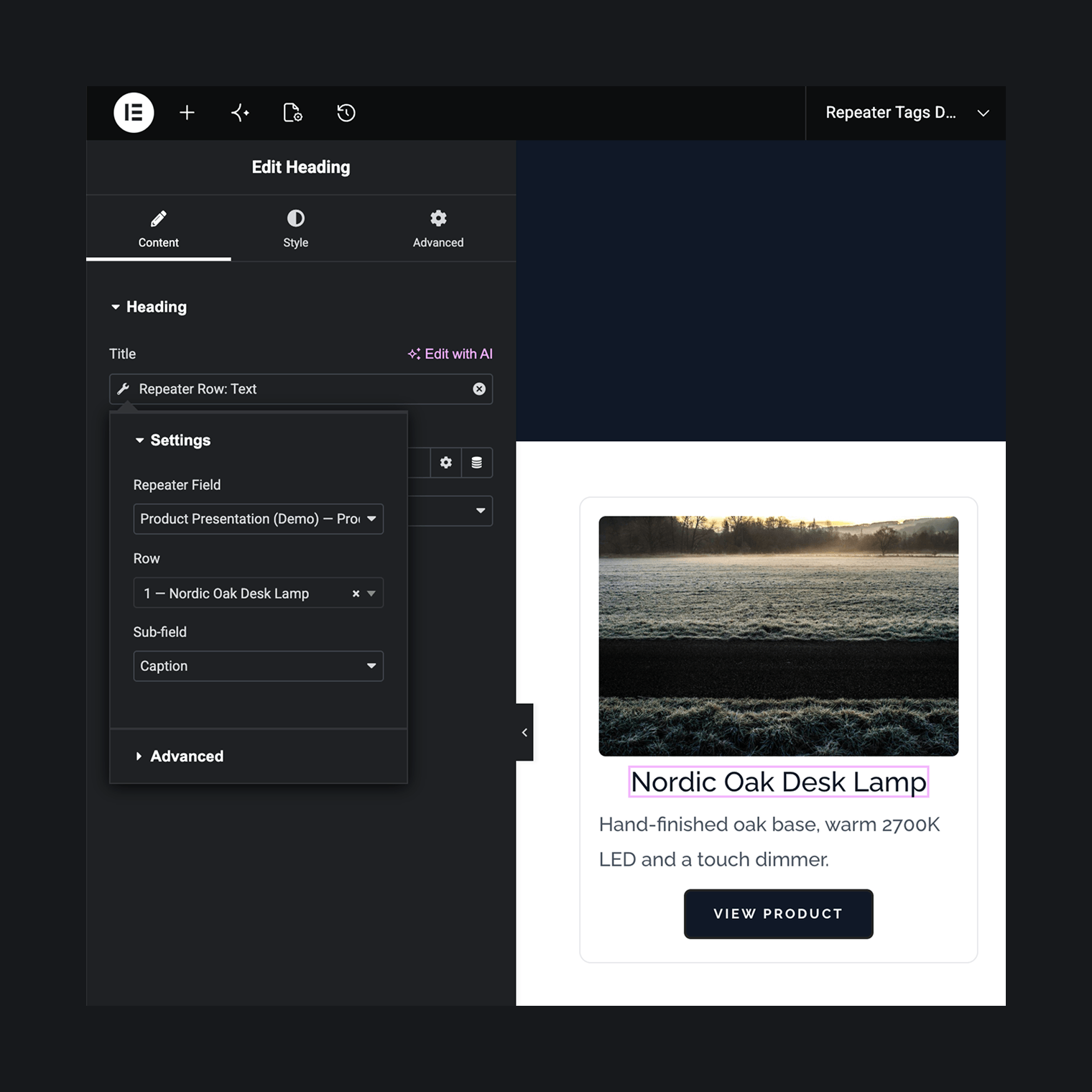
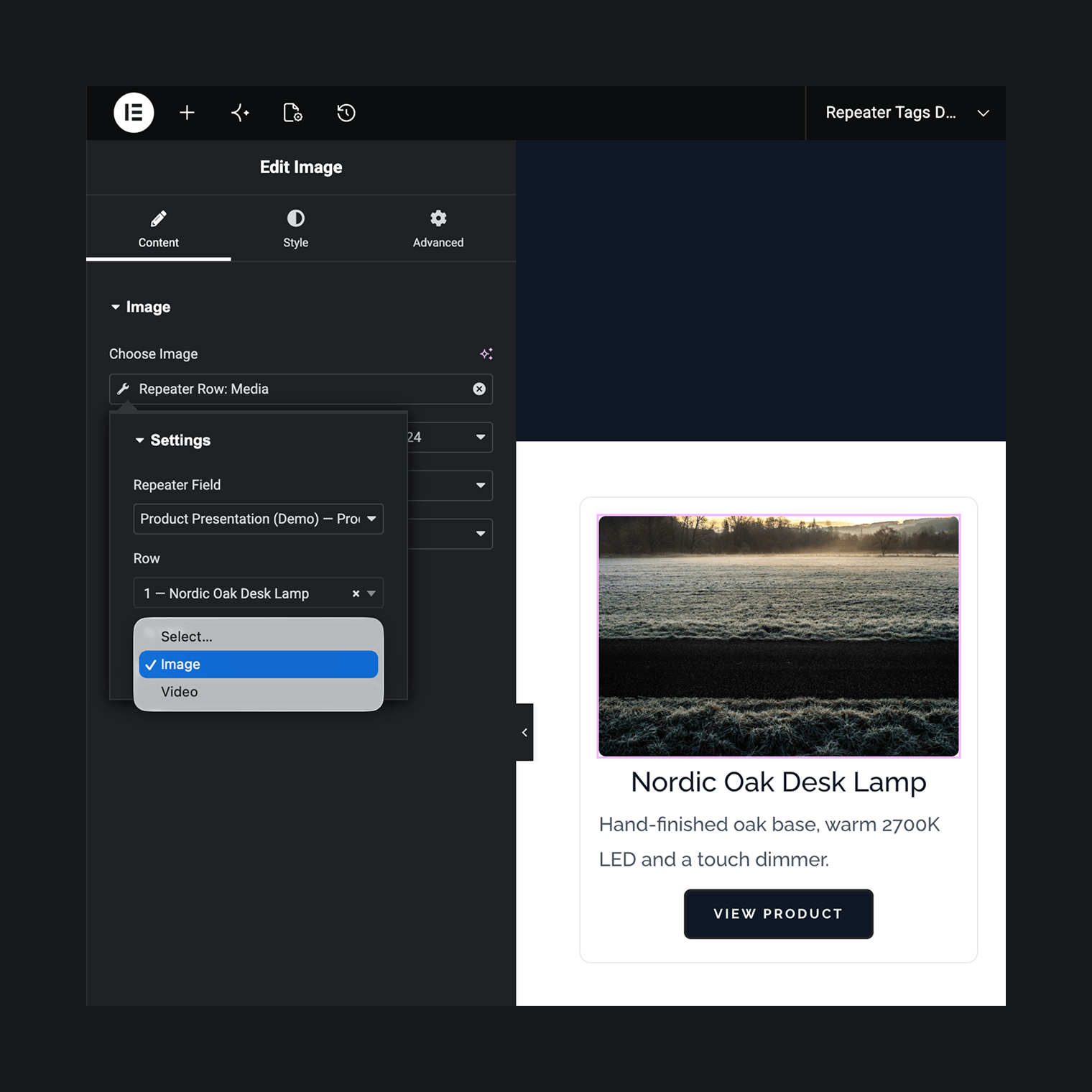
This plugin adds a “Repeater Tags” group to the dynamic tag picker. Every tag works the same way: pick the repeater, pick the row (any index, or “Last row”), pick the sub-field. The value lands in whatever control you attached the tag to. No widgets to place, no templates to maintain.
Things people build with it:
- The first row’s headline in a heading widget
- The second image of a repeater as a section background
- A gallery sub-field feeding a gallery widget
- An offer card where the price counter, the accent color and the “sale ends” countdown all come from one row
- A product card whose colour variants come from a repeater nested inside the product’s row
- A “latest update” badge bound to the last row, which keeps showing the newest entry as editors add rows
- A site-wide announcement bar fed by a repeater on an ACF options page
- One “Product Details” template in Theme Builder where every product renders its own rows (Elementor Pro)
- A Loop Grid where each card is a repeater row — three rows, three cards (Elementor Pro)
The seven tags
Seven tags land in the picker, one per value shape:
- Repeater Row: Text — for text controls anywhere, from headings to the Video widget’s URL and the Google Maps address. Reads text, textarea, email, URL, number, range, date, time and color sub-fields as plain text; choice fields (select, checkbox, radio, button group) as their labels; WYSIWYG as rich text; Google Map as its address
- Repeater Row: Media — for image controls, including section backgrounds. Reads image and file sub-fields
- Repeater Row: URL — for link controls like buttons. Reads URL, Link, page link and file sub-fields — and post object, relationship, taxonomy and user sub-fields as the linked post, term or author URL
- Repeater Row: Gallery — for gallery controls. Reads gallery sub-fields
- Repeater Row: Number — for numeric controls like the Counter and Progress Bar. Reads number and range sub-fields
- Repeater Row: Color — for every color control in the Style tabs. Reads color picker sub-fields
- Repeater Row: Date — for date controls like the Countdown (Elementor Pro). Reads date-time picker sub-fields and outputs a machine-readable date
Each tag’s sub-field dropdown offers only fields it can actually render — no pick-it-and-nothing-happens dead ends. Values follow the return format configured in ACF, the Date tag’s machine format being the one deliberate exception.
Works with free Elementor
The plugin has no Elementor Pro dependency. Free Elementor ships no dynamic tags of its own, so on a free Elementor + ACF site these are the only dynamic tags in the picker. With Secure Custom Fields as the repeater provider, the entire stack is free.
Repeaters on options pages, terms and users
Repeaters attached to an ACF options page are available site-wide and marked “(Options)” in the picker. On taxonomy and author archive templates, tags read the repeater from the current term or user.
Extras with Elementor Pro
Pro isn’t required, but if it’s active:
- Tags resolve per post inside Theme Builder single templates and Loop items, so one template shows each post’s own rows
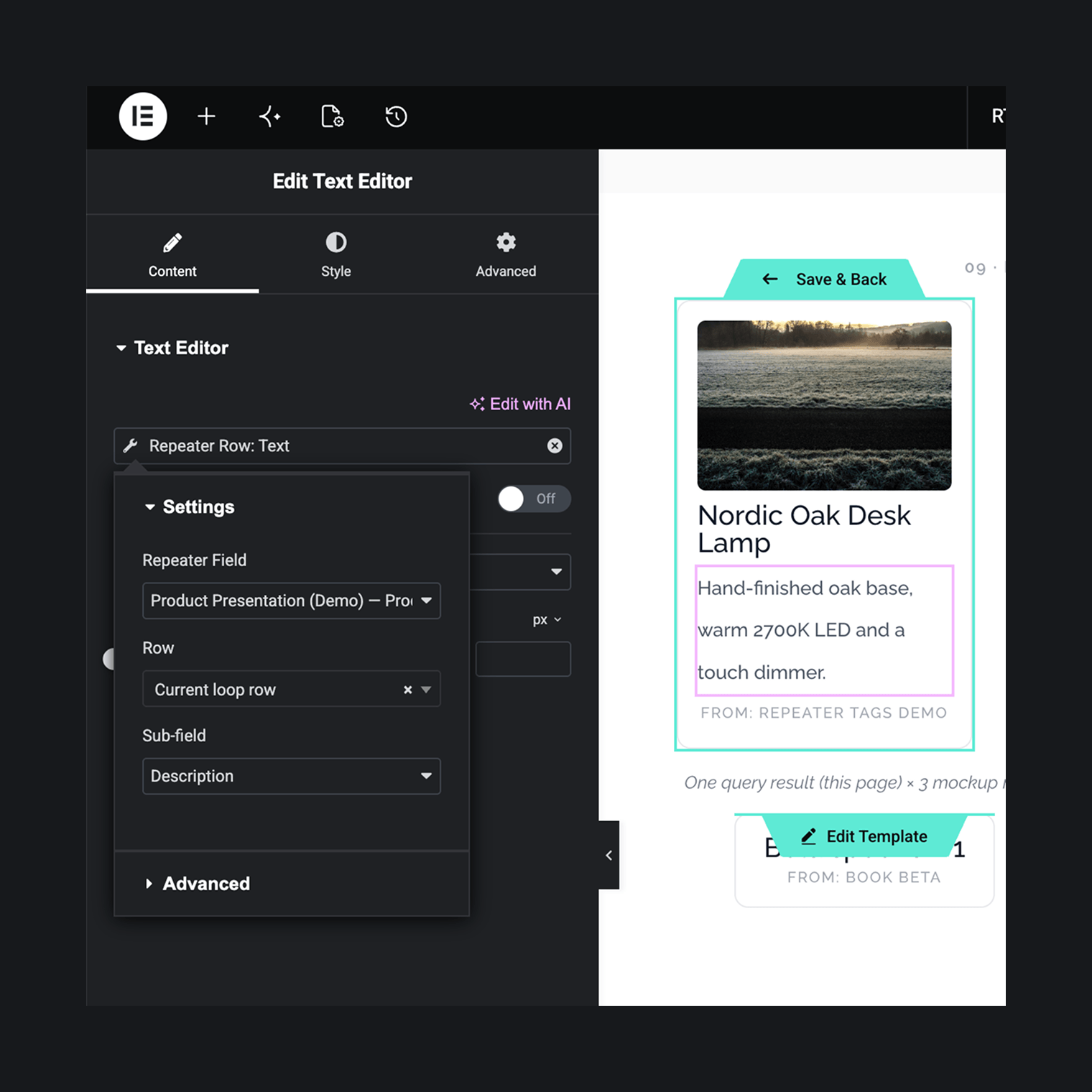
- “Repeat by ACF Repeater” on the Loop Grid and Loop Carousel renders one card per repeater row — design the card once, bind its tags to “Current loop row”, and three rows become three cards
- A “Repeater row count” display condition shows or hides a section depending on how many rows a repeater holds
Installation
Chances are Elementor and ACF Pro (or Secure Custom Fields) already run on your site, with a repeater or two wired up. From there:
- Install and activate the plugin. There is no settings screen — the tags just appear.
- In Elementor, click the dynamic tag icon on any supported control: text, image, link, gallery, number, color, date.
- Under “Repeater Tags”, pick the repeater, pick the row — the picker labels rows by their content — and pick the sub-field.
Starting from scratch instead? You need Elementor (the free version is enough), a repeater provider — ACF Pro or the free Secure Custom Fields — and a repeater with saved rows. Then the three steps above.
Frequently asked questions
Does it loop a layout for every row?
Yes, with Elementor Pro: enable “Repeat by ACF Repeater” on a Loop Grid or Loop Carousel and bind the loop template’s tags to “Current loop row” — one card per row, across every queried post. Pagination counts posts, not cards, so a page can show more cards than the “posts per page” number. While editing the loop template itself, the card previews the first row of the template’s “Preview Dynamic Content as” post — point it at a post that has rows to see real values instead of placeholders. On free Elementor (which has no loop widgets) each tag reads one addressed row: any index, or “Last row”.
Do I need Elementor Pro?
No. Everything runs on free Elementor 3.5 or newer. With Pro on top you get Theme Builder templates, repeat mode on the Loop Grid and Loop Carousel, and the row count display condition.
Do I need ACF Pro?
You need a plugin that provides the repeater field type: ACF Pro, or Secure Custom Fields — the free fork on WordPress.org that includes repeaters and options pages. Both work identically here. With free ACF (no repeaters) the picker has nothing to list.
Why does the row picker say “No rows found on this post”?
Rows are read from the current context: the post you’re editing, or whatever “Preview Dynamic Content as” points to in a Theme Builder template — a post, or the term of a taxonomy archive. If that target has no saved rows there’s nothing to pick, and on the frontend the tag renders empty where rows are missing. Add rows to the previewed target or switch the preview to one that has them.
What happens when rows are reordered in the WordPress admin?
Addressing is positional. A tag pointing at row 2 shows whatever currently sits in row 2, not what was there when you picked it. “Last row” always follows the final row. ACF rows have no stable IDs, so pinning a row by its content isn’t possible.
Does it read nested fields — groups, repeaters inside repeaters, flexible content?
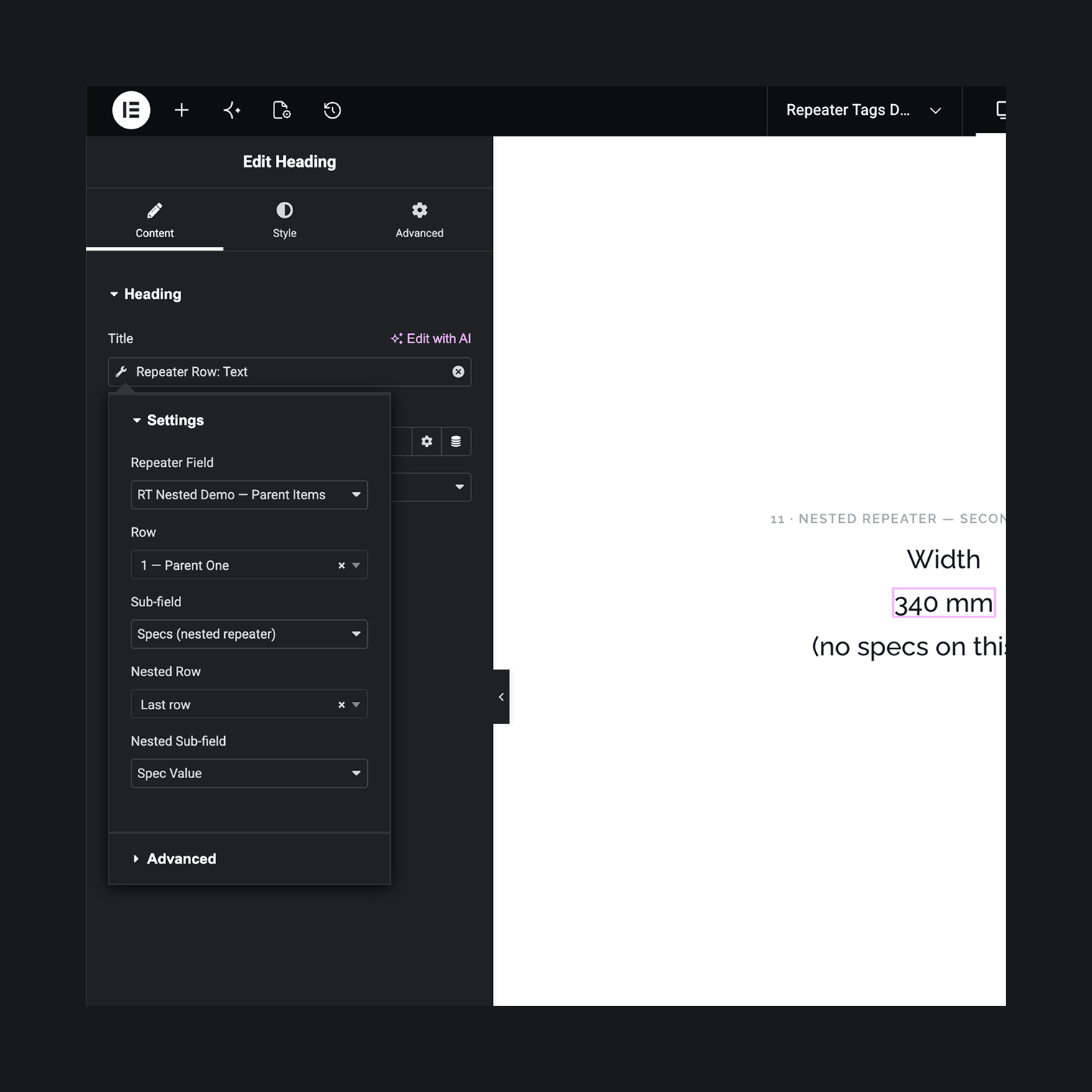
Yes, one level deep. Group sub-fields appear in the sub-field dropdown as “Group → Field” paths. A repeater inside a repeater gets a second row picker: pick the parent row, then the nested row — any index, or “Last row”. Flexible content fields work like repeaters whose row picker labels each row with its layout; if a row’s layout doesn’t include the chosen field, the tag renders empty for that row instead of guessing. It also works in reverse: a repeater or flexible content field sitting inside a top-level group shows up in the repeater picker as its own entry. Deeper nesting isn’t supported.
Which sub-field types are not supported?
oEmbed (store the URL in a URL sub-field instead), true/false, password, icon picker, and clone fields. Structures nested deeper than one level are out too.
Does it work on archive templates?
Taxonomy term and author archives work; the tag reads the repeater from the queried term or user. A custom post type archive has no single post to read from, so tags there fall back to the first post of the archive’s main query. The editor previews them against the newest post of that type — the same post on a date-sorted archive, a different one under a custom sort order or on later pages.
Changelog
1.0.1
- Confirmed compatibility with WordPress 7.1.
1.0.0
- Initial release: seven dynamic tags (text, image, URL, gallery, number, color, date), row picker with “Last row” mode, nested fields one level deep (groups as paths, repeater-in-repeater with a second row picker, flexible content), options page, term and user contexts, Theme Builder support. With Elementor Pro: repeat mode for Loop Grid/Carousel (one card per row) and the row count display condition.
Screenshots
For developers
Is this your plugin? Show off the numbers.
Add a live badge to your site, docs or GitHub README. It updates on its own — no account needed.
Best Arts Repeater Tags for Elemen… alternatives
All acf plugins →





FAQ
Arts Repeater Tags for Elementor an…: quick answers
Straight answers, pulled from live WordPress.org data.
Live data from WordPress.org · checked Oct 16, 2026
Is Arts Repeater Tags for Elemento… free?
Yes. Arts Repeater Tags for Elemento… is free to download and use from the official WordPress.org plugin directory.
Is Arts Repeater Tags for Elemento… safe to use in 2026?
Arts Repeater Tags for Elemento… works, but test it on a staging site before relying on it in 2026. Was last updated 2 months ago, and scores 60/100 on our health check.
How many websites use Arts Repeater Tags for Elemento…?
Arts Repeater Tags for Elemento… is active on <10 WordPress websites and has been downloaded 301 times since it launched in July 2026. It was downloaded 74 times in the last 30 days.
Does Arts Repeater Tags for Elemento… work with WordPress 7.1?
Yes. The developer has tested Arts Repeater Tags for Elemento… up to WordPress 7.1.3, the latest release. It requires WordPress 6.0 or newer.
What PHP version does Arts Repeater Tags for Elemento… need?
Arts Repeater Tags for Elemento… requires PHP 8.0 or higher. Most hosts run PHP 8.x today, so it works on any modern WordPress hosting.
When was Arts Repeater Tags for Elemento… last updated?
The latest version, 1.0.1, was released on August 13, 2026 (2 months ago).
Who makes Arts Repeater Tags for Elemento…?
Arts Repeater Tags for Elemento… is developed and maintained by Artem Semkin.
What are the best alternatives to Arts Repeater Tags for Elemento…?
The most popular alternatives to Arts Repeater Tags for Elemento… are Advanced Custom Fields (ACF… (2M+ installs), ACF Content Analysis for Yo… (100K+ installs) and Advanced Custom Fields: Ext… (100K+ installs).
Powered by PageForge
Want thousands of pages that rank like these? Build them in an afternoon.
This directory runs on the same engine as PageForge. Turn any spreadsheet, CSV or API into thousands of fast, SEO-ready WordPress pages — with schema, internal links and AI-written copy baked in.
- CSV, Google Sheets & API data sources
- AI content, schema & internal links per page
- Works with Elementor, Gutenberg, Yoast & Rank Math
- Free on WordPress.org — no credit card


