



RefreshRank – Content Decay Detection & AI Refresh
Find the posts losing search traffic with your Search Console data, then refresh them with AI - you review every change as a diff first.

Use with caution
RefreshRank works, but test it on a staging site before relying on it in 2026. Was last updated 3 months ago, and scores 55/100 on our health check.
- Small user base (<10 active installs)
- Very few reviews so far
How does it stack up?
Side-by-side on installs, updates, ratings & support



Daily downloads
Download spikes usually follow a new release — each site that auto-updates counts as a download.
Rankings
Where RefreshRank stands todayWordPress.org search rankings
Live position in the plugin search, top 100| Keyword | Position |
|---|---|
| AI | >100 |
| content decay | #8 |
| content refresh | >100 |
| Search Console | >100 |
| seo | >100 |
About RefreshRank
From the official readme · v0.1.3Description
Most blogs lose traffic the same way: not from a penalty, but from slow decay. Posts that ranked well in their first year drift down as competitors publish fresher content. RefreshRank finds those posts before the traffic is gone and helps you bring them back.
How it works
- Click “Start free” – no signup form, no email required.
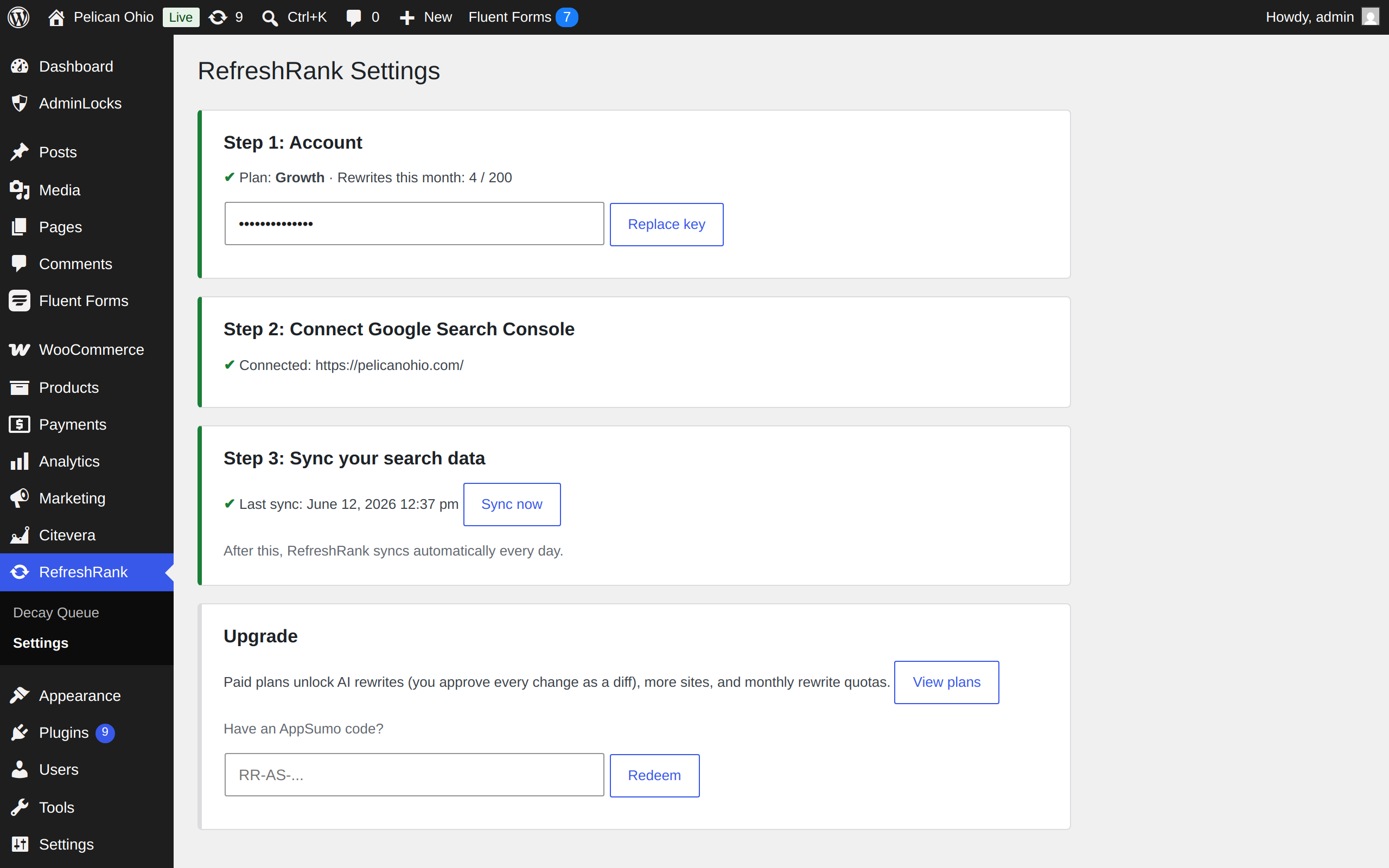
- Connect Google Search Console (one click, standard Google consent screen).
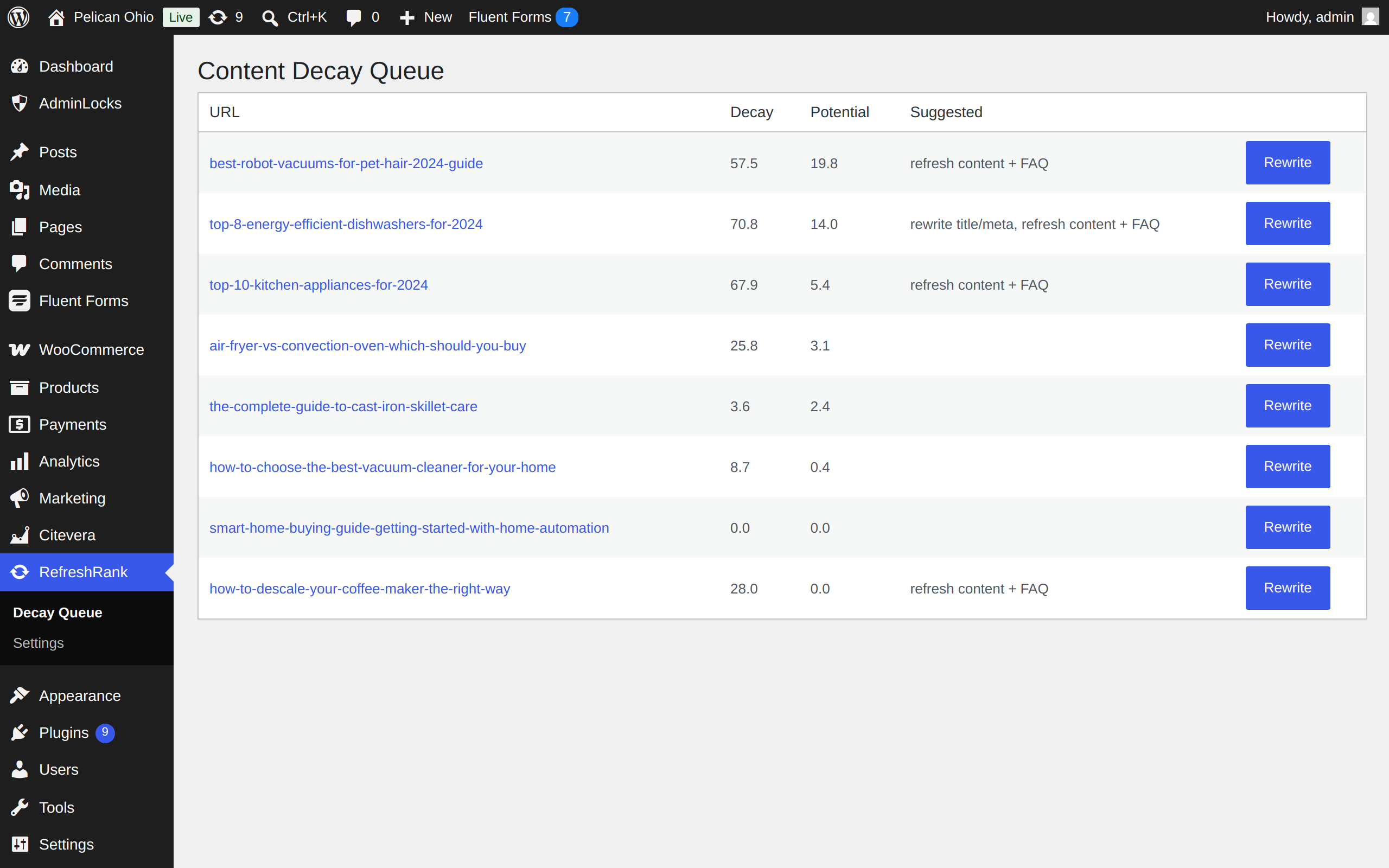
- RefreshRank analyzes 16 months of your search data and ranks every post by decay: how much traffic it is losing, and how much it could win back.
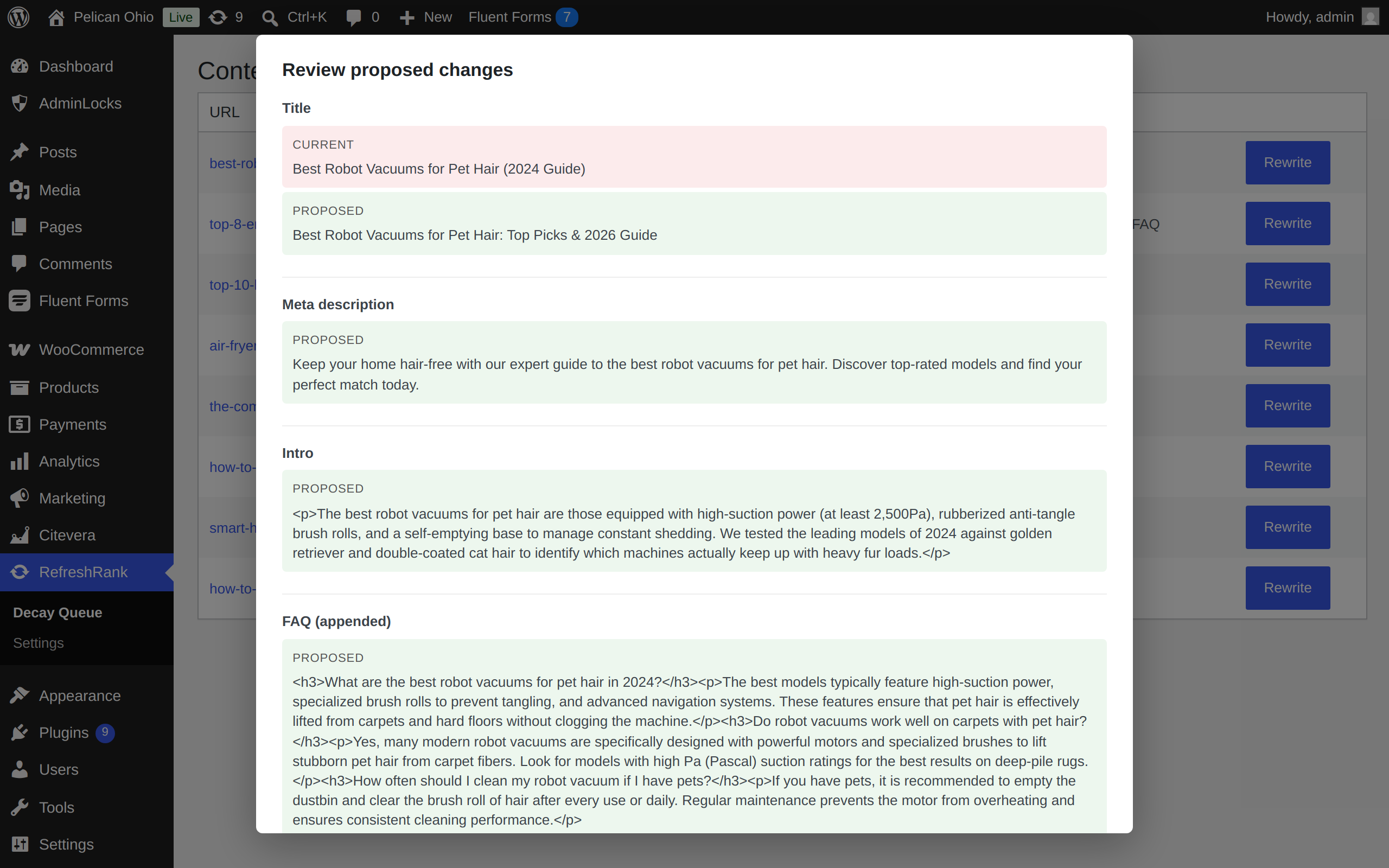
- (Paid plans) Click Rewrite on a decaying post. The AI proposes a refreshed title, meta description, answer-first intro, an FAQ section, and date updates. You see every change side by side – current vs proposed – and nothing touches your post until you approve it.
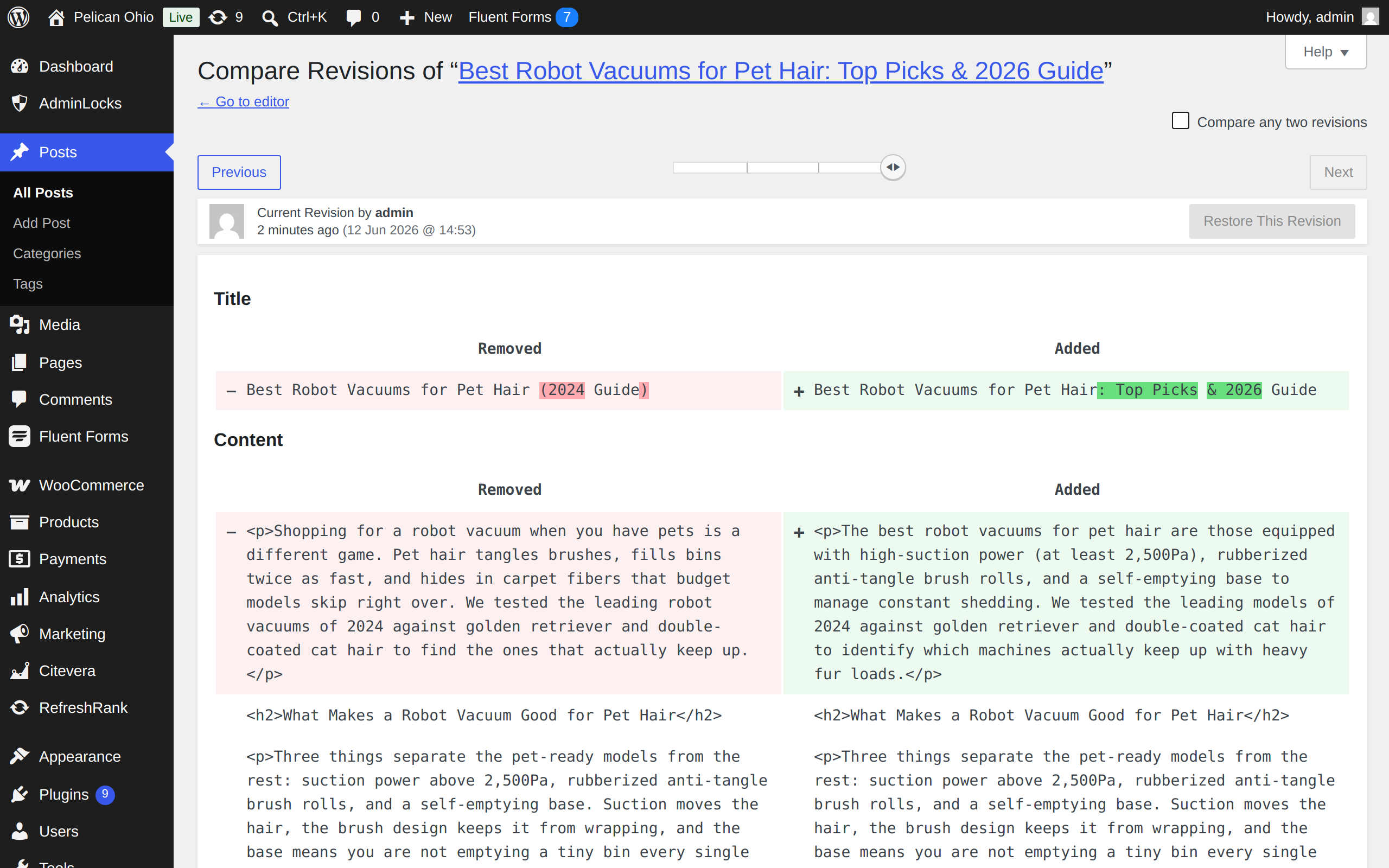
- Approved changes are applied as a normal WordPress revision, so you can always roll back.
Free plan
- Decay detection for one site
- Full ranked decay queue with scores, trends, and suggested actions
- Daily automatic sync with Search Console
Paid plans
- AI rewrites (titles, metas, intros, FAQs, date updates) with human approval on every change
- Monthly rewrite quotas by tier
- Multiple sites on one license
- White-label reports (top tier)
What makes it different
- You approve everything. RefreshRank never auto-publishes. Every AI proposal is a diff you accept or reject, and accepted changes are saved as revisions.
- Self-hosted AI, flat pricing. Rewrites run on RefreshRank’s own inference servers – no per-token API bills, no OpenAI key to bring.
- Built on your real data. Decay scores come from your own Search Console clicks, impressions, and positions – not third-party estimates.
External services
This plugin talks to the RefreshRank API (https://api.refreshrank.com), operated by the plugin author. It is required for the plugin to function – the decay analysis and AI rewriting happen there, not on your server.
What is sent, and when:
- Account signup / license activation: your site URL, when you click “Start free” or activate a license key.
- Search Console connection: handled entirely between Google and the RefreshRank server via OAuth. Google tokens are stored on the RefreshRank server and never on your WordPress site.
- Decay queue: your license key, when the plugin fetches your ranked queue.
- AI rewrite requests (paid plans): the title, meta description, and post content (up to 30KB) of the specific post you ask to rewrite, plus its top search queries. Content is processed on RefreshRank’s own AI servers and is not shared with third-party AI providers.
Terms of service: https://refreshrank.com/terms – Privacy policy: https://refreshrank.com/privacy
Frequently asked questions
Is the free plan really free?
Yes. Decay detection for one site is free forever – no trial, no card. Paid plans add AI rewrites, more sites, and white-label reports.
Will the AI change my posts without asking?
No, and it can’t. Every proposed change is shown to you as a current-vs-proposed diff, and only applied after you click Approve. Applied changes are saved as standard WordPress revisions, so you can roll any of them back from the post editor.
Do I need an OpenAI or other AI API key?
No. Rewrites run on RefreshRank’s own servers. Pricing is flat per plan – there are no per-token charges and no keys to manage.
What data do you collect from Search Console?
Per-page clicks, impressions, click-through rate, and average position, in 28-day windows over the last 16 months. That is what powers the decay score. The connection is read-only.
Why don’t I see any decaying posts?
Three common reasons: Search Console is not connected yet (Step 2 in Settings), the first sync has not run yet (Step 3), or your content is genuinely holding its rankings – in which case, nothing to fix.
Does it work with my SEO plugin?
Yes. Meta description updates are written to Yoast SEO and Rank Math fields when those plugins are active, and always to RefreshRank’s own field as a fallback.
Changelog
Clearer Search Console connection status (no more silent "stuck on connect"), a direct connect button on the queue, and an upgrade link on the paywall.
0.1.3
- Fix: connecting Search Console for a site that is not yet a verified property no longer leaves you silently stuck. RefreshRank now tells you the site was not found in your Search Console and how to fix it, instead of showing a “connect” prompt that never changes.
- Improvement: the “Connect Search Console” button on the decay queue now opens Google directly instead of routing through the Settings page.
- Improvement: when a rewrite is blocked on the free plan, the notice now includes a “View plans” link.
0.1.2
- Security: the backend API URL is now fixed to a constant (overridable only in wp-config.php) instead of a stored option, so it cannot be redirected by other code writing to the database.
- Reliability: on sites where post revisions are disabled, the pre-rewrite version of a post is now saved to a recovery slot before a rewrite is applied, so the original is never lost (previously rollback relied on revisions being enabled).
0.1.1
- Hardening for the WordPress.org review: validate and sanitize every field decoded from the rewrite payload before it is applied to a post (date find/replace values are now run through sanitize_text_field()).
- Renamed all internal functions, classes, options, constants, AJAX actions, transients, and nonces to the distinct “refrank” prefix to avoid conflicts with other plugins.
0.1.0
- Initial release: decay detection via Google Search Console, ranked decay queue, AI rewrites (title, meta, intro, FAQ, date updates) with diff approval, revision-safe apply, free plan with one-click signup, AppSumo code redemption.
Screenshots
For developers
Is this your plugin? Show off the numbers.
Add a live badge to your site, docs or GitHub README. It updates on its own — no account needed.
Best RefreshRank alternatives
All AI plugins →





FAQ
RefreshRank: quick answers
Straight answers, pulled from live WordPress.org data.
Live data from WordPress.org · checked Oct 11, 2026
Is RefreshRank free?
Yes. RefreshRank is free to download and use from the official WordPress.org plugin directory.
Is RefreshRank safe to use in 2026?
RefreshRank works, but test it on a staging site before relying on it in 2026. Was last updated 3 months ago, and scores 55/100 on our health check.
How many websites use RefreshRank?
RefreshRank is active on <10 WordPress websites and has been downloaded 178 times since it launched in July 2026. It was downloaded 55 times in the last 30 days.
Does RefreshRank work with WordPress 7.1?
RefreshRank is officially tested up to WordPress 7.0.7, while the latest release is 7.1.3. It may still work, but try it on a staging site first.
What PHP version does RefreshRank need?
RefreshRank requires PHP 8.0 or higher. Most hosts run PHP 8.x today, so it works on any modern WordPress hosting.
When was RefreshRank last updated?
The latest version, 0.1.3, was released on July 23, 2026 (3 months ago).
Who makes RefreshRank?
RefreshRank is developed and maintained by sheetlink.
What are the best alternatives to RefreshRank?
The most popular alternatives to RefreshRank are Elementor Website Builder (10M+ installs), All in One SEO (2M+ installs) and AI Agent by SiteGround (1M+ installs).
Powered by PageForge
Want thousands of pages that rank like these? Build them in an afternoon.
This directory runs on the same engine as PageForge. Turn any spreadsheet, CSV or API into thousands of fast, SEO-ready WordPress pages — with schema, internal links and AI-written copy baked in.
- CSV, Google Sheets & API data sources
- AI content, schema & internal links per page
- Works with Elementor, Gutenberg, Yoast & Rank Math
- Free on WordPress.org — no credit card


