


QuickEmailVerification
The QuickEmailVerification email verification plugin to avoid fake, bad and nonexistent emails.

Safe pick
Yes — QuickEmailVerification is a safe, well-maintained plugin to use in 2026. It runs on 200+ sites, is rated 5/5 and was last updated 4 days ago, and scores 81/100 on our health check.
- Actively developed — last update 4 days ago
- Tested with the latest WordPress (7.1)
- Momentum — downloads up 365.5% vs the previous 30 days
- Small user base (200+ active installs)
How does it stack up?
Side-by-side on installs, updates, ratings & support



Daily downloads
Download spikes usually follow a new release — each site that auto-updates counts as a download.
Rankings
Where QuickEmailVerification stands todayWordPress.org search rankings
Live position in the plugin search, top 100| Keyword | Position |
|---|---|
| disposable email | #23 |
| email checker | #32 |
| email validation | #70 |
| email verification | #61 |
| form validation | >100 |
Version adoption
Share of active sites per release.
Rating breakdown
★★★★★★★★★★ 5 from 5 reviews
About QuickEmailVerification
From the official readme · v1.14.0Description
An email verification plugin by QuickEmailVerification enables you to validate and verify the email address existence in real time, before you actually send them an email. Its unique email verification system is composed of multiple different validations starting from syntax checking to the end users’ mailbox existence checking. It not only detects invalid email addresses but also detects many other types of poor email addresses which could negatively impact the email deliverability and harm your sender reputation.
This plugin need a QuickEmailVerification API key to verify. You can get it from API settings page of QuickEmailVerification service.
Key features
- Email address syntax checking
- Domain/MX records checking
- Role address detection
- Disposable email address (DEA) detection
- Free email service detection
- Typo detection and suggestion
- Accept all email checking
- Mailbox existence checking
Supported form Plugins
- Contact Form 7
- Formidable forms
- Ninja forms
- WooCommerce
- WPForms
- Profile Builder
- Contact Form by BestWebSoft
- Ultimate Member registration form
- Fluent Forms
- WPEverest forms
- MailPoet
- Theme My Login
- WP-Members
- Visual Form Builder
- PlanSo forms
- Buddypress registration form
- Any other form which uses the is_email() function
This plugin works either with “is_email()” function or with any other supported form plugins. So if any supported form plugin is enabled, “is_email()” hook will automatically be disabled.
To know more about email verification results, please have a look at the QuickEmailVerification knowledge base.
Installation
- Click on the Plugins from left menu
- Click on the Add New button given on the top
- Search for “QuickEmailVerification” in the plugin search bar and click Install Now once the QuickEmailVerification appears in the search result
- Now the plugin is installed. Click on the Activate link to activate it.
- Get your QuickEmailVerification API key to start with the plugin
- Click on the QuickEmailVerification option from the left side Settings menu
- On the settings page, paste the API key. You can also change other settings like emails to exclude, customized error message, form plugins to hook with QuickEmailVerification plugin etc.
Frequently asked questions
How does it work?
Once the QuickEmailVerification plugin is installed and activated, it will automatically detect and verify email fields present on the form when the form is submitted. If the email verification results are not as per your allowed result values, it will show an error message to the person entering the email address. When the email provided by the user is acceptable, form submission will proceed normally.
What happens when free credits are exceeded?
When your account is running out of credits, the QuickEmailVerification plugin will skip the verification. To avoid any disruption to the service, we recommend to add persistent credits to your QuickEmailVerification account which does not have any expiry attached and can be used any time. We also recommend, you subscribe to low credit email alerts for your QuickEmailVerification account here.
Which forms does this plugin supports?
Currently, the QuickEmailVerification plugin supports following form plugins. Contact Form 7 Formidable forms Ninja forms WooCommerce WPForms Profile Builder Contact Form by BestWebSoft Ultimate Member registration form Fluent Forms WPEverest Forms Theme My Login WP-Members Visual Form Builder PlanSo forms Buddypress registration form Apart from this, the QuickEmailVerification plugin also extends the basic syntax validation done by is_email() function so it supports many more form plugin which are using is_email() function.
Does it verify accept all emails as well?
Yes, the QuickEmailVerification plugin is able to detect ‘accept_all’ emails with highest accuracy.
Do I need an API key to use this plugin?
Yes, you need an API key to use the QuickEmailVerification plugin. Creating an API key is very easy. Just sign up to the QuickEmailVerification for free and get your API key.
How do I change the default behavior of the plugin?
You can customize the behavior of the QuickEmailVerification plugin by changing its settings. From the provided list, select the form plugin which you want to hook with QuickEmailVerification plugin. By default, plugin will not accept emails which has been marked invalid or disposable. But you can change this default setting by changing the value of “Results to Exclude” checkboxes. During plugin setup, sometimes you may want to generate the log of QuickEmailVerification API results. With the plugin settings, there is a radio button to ON or OFF the API result “Debug Log”. We recommend to…
Unable to find your answer here?
Send us an email at support@quickemailverification.com if you have any query or need any assistance. We will be happy to help!
Changelog
1.14.0
- WooCommerce block/classic checkout compatibility, PHP 8 billing email validation, and safer order/request data handling.
- Update version to 1.14.0
1.13.0
- Added PHP 8.0+ compatibility support
1.12.0
- Update versin to 1.12.0
1.11.0
- Enhance compatibility with the BuddyPress registration form plugin version
1.10.0
- Update versin to 1.10.0
1.9.0
- Update versin to 1.9.0
Screenshots

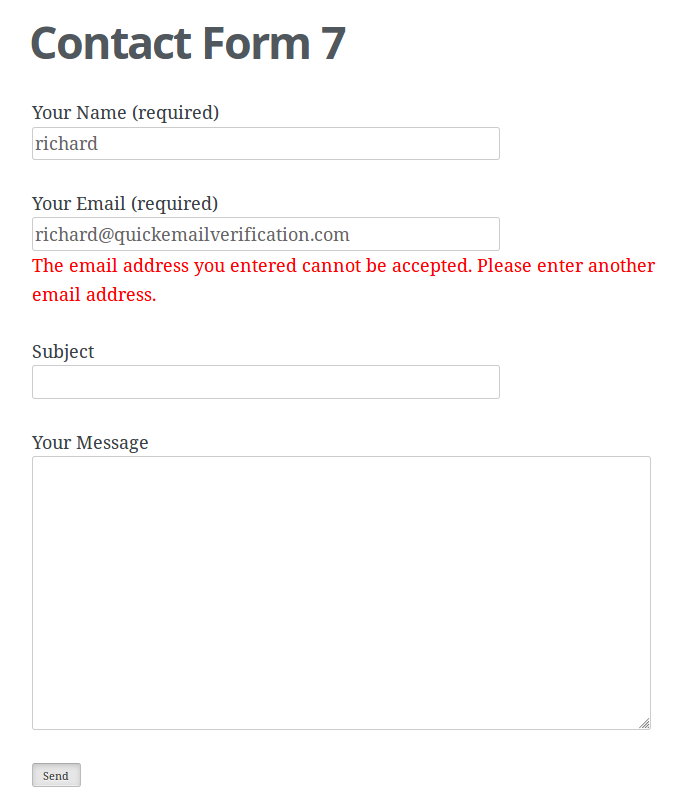


For developers
Is this your plugin? Show off the numbers.
Add a live badge to your site, docs or GitHub README. It updates on its own — no account needed.
Best QuickEmailVerification alternatives
All disposable email plugins →





FAQ
QuickEmailVerification: quick answers
Straight answers, pulled from live WordPress.org data.
Live data from WordPress.org · checked Oct 5, 2026
Is QuickEmailVerification free?
Yes. QuickEmailVerification is free to download and use from the official WordPress.org plugin directory.
Is QuickEmailVerification safe to use in 2026?
Yes — QuickEmailVerification is a safe, well-maintained plugin to use in 2026. It runs on 200+ sites, is rated 5/5 and was last updated 4 days ago, and scores 81/100 on our health check.
How many websites use QuickEmailVerification?
QuickEmailVerification is active on 200+ WordPress websites and has been downloaded 8,272 times since it launched in December 2019. It was downloaded 540 times in the last 30 days.
Does QuickEmailVerification work with WordPress 7.1?
Yes. The developer has tested QuickEmailVerification up to WordPress 7.1.2, the latest release. It requires WordPress 4.6 or newer.
When was QuickEmailVerification last updated?
The latest version, 1.14.0, was released on October 1, 2026 (4 days ago).
Who makes QuickEmailVerification?
QuickEmailVerification is developed and maintained by quickemailverification.
What are the best alternatives to QuickEmailVerification?
The most popular alternatives to QuickEmailVerification are Block Temporary Email (400+ installs), DeBounce Email Validator (300+ installs) and Advanced Email Filter for E… (100+ installs).
Powered by PageForge
Want thousands of pages that rank like these? Build them in an afternoon.
This directory runs on the same engine as PageForge. Turn any spreadsheet, CSV or API into thousands of fast, SEO-ready WordPress pages — with schema, internal links and AI-written copy baked in.
- CSV, Google Sheets & API data sources
- AI content, schema & internal links per page
- Works with Elementor, Gutenberg, Yoast & Rank Math
- Free on WordPress.org — no credit card


