


Block Temporary Email
This plugin stops users from giving you disposable or fake email addresses when signing up. This helps reduce spam and fraud.

Use with caution
Block Temporary Email works, but test it on a staging site before relying on it in 2026. It runs on 400+ sites, is rated 4.5/5 and was last updated 1 year ago, and scores 46/100 on our health check.
- Small user base (400+ active installs)
- No update in over a year
- Only tested up to WordPress 6.8 (latest is 7.1)
How does it stack up?
Side-by-side on installs, updates, ratings & supportDaily downloads
Download spikes usually follow a new release — each site that auto-updates counts as a download.
Rankings
Where Block Temporary Email stands todayWordPress.org search rankings
Live position in the plugin search, top 100| Keyword | Position |
|---|---|
| check email | >100 |
| disposable email | #18 |
| fake email | #17 |
| temporary email | #7 |
| validate email | #30 |
Version adoption
Share of active sites per release.
Rating breakdown
★★★★★★★★★★ 4.5 from 8 reviews
About Block Temporary Email
From the official readme · v1.7.5Description
This plugin will verify every email address submitted by users.
It’ll automatically detect and block disposable, temporary email addresses.
It’ll give a nice warning message when users are signing up, logging in,
or changing email to a temporary email.
The plugin checks the domain name using a service named
IsTempMail.
If a domain name is blocked, it will be stored into a local blacklist.
You can also manage your own local whitelist and blacklist to allow or
disallow certain domains.
The plugin integrates with the WordPress built-in function is_email().
It works seamlessly with other plugins including WooCommerce,
Contact Form 7, Gravity Form, Jetpack/Grunion contact forms, Kadence Blocks Forms as well as
other formbuilders and ecommerce plugins and WordPress’ own registration form.
Installation
Sign up and get your API token at IsTempMail.
Upload the plugin to your blog, then click Activate it under Plugins > Installed Plugins.
Then enter the API token at your WordPress Dashboard > Settings > IsTempMail.
Frequently asked questions
Do you send my user email addresses to other servers?
No, we don’t. The plugin will only send the domain part of email address to validate.
Is the plugin free?
Yes, the plugin is free to use. IsTempMail also offers a free plan that will be sufficient for most blogs. You will be notified when you use more credits than included in the free plan.
What happens if the service is down?
A downtime is very unlikely, the IsTempMail service has outstanding availability of 99.99% over the last 6 months. But the plugin was developed to be stable in the unlikely event of a temporary downtime. It will continue to work, validating emails using your local blacklist and whitelist. Your users will be able to sign up, log in and comment on your blog just fine.
What happens to existing users with fake email address
Existing users registered with fake email addresses won’t be able to log in to your blog when the plugin is activated. Be prepared for users contacting you regarding this topic. Usually people who used a disposable email address won’t come back to your website though.
Changelog
1.7.5
Add filter to allow customizing message when a disposable email was found
Tested with WordPress 6.8.2
1.7.4
Tested with WordPress 6.6
1.7.3
Tested with WordPress 6.4.3
1.7.2
Improve support for forms and advanced forms built with Kadence Blocks
1.7.1
Add support for advanced forms built with Kadence Blocks
1.7
Add support for forms built with Kadence Blocks
Tested with WordPress 6.4.2
Screenshots
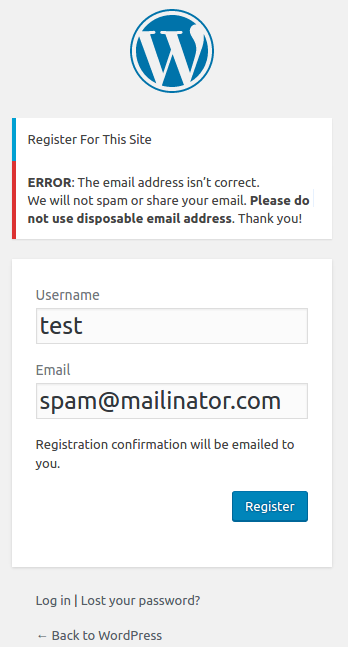


For developers
Is this your plugin? Show off the numbers.
Add a live badge to your site, docs or GitHub README. It updates on its own — no account needed.
Best Block Temporary Email alternatives
All check email plugins →| Rank | Plugin | Active installs |
|---|---|---|
| 2 |
 WP Valid Email
 is a WordPress plugin which offers suggestions to users who mis-type their…
WP Valid Email
WP Valid Email is a WordPress plugin which offers suggestions to users who mis-type their…
|
10+ |
FAQ
Block Temporary Email: quick answers
Straight answers, pulled from live WordPress.org data.
Live data from WordPress.org · checked Oct 5, 2026
Is Block Temporary Email free?
Yes. Block Temporary Email is free to download and use from the official WordPress.org plugin directory.
Is Block Temporary Email safe to use in 2026?
Block Temporary Email works, but test it on a staging site before relying on it in 2026. It runs on 400+ sites, is rated 4.5/5 and was last updated 1 year ago, and scores 46/100 on our health check.
How many websites use Block Temporary Email?
Block Temporary Email is active on 400+ WordPress websites and has been downloaded 9,306 times since it launched in January 2017. It was downloaded 128 times in the last 30 days.
Does Block Temporary Email work with WordPress 7.1?
Block Temporary Email is officially tested up to WordPress 6.8.10, while the latest release is 7.1.2. It may still work, but try it on a staging site first.
When was Block Temporary Email last updated?
The latest version, 1.7.5, was released on August 12, 2025 (1 year ago).
Who makes Block Temporary Email?
Block Temporary Email is developed and maintained by IsTempMail.
What are the best alternatives to Block Temporary Email?
The most popular alternatives to Block Temporary Email are WP Valid Email (10+ installs).
Powered by PageForge
Want thousands of pages that rank like these? Build them in an afternoon.
This directory runs on the same engine as PageForge. Turn any spreadsheet, CSV or API into thousands of fast, SEO-ready WordPress pages — with schema, internal links and AI-written copy baked in.
- CSV, Google Sheets & API data sources
- AI content, schema & internal links per page
- Works with Elementor, Gutenberg, Yoast & Rank Math
- Free on WordPress.org — no credit card


