


Quick Orders | Easy Product & Order System Management for F-Commerce
Quick Orders is a powerful WordPress plugin designed specifically for F-Commerce and social media-based businesses. It provides a streamlined solution for product management and order processing without the complexity…

Consider an alternative
Quick Orders shows warning signs in 2026 — compare the alternatives below before installing. Is rated 5/5 and was last updated 1 year ago, and scores 37/100 on our health check.
- Small user base (<10 active installs)
- Very few reviews so far
- No update in over a year
- Only tested up to WordPress 6.8 (latest is 7.1)
How does it stack up?
Side-by-side on installs, updates, ratings & support



Daily downloads
Download spikes usually follow a new release — each site that auto-updates counts as a download.
Rankings
Where Quick Orders stands todayWordPress.org search rankings
Live position in the plugin search, top 100| Keyword | Position |
|---|---|
| ecommerce | >100 |
| onepage checkout | #5 |
| order management | >100 |
| product management | >100 |
| quick checkout | >100 |
Rating breakdown
★★★★★★★★★★ 5 from 2 reviews
About Quick Orders
From the official readme · v1.1.0Description
Quick Orders is a powerful WordPress plugin designed specifically for F-Commerce and social media-based businesses. It provides a streamlined solution for product management and order processing without the complexity of WooCommerce. With built-in Elementor widgets and a focus on simplicity, Quick Orders helps you manage your online business efficiently.
🚀 Explore the Plugin Instantly!
No setup needed — test the plugin with dummy content on a fresh WordPress site.
🔧 Launch your personal demo now
It takes just a few seconds to spin up your own test site!
🎧 Order Form Demo
Want to see our Order Form in action?
👉 Click here to view the live demo
Explore a fully functional product page with an instant ordering experience.
Transform Your Social Media Business Today! Experience the simplicity of our clean, professional order forms that convert visitors into customers. Our plugin creates beautiful, mobile-optimized checkout pages with product details, shipping options, and secure payment methods—all without the bloat of traditional e-commerce platforms.
Why Choose Quick Orders?
– Perfect for Facebook/Social Media Commerce
– No WooCommerce Required
– Lightweight and Fast Performance
– Built-in Elementor Integration
– Designed for F-Commerce businesses
Features Available Now:
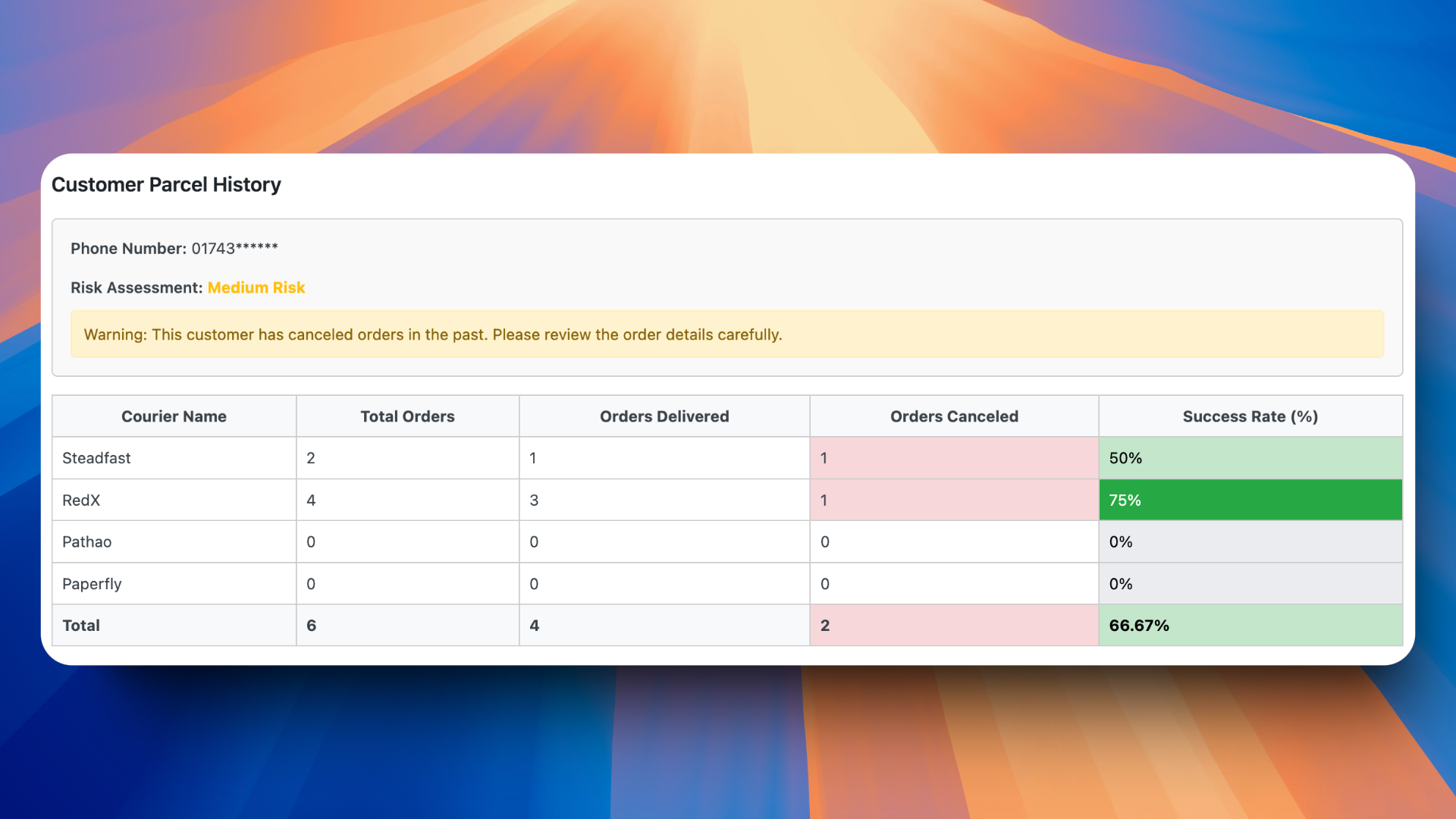
– Customer Parcel History: Track parcel history for Bangladeshi customers.
– Seamless Elementor Integration: Design and customize order forms directly within Elementor.
– Easy Product Management: Effortlessly manage products without using WooCommerce.
– Fast Order Processing: Provides a simplified ordering process for a better user experience.
– Lightweight Setup: Works independently of WooCommerce, ensuring a fast and smooth setup.
– Customizable Layouts: Personalize your order interface to align with your branding.
– User-Friendly Dashboard: Intuitive admin panel for managing products.
– Responsive Design: Optimized for use across desktops, tablets, and mobile devices.
– Secure Transactions: Built with security best practices for safe handling of orders.
– Multi-language Support: Ready for localization
– Performance Optimized: Fast loading and efficient operation
Upcoming Features:
– Exciting new tools and enhancements for better functionality.
– Improved security measures and advanced controls.
– User experience refinements for smoother operation.
– Additional customization and performance improvements.
– Optimizations to support faster and more efficient workflows.
– Order Status Checker (Customers can check their Order Status)
– bKash Payment Gateways (Personal QR Code Not Automation)
– Product Grids Layout Widget for Elementor
Usage
After activating the plugin, manage your products from the admin dashboard and use Elementor widgets to display order forms on the public-facing site.
License
This plugin is licensed under the GPLv2 or later.
Installation
Plugin Installation Method:
- Go to the WordPress dashboard.
- Navigate to Plugins > Add New.
- Type “Quick Orders” in the search box.
- Click on the Install button.
- After installation, activate the plugin.
Installation via Zip File:
- Download the Quick Orders plugin zip file from WordPress.
- Go to your site Dashboard > Plugins > Add New > Upload Plugins.
- Select the
quick-orders.zipfile and proceed to install. - Activate Quick Orders.
Frequently asked questions
Is this plugin compatible with the latest WordPress version?
Yes, Quick Orders is regularly tested and updated to ensure compatibility with the latest WordPress versions, currently tested up to version 6.8.
Do I need WooCommerce for this plugin to work?
No, Quick Orders is completely independent of WooCommerce. It’s designed as a lightweight alternative specifically for F-Commerce businesses.
Can I customize the order forms?
Yes, you can fully customize order forms using Elementor’s drag-and-drop interface. Create unique layouts, add custom fields, and style forms to match your brand.
Is Quick Orders mobile-friendly?
Absolutely! The plugin is built with a mobile-first approach, ensuring perfect functionality on smartphones, tablets, and desktop devices.
How does the parcel tracking feature work?
The parcel tracking system allows customers to track their orders using a unique tracking ID. Admins can update order status and location information in real-time.
Can I use this for my Facebook-based business?
Yes! Quick Orders is specifically designed for F-Commerce businesses, making it perfect for managing orders from Facebook and other social media platforms.
Does the plugin support multiple payment methods?
Currently, we support basic payment tracking. bKash payment gateway integration is coming soon in our next update.
Can I manage multiple products and categories?
Yes, you can manage unlimited products and organize them into categories through our intuitive admin dashboard.
Is technical knowledge required to use this plugin?
No, Quick Orders is designed to be user-friendly. Basic WordPress knowledge is sufficient to get started.
How secure is the plugin?
The plugin follows WordPress security best practices and includes features like input validation, data sanitization, and secure order processing.
Can I export order data?
Yes, you can export order data in various formats for your records or analysis.
Does it support bulk order processing?
Bulk order processing features are planned for upcoming releases to help manage multiple orders efficiently.
Is the plugin GDPR compliant?
Yes, Quick Orders follows GDPR guidelines for handling customer data and provides necessary tools for data management.
Can I use custom domains for tracking pages?
Yes, you can set up custom domains for your tracking pages to maintain brand consistency.
How often is the plugin updated?
We regularly update the plugin with new features, security patches, and compatibility improvements.
Changelog
Initial release of Quick Orders.
1.1
- Improved performance and layout
1.0.2
- Add: Customer Parcel History.
- Payment Gateways.
- Shipping Method.
1.0.1
- Email Issues fix
1.0.0
- Initial release with core features:
- Product management without WooCommerce.
- Elementor-based order forms.
- Lightweight, user-friendly design.
Screenshots



For developers
Is this your plugin? Show off the numbers.
Add a live badge to your site, docs or GitHub README. It updates on its own — no account needed.
Best Quick Orders alternatives
All ecommerce plugins →





FAQ
Quick Orders: quick answers
Straight answers, pulled from live WordPress.org data.
Live data from WordPress.org · checked Sep 30, 2026
Is Quick Orders free?
Yes. Quick Orders is free to download and use from the official WordPress.org plugin directory.
Is Quick Orders safe to use in 2026?
Quick Orders shows warning signs in 2026 — compare the alternatives below before installing. Is rated 5/5 and was last updated 1 year ago, and scores 37/100 on our health check.
How many websites use Quick Orders?
Quick Orders is active on <10 WordPress websites and has been downloaded 1,630 times since it launched in November 2024. It was downloaded 41 times in the last 30 days.
Does Quick Orders work with WordPress 7.1?
Quick Orders is officially tested up to WordPress 6.8.10, while the latest release is 7.1.2. It may still work, but try it on a staging site first.
What PHP version does Quick Orders need?
Quick Orders requires PHP 8.0 or higher. Most hosts run PHP 8.x today, so it works on any modern WordPress hosting.
When was Quick Orders last updated?
The latest version, 1.1.0, was released on May 6, 2025 (1 year ago).
Who makes Quick Orders?
Quick Orders is developed and maintained by Md Abul Bashar.
What are the best alternatives to Quick Orders?
The most popular alternatives to Quick Orders are WooCommerce (7M+ installs), Popup Builder & Popup Maker… (1M+ installs) and WooCommerce PayPal Payments (800K+ installs).
Powered by PageForge
Want thousands of pages that rank like these? Build them in an afternoon.
This directory runs on the same engine as PageForge. Turn any spreadsheet, CSV or API into thousands of fast, SEO-ready WordPress pages — with schema, internal links and AI-written copy baked in.
- CSV, Google Sheets & API data sources
- AI content, schema & internal links per page
- Works with Elementor, Gutenberg, Yoast & Rank Math
- Free on WordPress.org — no credit card


