


Pufferbay
WordPress-native feature feedback, roadmap, voting, comments, changelog, and status notifications.

Use with caution
Pufferbay works, but test it on a staging site before relying on it in 2026. Was last updated 3 months ago, and scores 55/100 on our health check.
- Small user base (<10 active installs)
- Very few reviews so far
How does it stack up?
Side-by-side on installs, updates, ratings & support



Daily downloads
Download spikes usually follow a new release — each site that auto-updates counts as a download.
Rankings
Where Pufferbay stands todayWordPress.org search rankings
Live position in the plugin search, top 100| Keyword | Position |
|---|---|
| changelog | >100 |
| customer feedback | >100 |
| feedback | >100 |
| roadmap | >100 |
| user feedback | >100 |
About Pufferbay
From the official readme · v0.1.1Description
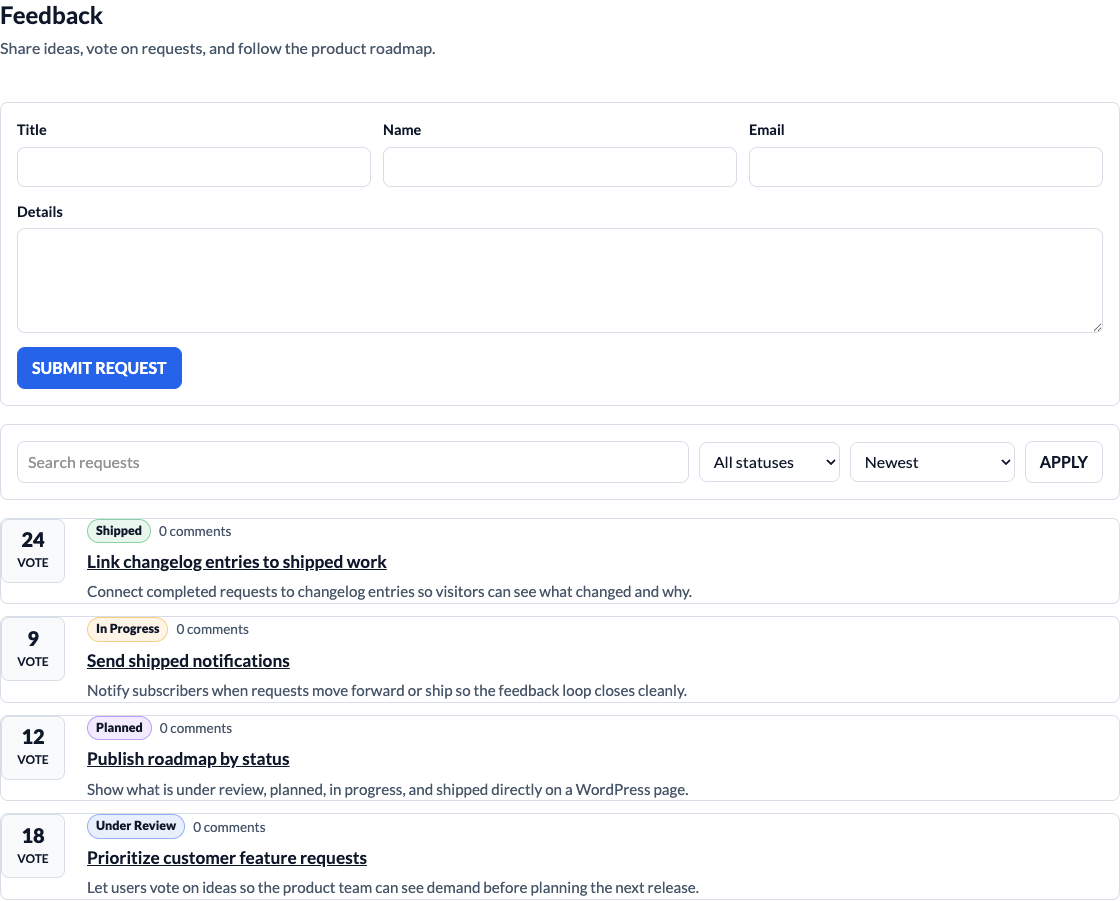
Pufferbay helps WordPress site owners collect product ideas, let users vote and comment, manage roadmap statuses, publish changelog entries, and notify subscribers when requests move forward.
The plugin stores feedback in your WordPress database and integrates with WordPress users, roles, capabilities, REST API, shortcodes, blocks, email, privacy tools, and the admin UI.
Included features
- One seeded default feedback board, with optional additional boards
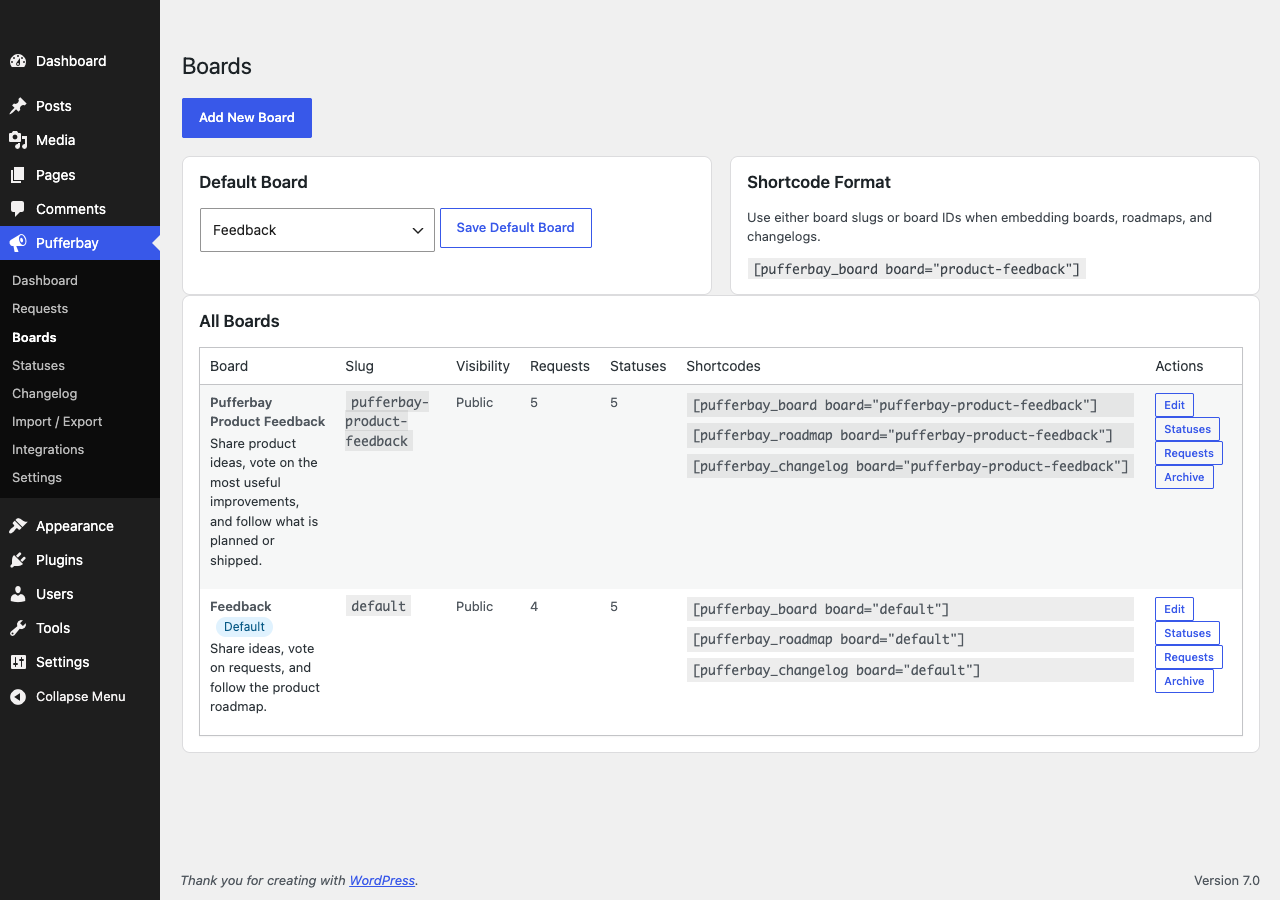
- Board management with default-board selection and archive/restore
- Frontend request submission
- Logged-in and guest voting
- Comments with moderation
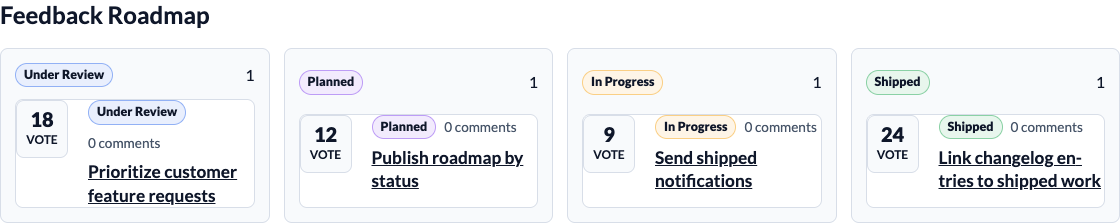
- Default roadmap statuses
- Classic WordPress admin management
- Per-board requests, statuses, roadmap, changelog, and CSV import/export
- Roadmap shortcode and block
- Changelog shortcode and block
- Email notifications for status changes and shipped requests
- CSV request import/export
- WordPress privacy exporter and eraser support
- Outgoing webhook foundation
Use Pufferbay for product feedback portals, plugin and theme roadmaps, customer idea boards, internal request boards, community voting, and public changelogs.
Installation
- Upload the
pufferbayfolder to/wp-content/plugins/. - Activate Pufferbay from the Plugins screen.
- Go to Pufferbay > Boards to review the default board or create another board.
- Add
[pufferbay_board]to a page, or target a board by slug with[pufferbay_board board="product-feedback"]. - Add
[pufferbay_roadmap]and[pufferbay_changelog]to public pages if you want separate roadmap and changelog views. - Manage requests, statuses, comments, changelog entries, imports, exports, and settings from Pufferbay in wp-admin.
Frequently asked questions
Which shortcodes are available?
Use [pufferbay_board], [pufferbay_roadmap], and [pufferbay_changelog]. Each shortcode can target a board by numeric ID or slug, for example [pufferbay_board board="product-feedback"].
Are blocks included?
Yes. Pufferbay includes dynamic blocks for the feedback board, roadmap, and changelog.
Can I create more than one board?
Yes. Pufferbay supports multiple boards, per-board statuses, per-board changelog entries, board-scoped import/export, and a default board setting.
Does Pufferbay use custom tables?
Yes. Requests, votes, comments, statuses, changelog entries, subscribers, events, and integrations are stored in custom tables for performance and cleaner upgrades.
Can guests submit and vote?
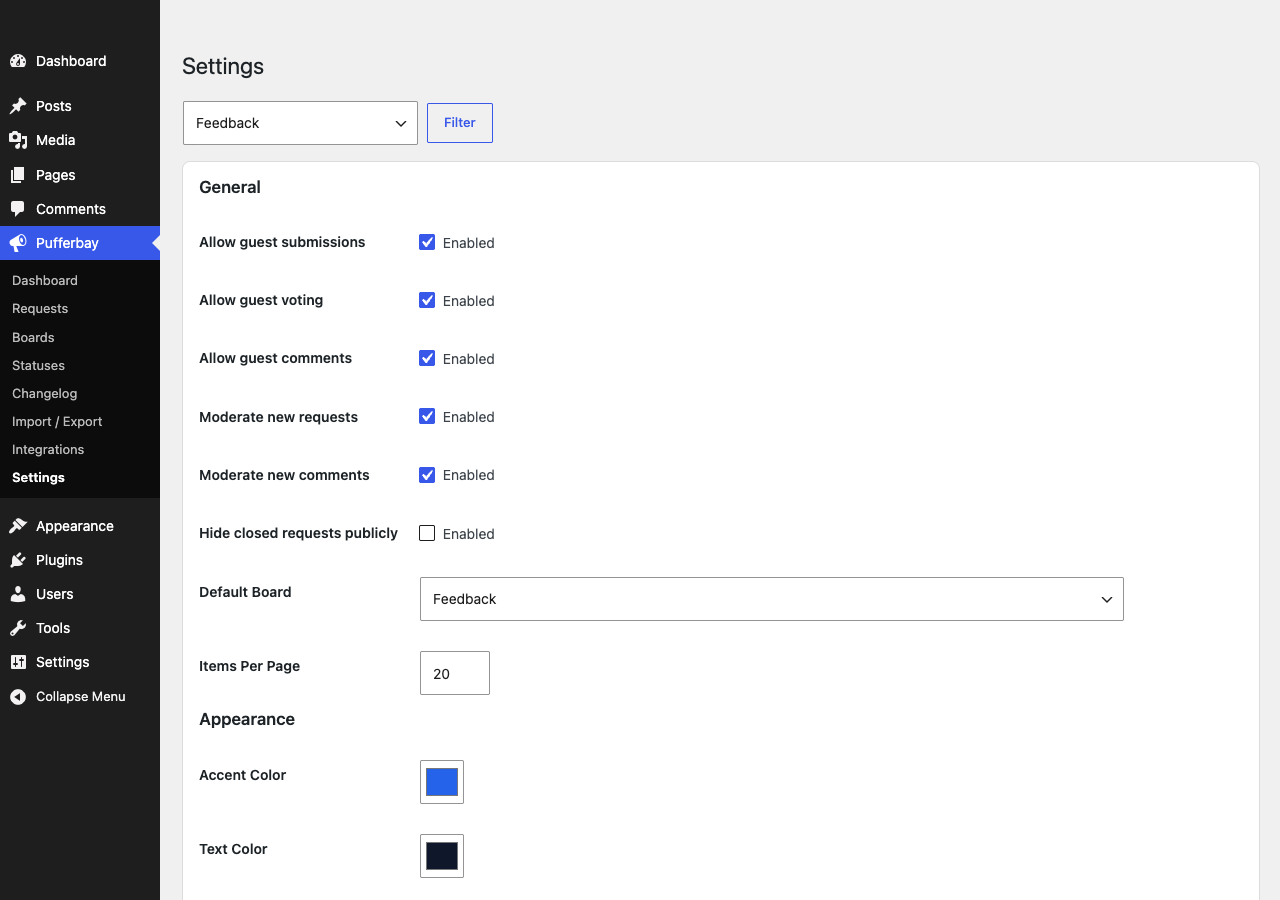
Yes. Guest submissions, votes, and comments can be enabled or disabled from settings.
Are comments WordPress comments?
No. Comments are Pufferbay-owned comments so moderation, privacy, and future product workflows can stay consistent.
How are email notifications sent?
Pufferbay sends email through WordPress using wp_mail(). Your site can use the server mail setup or any SMTP/transactional mail plugin that integrates with WordPress mail.
Can subscribers unsubscribe?
Yes. Subscriber notification emails include unsubscribe links, and Pufferbay provides an unsubscribe endpoint.
Does Pufferbay include import and export?
Yes. Requests can be imported and exported with CSV from wp-admin.
Does Pufferbay work with my theme?
Pufferbay uses scoped frontend CSS, inherits theme typography for controls, and exposes appearance settings for colors, radius, density, and button style.
What happens when I uninstall Pufferbay?
By default, deactivation preserves your data. If the uninstall cleanup setting is enabled, Pufferbay removes its plugin-owned tables and options during uninstall.
Changelog
0.1.1
- Fixed changelog entry titles, version badges, and dates being hidden by broad theme header styles.
- Fixed inconsistent frontend filter control heights in Safari.
- Hardened roadmap column and comment metadata layouts against theme header style conflicts.
0.1.0
- Initial release.
Screenshots

For developers
Is this your plugin? Show off the numbers.
Add a live badge to your site, docs or GitHub README. It updates on its own — no account needed.
Best Pufferbay alternatives
All changelog plugins →




FAQ
Pufferbay: quick answers
Straight answers, pulled from live WordPress.org data.
Live data from WordPress.org · checked Sep 29, 2026
Is Pufferbay free?
Yes. Pufferbay is free to download and use from the official WordPress.org plugin directory.
Is Pufferbay safe to use in 2026?
Pufferbay works, but test it on a staging site before relying on it in 2026. Was last updated 3 months ago, and scores 55/100 on our health check.
How many websites use Pufferbay?
Pufferbay is active on <10 WordPress websites and has been downloaded 182 times since it launched in July 2026. It was downloaded 51 times in the last 30 days.
Does Pufferbay work with WordPress 7.1?
Pufferbay is officially tested up to WordPress 7.0.6, while the latest release is 7.1.2. It may still work, but try it on a staging site first.
What PHP version does Pufferbay need?
Pufferbay requires PHP 7.4 or higher. Most hosts run PHP 8.x today, so it works on any modern WordPress hosting.
When was Pufferbay last updated?
The latest version, 0.1.1, was released on July 15, 2026 (3 months ago).
Who makes Pufferbay?
Pufferbay is developed and maintained by senols.
What are the best alternatives to Pufferbay?
The most popular alternatives to Pufferbay are WP Theme Changelogs (800+ installs), Simple History Beaver Build… (300+ installs) and CBX Changelog & Release Note (300+ installs).
Powered by PageForge
Want thousands of pages that rank like these? Build them in an afternoon.
This directory runs on the same engine as PageForge. Turn any spreadsheet, CSV or API into thousands of fast, SEO-ready WordPress pages — with schema, internal links and AI-written copy baked in.
- CSV, Google Sheets & API data sources
- AI content, schema & internal links per page
- Works with Elementor, Gutenberg, Yoast & Rank Math
- Free on WordPress.org — no credit card


