



Changelog as a Service – Publish, Display, and Communicate Beautiful Changelogs
Beautiful changelogs for plugins, themes, and more. Color-coded badges, search, and filtering. Connects to ChangelogWP.com.

Solid choice
Changelog as a Service is a solid plugin choice in 2026, with a few things worth checking first. It runs on 10+ sites, is rated 5/5 and was last updated 2 weeks ago, and scores 78/100 on our health check.
- Actively developed — last update 2 weeks ago
- Tested with the latest WordPress (7.1)
- Small user base (10+ active installs)
How does it stack up?
Side-by-side on installs, updates, ratings & support



Daily downloads
Download spikes usually follow a new release — each site that auto-updates counts as a download.
Rankings
Where Changelog as a Service stands todayWordPress.org search rankings
Live position in the plugin search, top 100| Keyword | Position |
|---|---|
| changelog | #4 |
| plugin changelog | #25 |
| release notes | #56 |
| updates | >100 |
| version history | #95 |
Version adoption
Share of active sites per release.
Rating breakdown
★★★★★★★★★★ 5 from 7 reviews
About Changelog as a Service
From the official readme · v1.3.3Description
Are you tired of managing changelogs manually or using plain text that looks unprofessional? ChangelogWP transforms how you create and display changelogs for your WordPress products, making it easy to show users what’s new, what’s fixed, and what’s improved—all with beautiful, color-coded badges that make your updates stand out.
Why You Need a Professional Changelog Plugin
Whether you’re a plugin developer, theme creator, or agency managing multiple WordPress products, maintaining clear, visually appealing changelogs is essential for:
* Building user trust by transparently showing what’s changed
* Reducing support requests with clear update documentation
* Increasing user engagement with searchable, filterable changelogs
* Providing REST API endpoints for automation and syndication
Our changelog plugin solves the problem of unprofessional changelog displays by giving you a dedicated post type, beautiful badge system, and flexible display options—all while using the familiar WordPress readme.txt format you already know.
🌐 Optional: ChangelogWP.com – Centralized Changelog Service & Email Notifications
This plugin works perfectly on its own, but you can also optionally use it with ChangelogWP.com—a centralized changelog service that enhances your changelog workflow:
For Product Owners: Submit your changelogs to ChangelogWP.com using this plugin. Your changelogs will be available in a centralized directory where users can discover and subscribe to your product updates. Add a “Get notified of updates” signup link to your embedded changelogs so visitors can easily subscribe.
For Site Owners: Subscribe to any product’s changelog on ChangelogWP.com to receive email notifications whenever new versions are released. Stay informed about updates, new features, bug fixes, and security patches for all your favorite WordPress plugins and themes—all in one place.
Whether you use ChangelogWP.com or not, this plugin provides everything you need to create and display beautiful changelogs on your WordPress site.
What Makes This Changelog Plugin Different
Unlike basic changelog solutions or manual HTML, our changelog plugin provides:
Professional Display with Color-Coded Badges
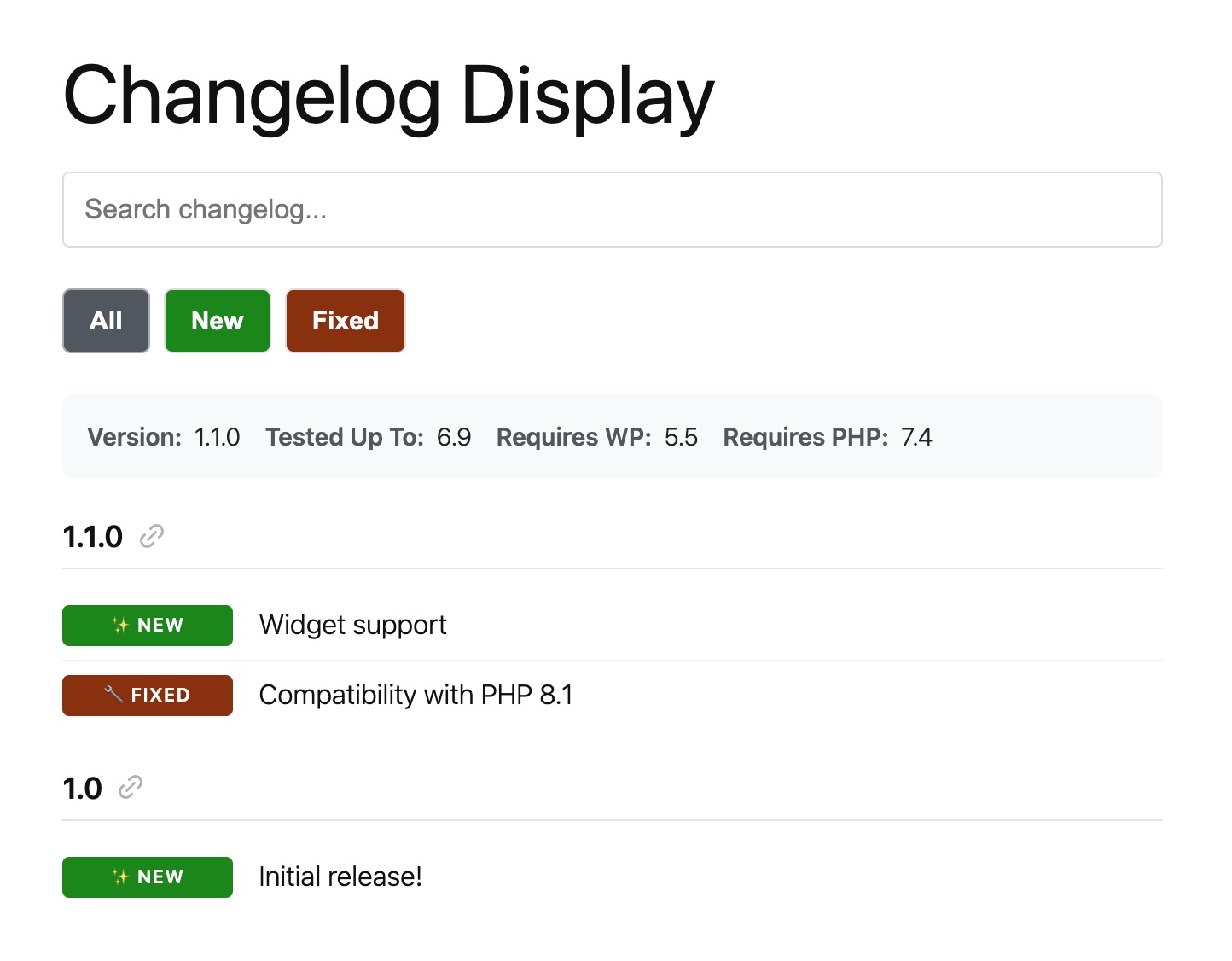
Automatically detect and display badges for Added (green), Fixed (orange), Improved (blue), Security (red), and more. Each badge is color-coded and customizable, making your changelog visually appealing and easy to scan.
Flexible Display Options
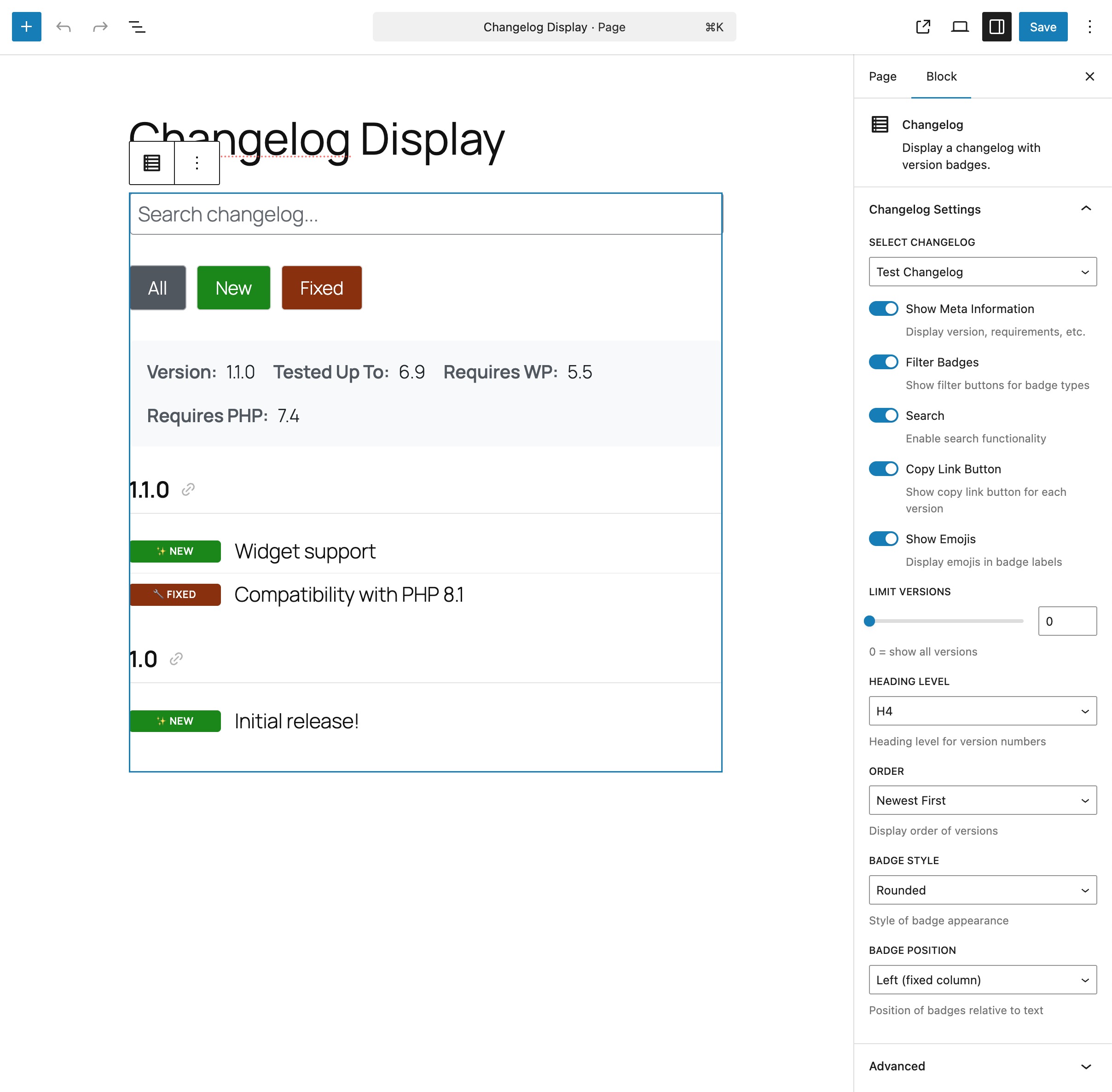
Display your changelog anywhere using shortcodes or the Gutenberg block. Customize heading levels, order (newest/oldest first), enable search and filtering, and control which versions to show—all without touching code.
Easy Content Creation
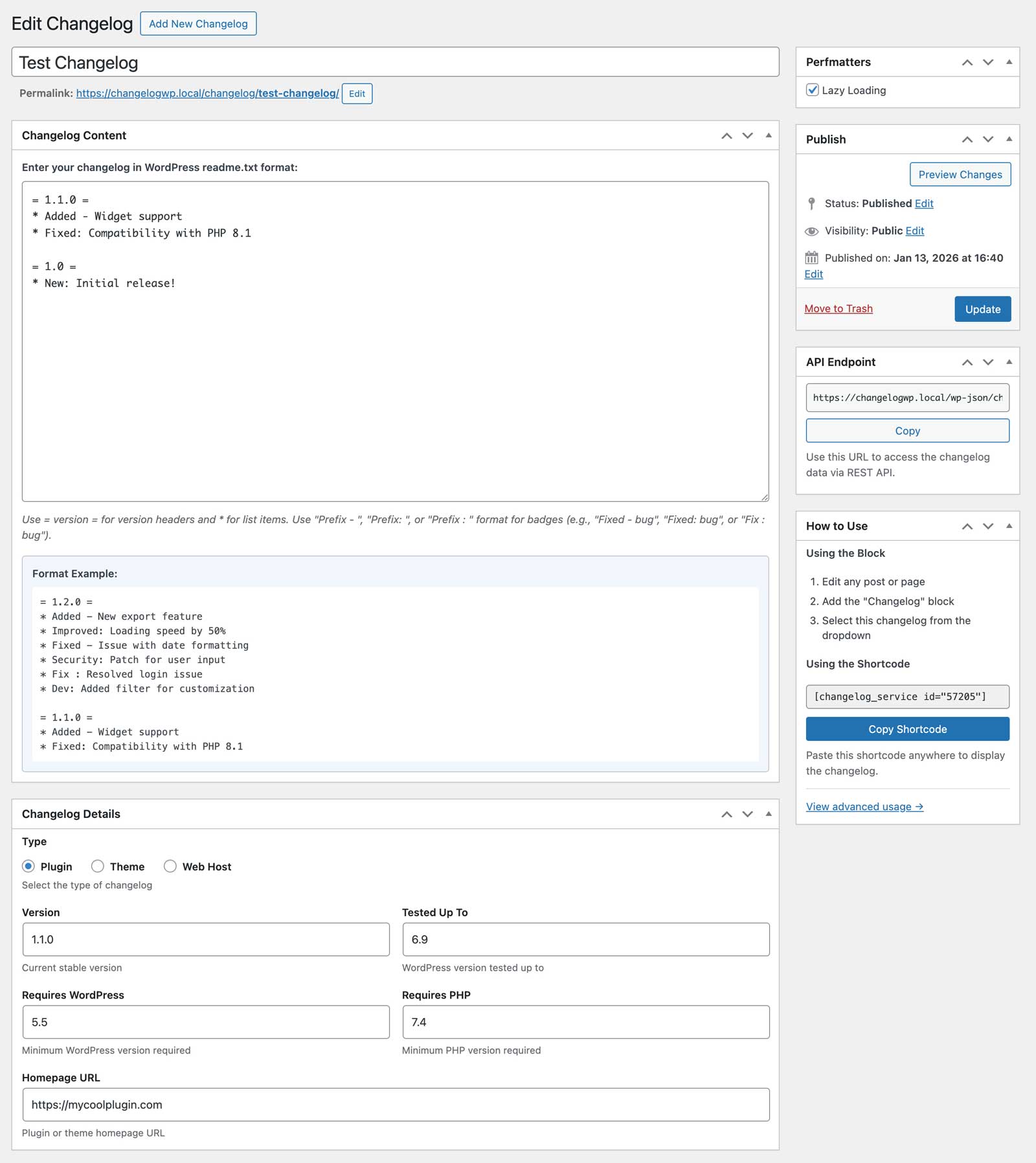
Use the familiar WordPress readme.txt format you already know. No HTML required, just simple text with version headers and bullet points. The plugin automatically formats everything beautifully.
Developer-Friendly
Full REST API support for automation and syndication. Integrates with Easy Digital Downloads for seamless product changelog management. Extensive filter and action hooks for complete customization.
Key Features
- Dedicated Changelog Post Type – Manage all your changelogs in one place
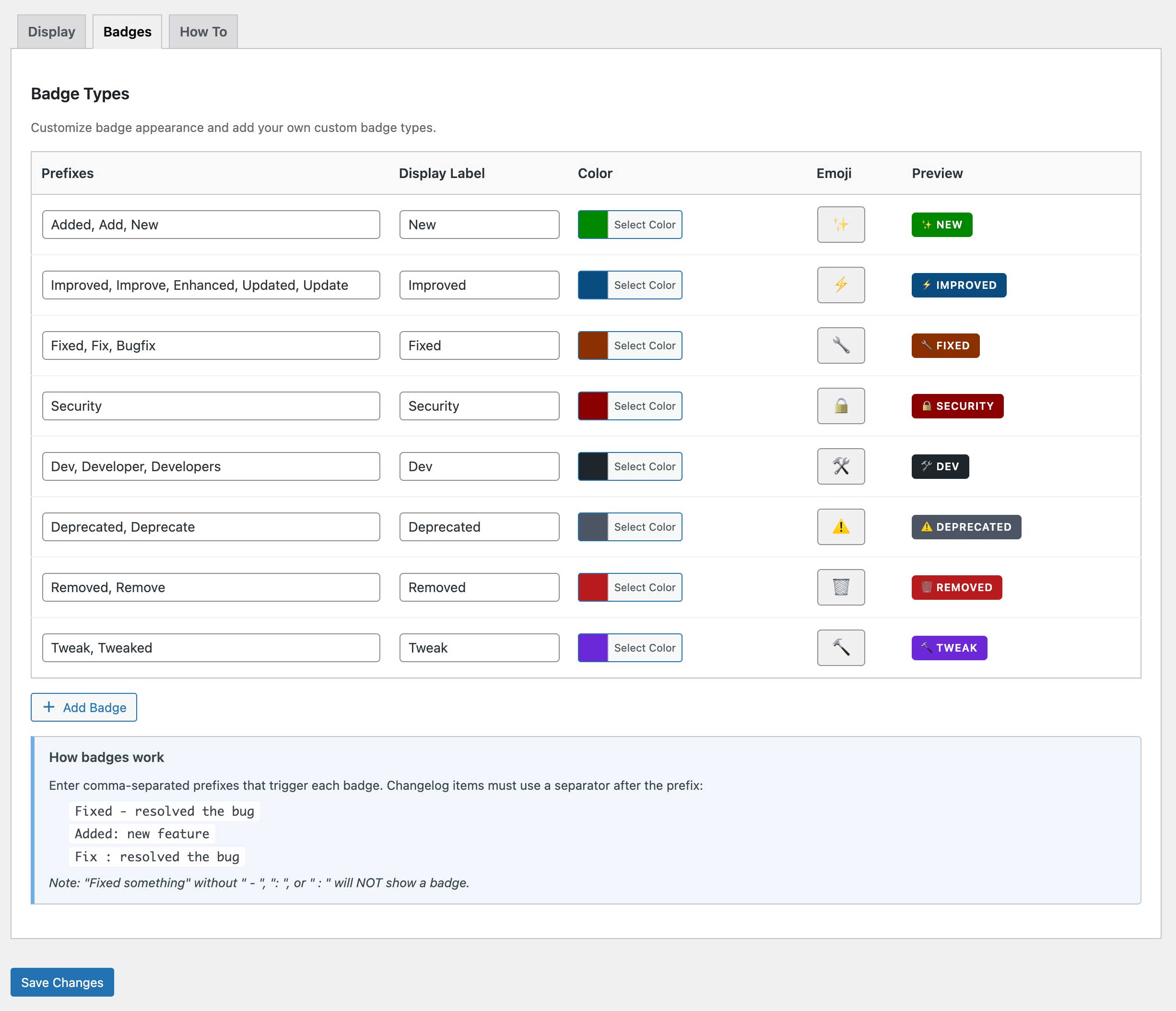
- Color-Coded Badge System – Automatic badges for Added, Fixed, Improved, Security, Dev, Deprecated, Removed, and Tweak
- Fully Customizable Badges – Customize colors, labels, emojis, and create unlimited custom badge types
- Shortcode & Gutenberg Block – Display changelogs anywhere with
[changelog_service]or use the modern block editor - WordPress.org Plugin Support – Display changelogs from any WordPress.org plugin by specifying its slug, with automatic daily caching
- Search & Filter Functionality – Let users search changelog content and filter by badge type
- REST API Endpoints – JSON endpoints for changelog syndication and automation
- EDD Integration – Works seamlessly with Easy Digital Downloads products
- Version Control Meta Fields – Track version, tested up to, requires WordPress/PHP, and homepage
- Copy Link Buttons – One-click copy links to specific versions (always enabled on hover)
- Signup Links – Let users subscribe to changelog updates via ChangelogWP.com with one click
- Responsive & Accessible – Full keyboard navigation, ARIA labels, and screen reader support
Who Is This Plugin For?
WordPress Plugin Developers
Maintain professional changelogs for your free and premium plugins. Display updates on your website with beautiful badges that build user trust.
WordPress Theme Developers
Show your theme updates clearly with searchable, filterable changelogs. Let users see exactly what changed in each version.
Product Managers
Keep users informed about updates, new features, bug fixes, and security patches with transparent, professional changelog displays.
Credits
Badge system inspired by EDD Changelog Badges by Very Good Plugins.
Emoji picker powered by emoji-picker-element by Nolan Lawson (Apache-2.0 license).
Installation
- Upload the
changelog-servicefolder to your/wp-content/plugins/directory, or install directly through the WordPress plugin screen. - Activate the plugin through the Plugins menu in WordPress.
- Go to Changelogs > Add New to create your first changelog using the familiar readme.txt format.
- Display your changelog anywhere using the
[changelog_service]shortcode or the Gutenberg block. - Optionally, customize badge colors, labels, and styles under Changelogs > Settings > Badges.
Frequently asked questions
How do I display my changelog on my website?
You have three easy options: 1. Shortcode: Use [changelog_service id="123"] or [changelog_service slug="my-plugin"] anywhere on your site 2. Gutenberg Block: Search for “Changelog” in the block inserter and select your changelog 3. Automatic Display: If your changelog post type is public, it displays automatically on single changelog pages
Can I customize the badge colors and styles?
Absolutely! Go to Changelogs > Settings > Badges to customize colors, labels, and emojis for each badge type. Choose from three badge styles (rounded, square, or pill) and position them left or inline. You can also create unlimited custom badge types with your own prefixes.
Can I use this for WordPress themes or other projects?
Yes! While the terminology focuses on plugins, it works perfectly for themes, any WordPress product, or even non-WordPress project changelogs. Just create a changelog post and use the shortcode or block wherever you need it.
How do I format my changelog entries to get badges?
Use the format “Prefix – Description” or “Prefix: Description” or “Prefix : Description”. For example: * Added - New feature (shows green “New” badge) * Fixed: Bug resolved (shows orange “Fixed” badge) * Improved - Performance boost (shows blue “Improved” badge) See the Badge Format section below for all supported prefixes.
Does this work with page builders like Elementor, Beaver Builder, or Divi?
Yes! Use the [changelog_service] shortcode in any page builder that supports shortcodes. Most popular page builders have shortcode widgets or modules you can use.
Can I search and filter changelog entries?
Yes! Enable search and filtering in your shortcode: [changelog_service id="123" search="true" filter_badges="true"]. Users can search changelog content or filter by badge type (Added, Fixed, Improved, etc.). Results show version headers with matching items.
Is there a REST API I can use?
Yes! This changelog plugin provides REST API endpoints for changelog data: * GET /wp-json/changelogwp/v1/changelog/{slug} – Get single changelog * GET /wp-json/changelogwp/v1/changelogs – Get all changelogs with pagination Perfect for automation, syndication, or integrating with external services.
Does this integrate with Easy Digital Downloads?
Yes! If you have EDD Software Licensing active, you can display changelogs for your EDD products using the edd_id attribute: [changelog_service edd_id="456"]. This is perfect for premium plugin developers managing product changelogs.
Is it accessible for screen readers?
Yes! It includes full accessibility support: * Keyboard navigation for all interactive elements * ARIA labels and roles for screen readers * Visible focus indicators * Semantic HTML structure * Screen reader text for icon-only buttons like copy links
Can I create custom badge types?
Yes! Go to Changelogs > Settings > Badges and click “Add Badge” to create custom badge types with your own prefixes (like “Enhancement”, “Performance”, “Breaking”), colors, and emojis. No coding required.
How do I link to specific versions in my changelog?
Copy link buttons are always enabled and appear on hover next to each version number. Users can click to copy the URL with the version anchor, making it easy to share specific updates.
How do I add a signup link for update notifications?
Use the signup shortcode parameter to add a “Get notified of updates” link that connects to ChangelogWP.com: For WordPress.org plugins (auto-generates URL from plugin slug): [changelog_service plugin_slug=”woocommerce” signup=”true”] For other sources (provide a custom URL): [changelog_service id=”123″ signup=”https://changelogwp.com/plugin/my-plugin/”] You can also enable this globally in Changelogs > Settings > Display by checking “Signup Link”. When using the Gutenberg block, toggle “Show Signup Link” in the block settings—if using a WordPress.org plugin, the URL is auto-generated…
Changelog
1.3.3 – September 15, 2026
- Fix: Changelogs pulled from Easy Digital Downloads Software Licensing showed a backslash before quotes and apostrophes
1.3.2 – April 3, 2026
- Fix: Allow x.x.x.x version numbers for version number parsing
- Fix: Allow pipe “|” as separator between version number and date
1.3.1 – March 24, 2026
- Fix: Allow version line to include date without a separator
1.3.0 – March 23, 2026
- New: Timeline template – a vertical timeline layout with version badges on the line and changelog items to the right
- New:
templateshortcode attribute – choose between “default” and “timeline” layouts - New: Template selector added to Gutenberg block editor
- New: Default template setting in plugin settings with customizable timeline colors (line, version badge background, version badge text)
- New: Release notes support – free-form text between a version header and list items is now displayed as release notes
- New: Inline markdown support – bold, italic, links, and code in release notes and changelog items
1.2.0 – February 26, 2026
- New: Signup link setting to show “Get notified of updates” link to ChangelogWP.com
- New:
signupshortcode parameter – set to “true” to auto-generate URL from plugin_slug, or provide custom URL - New: Signup link attribute added to Gutenberg block with editor control
- New: Filter ‘caas_shortcode_output’
- Fix: Settings page now preserves active tab after saving
- Fix: “View advanced usage” link in changelog editor now points to correct URL
- Fix: Badge parsing now supports en-dash (–) and em-dash (—) in addition to regular hyphen (-) for formats like “Fix – Description”
1.1.0 – January 23, 2026
- New: WordPress.org plugin slug support – Display changelogs from any WordPress.org plugin by specifying its slug
- New: Filter for ‘changelog-service’ post type arguments
- Change: Post type rewrite slug changed to “changelog-details” to better avoid permalink collisions
- Fix: Processing EDD changelogs with HTML structure
Screenshots
For developers
Is this your plugin? Show off the numbers.
Add a live badge to your site, docs or GitHub README. It updates on its own — no account needed.
Best Changelog as a Service alternatives
All changelog plugins →



FAQ
Changelog as a Service: quick answers
Straight answers, pulled from live WordPress.org data.
Live data from WordPress.org · checked Sep 29, 2026
Is Changelog as a Service free?
Yes. Changelog as a Service is free to download and use from the official WordPress.org plugin directory.
Is Changelog as a Service safe to use in 2026?
Changelog as a Service is a solid plugin choice in 2026, with a few things worth checking first. It runs on 10+ sites, is rated 5/5 and was last updated 2 weeks ago, and scores 78/100 on our health check.
How many websites use Changelog as a Service?
Changelog as a Service is active on 10+ WordPress websites and has been downloaded 857 times since it launched in January 2026. It was downloaded 137 times in the last 30 days.
Does Changelog as a Service work with WordPress 7.1?
Yes. The developer has tested Changelog as a Service up to WordPress 7.1.2, the latest release. It requires WordPress 5.8 or newer.
What PHP version does Changelog as a Service need?
Changelog as a Service requires PHP 7.4 or higher. Most hosts run PHP 8.x today, so it works on any modern WordPress hosting.
When was Changelog as a Service last updated?
The latest version, 1.3.3, was released on September 15, 2026 (2 weeks ago).
Who makes Changelog as a Service?
Changelog as a Service is developed and maintained by ChangelogWP.
What are the best alternatives to Changelog as a Service?
The most popular alternatives to Changelog as a Service are WP Theme Changelogs (800+ installs), Simple History Beaver Build… (300+ installs) and CBX Changelog & Release Note (300+ installs).
Powered by PageForge
Want thousands of pages that rank like these? Build them in an afternoon.
This directory runs on the same engine as PageForge. Turn any spreadsheet, CSV or API into thousands of fast, SEO-ready WordPress pages — with schema, internal links and AI-written copy baked in.
- CSV, Google Sheets & API data sources
- AI content, schema & internal links per page
- Works with Elementor, Gutenberg, Yoast & Rank Math
- Free on WordPress.org — no credit card


