



Progressive Web Apps
Progressive Web Apps are user experiences that have the reach of the web, and are:

Consider an alternative
Progressive Web Apps shows warning signs in 2026 — compare the alternatives below before installing. It runs on 10+ sites, is rated 4.5/5 and was last updated 7 years ago, and scores 29/100 on our health check.
- Small user base (10+ active installs)
- Very few reviews so far
- No update in 6 years
- Only tested up to WordPress 5.3 (latest is 7.1)
How does it stack up?
Side-by-side on installs, updates, ratings & support



Daily downloads
Download spikes usually follow a new release — each site that auto-updates counts as a download.
Rankings
Where Progressive Web Apps stands todayWordPress.org search rankings
Live position in the plugin search, top 100| Keyword | Position |
|---|---|
| mobile | >100 |
| mobile internet | >100 |
| mobile web | >100 |
| progressive web apps | #82 |
| pwa | >100 |
Version adoption
Share of active sites per release.
Rating breakdown
★★★★★★★★★★ 4.5 from 4 reviews
About Progressive Web Apps
From the official readme · v1.0.1Description
Progressive Web Apps are user experiences that have the reach of the web, and are:
- Reliable – Load instantly even in uncertain network conditions.
- Fast – Respond quickly to user interactions with silky smooth animations and no janky scrolling.
- Engaging – Feel like a natural app on the device, with an immersive user experience.
This new level of quality allows Progressive Web Apps to earn a place on the user’s home screen. More details about PWAs here: https://developers.google.com/web/progressive-web-apps/
The WordPress Progressive Web Apps plugin helps bloggers, publishers and other content creators to go beyond responsive web design and ‘appify’ their existing mobile presence. Progressive Web Apps is supported on: iOS & Android. Compatible browsers: Safari, Google Chrome, Android – Native Browser. The plugin has been tested on WordPress 4.8 and later, we recommend using the latest WordPress version.
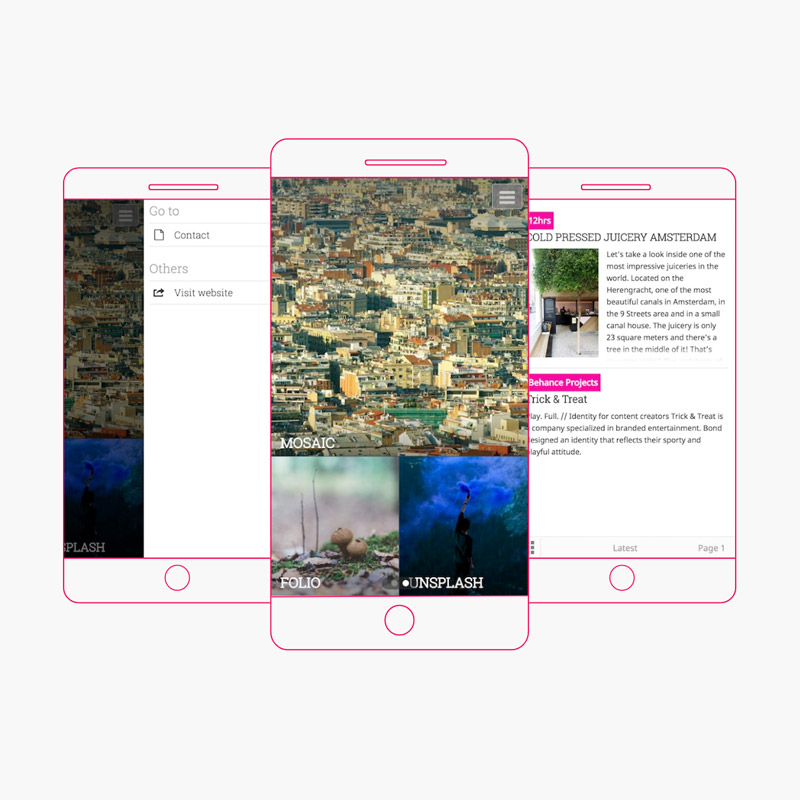
The WordPress Progressive Web Apps plugin includes one FREE mobile PWA (MOSAIC) which is customizable (colors, fonts, appearance) via the WordPress admin area. The tech stack we used in building this Progressive Web App includes:
- React JS
- Semantic UI for UI components
- Redux for app state management
- SASS
- Webpack (Create React App boilerplate)
- Babel
- Jest & Sinon for unit tests
The MOSAIC PWA (available for FREE) is built with React JS. Most of the premium mobile progressive web apps available at PWAThemes.com/progressive-web-app-themes.html are built using Angular/Ionic 1 or React. Each PWA comes with a “production” version, which in essence is the bundled/packaged/minified collection of all the necessary JS and CSS files for the PWA to run correctly.
Each of our progressive web apps are tested with Karma, Jasmine and Protractor (Angular) or Jest (React). We have an average of 70-80% code coverage and we’re working on improving this rate. While we do our best to catch any bugs out there, we are aware that some of them might escape us. Please reach out if you happen to come across a nasty one 😊.
The FREE PWA MOSAIC available in the WordPress Progressive Web Apps plugin is the window-display of themes. You can instantly see several categories and choose which ones are of interest and focus on those. Depending on the number of displayed categories, the boxes will resize to fit all available space. It’s great for publishers that have posts spanning several categories and need a way to visually structure their content.
It comes with support for:
- Multi-image mosaic on cover page
- Pages & sub-pages menu
- Side-to-side navigation with lateral swiping through categories
- Maximum 2 articles per card
There are dozens of mobile progressive web apps available in the PRO version: BASE, OBLIQ, ELEVATE, FOLIO, INVISION, POPSICLE, PULSE, GHOST, PHANTOM, LUCID, EXTRUDE, VEDI, BLEND, PURE, FUTURE & PALM.
Additional key features available in PRO:
-
Rich UI/UX
Your users can have a cozy browsing experience on their favorite mobile device without having to go to an App Store and install anything. -
Monetization
Take full control of your income by easily connecting the plugin with your Google DoubleClick for Publishers account. -
Translations
The plugin will automatically translate your mobile web app in one of the supported languages: Chinese (zh_CN), Dutch, English, French, German, Hungarian, Italian, Polish, Portuguese (Brazil), Romanian, Spanish or Swedish. -
Premium Support
We take pride in offering fantastic maintenance and hands-on support. Our team of friendly mobile experts makes sure technology doesn’t stand in your way. -
Analytics
Get to know your mobile users and analyze your impact with our powerful yet simple reader-centric analytics via Google Analytics integration. -
Add to Homescreen
Users can add your mobile web application to their homescreens making it just a tap away. -
Offline Mode
The application’s files are cached for offline usage together with the content. All of the categories, posts and pages that your users navigate to will be cached for offline usage. -
Web Push Notifications
We have integrated with the OneSignal WordPress plugin, allowing you to engage users through push notifications.
Advanced PWA features like offline mode and web push notifications are implemented using service workers and are currently available on Chrome.
We enjoy writing and maintaining this plugin. If you like it too, please rate us. But if you don’t, let us know how we can improve it.
Have fun on your mobile adventures!
Repositories
Here are our Github development repositories:
- https://github.com/rock-solid/wordpress-progressive-web-apps – The plugin files, same as you will find for download on WordPress.org.
- https://github.com/rock-solid/pwa-theme-mosaic – The Progressive Web App source, built with React, Redux and Semantic UI.
Installation
Simple installation for WordPress v4.8 and later
- Go to the ‘Plugins’ / ‘Add new’ menu
- Upload progressive-web-apps.zip then press ‘Install now’.
- Enjoy.
Comprehensive setup
A more comprehensive setup process and guide to configuration is as follows.
- Locate your WordPress install on the file system
- Extract the contents of
progressive-web-apps.zipintowp-content/plugins - In
wp-content/pluginsyou should now see a directory namedprogressive-web-apps - Login to the WordPress admin panel at
http://yoursite.com/wp-admin - Go to the ‘Plugins’ menu.
- Click ‘Activate’ for the plugin.
- Go to the ‘Progressive Web Apps’ admin panel.
- Choose color schemes, fonts and add your own logo and app icon.
- Access your site in a mobile browser and check if the application is displayed. If the app is not loading properly, make sure that the WordPress REST API can be accessed in the browser and doesn’t return an error.
- You’re all done!
Testing your installation
Ideally, use a real mobile device to access your (public) site address and check that the switching and mobile web app work correctly.
You can also download a number of mobile emulators that can run on a desktop PC and simulate mobile devices.
Please note that the progressive web app will be enabled only on supported devices: iOS & Android. Only the following browsers are compatible: Safari, Google Chrome, Android – Native Browser.
Changelog
The latest version comes with a brand new Progressive Web App built on React & Semantic UI.
1.0.1
- Small updates
1.0
- Completely rebuild Progressive Web App theme (Mosaic) using React, Redux and Semantic UI
- Connected app with the WordPress REST API
- Added PHP namespaces
0.7
- Security fix, replaced Smart App Banner script with jQuery Noty plugin
0.6
- Add Web App Install Banner( Add to Home Screen ) functionality
- Translate app to Bosnian
- Add resize image method for logo, icon and cover
0.5.1
- Add links to PWAThemes.com
0.5
- Various bug fixes for the Mosaic mobile app theme
- Add separate tab for App Themes
- Add manifest background color, to improve PWA score
Screenshots


For developers
Is this your plugin? Show off the numbers.
Add a live badge to your site, docs or GitHub README. It updates on its own — no account needed.
Best Progressive Web Apps alternatives
All mobile plugins →





FAQ
Progressive Web Apps: quick answers
Straight answers, pulled from live WordPress.org data.
Live data from WordPress.org · checked Oct 2, 2026
Is Progressive Web Apps free?
Yes. Progressive Web Apps is free to download and use from the official WordPress.org plugin directory.
Is Progressive Web Apps safe to use in 2026?
Progressive Web Apps shows warning signs in 2026 — compare the alternatives below before installing. It runs on 10+ sites, is rated 4.5/5 and was last updated 7 years ago, and scores 29/100 on our health check.
How many websites use Progressive Web Apps?
Progressive Web Apps is active on 10+ WordPress websites and has been downloaded 15,653 times since it launched in September 2016. It was downloaded 59 times in the last 30 days.
Does Progressive Web Apps work with WordPress 7.1?
Progressive Web Apps is officially tested up to WordPress 5.3.25, while the latest release is 7.1.2. It may still work, but try it on a staging site first.
What PHP version does Progressive Web Apps need?
Progressive Web Apps requires PHP 5.4 or higher. Most hosts run PHP 8.x today, so it works on any modern WordPress hosting.
When was Progressive Web Apps last updated?
The latest version, 1.0.1, was released on January 31, 2020 (7 years ago).
Who makes Progressive Web Apps?
Progressive Web Apps is developed and maintained by Rock Solid.
What are the best alternatives to Progressive Web Apps?
The most popular alternatives to Progressive Web Apps are AMP (400K+ installs), AMP for WP (70K+ installs) and WP Mobile Menu (70K+ installs).
Powered by PageForge
Want thousands of pages that rank like these? Build them in an afternoon.
This directory runs on the same engine as PageForge. Turn any spreadsheet, CSV or API into thousands of fast, SEO-ready WordPress pages — with schema, internal links and AI-written copy baked in.
- CSV, Google Sheets & API data sources
- AI content, schema & internal links per page
- Works with Elementor, Gutenberg, Yoast & Rank Math
- Free on WordPress.org — no credit card


