


ProductLift: Feedback, Roadmap, Changelog, Knowledge Base
Collect customer feedback, prioritize features with AI, share your roadmap, and publish changelogs. Includes SSO for seamless user authentication.

Use with caution
ProductLift: Feedback, Roadmap,… works, but test it on a staging site before relying on it in 2026. Was last updated 2 months ago, and scores 55/100 on our health check.
- Small user base (<10 active installs)
- Very few reviews so far
How does it stack up?
Side-by-side on installs, updates, ratings & support



Daily downloads
Download spikes usually follow a new release — each site that auto-updates counts as a download.
Rankings
Where ProductLift: Feedback, Road… stands todayWordPress.org search rankings
Live position in the plugin search, top 100| Keyword | Position |
|---|---|
| customer feedback | >100 |
| feature requests | >100 |
| feedback | >100 |
| product management | >100 |
| roadmap | >100 |
About ProductLift: Feedback, Roadmap, Changel…
From the official readme · v1.0.0Description
Build Products Your Customers Actually Want
ProductLift is the complete platform for gathering feedback, prioritizing features, and sharing your roadmap, powered by AI.
What you get with ProductLift:
- Feedback Portal – Collect feature requests and ideas from your customers
- AI Prioritization – Use RICE, ICE, or custom frameworks to prioritize what to build next
- Public Roadmap – Share your product roadmap with customers and stakeholders
- Changelog – Publish updates and automatically notify voters when features ship
- Knowledge Base – Create help articles and reduce support requests
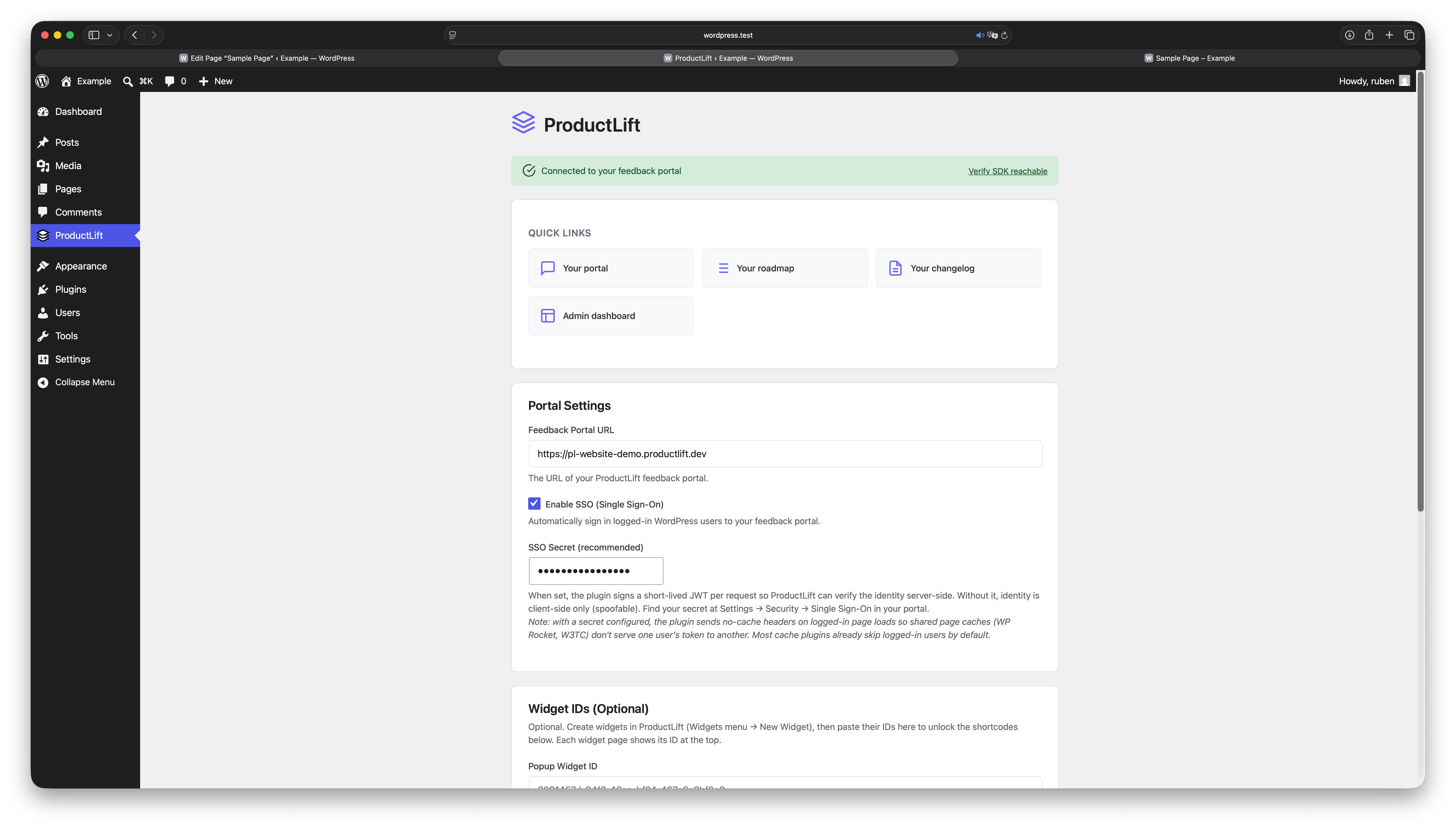
- SSO Integration – WordPress users automatically sign in to your feedback portal
Trusted by 6,000+ product teams worldwide. Rated 4.8/5 on G2.
How It Works
1. Create Your Feedback Portal
Sign up at ProductLift and customize your feedback portal. Choose your colors, domain, and settings.
2. Install This Plugin
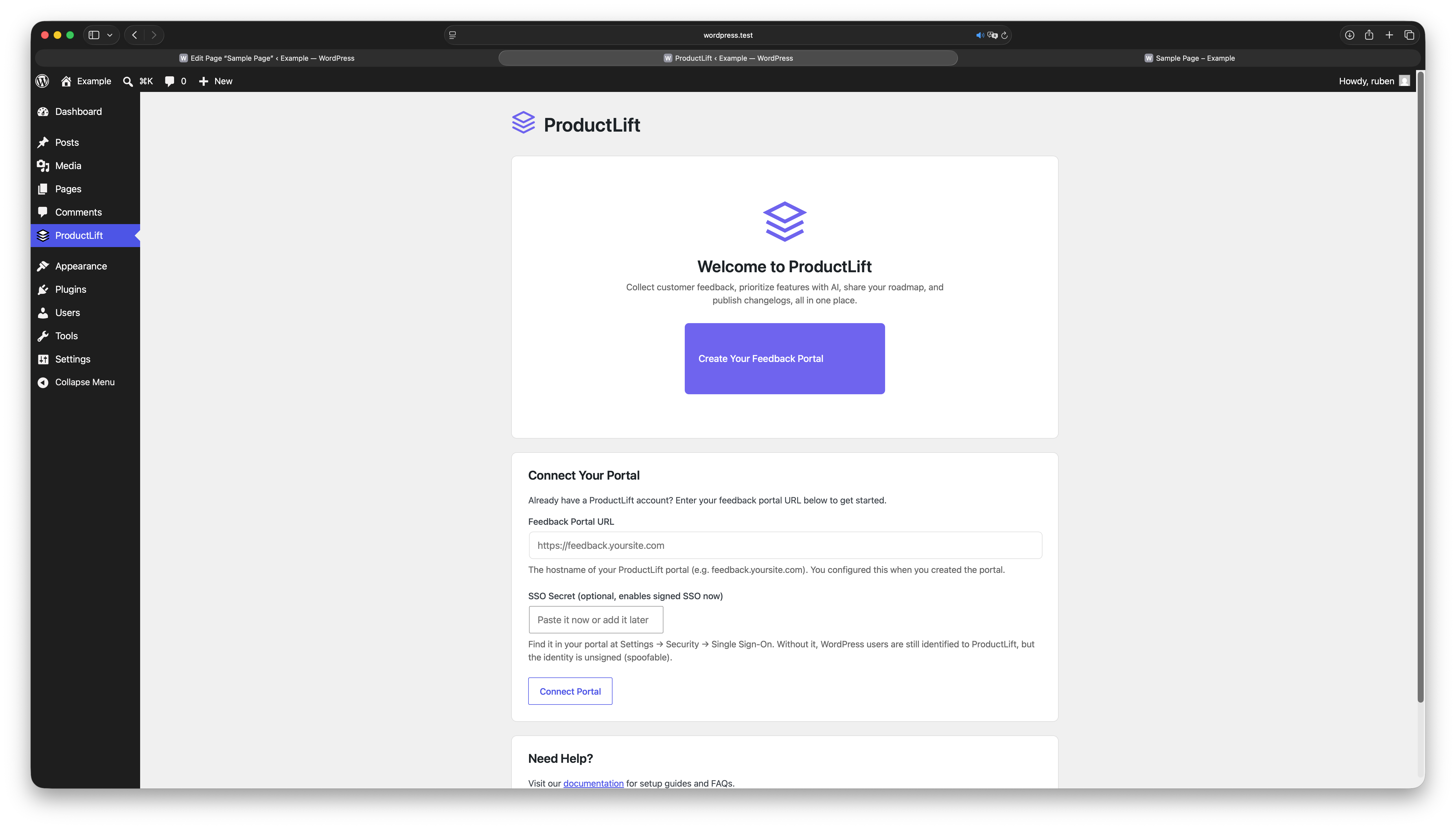
Install the ProductLift plugin on your WordPress site and enter your portal URL.
3. Collect Feedback
Visitors can submit feature requests, vote on ideas, and see your roadmap. Logged-in WordPress users are automatically authenticated via SSO.
Features
SSO (Single Sign-On)
When enabled, logged-in WordPress users are automatically authenticated in your ProductLift feedback portal. No separate passwords needed, users can immediately submit and vote on features.
Shortcodes
Easily embed ProductLift widgets in your content:
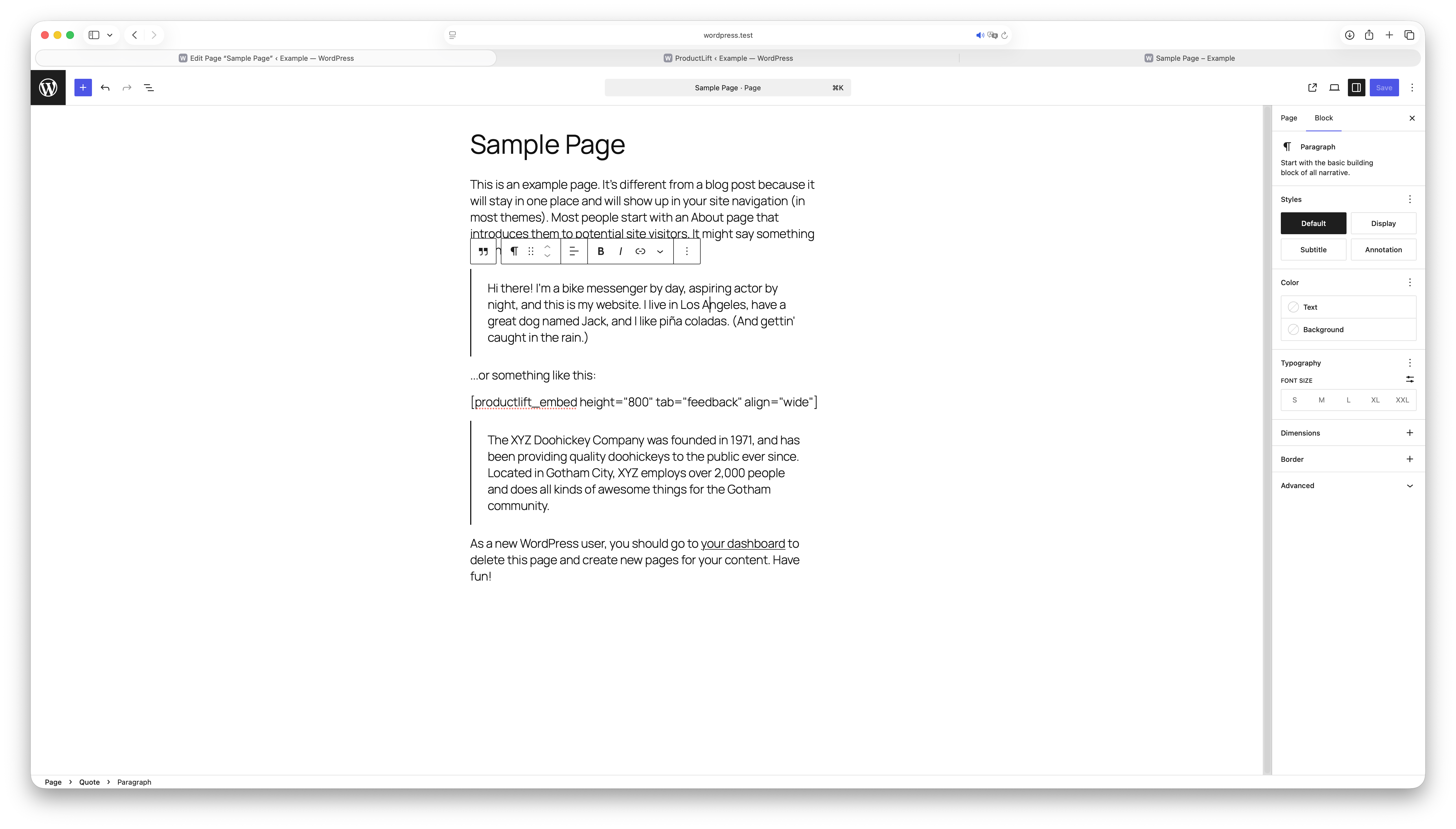
[productlift_link text="Give Feedback"]– Auto-login link to your portal[productlift_widget text="Suggest feature"]– Popup widget trigger[productlift_sidebar text="Open Widget"]– Sidebar widget trigger[productlift_embed height="700" tab="feedback" align="wide"]– Embed a feedback, roadmap, changelog, or knowledge base board inline. The embed auto-resizes to fit its content, soheightis only the initial and minimum height (in pixels) reserved before the board finishes loading. Usetab="roadmap"/tab="changelog"/tab="kb"to switch boards, andalign="full"for edge-to-edge,align="none"to keep the theme’s default content width.
Widget Types
- Popup Widget – Opens a feedback form in a modal
- Sidebar Widget – Slides in from the side of the screen
- Embedded Board – Full feedback board embedded in your page
External Services
This plugin connects to ProductLift’s external services to provide its core functionality.
What data is transmitted:
When SSO is enabled and a user is logged in to WordPress, the following data is sent to ProductLift servers:
– User email address
– User display name
– WordPress user ID
– User avatar URL
This data is transmitted when pages are loaded to enable automatic authentication to your ProductLift feedback portal.
External domains used:
- app.productlift.dev – ProductLift application and widget hosting
Service links:
- Service website: https://productlift.dev
- Terms of Service: https://www.productlift.dev/legal/
- Privacy Policy: https://www.productlift.dev/legal/
This integration is essential for the plugin’s core functionality. The external service processes user data to enable seamless authentication between your WordPress site and your ProductLift feedback portal.
Installation
Automatic Installation
- Go to Plugins > Add New in your WordPress admin
- Search for “ProductLift”
- Click Install Now, then Activate
- Go to ProductLift in your admin menu
- Enter your feedback portal URL
Manual Installation
- Download the plugin ZIP file
- Go to Plugins > Add New > Upload Plugin
- Upload the ZIP file and click Install Now
- Activate the plugin
- Go to ProductLift and enter your portal URL
Frequently asked questions
Do I need a ProductLift account?
Yes. This plugin connects your WordPress site to ProductLift. Create a free account at productlift.dev.
How does SSO work?
When SSO is enabled, the plugin sends the logged-in user’s email, name, and avatar to ProductLift. This allows them to submit feedback and vote without creating a separate account.
What data is sent to ProductLift?
For logged-in users with SSO enabled: email address, display name, user ID, and avatar URL. This data is used solely for authentication purposes.
Can I use ProductLift without SSO?
Yes. You can disable SSO in the plugin settings. Users will need to sign in separately to your ProductLift portal.
How do I find my widget IDs?
Log in to your ProductLift dashboard, go to Widgets, and copy the widget ID from any widget you create.
Does this plugin slow down my site?
No. The SSO script is minimal and only loads for logged-in users. Embeds and widgets load asynchronously.
Changelog
Initial release of the ProductLift WordPress plugin.
1.0.0
- Initial release
- Signed SSO (HS256 JWT) for WordPress users, with optional unsigned identify mode
- Shortcodes:
productlift_link,productlift_widget,productlift_sidebar,productlift_embed - Admin settings page with onboarding flow and “Verify SDK reachable” check
- Settings and Support quick links on the Plugins page
Screenshots
![A ProductLift feedback board embedded in a WordPress page via [productlift_embed].](https://ps.w.org/productlift-feedback/assets/screenshot-2.png?rev=3646935)
For developers
Is this your plugin? Show off the numbers.
Add a live badge to your site, docs or GitHub README. It updates on its own — no account needed.
Best ProductLift: Feedback, Roadma… alternatives
All customer feedback plugins →





FAQ
ProductLift: Feedback, Roadmap, Cha…: quick answers
Straight answers, pulled from live WordPress.org data.
Live data from WordPress.org · checked Sep 29, 2026
Is ProductLift: Feedback, Roadmap,… free?
Yes. ProductLift: Feedback, Roadmap,… is free to download and use from the official WordPress.org plugin directory.
Is ProductLift: Feedback, Roadmap,… safe to use in 2026?
ProductLift: Feedback, Roadmap,… works, but test it on a staging site before relying on it in 2026. Was last updated 2 months ago, and scores 55/100 on our health check.
How many websites use ProductLift: Feedback, Roadmap,…?
ProductLift: Feedback, Roadmap,… is active on <10 WordPress websites and has been downloaded 130 times since it launched in August 2026. It was downloaded 53 times in the last 30 days.
Does ProductLift: Feedback, Roadmap,… work with WordPress 7.1?
ProductLift: Feedback, Roadmap,… is officially tested up to WordPress 7.0.6, while the latest release is 7.1.2. It may still work, but try it on a staging site first.
What PHP version does ProductLift: Feedback, Roadmap,… need?
ProductLift: Feedback, Roadmap,… requires PHP 7.4 or higher. Most hosts run PHP 8.x today, so it works on any modern WordPress hosting.
When was ProductLift: Feedback, Roadmap,… last updated?
The latest version, 1.0.0, was released on August 14, 2026 (2 months ago).
Who makes ProductLift: Feedback, Roadmap,…?
ProductLift: Feedback, Roadmap,… is developed and maintained by Ruby Foundry B.V..
What are the best alternatives to ProductLift: Feedback, Roadmap,…?
The most popular alternatives to ProductLift: Feedback, Roadmap,… are Star Rating Field For Conta… (800+ installs), Mopinion Feedback Form (100+ installs) and Simple Feature Requests Free (100+ installs).
Powered by PageForge
Want thousands of pages that rank like these? Build them in an afternoon.
This directory runs on the same engine as PageForge. Turn any spreadsheet, CSV or API into thousands of fast, SEO-ready WordPress pages — with schema, internal links and AI-written copy baked in.
- CSV, Google Sheets & API data sources
- AI content, schema & internal links per page
- Works with Elementor, Gutenberg, Yoast & Rank Math
- Free on WordPress.org — no credit card


