


ProdTabs: Multilingual Product Tabs for WooCommerce
Product tabs for WooCommerce that work with WPML and Polylang: tabs per product, shared tabs, one-click import from Custom Product Tabs.

Solid choice
ProdTabs: Multilingual Product… is a solid plugin choice in 2026, with a few things worth checking first. Is rated 5/5 and was last updated 3 days ago, and scores 71/100 on our health check.
- Actively developed — last update 3 days ago
- Tested with the latest WordPress (7.1)
- Small user base (<10 active installs)
- Very few reviews so far
How does it stack up?
Side-by-side on installs, updates, ratings & support


Daily downloads
Download spikes usually follow a new release — each site that auto-updates counts as a download.
Rankings
Where ProdTabs: Multilingual Prod… stands todayWordPress.org search rankings
Live position in the plugin search, top 100| Keyword | Position |
|---|---|
| custom tabs | >100 |
| multilingual | >100 |
| product tabs | >100 |
| woocommerce tabs | >100 |
| wpml | >100 |
Rating breakdown
★★★★★★★★★★ 5 from 1 reviews
About ProdTabs: Multilingual Product Tabs for…
From the official readme · v0.4.8Description
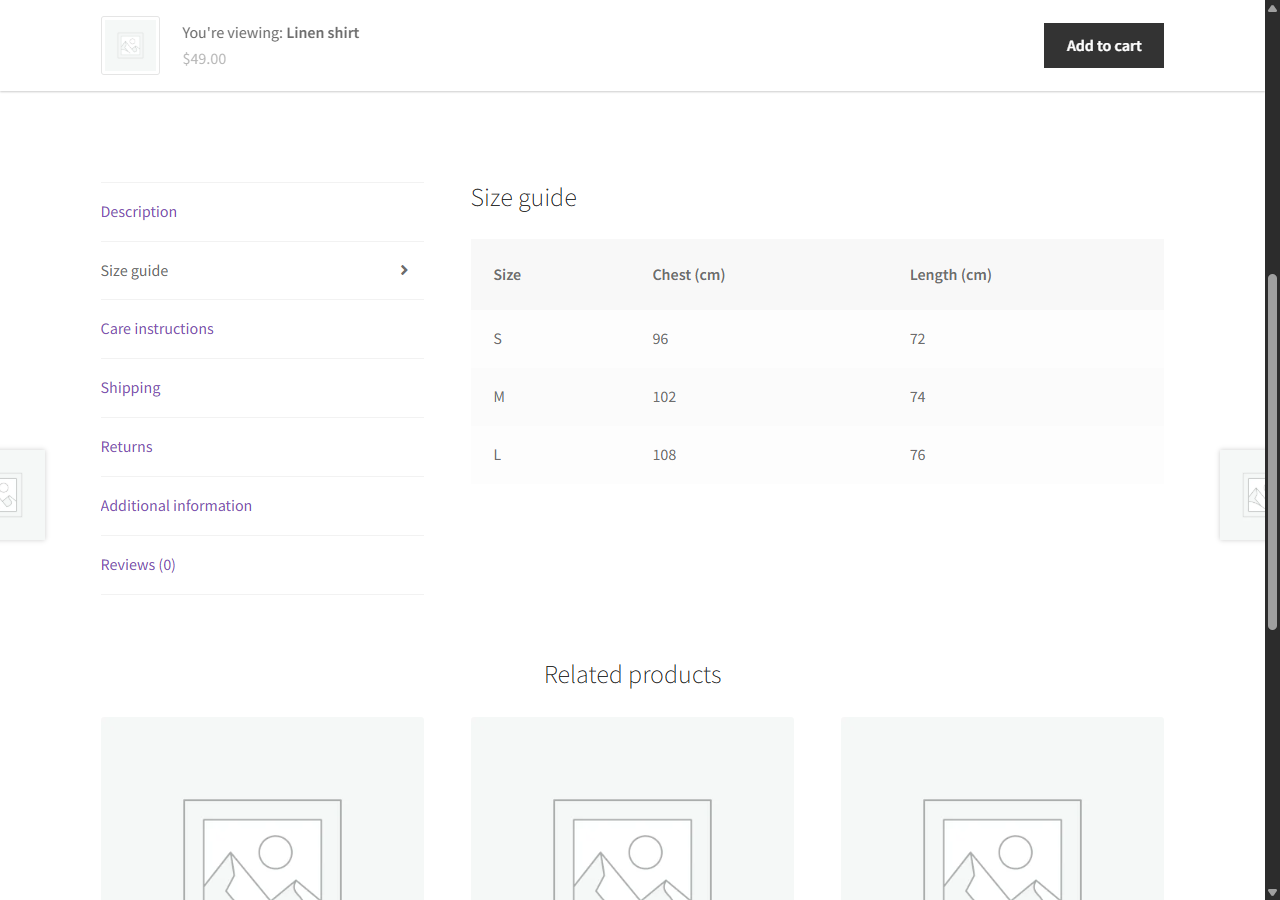
ProdTabs adds tabs to your WooCommerce product pages: shipping, size guide, ingredients, warranty, questions and answers, anything your customers ask about. It uses the tabs of your theme, so your product pages keep their look. On phones, the tabs become an accordion that opens on a tap.
Every feature described here is in this free plugin.
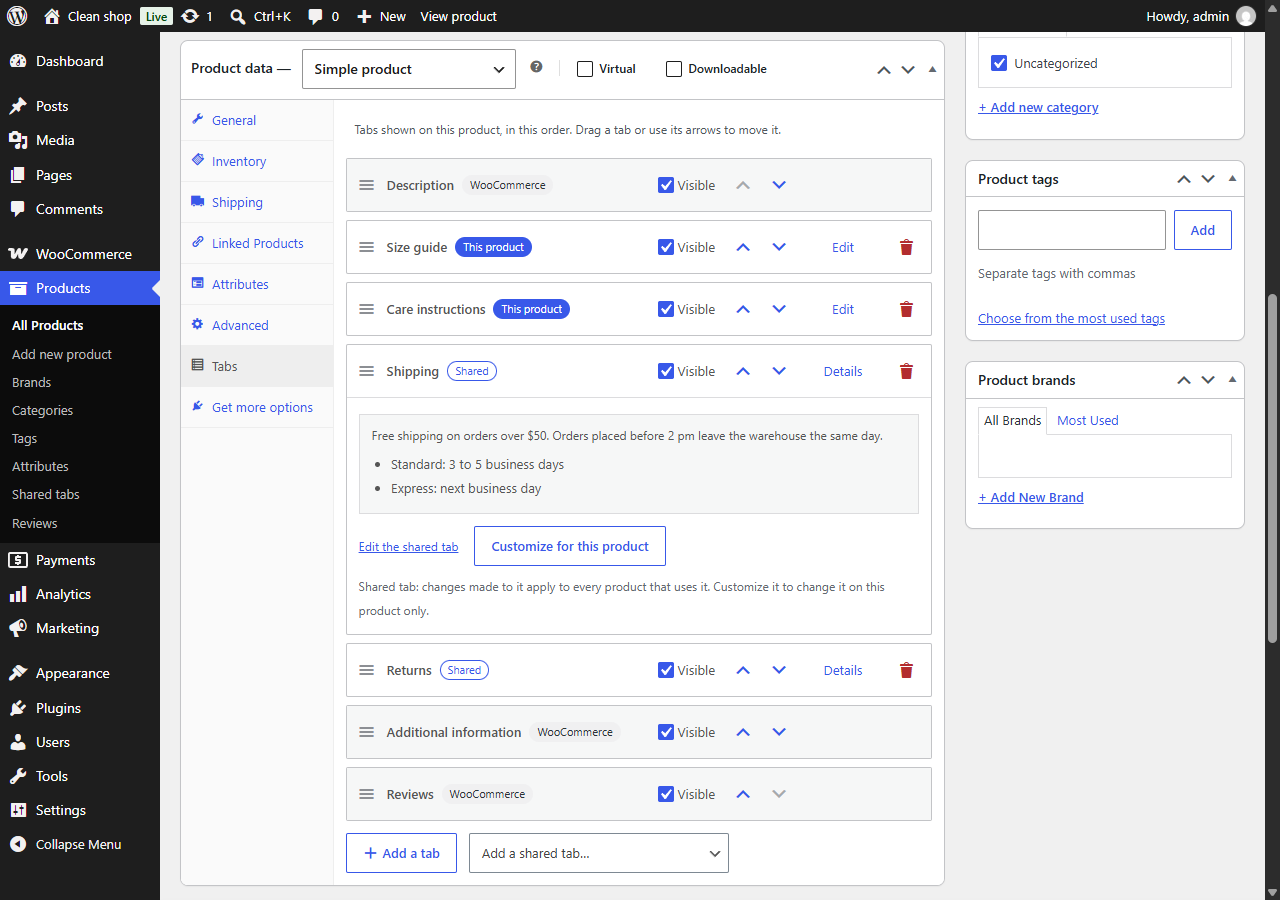
Tabs for each product
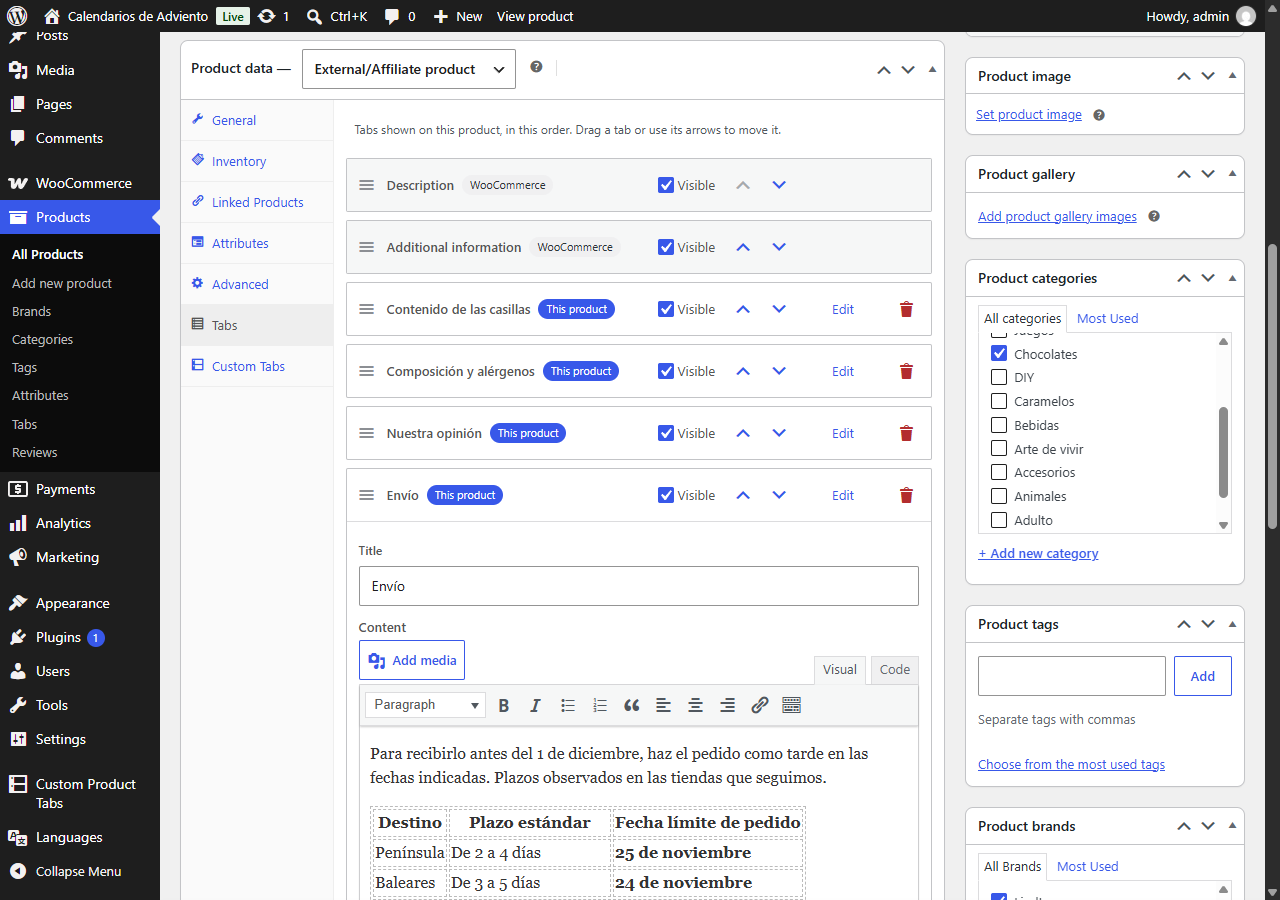
- Add as many tabs as you need to a product, with the WordPress editor: text, images, embeds, shortcodes.
- Put all the tabs of a product in the order you want, WooCommerce tabs included, by drag and drop or with the arrow buttons.
- Hide a tab on one product without deleting it.
- Link straight to a tab:
#tab-shippingat the end of the product address opens the tab.
Shared tabs
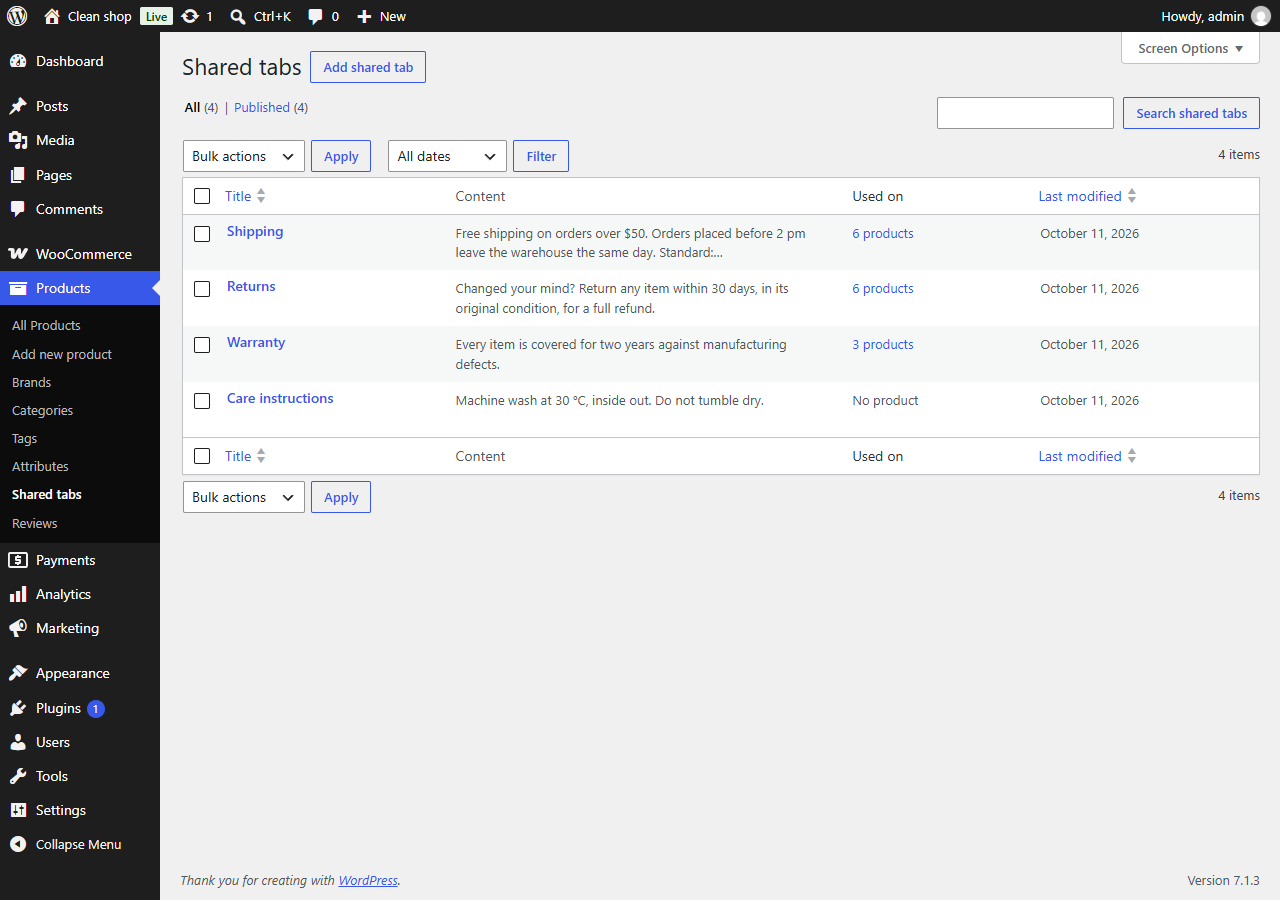
- Write a tab once (shipping, returns, warranty) and add it to as many products as you like.
- Or show it on all your products in one setting. A product can still hide it, or move it.
- Edit it once, with the block editor: every product that uses it is updated.
- Give it a title for the shop and keep another name for yourself.
- Customize a shared tab on one product, and go back to the shared version whenever you want.
- See which products use each shared tab.
The WooCommerce tabs, your way
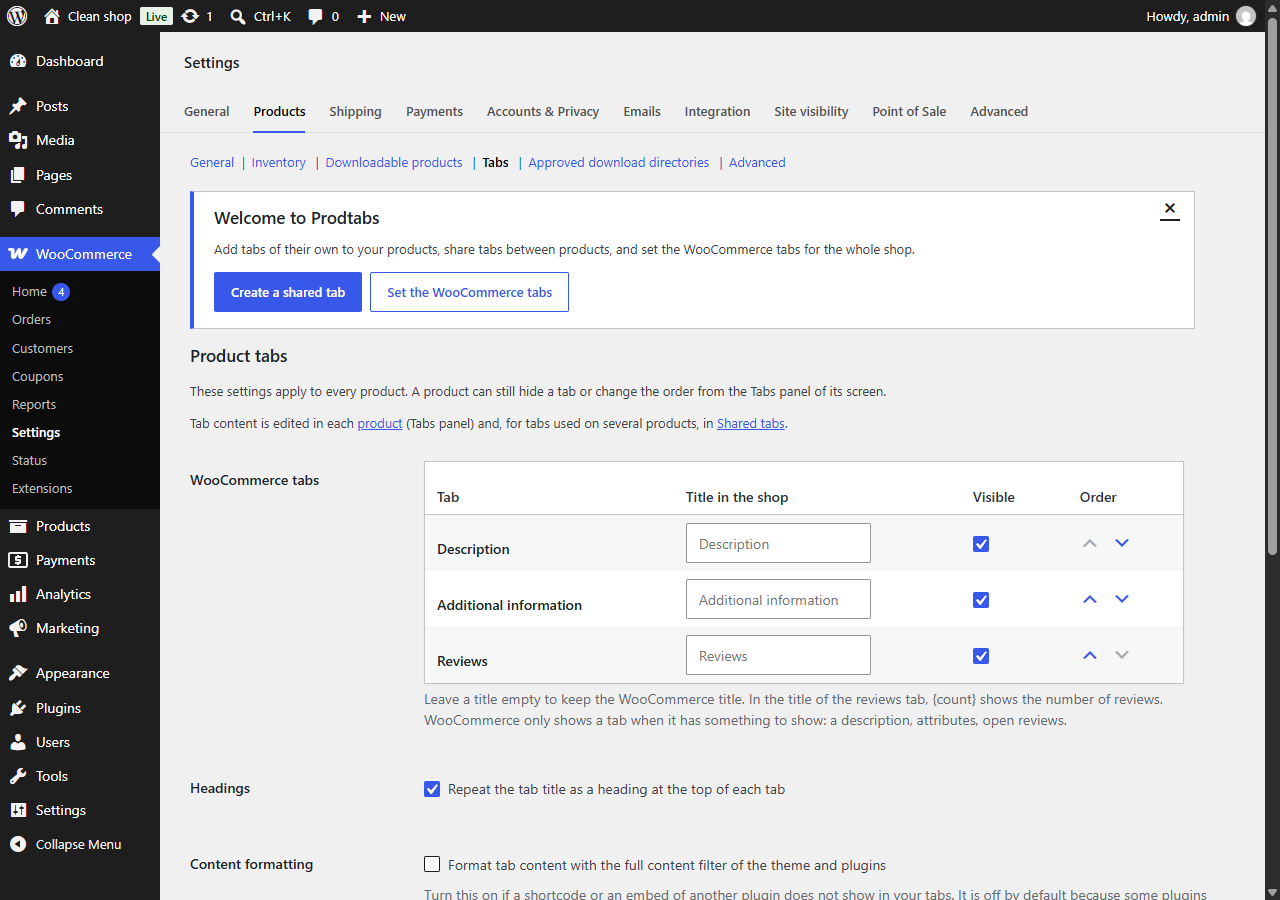
- Rename, hide or reorder Description, Additional information and Reviews for the whole shop.
- Show or hide the heading that repeats the tab title at the top of each tab.
- With the accordion of the Product Details block (block themes), your titles, order and hidden tabs apply too.
Made for phones, search engines and AI assistants
- On phones, the tabs become an accordion: each section opens on a tap and several can stay open. You choose the screen width where it starts, or keep the tabs everywhere.
- Headings and buttons that screen readers and keyboards understand, following the accordion pattern of the W3C.
- Every tab is in the HTML of the page, nothing loads on a click: search engines and AI assistants read all of it. In browsers that support it, a closed section opens when a visitor searches the page for a word it holds.
- A tab with a title and nothing in it is left out of the page.
Multilingual for real
ProdTabs is built for shops in several languages.
- WPML and WooCommerce Multilingual: a
wpml-config.xmlfile is included. The list of tabs is copied to every language; the titles and texts of the tabs are what you translate, tab by tab. Texts are stored by tab, not by position, so reordering tabs does not change them. Tested with WPML 5.2, String Translation and WooCommerce Multilingual 5.7. - Polylang: Polylang reads the same file. The list of tabs stays the same in every language, wherever you change it, and each language keeps its own texts. With Polylang Pro, the tab texts follow the description: “Duplicate content” and the bulk translation “Copy” copy them, synchronized products keep them the same in every language, and machine translation translates them with the rest of the product. Tested with Polylang 3.8, Polylang Pro 3.9 and Polylang for WooCommerce 2.2.
- Shared tabs are translated like your posts. A translated product shows the translated shared tab, or the original one until it is translated.
- A text not translated yet shows in the original language instead of disappearing, or stays hidden until it is translated if you prefer. The overview counts the tabs left to translate in each language.
- Links to a tab (
#tab-shipping) are the same in every language. - The titles you give to the WooCommerce tabs are translated in WPML String Translation or in Polylang’s Translations screen.
- TranslatePress and Weglot translate tabs on the page, like the rest of your content: everything is in the page, nothing is loaded later. Tested with TranslatePress 3.3 and Weglot 6.4.
Moving from Custom Product Tabs (YIKES)
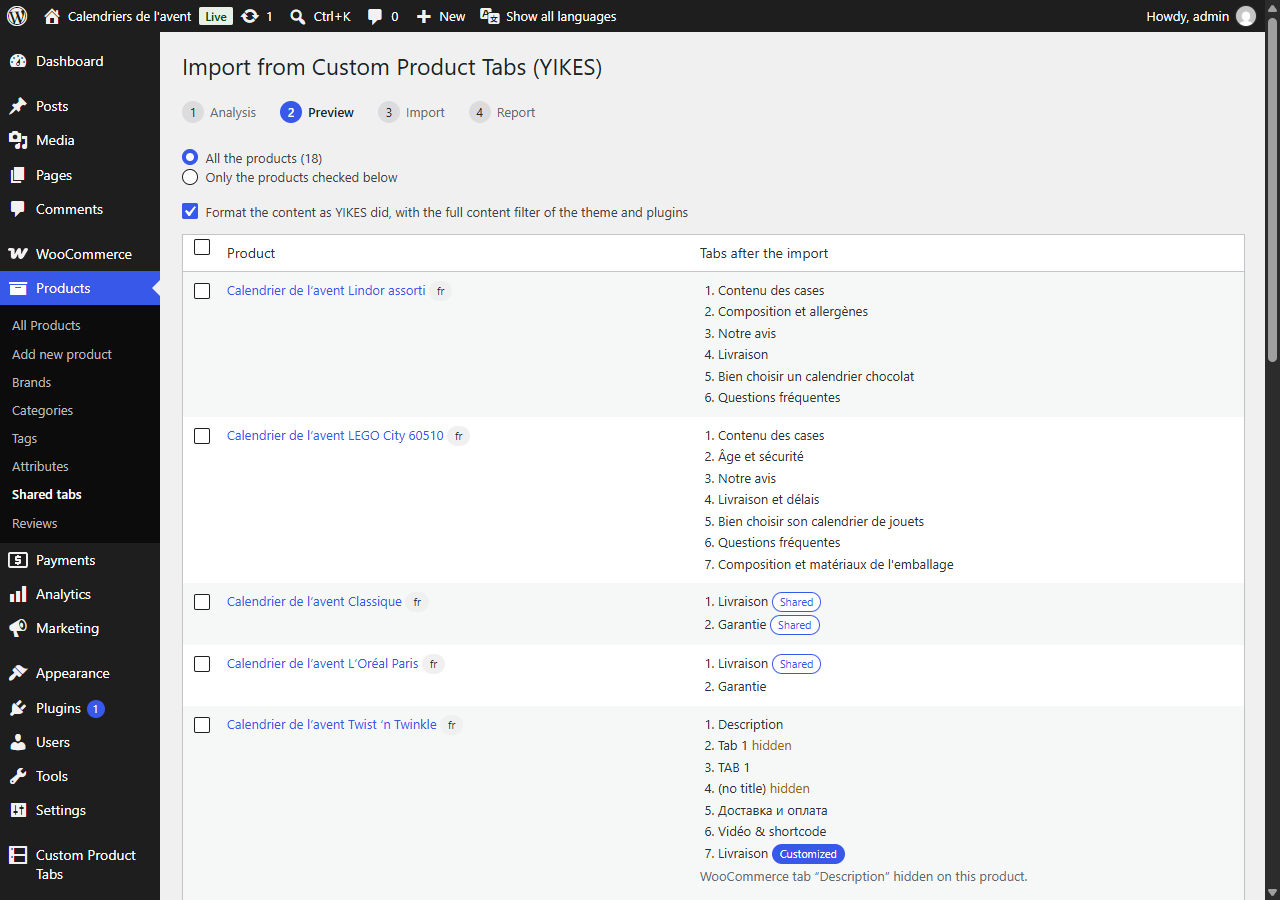
- ProdTabs finds the tabs of Custom Product Tabs for WooCommerce and imports them: the tabs of each product, and the saved tabs, which become shared tabs.
- An analysis and a preview come first, then the import runs in batches and resumes if you close the page. A report lists what to check.
- Your products keep their look: same tabs, same order, same links to tabs. Tabs that YIKES did not show (two tabs with the same title, tabs without a title) are imported hidden, so that you can check them.
- On a multilingual site, a product and its translations are imported together, and saved tabs written once per language become one shared tab with its translations.
- Customizations made for YIKES in your theme keep working: ProdTabs applies its filters and classes to the imported tabs.
- YIKES can stay active during the move: once a product is imported, its YIKES tabs are no longer shown, so nothing appears twice.
- The data of Custom Product Tabs is never changed or deleted, and the import can be run again.
- Changed your mind? Undo the import in one click: the imported products get back what they had before, and show the YIKES tabs again while YIKES is active.
Tabs anywhere
- The
[prodtabs]shortcode shows the tabs of a product where you want them: in a theme or a page builder that does not show the WooCommerce tabs, or on another page with[prodtabs product="123"]. - One tab on its own, without the tab titles:
[prodtabs tab="shipping"](the anchor of the tab, #tab-shipping), for a size guide in a page or shipping terms next to the price.title="no"leaves its heading out. - A shared tab on its own, on any page and in the language of the page:
[prodtabs shared="45"]. - No guessing: each tab shows its shortcode, ready to copy, in the Tabs panel of the product, and each shared tab on its own screen. The overview sums it up.
- The same in the block editor with the “Product tabs (ProdTabs)” block, previewed as the shop shows it. In a product template, a Single Product block or a product list, it takes the product from there.
Moving to another site
- The product CSV export and import of WooCommerce keep your tabs, and the links to shared tabs hold from one site to another (staging to production): each shared tab goes out with a reference and comes back pointing to the same shared tab on the other site.
- The WordPress export and import (Tools > Export, then Tools > Import > WordPress) carry the shared tabs, and the imported products are pointed to them, whatever the order of the files.
- A shared tab that cannot be found on the new site is left out of the product, never replaced by another one, and a notice tells you to import the shared tabs first.
Works with your setup
- Classic themes and block themes, including the Product Details block of WooCommerce. Tested with Storefront and Twenty Twenty-Five.
- Elementor: a product whose description is built with Elementor keeps its tabs, in the shop and in the Elementor editor.
- Compatible with High-Performance Order Storage (HPOS) and the cart and checkout blocks.
- Accessible: tabs can be reordered with the keyboard, screen readers announce the changes, right-to-left languages are supported.
- Ready for translation: the admin screens are translated on translate.wordpress.org and delivered as language packs. Translate ProdTabs into your language: once your translation is approved, write to us and get a one-year ProdTabs Premium license for one site.
- WP-CLI commands for large shops:
wp prodtabs import-yikesandwp prodtabs list. - Cache plugins: when a shared tab or the settings change, the product pages concerned are purged in LiteSpeed Cache, WP Rocket, W3 Total Cache, WP Super Cache and WP Fastest Cache.
- Your tabs survive the product CSV export and import of WooCommerce: check “Export custom meta” when exporting, and they come back as they were.
- An overview of your shop: WooCommerce tabs, shared tabs, products with tabs, languages, and what Custom Product Tabs left behind. A support report, ready to copy, lists versions, settings and active plugins when you ask for help.
- No ads in your dashboard, no tracking.
ProdTabs Premium
A separate plugin, sold on refficience.com, adds FAQ tabs with FAQPage structured data, shared tabs by category, tag or brand, bulk actions in the product list, tab texts in a spreadsheet (one column per language), tab layouts, product search that finds words in tabs, and the text of your tabs in the content analysis of Yoast SEO and Rank Math. This free plugin works on its own and nothing in it is locked.
Support
Ask in the support forum of this plugin, or use the support form.
Privacy
ProdTabs does not track you, shows no ads and contacts no server by itself. The support links of the overview open the support form on refficience.com with the ProdTabs versions and, with the “Contact support with this report” button, a technical report: versions, settings, theme, active plugins and the address of the site, never customer data. Both are written after the # of the address, a part your browser does not send to any server. The form shows you the report and lets you leave it out; refficience.com receives them only when you send your message.
Installation
- Install and activate ProdTabs from Plugins > Add New, or upload the plugin folder to
/wp-content/plugins/. WooCommerce must be active. - Edit a product and open the Tabs panel of the Product data box.
- Manage shared tabs under ProdTabs > Shared tabs.
- Set the WooCommerce tabs under WooCommerce > Settings > Products > Tabs.
- Coming from Custom Product Tabs (YIKES)? Follow the notice, or open WooCommerce > Settings > Products > Tabs > Tools.
Changelog
0.4.8
- Polylang Pro: “Duplicate content”, the bulk translation “Copy” and synchronized products now carry the tab texts, like the description.
- A tab translated in part (title only, or content only) shows the original text for the missing part, marked as not translated.
- Product screen: a warning icon next to Tabs when tabs are left to translate. The panel marks shared tabs without a translation, and tabs without a title or content, which the shop does not show.
- Overview: the number of products with tabs updates as soon as tabs are added or removed.
0.4.7
- Translators can give the import step and the “Import” row of the settings a noun, separate from the Import button, and the editor of a new shared tab its own title.
- The punctuation of the shared tabs sentence of the overview can be translated, for languages with their own comma and period such as Japanese or Chinese. The heading above the undo of the import now reads “Not what you expected?”.
- Overview: the shortcodes of the “Tabs anywhere” card fold away, the WooCommerce tabs card has its own icon, and the ProdTabs Premium card states the price for one shop.
- Overview: in an admin language ProdTabs is not translated into yet, a line explains how to translate it, with a ProdTabs Premium license offered to translators.
0.4.6
- The shortcode and the block show the original product or shared tab again while its translation in the language of the page is not published, and a shared tab shown on all products no longer disappears when its translation in the default language is not published (both broken in 0.4.5).
- With WPML, pages that contain [prodtabs] are no longer turned into strings to translate, and the language no longer stays on “all languages” for the rest of a request after a translation is saved.
- With Polylang, a new translation no longer copies the tab texts: it shows the original, marked as not translated, until its texts are typed. “Hide untranslated tabs”, the overview counts and the FAQ data treat these tabs as untranslated.
- The support report and the versions travel after the # of the address: refficience.com receives them only when you send the form.
- Import from Custom Product Tabs (YIKES): a product whose tabs only hide or order WooCommerce tabs keeps its YIKES tabs and is imported; a saved tab applied twice stays visible; “Undo the import” gives a product imported again, and its translations, what they had before the first import, keeps the shared tabs they use and puts back the settings the import changed; a copy made with Duplicate is no longer treated as imported; on a network, the import no longer deactivates Custom Product Tabs on every site; the YIKES compatibility has its own setting under Tools.
wp prodtabs import-yikesrefuses a--productsvalue without a valid ID instead of importing the whole catalog.- A Single Product block placed on a page keeps Additional information and Reviews in its accordion. A shortcode or block that shows another product inside a tab shows that product’s tabs, and no longer replaces an accordion item.
- The shortcode offered for a tab titled with a number, such as 2024, works. [prodtabs shared] on a product page fills in the dynamic content of ProdTabs Premium and keeps untranslated questions out of the FAQ data.
- Emptying every text of a translation shows the original again. Bulk changes reach WPML translations at once.
- When a product changes, the pages of its translations that show its texts are purged too, and a scheduled shared tab purges the pages that use it when it goes live.
- Bulk changes no longer remove embeds from tab texts when they are made by a user without the unfiltered_html capability.
- Importing shared tabs then products with the WordPress importer works under WP-CLI and on a network, and a file from an unknown site no longer keeps the IDs of another site.
- On large multilingual shops, the overview counts shared tabs and untranslated tabs correctly, and no shared tab shown on products is left out.
- Saving a shared tab while ProdTabs Premium is not active keeps its “Show on” setting, and backslashes in the shop title of a shared tab are kept.
- A FAQ of ProdTabs Premium keeps its questions when its row is moved in the Tabs panel.
0.4.5
- With WPML, a shared tab shown on all products no longer appears twice to visitors on translated products.
- The shortcode and the block show the product in the language of the page, with WPML and Polylang.
- The overview counts a shared tab and its translations once.
- WPML now points the product and shared tab IDs of the [prodtabs] shortcode to their translations when it translates a page.
- Thanks to the WPML compatibility team for testing ProdTabs and reporting these.
0.4.4
- The “Contact support with this report” button opens the support form with the report attached: you see it there, and it is sent only with your message.
0.4.3
- Support information in the overview: versions, settings, theme and active plugins in one report, to copy into a support request. Nothing is sent automatically.
Screenshots
For developers
Is this your plugin? Show off the numbers.
Add a live badge to your site, docs or GitHub README. It updates on its own — no account needed.
Best ProdTabs: Multilingual Produc… alternatives
All custom tabs plugins →


FAQ
ProdTabs: Multilingual Product Tabs…: quick answers
Straight answers, pulled from live WordPress.org data.
Live data from WordPress.org · checked Nov 16, 2026
Is ProdTabs: Multilingual Product… free?
Yes. ProdTabs: Multilingual Product… is free to download and use from the official WordPress.org plugin directory.
Is ProdTabs: Multilingual Product… safe to use in 2026?
ProdTabs: Multilingual Product… is a solid plugin choice in 2026, with a few things worth checking first. Is rated 5/5 and was last updated 3 days ago, and scores 71/100 on our health check.
How many websites use ProdTabs: Multilingual Product…?
ProdTabs: Multilingual Product… is active on <10 WordPress websites and has been downloaded 284 times since it launched in October 2026. It was downloaded 301 times in the last 30 days.
Does ProdTabs: Multilingual Product… work with WordPress 7.1?
Yes. The developer has tested ProdTabs: Multilingual Product… up to WordPress 7.1.4, the latest release. It requires WordPress 6.5 or newer.
What PHP version does ProdTabs: Multilingual Product… need?
ProdTabs: Multilingual Product… requires PHP 7.4 or higher. Most hosts run PHP 8.x today, so it works on any modern WordPress hosting.
When was ProdTabs: Multilingual Product… last updated?
The latest version, 0.4.8, was released on November 13, 2026 (3 days ago).
Who makes ProdTabs: Multilingual Product…?
ProdTabs: Multilingual Product… is developed and maintained by Thomas SOUDAZ.
What are the best alternatives to ProdTabs: Multilingual Product…?
The most popular alternatives to ProdTabs: Multilingual Product… are AffiliateWP (3K+ installs), WPC Product Tabs for WooCom… (800+ installs) and Custom Tabs for BuddyPress (10+ installs).
Powered by PageForge
Want thousands of pages that rank like these? Build them in an afternoon.
This directory runs on the same engine as PageForge. Turn any spreadsheet, CSV or API into thousands of fast, SEO-ready WordPress pages — with schema, internal links and AI-written copy baked in.
- CSV, Google Sheets & API data sources
- AI content, schema & internal links per page
- Works with Elementor, Gutenberg, Yoast & Rank Math
- Free on WordPress.org — no credit card


