



AffiliateWP – Affiliate Area Tabs
Add and reorder tabs in AffiliateWP's Affiliate Area

Solid choice
AffiliateWP is a solid plugin choice in 2026, with a few things worth checking first. It runs on 3K+ sites, is rated 5/5 and was last updated 2 weeks ago, and scores 78/100 on our health check.
- Actively developed — last update 2 weeks ago
- Tested with the latest WordPress (7.1)
- Momentum — downloads up 500.9% vs the previous 30 days
- Very few reviews so far
How does it stack up?
Side-by-side on installs, updates, ratings & support

Daily downloads
Download spikes usually follow a new release — each site that auto-updates counts as a download.
Rankings
Where AffiliateWP stands todayWordPress.org search rankings
Live position in the plugin search, top 100| Keyword | Position |
|---|---|
| affiliate area | #1 |
| affiliate dashboard | #4 |
| AffiliateWP | #1 |
| custom tabs | #10 |
Version adoption
Share of active sites per release.
Rating breakdown
★★★★★★★★★★ 5 from 1 reviews
About AffiliateWP – Affiliate Area Tabs
From the official readme · v1.4.4Description
This plugin requires AffiliateWP in order to function.
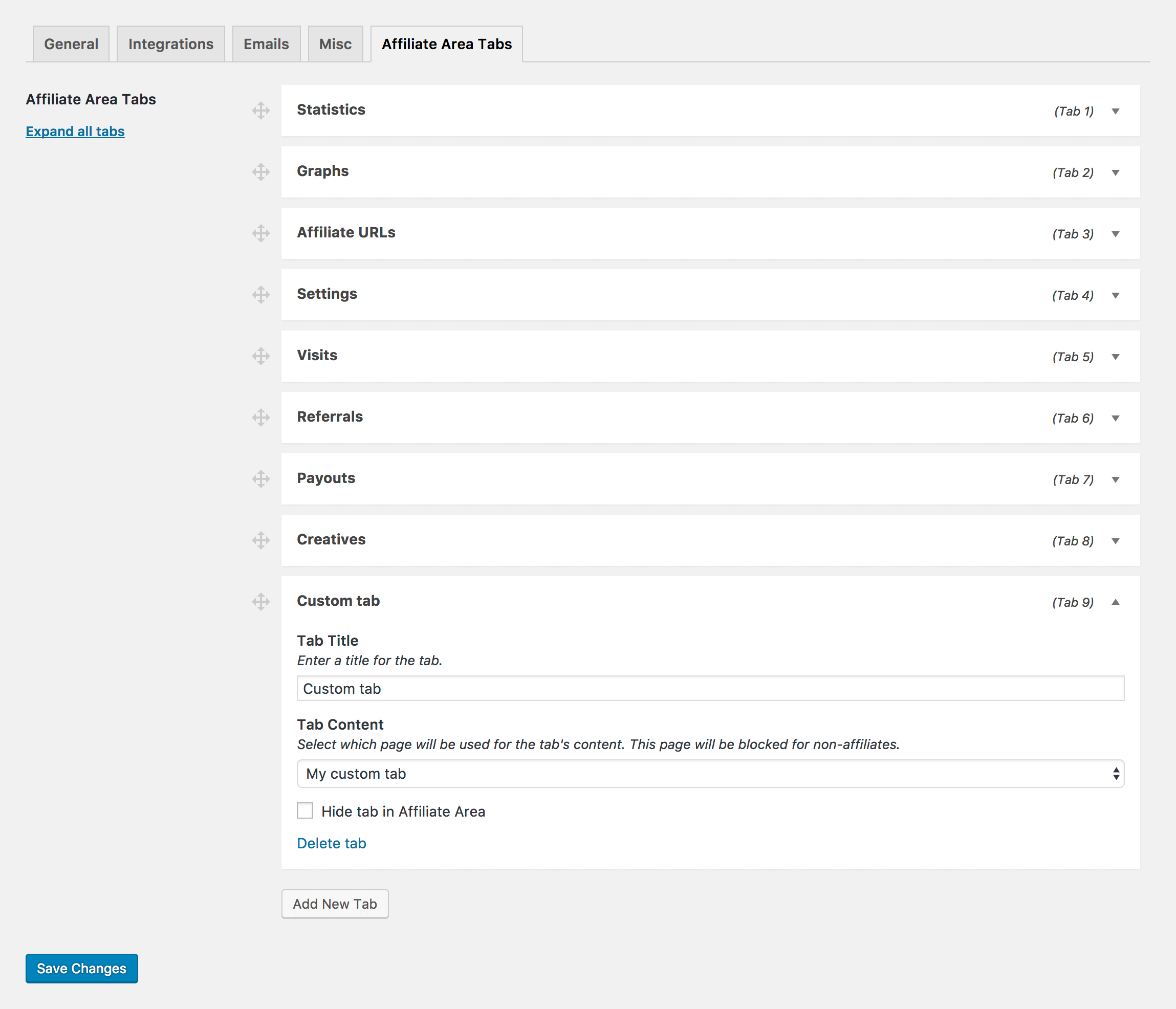
Affiliate Area Tabs allows you to add custom tabs to AffiliateWP’s Affiliate Area. Each tab is linked to a WordPress page making it exceptionally easy to add and manage the tab’s content. Pages assigned to a tab are only viewable to affiliates.
Affiliate Area Tabs allows you to:
- Add new custom tabs to your Affiliate Area
- Reorder any tab via drag and drop
- Hide tabs from appearing on the front-end Affiliate Area
- Manage tabs added by other AffiliateWP add-ons (Direct Link Tracking, Show Affiliate Coupons, Order Details For Affiliates)
Here are just some of the things you could do:
- Add a “Request Payout” tab and then insert a form. Your affiliates can now request that they be paid at any time.
- Add a “Contact” tab and insert a contact form. Your affiliates can now contact you from the Affiliate Area.
- Add a “FAQs” tab and insert some common questions and answers for your affiliates.
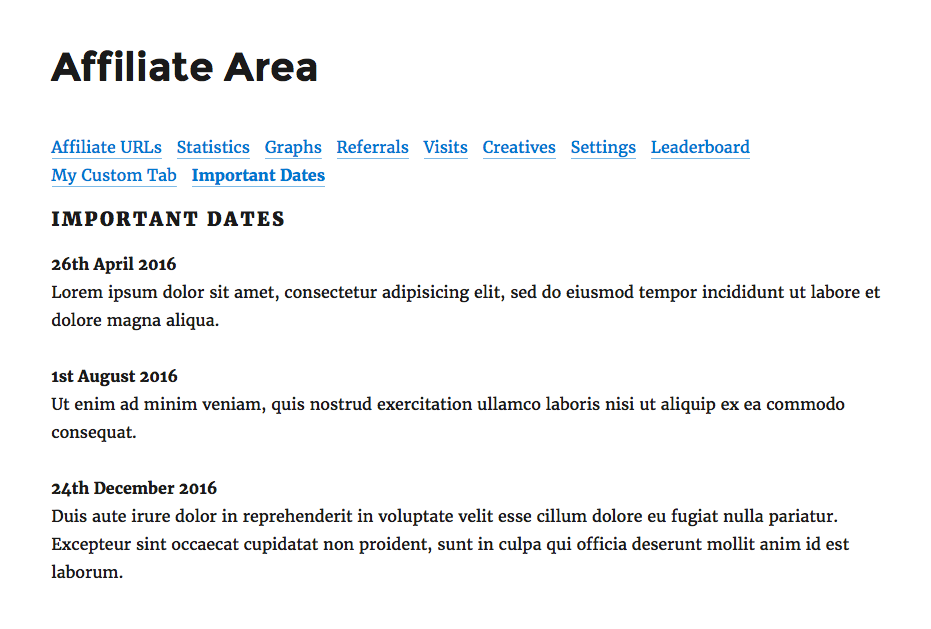
- Add an “Important Dates” tab and list some special dates and promotions for your affiliates to remember.
- Add a “URLs” tab and list some special URLs (landing pages or product pages) for your affiliates. You can even show their own referral URL using AffiliateWP’s [affiliate_referral_url] shortcode.
- Add a “Leaderboard” tab and insert an affiliate leaderboard, using the AffiliateWP Leaderboard plugin.
- Add a “News” tab and share important news with your affiliates (or link to other blog posts).
- Add an “Affiliate Brand Assets” or “Downloadables” tab, and add documents or images from your WordPress Media Library that don’t suit the existing Creatives tab.
What is AffiliateWP?
AffiliateWP provides a complete affiliate management system for your WordPress website that seamlessly integrates with all major WordPress e-commerce and membership platforms. It aims to provide everything you need in a simple, clean, easy to use system that you will love to use.
Installation
- Unpack the entire contents of this plugin zip file into your
wp-content/plugins/folder locally - Upload to your site
- Navigate to
wp-admin/plugins.phpon your site (your WP Admin plugin page) - Activate this plugin
- Go to Affiliates → Settings → Affiliate Area Tabs to configure the tabs (or removing the existing ones)
- View the new tabs by visiting the Affiliate Area page on the front-end of your website. This is the page defined as the “Affiliate Area” at Affiliates → Settings → General
OR you can just install it with WordPress by going to Plugins >> Add New >> and type this plugin’s name
Changelog
1.4.4
- Changed: Strengthened security across the plugin
- Fix “Expand all tabs” link on settings page
1.4.2
- Fix: Unable to click the “Expand all tabs” link
1.4.1
- Improved: Our settings have been re-organized to be more intuitive (intended to be used with AffiliateWP 2.18.0)
1.4
- New: Requires WordPress 5.2 minimum
1.3
- New: Enforce minimum dependency requirements checking
- New: Requires PHP 5.6 minimum
- New: Requires WordPress 5.0 minimum
- New: Requires AffiliateWP 2.6 minimum
- Improved: Tested up to WordPress 5.7
1.2.9
- Fix: Unable to hide Coupons tab with AffiliateWP v2.6
- Fix: Custom tabs not displaying dynamic blocks
Screenshots
For developers
Is this your plugin? Show off the numbers.
Add a live badge to your site, docs or GitHub README. It updates on its own — no account needed.



Best AffiliateWP alternatives
All affiliate area plugins →FAQ
AffiliateWP – Affiliate Area Tabs: quick answers
Straight answers, pulled from live WordPress.org data.
Live data from WordPress.org · checked Nov 11, 2026
Is AffiliateWP free?
Yes. AffiliateWP is free to download and use from the official WordPress.org plugin directory.
Is AffiliateWP safe to use in 2026?
AffiliateWP is a solid plugin choice in 2026, with a few things worth checking first. It runs on 3K+ sites, is rated 5/5 and was last updated 2 weeks ago, and scores 78/100 on our health check.
How many websites use AffiliateWP?
AffiliateWP is active on 3K+ WordPress websites and has been downloaded 75,984 times since it launched in April 2016. It was downloaded 2,644 times in the last 30 days.
Does AffiliateWP work with WordPress 7.1?
Yes. The developer has tested AffiliateWP up to WordPress 7.1.4, the latest release. It requires WordPress 5.2 or newer.
What PHP version does AffiliateWP need?
AffiliateWP requires PHP 7.4 or higher. Most hosts run PHP 8.x today, so it works on any modern WordPress hosting.
When was AffiliateWP last updated?
The latest version, 1.4.4, was released on October 27, 2026 (2 weeks ago).
Who makes AffiliateWP?
AffiliateWP is developed and maintained by Syed Balkhi.
What are the best alternatives to AffiliateWP?
The most popular alternatives to AffiliateWP are Affiliate Area Shortcodes b… (2K+ installs) and AffiliateWP (1K+ installs).
Powered by PageForge
Want thousands of pages that rank like these? Build them in an afternoon.
This directory runs on the same engine as PageForge. Turn any spreadsheet, CSV or API into thousands of fast, SEO-ready WordPress pages — with schema, internal links and AI-written copy baked in.
- CSV, Google Sheets & API data sources
- AI content, schema & internal links per page
- Works with Elementor, Gutenberg, Yoast & Rank Math
- Free on WordPress.org — no credit card