


PostNotify – Email Notification to Press Office, Client or Author on Publish
Email the press office, client or author the moment their post goes live, with the direct link. No newsletter, no list: one recipient per post.

Use with caution
PostNotify works, but test it on a staging site before relying on it in 2026. Was last updated 2 months ago, and scores 60/100 on our health check.
- Tested with the latest WordPress (7.1)
- Small user base (<10 active installs)
- Very few reviews so far
How does it stack up?
Side-by-side on installs, updates, ratings & support



Daily downloads
Download spikes usually follow a new release — each site that auto-updates counts as a download.
Rankings
Where PostNotify stands todayWordPress.org search rankings
Live position in the plugin search, top 100| Keyword | Position |
|---|---|
| email notification | >100 |
| notify author | >100 |
| post notification | >100 |
| press release | >100 |
| publish notification | >100 |
About PostNotify
From the official readme · v1.0.5Description
Who is waiting for that article? A press office that sent you a press release, a client who paid for a sponsored post, a guest author, a colleague. PostNotify emails them automatically the moment the post is published, with the title and the direct link — so you no longer have to write “it’s online, here is the link” by hand every time.
PostNotify is not a newsletter plugin and does not manage subscriber lists. You choose the recipient post by post, right in the editor.
It was born in the newsroom of Oblò.it, an Italian online magazine since 1998, where it notifies press offices every day that their press releases have been published.
Who it is for
- Online magazines and news sites: tell press offices and agencies their press release is online, so they share the link while the news is fresh.
- Press offices and PR agencies running their own site: notify the client as soon as an article goes live.
- Companies: inform a partner, a client or another office when you publish a news item.
- Multi-author blogs: let guest authors know their post has been published.
- Associations: notify a board member or a partner organisation about a new announcement.
How it works
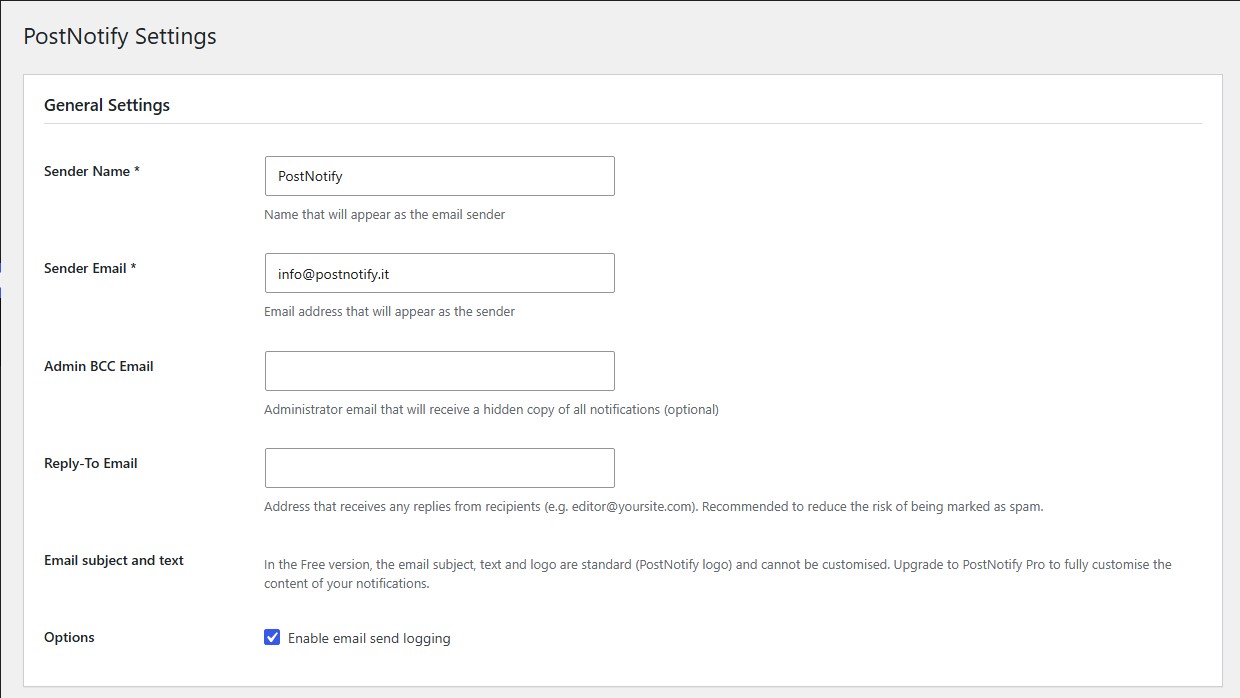
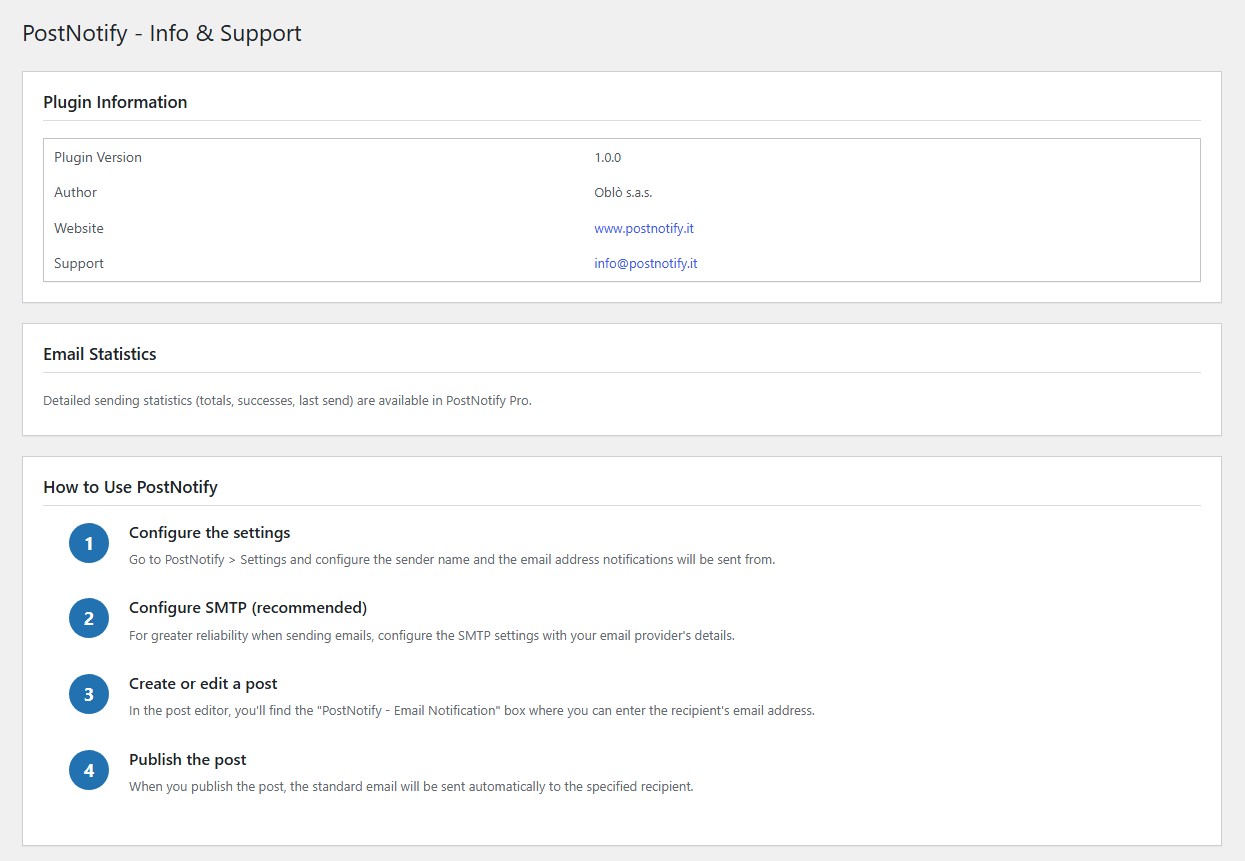
- Set the sender name and email (SMTP optional but recommended).
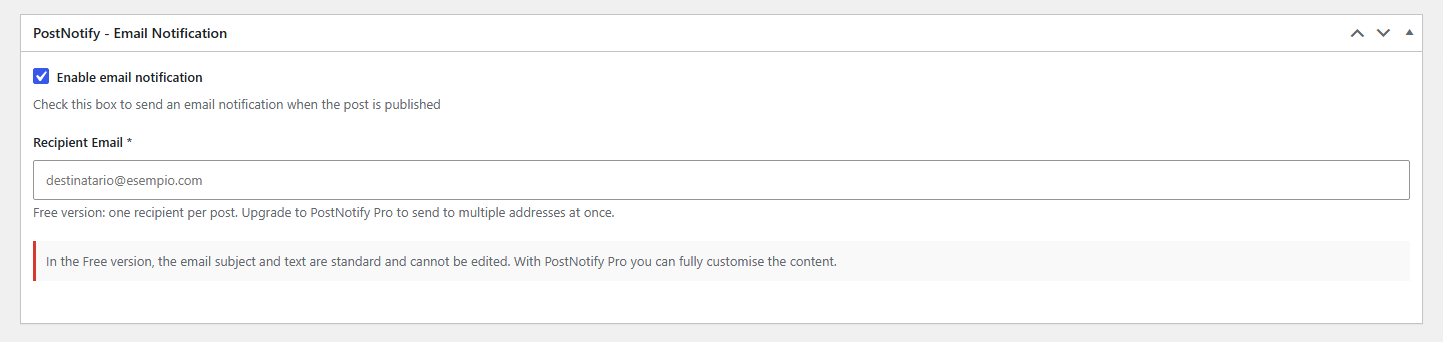
- Write your post and enter the recipient’s address in the PostNotify box.
- Publish: the notification email is sent automatically, once.
Free version features
- Automatic email when a post is published
- One recipient per post, set in the post editor
- On/off switch for each post
- Courtesy copy to the administrator, to check that every notification was sent
- Reply-To address, so replies reach the right inbox
- Send log directly in the post editor
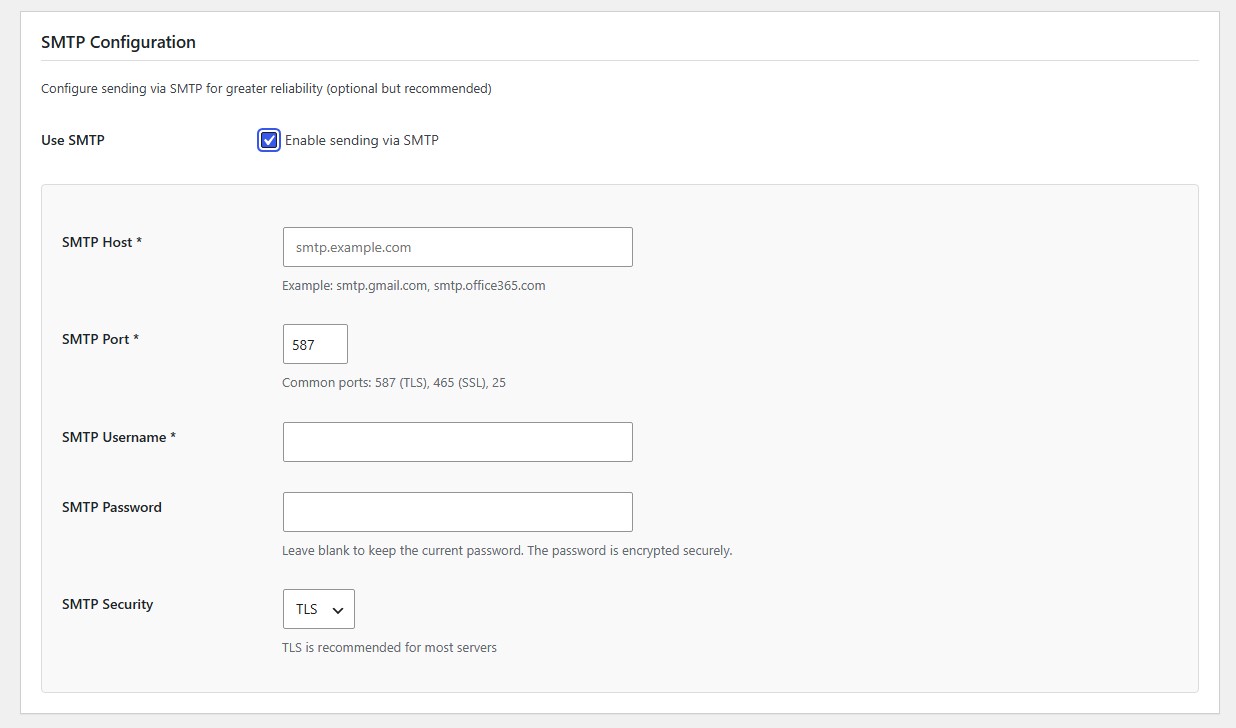
- SMTP support with encrypted password and a built-in test email
- Your site name in the email header, so the message looks like it comes from your site
- Standard subject and text with automatic title and link
- Works with the block editor and the Classic editor
- No external services: emails are sent by your own site
- Available in English and Italian, translatable on translate.wordpress.org
PostNotify Pro
Need more? PostNotify Pro adds:
- Multiple recipients for each post, in BCC (nobody sees the other addresses)
- Custom subject and text for each post
- Your own logo in the email
- Sending statistics: emails sent, failed, success rate and last send
- Licences for 1 site, 3 sites or unlimited sites. Licences are permanent; updates and support are included for 12 months.
Do you like PostNotify? Leave a review on WordPress.org: it helps other users find it.
Template variables (used in the standard text)
- [titolo_articolo] – Post title
- [link_articolo] – Direct link to the post
- [link_homepage] – Link to the homepage
- [firma] – Signature with sender name
Support
For technical support or bug reports:
* Support forum on WordPress.org
* Email: info@postnotify.it
* Website: https://www.postnotify.it
Credits
Developed by Oblò s.a.s. — website: https://www.postnotify.it — email: info@postnotify.it
Installation
- From your WordPress dashboard go to Plugins > Add New, search for “PostNotify” and click Install, then Activate.
- Go to PostNotify > Settings and set the sender name and email.
- (Optional but recommended) Configure SMTP and send a test email.
- When writing a post, enter the recipient in the PostNotify box and publish.
Changelog
1.0.5 – 2026-10-11
- Improvement: in the block editor the PostNotify box now appears in the sidebar, so it is always visible (before it was collapsed at the bottom of the page). It also appears in the sidebar of the Classic editor.
- Fix: the SMTP settings of PostNotify now apply only to PostNotify emails, no longer to every email sent by the site (password resets, shop and contact form emails).
- Fix: in the block editor the notification is sent to the recipient written in the box at the moment of publishing, and a false “no recipient” error is no longer logged.
- Fix: SMTP passwords containing special characters (for example “<” or “%”) are now saved correctly.
- Fix: outdated texts about the logo in the email (since 1.0.4 the header shows the site name).
- New: a box in the Info page to leave a review and discover PostNotify Pro, and a one-time thank-you notice after the first notifications (it can be closed for good).
- Tested up to WordPress 7.1
- Code cleanup: removed unused files and code
1.0.4 – 2026-08-11
- Change: notification emails now show the site name in the header instead of the PostNotify logo, so each message looks like a communication from your own site. A discreet PostNotify credit remains in the footer.
- No other functional changes
1.0.3 – 2026-07-27
- Internationalization: source strings are now in English (WordPress.org standard), with the full Italian translation shipped in the plugin (it_IT) — Italian sites see exactly the same texts as before
- Added the translation template (POT file) so the plugin can be translated into any language via translate.wordpress.org
- No functional changes
1.0.2 – 2026-07-20
- New: dashboard notice when the plugin configuration is incomplete (dismissible, with a direct link to the settings page)
- New: dashboard notice when a post is published with sending enabled but no recipient set, so missed notifications are no longer silent
- New: quick links in the Plugins list — Settings, Support and Rate the plugin
- Fix: brand color consistency in the post editor metabox
1.0.1 – 2026-07-12
- Internal code cleanup: renamed internal function/class/option/hook names to use a more distinctive “pnot” prefix, avoiding the generic word “post” (no user-facing changes)
1.0.0 – 2026-07-08
- First public release of the Free version
- Automatic email on post publish
- One recipient per post
- Standard email subject and text with dynamic variables
- PostNotify logo in the email header
- SMTP configuration with encrypted password (OpenSSL)
- Built-in SMTP send test
- Security: XSS/CSRF protection, input validation and sanitization
Screenshots

For developers
Is this your plugin? Show off the numbers.
Add a live badge to your site, docs or GitHub README. It updates on its own — no account needed.
Best PostNotify alternatives
All email notification plugins →





FAQ
PostNotify: quick answers
Straight answers, pulled from live WordPress.org data.
Source: WordPress.org
Is PostNotify free?
Yes. PostNotify is free to download and use from the official WordPress.org plugin directory.
Is PostNotify safe to use in 2026?
PostNotify works, but test it on a staging site before relying on it in 2026. Was last updated 2 months ago, and scores 60/100 on our health check.
How many websites use PostNotify?
PostNotify is active on <10 WordPress websites and has been downloaded 581 times since it launched in July 2026. It was downloaded 108 times in the last 30 days.
Does PostNotify work with WordPress 7.1?
Yes. The developer has tested PostNotify up to WordPress 7.1.5, the latest release. It requires WordPress 5.8 or newer.
What PHP version does PostNotify need?
PostNotify requires PHP 7.4 or higher. Most hosts run PHP 8.x today, so it works on any modern WordPress hosting.
When was PostNotify last updated?
The latest version, 1.0.5, was released on October 11, 2026 (2 months ago).
Who makes PostNotify?
PostNotify is developed and maintained by Fuska.
What are the best alternatives to PostNotify?
The most popular alternatives to PostNotify are Waitlist Woocommerce ( Back… (4K+ installs), bbPress Notify (No-Spam) (2K+ installs) and Simple Login Notification (2K+ installs).
Powered by PageForge
One template and a spreadsheet. A real page for every search.
PageForge turns each row of a CSV into a WordPress page with its own title, URL, SEO fields and schema, built on the layout you already designed. Free on WordPress.org.
- CSV and XLSX, plus Google Sheets on Professional and Enterprise
- Its own title, URL, SEO fields and schema for every page
- Works with the block editor, Elementor, Divi and Avada
- Free on WordPress.org, no credit card