



Easy Form Builder by WhiteStudio – Drag & Drop Form Builder
Drag-and-drop WordPress forms with a built-in email delivery test, a tracking code for every entry, multi-step forms and free CSV export.

Safe pick
Yes — Easy Form Builder by WhiteStudio is a safe, well-maintained plugin to use in 2026. It runs on 1K+ sites, is rated 5/5 and was last updated 1 week ago, and scores 91/100 on our health check.
- Loved by users — 5/5 from 70 reviews
- Actively developed — last update 1 week ago
- Tested with the latest WordPress (7.1)
How does it stack up?
Side-by-side on installs, updates, ratings & support



Daily downloads
Download spikes usually follow a new release — each site that auto-updates counts as a download.
Rankings
Where Easy Form Builder by WhiteS… stands todayWordPress.org search rankings
Live position in the plugin search, top 100| Keyword | Position |
|---|---|
| contact form | >100 |
| email notification | >100 |
| form builder | #20 |
| Multi-Step Form | #22 |
| payment form | #37 |
Version adoption
Share of active sites per release.
Rating breakdown
★★★★★★★★★★ 5 from 70 reviews
About Easy Form Builder by WhiteStudio
From the official readme · v4.3.1Description
Easy Form Builder is a comprehensive WordPress form plugin designed to help website owners create, manage, and maintain a wide variety of forms using a visual drag-and-drop form builder interface. The plugin is suitable for users who want to build professional forms without writing code, while still keeping full control over form data, submissions, and communication workflows, including free custom email notification templates with a built-in visual editor.
This form builder plugin can be used to create contact forms, support request forms, survey and feedback forms, payment forms using Stripe, subscription forms and custom login or registration forms for WordPress users. All form data is stored directly on your WordPress website, ensuring transparency, data ownership, and predictable behavior.
Easy Form Builder focuses on clarity, extensibility, and usability. The plugin does not rely on external form services by default and does not send form submissions to third-party servers. This makes it suitable for websites that require clear data handling policies and on-site form management.
What Can This Form Plugin Do?
With Easy Form Builder, you can use a single form plugin to build and manage multiple types of forms and form-based workflows:
- Contact forms for general inquiries
- Support and feedback forms with message tracking
- Survey and poll forms with structured results
- Stripe payment forms for online payments
- PayPal payment forms for collecting online payments
- Login (sign-in) forms for WordPress users
- Registration (sign-up) forms for new users
- File upload forms
- Audio recording forms for collecting voice messages and voice feedback
- Video recording forms for video testimonials and webcam responses
- Screen recording forms for bug reports and support requests
- Private or restricted-access forms
- Multi-step forms for improved usability
- Smart forms with conditional logic that show or hide fields based on user answers
- Electronic signature forms for contracts and agreements
- Location picker forms for address and map selection
- Custom email notification templates with a built-in visual editor
- Job application forms for hiring and recruitment
- Event registration forms for conferences and workshops
- Order forms with recurring and subscription billing options
The form builder provides a consistent interface for form creation, submission handling, and response management inside WordPress.
Core Features
Drag & Drop Form Builder
The plugin includes a visual drag-and-drop form builder. Fields can be added, removed, and reordered without writing code. Each field provides configuration options such as labels, placeholders, validation rules, and display settings.
Email Notification
Easy Form Builder supports automatic email notifications after a form is submitted. Notifications can be sent to administrators, form managers, or users. Email templates can be customized to control the message content and layout.
Custom email notification templates are included for free. The built-in visual editor lets you design clear, branded WordPress form notification emails without writing HTML code. You can customize the email subject, message body, layout, and submission details so each contact form, survey form, payment form, registration form, or support form can send a professional email notification that matches your website and workflow.
To help you keep WordPress form notifications reliable, Easy Form Builder includes an email delivery check (“Check Email Server”) that sends a real test message the same way a form email is sent, waits for it to arrive, and reports a deliverability score out of 100. A detailed report with spam score, SPF, DKIM and DMARC results and recommendations is emailed to the site admin. The Easy Form Builder dashboard widget also shows useful form activity insights, including page views for pages containing forms, completed form submissions, sent email counts, failed email counts, and an Email Error Log button where you can review any email sending errors when needed.
For detailed setup instructions, see:
How to set up form notification emails in Easy Form Builder
Confirmation Code (Tracking ID)
Each form submission generates a unique confirmation code. This tracking ID allows administrators and users to reference, search, and manage individual submissions efficiently.
Learn more about this feature:
How to activate a Confirmation Code in Easy Form Builder
Form Validation and Spam Protection
The form plugin includes client-side and server-side validation. Google reCAPTCHA v2 can be enabled to reduce spam and automated submissions.
Multi-Step Forms
Multi-step forms allow long forms to be divided into multiple sections. This improves user experience and helps reduce form abandonment.
Ready-Made Form Templates
The plugin includes pre-built form templates to help you get started quickly. Available templates include contact forms, reservation forms, job application forms, event registration forms, quote request forms, booking forms, order forms, survey forms, and more.
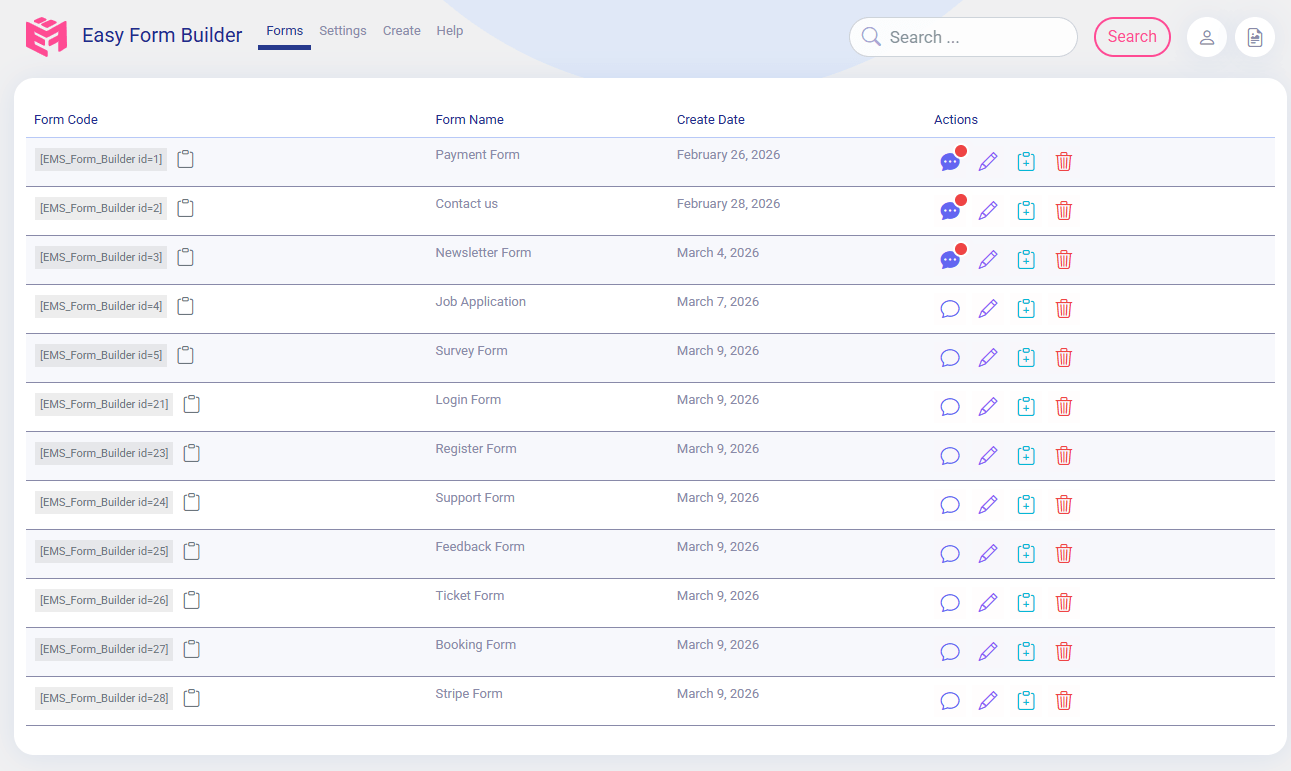
Form Entry & Message Management Dashboard
Easy Form Builder includes a dedicated Form Entry & Message Management Dashboard that allows administrators to manage all form submissions directly from the WordPress admin area. This dashboard acts as a centralized system for reviewing messages, tracking requests, and communicating with users without relying solely on email.
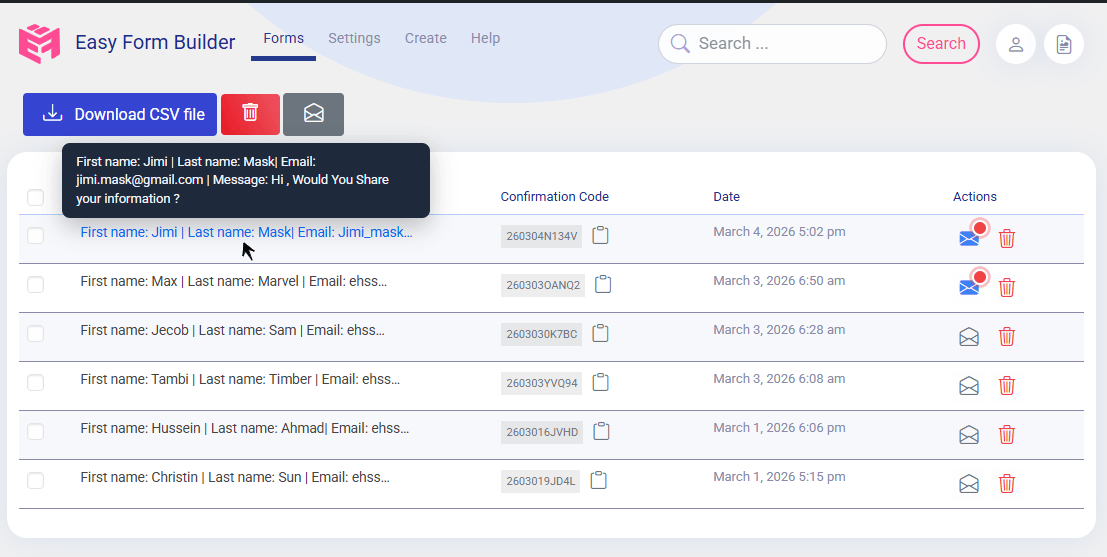
Through this dashboard, administrators can read submitted messages, respond directly from the WordPress backend, and attach files to replies when needed. This approach helps keep communication organized and ensures that conversations related to form submissions remain accessible in one place.
The Form Entry & Message Management Dashboard also provides practical tools for organizing and reviewing submissions. Administrators can change the status of messages (Open or Closed), edit or delete entries, search submissions by form or confirmation code, and receive notifications when new messages arrive. Form responses and message data can be downloaded in PDF format or exported to CSV files for reporting, archiving, or further analysis.
Survey and Poll Forms
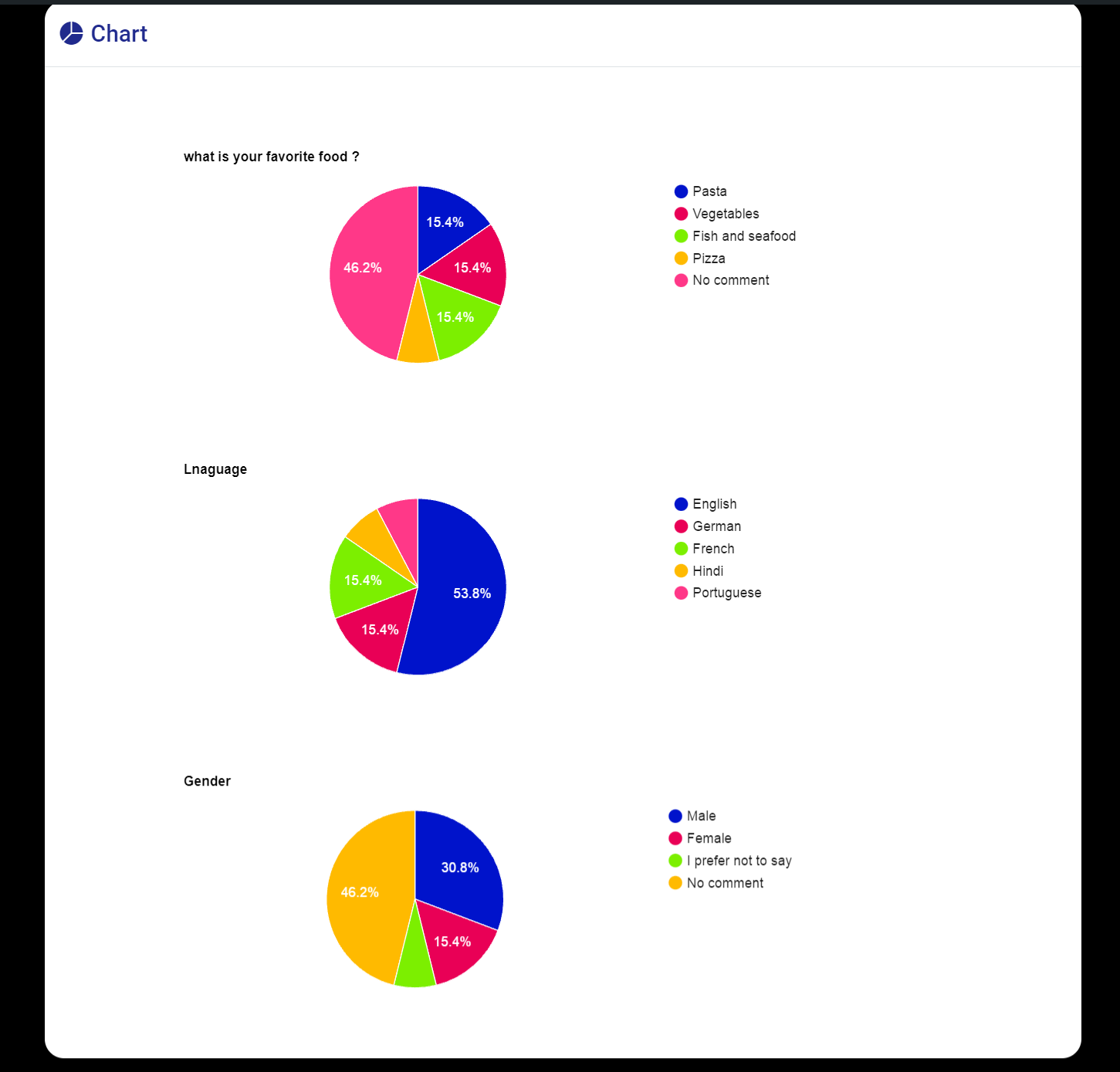
Easy Form Builder includes dedicated fields for creating survey and poll forms. These fields allow website owners to collect structured feedback and analyze results directly inside WordPress.
Survey-related features include:
- Rating star fields
- 5-point scale fields
- Net Promoter Score (NPS) fields
- Yes / No question fields
- Visual charts for survey results
- Exporting survey responses to CSV format
Survey forms can be used for customer feedback, research, evaluations, and internal assessments.
Conditional Logic – Show or Hide Fields Based on User Answers
Easy Form Builder includes a visual conditional logic builder that turns static forms into smart forms. Conditional logic (also known as conditional fields) lets a form react to what a visitor enters, so each user only sees the fields that are relevant to them. Shorter, more personal forms reduce form abandonment and improve completion rates.
With conditional logic you can:
- Show or hide fields based on a user’s answer
- Show or hide entire steps in multi-step forms
- Make fields required or optional dynamically
- Set, copy, or clear field values automatically
- Jump to a specific step (skip logic and conditional branching)
- Send conditional email notifications to different recipients based on the submitted answers
Conditions support text, choice, numeric, and date comparisons (is, is not, contains, greater than, less than, between, before, after) and can be combined with AND/OR groups. Rules are enforced on the server as well as in the browser, so hidden or disabled fields are validated and sanitized correctly – conditional logic is not just a front-end effect.
Conditional logic is available at no cost in the Free Plus version: up to 3 logic rules per form, up to 2 conditions per rule, and up to 2 conditional email notification rules, with an in-builder Test mode. The Pro version removes these limits and adds nested AND/OR groups, calculations, rule priority, conditional thank-you messages and redirects, conditional webhooks, rule export/import, and the logic Inspector (debugger).
Payment Forms with Stripe
Easy Form Builder supports Stripe payment fields, allowing you to collect online payments securely through your WordPress forms.
You can use Stripe payment fields to create:
- Donation forms
- Order forms
- Booking and service payment forms
Payment entries are handled alongside other form submissions and can be reviewed through the form management dashboard.
For a step-by-step guide, see:
How to Create a payment form to collect online payments in Easy Form Builder
Login and Registration Forms
The form builder allows you to create custom login and registration forms for WordPress users. These forms can replace the default WordPress login page and provide a customized user onboarding experience.
Login and registration forms integrate with WordPress user management and allow you to control form layout, validation, and additional user fields.
Advanced Form Fields
Easy Form Builder provides a wide collection of advanced form fields, including:
- Drag-and-drop file upload fields
- Audio recorder field for recording voice messages from the microphone
- Video recorder field for recording video from the webcam
- Screen recorder field for capturing on-screen recordings
- Signature (e-signature) fields
- Location picker fields (OpenStreetMap and LeafletJS)
- Country, state/province, and city dropdown fields
- Multiple select dropdown fields
- Range slider fields
- Rating and star fields
- Switch and toggle fields
- Date pickers (Gregorian, Hijri, and Jalali)
- Telephone and mobile input fields
- Color picker fields
- Matrix and table fields for structured data collection
These fields allow you to build complex, region-aware, and structured forms without custom development.
Audio, Video, and Screen Recording Form Fields
Easy Form Builder lets you add audio recording, video recording, and screen recording fields to any WordPress form, so visitors can record and submit media right from the browser – no extra apps, plugins, or third-party recording services. Every recording is uploaded to your own WordPress site, so your form data stays under your control.
- Audio recorder field – let visitors record a voice message from their microphone. Great for voice feedback forms, audio testimonial forms, voice message and voicemail forms, language and pronunciation practice, and podcast or audio submission forms.
- Video recorder field – let visitors record video from their webcam. Perfect for video testimonial forms, job application video introductions, customer video feedback, and video question-and-answer forms.
- Screen recorder field – let visitors record their screen (with optional microphone audio). Ideal for bug report forms, technical support request forms, product feedback, and tutorial or demo submission forms.
Integrations and Add-ons
Easy Form Builder supports optional integrations and add-ons that extend the functionality of the form plugin:
-
Conditional Logic add-on for building smart forms – show or hide fields and steps, send conditional email notifications, and (in Pro) trigger conditional redirects and webhooks based on user answers. Included at no cost with the Free Plus version
-
SMS notification add-on for sending text messages on form submission
-
Stripe add-on for extended payment workflows
-
PayPal add-on for creating payment forms and managing transactions through PayPal
-
Offline forms add-on for collecting data without an active internet connection
-
Hijri (Qamari) date picker add-on
-
Jalali (Shamsi) date picker add-on
-
Auto-Populate Integrations add-on (Autofill) for auto-filling form fields with real-time data from an external API – with API Key, Bearer Token, or Basic Auth authentication, response-to-field mapping, a built-in connection test, and smart caching
-
Telegram notification add-on for sending instant form submission alerts and admin response notifications to Telegram using a bot
-
Google Sheets integration for sending WordPress form submissions to Google Sheets automatically – no Zapier or third-party connector required. Connect your site with a Google service account (one-time setup, no OAuth login and no expiring tokens), let the plugin create a new spreadsheet or use one you already own, and bind each form to a sheet tab with a simple wizard. You can map form fields to spreadsheet columns with custom headers and ordering, apply ready-made sheet styles, and review every sync attempt in a built-in Google Sheet log. The header row and worksheet tab are created automatically on the first submission
-
Security & Spam Protection add-on for blocking WordPress form spam without CAPTCHA – invisible, behavior-based bot detection with a hidden honeypot field, signed single-use security tokens, and per-IP rate limiting for form submissions, file uploads, confirmation-code lookups, public replies, and payment requests. It also protects your notification budget by stopping suspicious entries from consuming email, SMS, Telegram, webhook, or Google Sheets quota, supports an IP allowlist and blocklist, and keeps privacy-aware security logs that store hashed identifiers instead of raw IP addresses. It starts in Monitor-only mode, so you can review real traffic before turning on blocking
-
Shield Security plugin silentCAPTCHA integration for invisible bot and spam protection without user interaction
Premium Features Included Free
Many WordPress form plugins only offer these features in a paid plan. In Easy Form Builder, they are included at no cost:
- Form entries stored in your own WordPress database, with a full entry management dashboard (Free)
- Email notifications after each form submission (Free)
- Custom email notification templates with a built-in visual editor for branded WordPress form emails (Free)
- File upload forms (Free)
- Confirmation code (tracking ID) for every submission (Free)
- Multi-step forms (Free)
- Basic survey and poll fields (Free)
- Exporting form entries to CSV (Free)
- Conditional logic to show or hide fields based on answers (Free Plus)
- Payment forms with Stripe and PayPal (Free Plus)
- Advanced fields such as signature, location picker, matrix and table, and more (Free Plus)
- Downloading responses as PDF (Free Plus)
- Automated weekly email deliverability test with spam score and SPF/DKIM/DMARC checks (Free)
The Free Plus version is completely free of charge – the only difference is a small “Powered by Easy Form Builder” link and credit, included only in the content of the page where the form is published.
Available Versions
Easy Form Builder is available in multiple versions to support different usage needs. Each version is designed to provide a clear and predictable set of features.
Documentation & Support
For setup guides, tutorials, and feature walkthroughs, visit the official documentation:
Easy Form Builder Documentation
For more information, visit the official website:
WhiteStudio – Easy Form Builder
Installation
Bootstrap Notice:
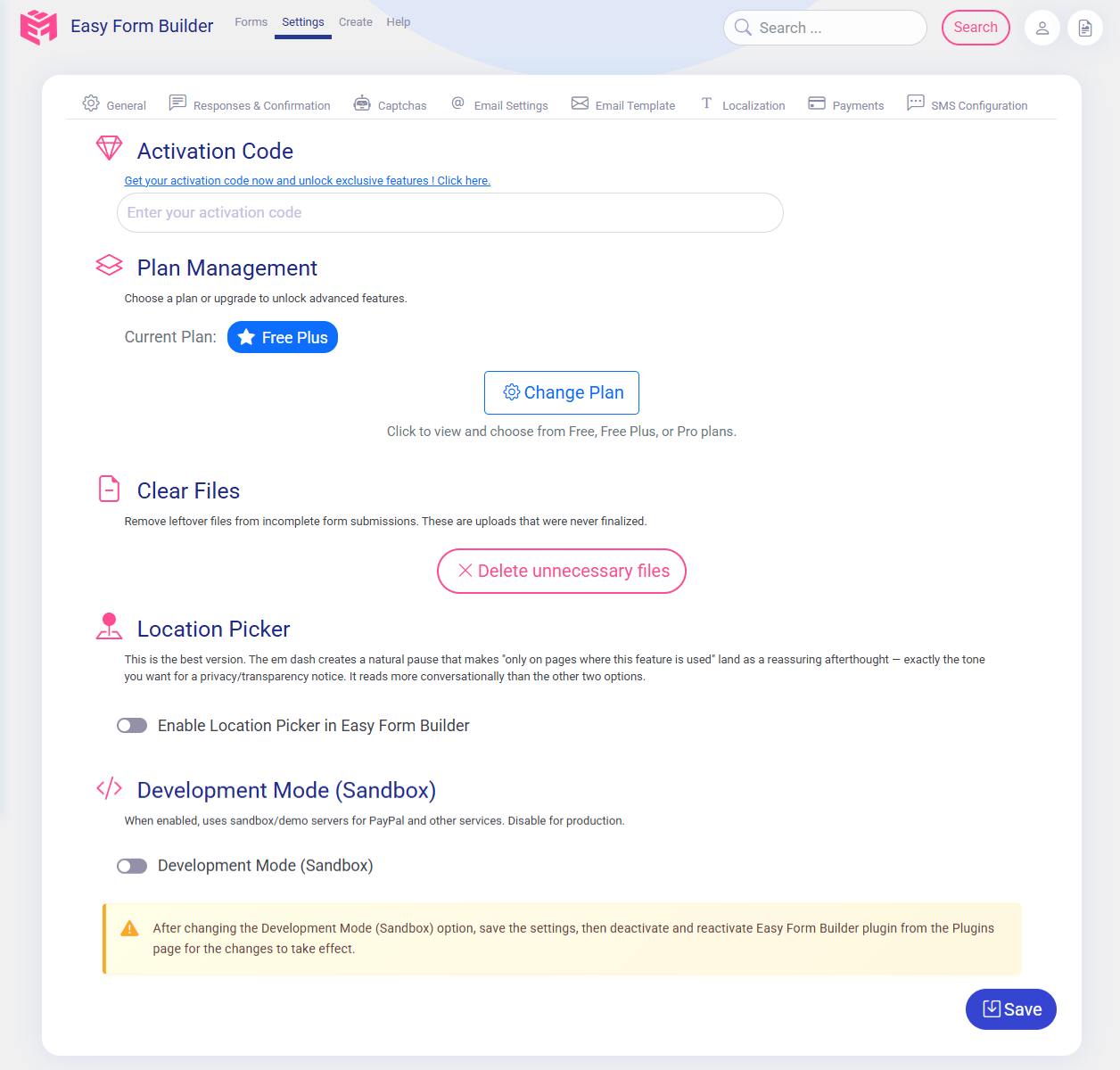
If your theme uses Bootstrap, go to “Easy Form Builder” → “Settings” and enable the Bootstrap option.
- Download Easy Form Builder
- Navigate to Dashboard → “Plugins” → “Add New” → “Upload Plugin” → select Easy Form Builder zip file then “Activate”.
- In the menu bar, navigate to “Easy Form Builder” → “Settings” → “Add Google reCAPTCHA keys”
- For local testing environments, you may use the key and secret below. For online websites, click here to obtain the API keys for reCAPTCHA v2.
Development Google reCAPTCHA keys for localhost
Site key: 6LeIxAcTAAAAAJcZVRqyHh71UMIEGNQ_MXjiZKhI
Secret key: 6LeIxAcTAAAAAGG-vFI1TnRWxMZNFuojJ4WifJWe
Changelog
Recommended update. Turns form emails on if they were off (you now receive each submission by email), verifies Stripe payments on the server and keeps form pages out of page caches. Purge your page cache and CDN after updating. Requires WordPress 5.7+ and PHP 7.4+.
4.3.1
-
Improved: Forms use your theme’s font; typed Jalali and Hijri dates are checked; offline answers come back after a reload; fixes for Stripe, PayPal, ZarinPal, SMS, Telegram, Google Sheets, Conditional Logic, Auto-Populate and the date pickers.
-
Security: Stripe one-time payments are now verified with Stripe on the server before the form is submitted. A confirmation that fails for a moment after the card was charged is retried and the form is still submitted, and pending payments are re-checked in the background; an attempt that was declined or abandoned is marked Failed after an hour.
-
Changed: Form emails are on by default. Updating from an older version turns “This site can send emails” on once if it was off (sites set up before 4.3.1 started with it off, and a failed email check used to switch it off). If you had turned it off on purpose, turn it off again in Panel > Settings > Email; it stays off. An email check no longer turns form emails off.
-
Changed: The owner’s notification email now includes the submitted answers and has Reply-To set to the visitor’s address. The visitor’s confirmation email keeps only the confirmation code and link unless the form chooses otherwise.
-
Security: Fixed a stored cross-site scripting issue through the Signature field. A submitted signature must now be a complete, valid PNG image; it is stored as a re-encoded copy under the field’s saved type, and every value shown in the response viewer is escaped, including responses saved by earlier versions.
-
Security: Hardened every path that stores or shows visitor data. Each saved answer keeps the field’s own label and type from the form, whatever the browser sent. Replies on the confirmation-code page are rebuilt from an allow-list (attachments must be uploads on this site); register forms no longer store the password or rows for fields the form does not have; notification emails are built from the validated answers and send the visitor copy to one verified address; the page link must be on this site’s own domain; the confirmation-code finder escapes the code from the address bar; the response viewer only links http(s) attachments and ignores invalid colors, ratings and currencies; passwords saved by earlier versions are masked.
-
Fixed: Saving the settings replaced the Stripe and PayPal secret keys with an internal placeholder, so payments then failed (Stripe answered 401). Secret keys are now saved as typed, and a placeholder is never stored or used as a key.
-
Fixed: A double quote typed by a visitor showed as two apostrophes (”) in the response viewer, the entries list, the CSV export and the notification email. It now shows as a double quote, also in entries saved by earlier versions.
-
Changed: In the CSV export a Signature field is a link to the signature image instead of the image data, which was thousands of characters long and could exceed a spreadsheet cell’s limit. The link opens only for a logged-in user who may read responses; the signature is not made public.
-
Fixed: Ticking the reCAPTCHA on the confirmation-code page sent a request the server refused, which logged a false “request failure”. “Enable Google reCAPTCHA in the response box” can now be switched off after the site key was removed, and the page shows no reCAPTCHA without a site key (it used to block every lookup).
-
Security: The Google reCAPTCHA on the confirmation-code page is now verified on the server for every lookup; before, it was checked only in the browser and could be skipped. Sites that turned it on (Settings > “Enable Google reCAPTCHA in the response box”) need the secret key saved as well.
-
Security: Uploaded archives must really be the archive type they are named as, and files containing a PHP open tag are refused.
-
New: The Free plan has 20 form fields: terms and conditions, country list, star rating and heading joined the 16. Forms that already use them keep working on every plan.
-
New: CSV export of form entries is free in every version.
-
New: Stripe and PayPal payments are included in Free Plus.
-
New: Import from Contact Form 7. The Create and Panel screens offer to copy your Contact Form 7 forms into Easy Form Builder in one click: fields, choices, required fields, notification addresses, the visitor confirmation email and the message after sending. A report for each form says what was carried over and what could not be, and why. Your Contact Form 7 forms are not changed or deleted. Optionally the new form replaces the old one on your pages; each page is saved as a revision first, so the change can be undone. The importer loads only on these screens.
-
Improved: Only Persian sites check the Iran CDN; other sites no longer contact it.
-
Fixed: Email addresses typed with Persian or Arabic digits, invisible direction marks, a fullwidth “@” or a Persian decimal separator were rejected as not valid (in forms, registration, login and password recovery).
-
Fixed: The email check reported “not received” when the test message took more than 45 seconds to arrive (common with Microsoft 365 and hosts that queue mail). It now waits until the message arrives or the test expires.
-
Fixed: The email check forced its own sender address over the one an SMTP plugin sets, so it failed on Microsoft 365 while form emails arrived. It now sends exactly like a form email.
-
Fixed: A new form was missing from the Easy Form Builder block for up to an hour.
-
Fixed: On phones, the field category tabs were cut off and Form Settings and Help were hidden in a sideways-scrolling toolbar.
-
Fixed: Saving a form said “updated” even when the database refused the change or the form no longer existed, and the builder then discarded its local draft. A save that is not stored now says so, and the draft is kept.
-
Fixed: Where Google Fonts, jsDelivr or gstatic.com hang instead of failing (common on some networks, for example in Iran), Easy Form Builder admin screens stayed blank or on “Please wait”. These files no longer hold up the page.
-
Fixed: The heading field’s font size control was labelled “Height”.
-
Fixed: The admin email shortcode in email templates (shortcode_admin_email, shown in the default footer) now uses the site’s Administration Email Address from Settings > General instead of the first user’s address.
-
Fixed: In Email Settings, the descriptions under the two weekly report switches were swapped.
-
Fixed: A form holding a field the site’s plan does not include (for example a signature after moving from Pro to Free) showed the plan notice but pushed the following fields and the Submit button outside the form. The rest of the form now works.
-
Fixed: An entry with malformed data could stop the owner’s notification email with a server error.
-
New: Pages that show a form in their content, and the tracking and payment views, are kept out of page caches (LiteSpeed, WP Rocket, W3 Total Cache, WP Super Cache, WP Fastest Cache, WP-Optimize, Cache Enabler, SiteGround, Cloudflare and others). Pages with a form only in a sidebar, footer or widget stay cached. Developers can adjust this with the
emsfb_cache_bypassfilter. -
New: Form scripts are excluded from script optimizers (delay/defer, combine and minify JavaScript options) and wait for jQuery when it loads late, so forms also work with Cloudflare Rocket Loader.
-
New: Each form gets a short-lived session before it is submitted. When a firewall, a REST API restriction or a rate limit blocks that step, the form falls back to the 4.3.0 request, which the server still fully validates.
-
New: A dashboard notice reports form requests that fail on the server. It can be dismissed and shows details only on Easy Form Builder screens.
-
Fixed: Network activation on WordPress Multisite caused a fatal error on admin pages, and sub-sites never got their database tables. Each sub-site now gets them the first time its dashboard opens.
-
Fixed: The confirmation code (tracking) page caused a fatal error on WordPress versions before 6.5 with PHP 8.
-
Fixed: Custom dashboard texts saved by version 3.x stopped the settings from saving.
-
Fixed: Apostrophes inside email template styles (for example font names) were broken when the template was saved.
-
Fixed: Form submissions and replies containing double quotes failed.
-
Improved: Reinstalling add-ons after an update is time-limited, so admin pages no longer wait on an add-on server that does not answer.
-
Improved: The email test report warns about active page caching plugins, and SiteGround and Swift Performance Lite are detected.
-
Improved: Payment requests with malformed values get a clear error message instead of a server error.
-
Improved: When a submission is refused (for example by Form Security & Spam Protection in strict mode or a rate limit), visitors see the actual reason instead of a generic error.
-
Changed: Requires WordPress 5.7 or later and PHP 7.4 or later.
4.3.0
- Security: Improved form builder security and set up the i18n translation and localization infrastructure.
4.2.0
-
New: Added an onboarding wizard for new installations, with setup progress and direct links to the relevant settings tabs.
-
New: Added a weekly email deliverability report with delivery status, score, authentication checks, and recommendations.
-
New: Added an Email Error Log and expanded email activity details in the Easy Form Builder dashboard widget.
-
Improved: Improved email delivery handling, error reporting, and payment form notification reliability.
-
Improved: Improved add-on installation and endpoint handling, including more resilient download and subscription flows.
-
Improved: Improved form submission handling on cached pages and strengthened session, nonce, and recovery-token validation.
-
Security: Hardened upload, recorder, login, registration, and tracking-code handling with additional validation and abuse protections.
-
Changed: Updated the database schema to version 1.2. Existing installations run the schema upgrade automatically when the plugin loads.
4.1.3
-
New: File upload form fields now have a built-in limit (3 files per field, no add-on needed), your own budget/size settings, server-side file-type enforcement, and fixed audio/video/screen recording uploads with clearer error messages.
-
New: Setup guide for new installs, with direct links to each settings tab.
-
New: Weekly email delivery report for your forms.
-
Fixed: Stray empty paragraphs no longer appear between fields on themes/page builders that run wpautop after shortcodes.
-
Fixed: Payment form notification emails could fail to send.
-
Fixed: Forms keep working on cached pages instead of showing a security error.
-
Improved: Faster page loads – forms no longer wait on a remote check to render.
4.1.2
-
Fixed: Forms with file upload or recorder fields no longer get wrongly blocked by Form Security & Spam Protection in WordPress Form Builder.
-
Fixed: Genuine visitors are no longer blocked when their browser or password manager auto-fills a hidden field.
-
New: Audio, video, and screen recording fields released for WordPress Form Builder.
-
Improved: Smarter spam scoring in Form Builder for recorder and file-upload forms, so real visitors aren’t mistaken for bots.
-
Fixed: Password field placeholder now displays correctly.
-
Improved: Safe plugin loading – if any plugin file is missing after an update or an incomplete deploy, the plugin now stays inactive for that request and shows an admin notice asking for a reinstall, instead of causing a fatal error on the whole site.
4.1.1
- Fixed: Restored plugin files that were missing from the 4.1.0 release package on wordpress.org, which caused a fatal error after updating.
Screenshots




For developers
Is this your plugin? Show off the numbers.
Add a live badge to your site, docs or GitHub README. It updates on its own — no account needed.
Best Easy Form Builder by WhiteStu… alternatives
All contact form plugins →





FAQ
Easy Form Builder by WhiteStudio: quick answers
Straight answers, pulled from live WordPress.org data.
Live data from WordPress.org · checked Nov 17, 2026
Is Easy Form Builder by WhiteStudio free?
Yes. Easy Form Builder by WhiteStudio is free to download and use from the official WordPress.org plugin directory.
Is Easy Form Builder by WhiteStudio safe to use in 2026?
Yes — Easy Form Builder by WhiteStudio is a safe, well-maintained plugin to use in 2026. It runs on 1K+ sites, is rated 5/5 and was last updated 1 week ago, and scores 91/100 on our health check.
How many websites use Easy Form Builder by WhiteStudio?
Easy Form Builder by WhiteStudio is active on 1K+ WordPress websites and has been downloaded 123,187 times since it launched in February 2021. It was downloaded 3,482 times in the last 30 days.
Does Easy Form Builder by WhiteStudio work with WordPress 7.1?
Yes. The developer has tested Easy Form Builder by WhiteStudio up to WordPress 7.1.4, the latest release. It requires WordPress 5.7 or newer.
What PHP version does Easy Form Builder by WhiteStudio need?
Easy Form Builder by WhiteStudio requires PHP 7.4 or higher. Most hosts run PHP 8.x today, so it works on any modern WordPress hosting.
When was Easy Form Builder by WhiteStudio last updated?
The latest version, 4.3.1, was released on November 7, 2026 (1 week ago).
Who makes Easy Form Builder by WhiteStudio?
Easy Form Builder by WhiteStudio is developed and maintained by hassantafreshi.
What are the best alternatives to Easy Form Builder by WhiteStudio?
The most popular alternatives to Easy Form Builder by WhiteStudio are Contact Form 7 (10M+ installs), Akismet Anti-spam: Spam Pro… (5M+ installs) and WPForms (5M+ installs).
Powered by PageForge
Want thousands of pages that rank like these? Build them in an afternoon.
This directory runs on the same engine as PageForge. Turn any spreadsheet, CSV or API into thousands of fast, SEO-ready WordPress pages — with schema, internal links and AI-written copy baked in.
- CSV, Google Sheets & API data sources
- AI content, schema & internal links per page
- Works with Elementor, Gutenberg, Yoast & Rank Math
- Free on WordPress.org — no credit card


