


SiteOrigin Widgets Bundle
Essential elements for modern websites. Add buttons, sliders, heroes, maps, images, carousels, features, icons, more. Create dynamic pages easily.

Safe pick
Yes — SiteOrigin Widgets Bundle is a safe, well-maintained plugin to use in 2026. It runs on 400K+ sites, is rated 4.9/5 and was last updated 5 days ago, and scores 92/100 on our health check.
- Proven at scale on 400K+ active sites
- Loved by users — 4.9/5 from 134 reviews
- Actively developed — last update 5 days ago
- Momentum — downloads up 105.3% vs the previous 30 days
How does it stack up?
Side-by-side on installs, updates, ratings & support



Daily downloads
Download spikes usually follow a new release — each site that auto-updates counts as a download.
Rankings
Where SiteOrigin Widgets Bundle stands todayWordPress.org search rankings
Live position in the plugin search, top 100| Keyword | Position |
|---|---|
| blocks | >100 |
| blog | #29 |
| contact form | >100 |
| slider | >100 |
| widgets | #5 |
Version adoption
Share of active sites per release.
Rating breakdown
★★★★★★★★★★ 4.9 from 134 reviews
About SiteOrigin Widgets Bundle
From the official readme · v1.74.3Description
The SiteOrigin Widgets Bundle gives you all the elements you need to build modern, responsive, and engaging website pages. Using the Widgets Bundle, you can quickly and effortlessly add buttons, sliders, heroes, maps, images, carousels, features, icons, and so much more.
SiteOrigin Widgets are ready to be used anywhere, in Page Builder by SiteOrigin, in the Block Editor or your theme’s widget areas. The Widgets Bundle is even compatible with other popular page-building plugins.
Our collection is growing, and here are some of the powerful widgets included so far:
- Accordion Efficiently display content in expandable sections, maximizing space for improved organization.
- Anything Carousel Display images, text, or any content in a highly customizable and responsive carousel slider.
- Author Box Display author information, including avatar, name, bio, and post links in a customizable box.
- Blog Showcase blog content in personalized list or grid layouts with flexible design and display settings.
- Button Create a custom button with flexible styling, icon support, and click tracking functionality.
- Button Grid Add multiple buttons in one go, customize individually, and present them in a neat grid layout.
- Contact Form Add a contact form with custom fields, design options, spam protection, and email notifications.
- Call To Action Prompt visitors to take action with a customizable title, subtitle, button, and design settings.
- Editor Insert and customize content with a rich text editor offering extensive formatting options.
- Features Showcase features with icons, titles, text, and links in a customizable grid layout.
- Google Maps Embed a customizable Google Map with markers, directions, styling options, and interactive elements.
- Headline Engage visitors with a prominent, stylish headline and optional divider and sub-headline to convey key messages.
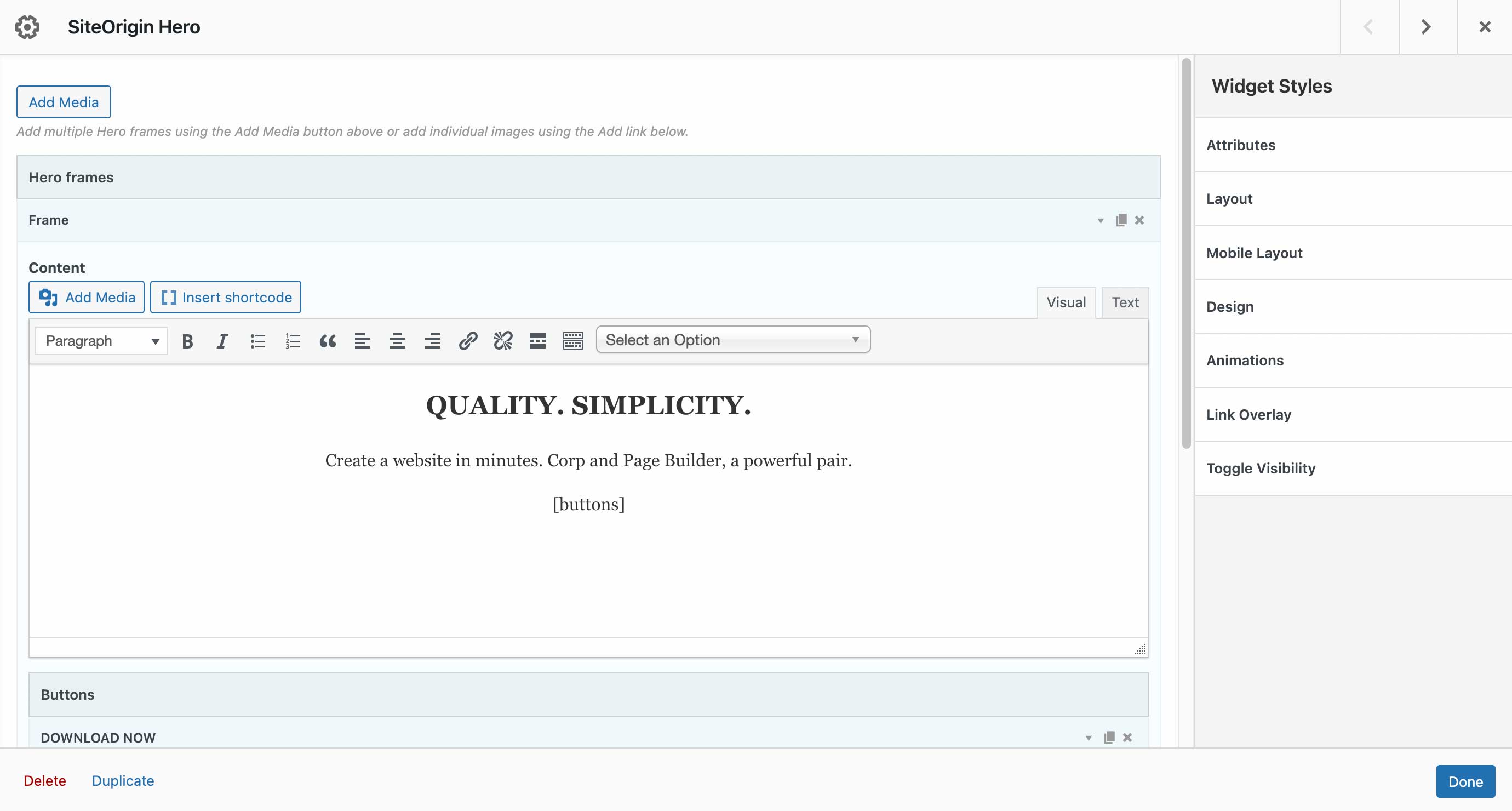
- Hero Image Build an impressive hero image section with custom content, buttons, background image, color, and video.
- Icon Display a customizable icon with color, size, alignment, and optional link settings.
- Image Add a responsive image with custom dimensions, positioning, caption, link, and styling options.
- Image Grid Showcase images in a responsive grid layout with custom size, spacing, alignment, and captions.
- Image Slider Create a responsive slider with customizable image and video frames, navigation, and appearance settings.
- Layout Slider Design responsive slider frames with unique layouts, backgrounds, and content built with Page Builder.
- Lottie Player Bring your content to life using interactive Lottie animations with personalized settings and links.
- Post Carousel Display blog posts or custom post types in a responsive, customizable carousel layout.
- Price Table Display pricing plans in a professional table format with custom columns, features, and design.
- Recent Posts Drive traffic to your latest content with a visually appealing, fully customizable recent posts showcase.
- Simple Masonry Layout Display images in an attractive masonry grid with adjustable columns, gutters, and optional captions.
- Social Media Buttons Add social media buttons to your site with personalized icons, colors, and design settings.
- Tabs Create tabbed content panels with customizable titles, content, initial tab, and design settings.
- Taxonomy Automatically display the taxonomies of the current post with customizable labels, colors, and link settings.
- Testimonials Feature testimonials from satisfied customers with tailored layouts, images, text, colors, and mobile compatibility.
- Video Player Embed self-hosted or externally hosted videos with a customizable player, controls, and responsive sizing.
Ready to Be Used Anywhere
- Page Builder by SiteOrigin: Insert widgets in Page Builder by SiteOrigin in either the Classic Editor or Page Builder Layout Block in the Block Editor.
- Block Editor: The Widgets Bundle is 100% Block Editor compatible. Insert widgets using the SiteOrigin Widgets Block featuring a live widget search form.
- Theme and Plugin Widget Areas: Insert widgets in any theme or plugin widget area.
- In Other Popular Page Builder Plugins: Insert widgets in Elementor or Beaver Builder.
Built for Speed
We carefully built each widget for the best possible page size and load time. The Widgets Bundle is perfectly compatible with Autoptimize and all other major performance plugins.
SEO Optimized
The Widgets Bundle uses modern SEO best practices and seamlessly integrates with all major SEO plugins.
Accessibility Ready
The Widgets Bundle is accessibility-ready. Tab through all form fields and settings, make changes without using a mouse.
Actively Developed
SiteOrigin has been creating magical tools for your WordPress website since 2011. We actively develop the Widgets Bundle with updates released several times a month, including new features and fixes as required. View our Widgets Bundle work on GitHub.
Create Custom Widgets
Access a huge array of features and save time by developing custom widgets for your theme or plugin on the Widgets Bundle Framework. Read more in our extensive developer documentation.
Documentation
Documentation is available on SiteOrigin.
Support
Free support is available on the SiteOrigin support forums.
SiteOrigin Premium
SiteOrigin Premium enhances the Widgets Bundle with a vast array of additional features and settings. Take your layouts to the next level with SiteOrigin Premium addons.
SiteOrigin Premium includes access to our professional email support service, perfect for those times when you need fast and effective technical support. We’re standing by to assist you in any way we can.
Frequently asked questions
The widget I’d like to add isn’t available; where can I enable it?
The Widgets Bundle global interface is available at Plugins > SiteOrigin Widgets. Widgets can be enabled or disabled as needed. If a widget offers global settings, you can access those via the Settings button next to each applicable widget.
Changelog
1.74.3 – 18 September 2026
- General: Fixed saving a page failing with “Cannot access offset of type string on string” when a widget had a design or settings section stored as an empty string. Section, toggle and repeater fields now store an array when left empty, existing widgets are repaired on their next save, and the Hero, Anything Carousel, Testimonial, Layout Slider, Google Maps, Social Media Buttons and Price Table widgets read their settings safely.
- Contact Form: Fixed a fatal error when a design section held a stored string instead of an array. Existing style hashes are kept, so generated CSS is not rebuilt on every site; the 1.74.3 beta.3 build regenerated it.
- Editor: Fixed shortcodes being executed and stored when Page Builder copied a layout into the post content. Shortcodes now run only when the widget renders on the front end.
- Widget Block: Fixed admin-authored rich content, such as iframes, being stripped for logged-out visitors.
- Block Editor: Fixed the Open Builder button doing nothing when jQuery had not loaded in the editor canvas.
- Block Editor: Fixed the icon picker not initializing in newly added or copied repeater items in the block editor canvas, and aligned color picker heights and palette swatch sizes with the editor.
- Image: Fixed the Image Shape section storing an empty shape when enabled without choosing one, so the default Circle mask now renders, and widgets already saved that way render without a re-save.
- Beaver Builder: Color fields fall back to a native color input when the WordPress color picker is not available.
- General: Fixed a PHP 8.1 deprecation notice when a field used a single-argument sanitizer such as intval.
- General: Generated CSS is no longer cleared when only translations or WordPress core are updated.
- LiteSpeed Cache: Page and site purges use the LiteSpeed purge action, so they also work during plugin updates, cron and WP-CLI requests where a response header is dropped.
1.74.2 – 23 July 2026
- Post Carousel: Fixed thumbnails collapsing when the Full image size was selected by falling back to the default box dimensions.
- General: Fixed widget content being lost when saving in the Block Editor while the visual editor had not finished initializing.
- General: Preserved a measurement field’s unit on re-save when the field’s default value already carried a unit.
1.74.1 – 17 July 2026
- Hero, Layout Slider: Fixed empty or zero mobile height so the slide inherits the desktop height instead of collapsing.
- Image: Preserved custom image size dimensions on save so manually entered width and height are retained.
- General: Preserved the measurement field unit when re-saving a widget without changing the value.
- General: Prevented a TinyMCE initialization error on hosts that disable the rich text editor.
1.74.0 – 13 July 2026
- Accordion, Tabs: Reset filter-owned title slots at render and escaped title output in templates.
- Posts Field: Restored listing of all public post types in the Post Type selector regardless of the current user’s edit capability.
- Price Table: Escaped title and icon color style output in the template.
- General: Added a neutral sanitization floor for select, radio, image radio, and checkboxes fields when the options list is unavailable, so stored values are no longer reset.
- General: Stripped unrecognized keys from widget instances on save so only declared fields and known companion keys persist.
- General: Made media, TinyMCE, and container field sanitization more robust across nested and repeater contexts.
- General: Contributed a field sanitization version signal to Page Builder to keep Layout Block trust signatures accurate.
1.73.2 – 01 July 2026
- Blog: Fixed font field initialization lag by lazy-populating font selects on focus while preserving the saved value on save.
- Video: Removed the hard-coded sandbox from cached oEmbed output and added the siteorigin_widgets_sow-video_oembed_iframe_sandbox filter to control iframe sandbox attributes.
- General: Made field sanitization idempotent across the posts, multiple media, select, checkboxes, radio, image radio, icon, and font fields, and guarded resets against empty options and family lists.
- General: Set Tested up to WordPress (WP) 7.0.
1.73.1 – 19 May 2026
- General: Corrected release package version metadata to prevent WordPress from repeatedly offering the same update after installing 1.73.0.
Screenshots




For developers
Is this your plugin? Show off the numbers.
Add a live badge to your site, docs or GitHub README. It updates on its own — no account needed.
Best SiteOrigin Widgets Bundle alternatives
All blocks plugins →





FAQ
SiteOrigin Widgets Bundle: quick answers
Straight answers, pulled from live WordPress.org data.
Live data from WordPress.org · checked Sep 27, 2026
Is SiteOrigin Widgets Bundle free?
Yes. SiteOrigin Widgets Bundle is free to download and use from the official WordPress.org plugin directory.
Is SiteOrigin Widgets Bundle safe to use in 2026?
Yes — SiteOrigin Widgets Bundle is a safe, well-maintained plugin to use in 2026. It runs on 400K+ sites, is rated 4.9/5 and was last updated 5 days ago, and scores 92/100 on our health check.
How many websites use SiteOrigin Widgets Bundle?
SiteOrigin Widgets Bundle is active on 400K+ WordPress websites and has been downloaded 47,906,794 times since it launched in June 2014. It was downloaded 180,602 times in the last 30 days.
Does SiteOrigin Widgets Bundle work with WordPress 7.1?
SiteOrigin Widgets Bundle is officially tested up to WordPress 7.0.6, while the latest release is 7.1.2. It may still work, but try it on a staging site first.
What PHP version does SiteOrigin Widgets Bundle need?
SiteOrigin Widgets Bundle requires PHP 7.0.0 or higher. Most hosts run PHP 8.x today, so it works on any modern WordPress hosting.
When was SiteOrigin Widgets Bundle last updated?
The latest version, 1.74.3, was released on September 22, 2026 (5 days ago).
Who makes SiteOrigin Widgets Bundle?
SiteOrigin Widgets Bundle is developed and maintained by Greg - SiteOrigin.
What are the best alternatives to SiteOrigin Widgets Bundle?
The most popular alternatives to SiteOrigin Widgets Bundle are Spectra Legacy (1M+ installs), Kadence Blocks (600K+ installs) and Extendify (500K+ installs).
Powered by PageForge
Want thousands of pages that rank like these? Build them in an afternoon.
This directory runs on the same engine as PageForge. Turn any spreadsheet, CSV or API into thousands of fast, SEO-ready WordPress pages — with schema, internal links and AI-written copy baked in.
- CSV, Google Sheets & API data sources
- AI content, schema & internal links per page
- Works with Elementor, Gutenberg, Yoast & Rank Math
- Free on WordPress.org — no credit card


