



Pastmark – Activity Log, User Activity & Audit Trail
Activity log & audit trail for WordPress. Track user activity, logins, content changes, WooCommerce orders and site settings in real time.

Solid choice
Pastmark is a solid plugin choice in 2026, with a few things worth checking first. Was last updated 3 weeks ago, and scores 64/100 on our health check.
- Actively developed — last update 3 weeks ago
- Tested with the latest WordPress (7.1)
- Small user base (<10 active installs)
- Very few reviews so far
How does it stack up?
Side-by-side on installs, updates, ratings & support



Daily downloads
Download spikes usually follow a new release — each site that auto-updates counts as a download.
Rankings
Where Pastmark stands todayWordPress.org search rankings
Live position in the plugin search, top 100| Keyword | Position |
|---|---|
| Activity Log | >100 |
| audit log | >100 |
| audit trail | #69 |
| user activity | >100 |
| woocommerce | >100 |
About Pastmark
From the official readme · v1.0.5Description
Pastmark is an easy & powerful WordPress activity log plugin that keeps a complete audit trail of everything that happens on your site. From failed login attempts to post edits, plugin changes, and WooCommerce orders, Pastmark records the user, timestamp, IP address, and contextual details behind every event — so you always know who did what, and when.
Whether you’re a site owner who wants peace of mind, an agency managing client sites, or a WooCommerce store tracking orders and product changes, Pastmark gives you a searchable, filterable activity log dashboard without slowing your site down.
Why use an activity log plugin?
Without a user activity log, it’s nearly impossible to answer basic questions after something goes wrong: Who deleted that page? Who changed the site’s permalink structure? Was that a failed login attempt or a real intrusion? Pastmark answers those questions automatically by logging activity as it happens, in a dedicated database table, so nothing is missed.
Track user & security activity
- Log successful and failed login attempts.
- Throttle repeated failed login attempts from the same user and IP address, so a brute-force run collapses into a single updating log entry instead of one row per attempt.
- Track user registrations, profile updates, and role changes.
- Monitor password changes and account-level activity.
- Keep a security audit log to help spot suspicious behavior early.
Track content changes
- Log post, page, and custom post type changes — created, published, updated, trashed, and restored.
- Log comment activity, including status changes and deletions.
- Track media library uploads, updates, and deletions.
- Log navigation menu changes.
- Track widget changes.
Track site & plugin activity
- Log plugin activation, deactivation, installs, and updates.
- Log theme activation, installs, and updates.
- Log changes to WordPress core settings (site title, URL, permalinks, timezone, and more).
WooCommerce activity log
If WooCommerce is active, Pastmark automatically extends its logging to your store — 167 of WP Activity Log’s 173 live WooCommerce events, formally confirmed against its real installed source:
- Orders: placed, status changes, edits (billing, shipping, total, customer note), refunds, trash, restore, deletion, and notes.
- Order line items: products, fees, coupons, taxes, and shipping lines added, removed, or changed, plus reversed refund lines.
- Products: creation, publishing, and full field-level edits (description, price, stock, weight, dimensions, downloadable files, tax settings, backorders, upsells, cross-sells, visibility, product type, and more), duplication, and deletion.
- Product categories, tags, and global attributes: full lifecycle (create/delete) plus slug, parent, display-type, and rename changes.
- Per-product attribute values, product reviews (create, approve, unapprove, spam, trash, restore, delete, and edit), and webhooks (create, edit, status change, delete).
- Coupons: full lifecycle plus discount type, expiry date, usage limits, usage restrictions, description, and visibility changes.
- Customers: self-service billing and shipping address changes made from My Account.
- Store settings, payment gateways, and tax settings: every individual setting change, each correctly labeled with a before/after value.
Third-party plugin integrations
If any of the following plugins are active, Pastmark automatically extends its logging to them:
- Advanced Custom Fields (ACF): field-group and individual-field create, update, delete, trash, restore, and duplicate — down to which field changed.
- WPForms: form create, edit, trash, restore, duplicate, delete, activate/deactivate, import/export; real visitor form submissions; best-effort notification-failure detection; global settings, service-integration, and addon changes; confirmation and notification changes.
- Gravity Forms: form create, edit, trash, restore, duplicate, delete, activate/deactivate, import/export; real visitor form submissions; reliable notification-failure detection; global settings, confirmation, and notification changes; entry moderation (star, read, trash, notes, admin edits, exports).
- Yoast SEO: global SEO settings and per-post SEO meta changes (title, meta description, focus keyword, indexing, canonical URL, schema, and more).
- RankMath: global SEO settings and per-post SEO meta changes (title, meta description, focus keyword, robots meta, canonical URL, and more), plus module toggles.
- Redirection: redirect rule and redirect group create, edit, enable/disable, and delete.
- TablePress: table create, edit (with a diff), copy, and delete.
- bbPress: forum, topic, and reply create, edit, close/open, stick/unstick, trash, restore, and delete; forum settings changes.
- WP 2FA: two-factor method changes, policy changes, user lock/unlock, and enrollment activity.
- Ultimate Member: member registration, profile field changes, and role changes.
- Wordfence: login lockouts, firewall blocks/throttling, country-block changes, and security settings changes.
- Tutor LMS: course, lesson, topic, and quiz create/edit/delete; student enrollment; and lesson/quiz/course completion.
- Easy Digital Downloads: download (product) create, edit (with a diff), trash, restore, and delete; order/payment placed, completed, refunded, and failed; discount-code create, edit, and delete.
Dashboard, reports & retention
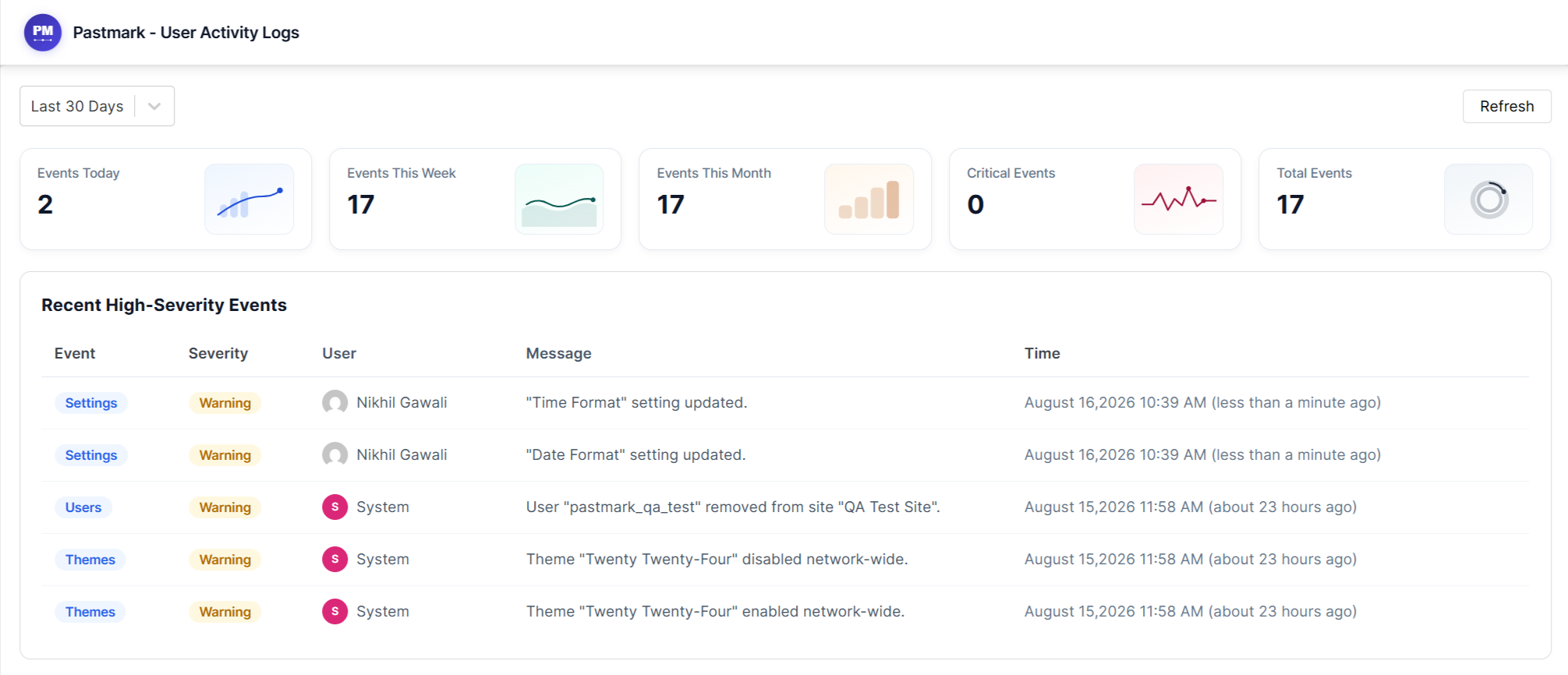
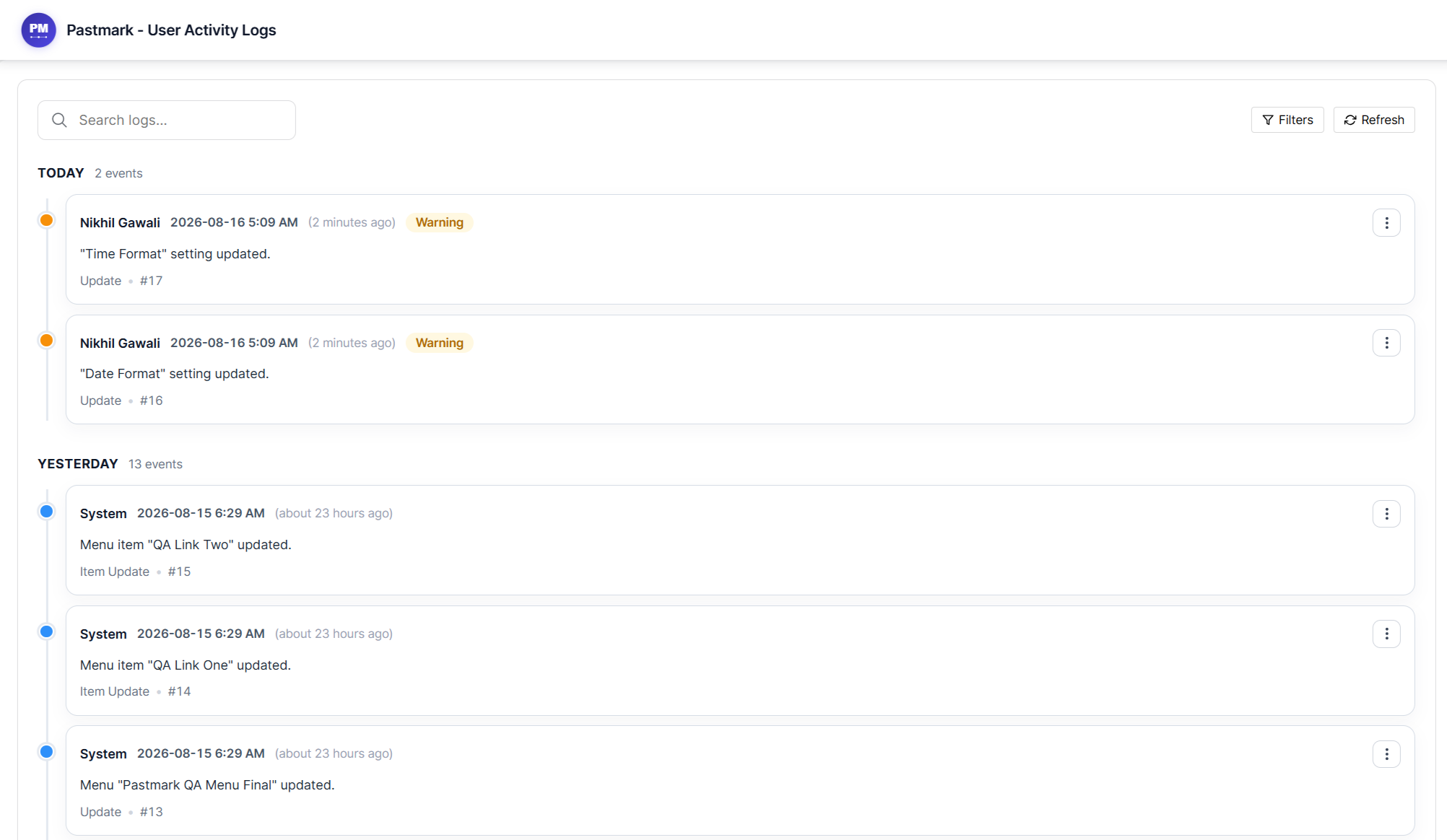
- Searchable, filterable activity log dashboard inside wp-admin.
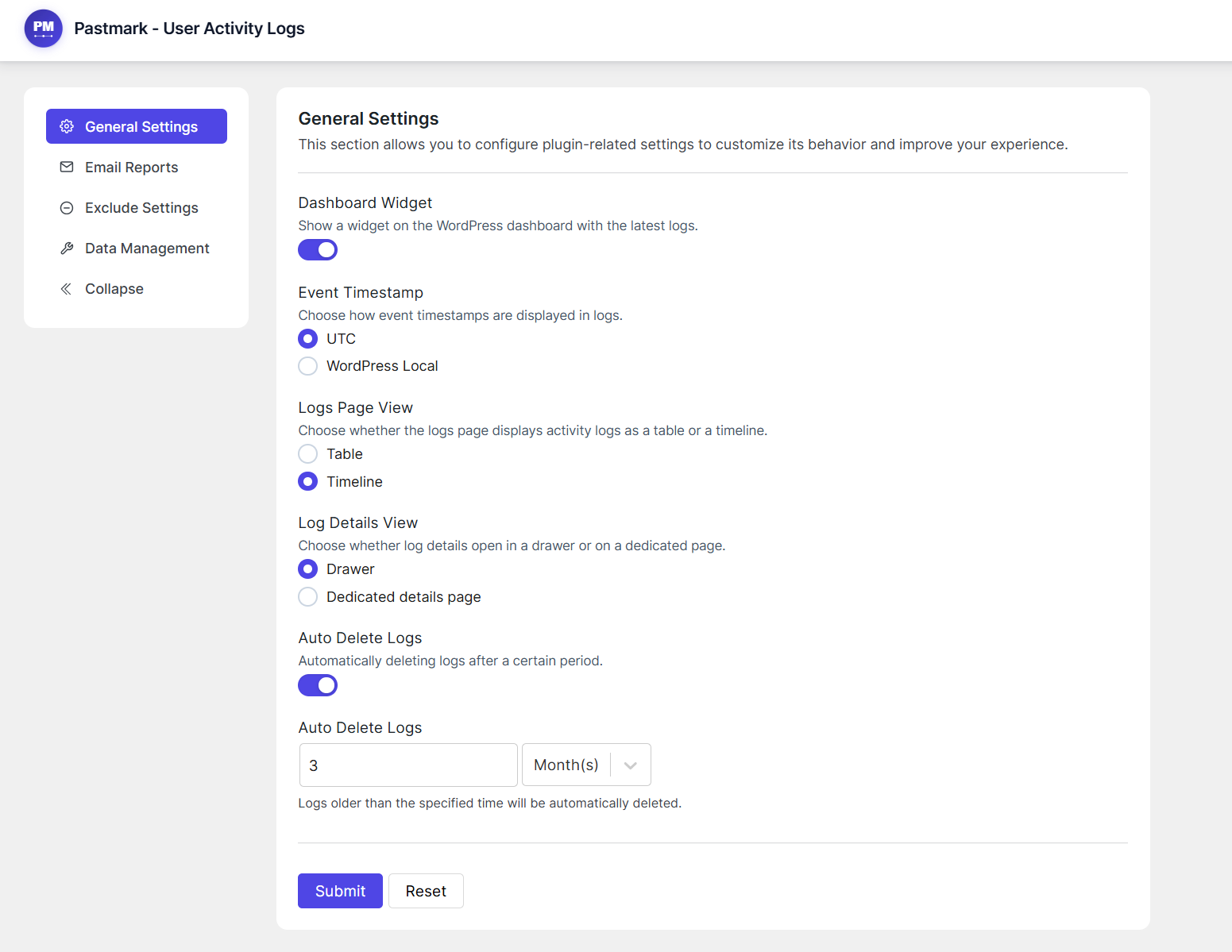
- At-a-glance activity summary via an optional dashboard widget.
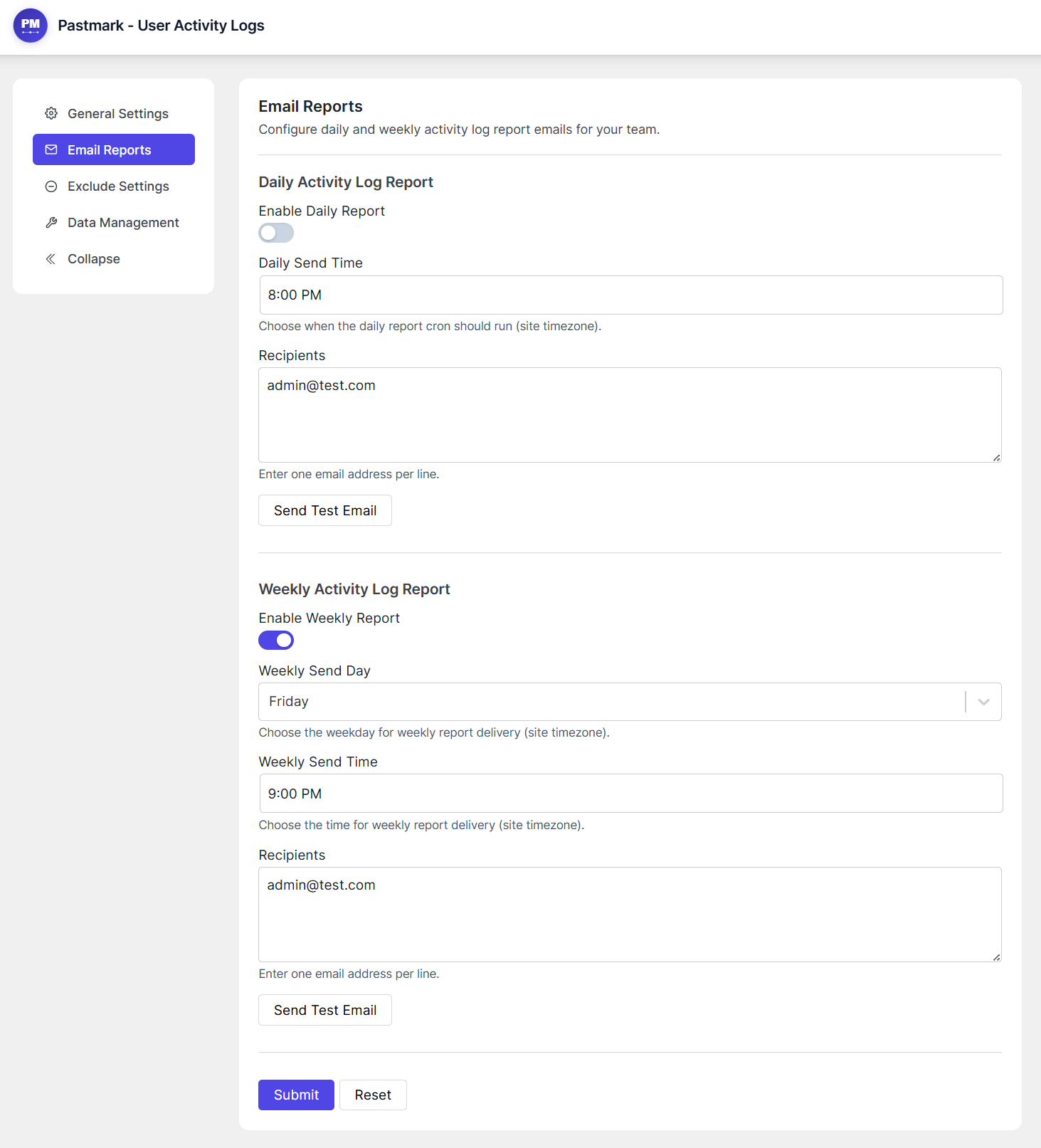
- Daily and weekly email activity reports sent to the recipients you choose.
- Automatic cleanup of old log entries with a configurable retention period.
Fine-grained control over what gets logged
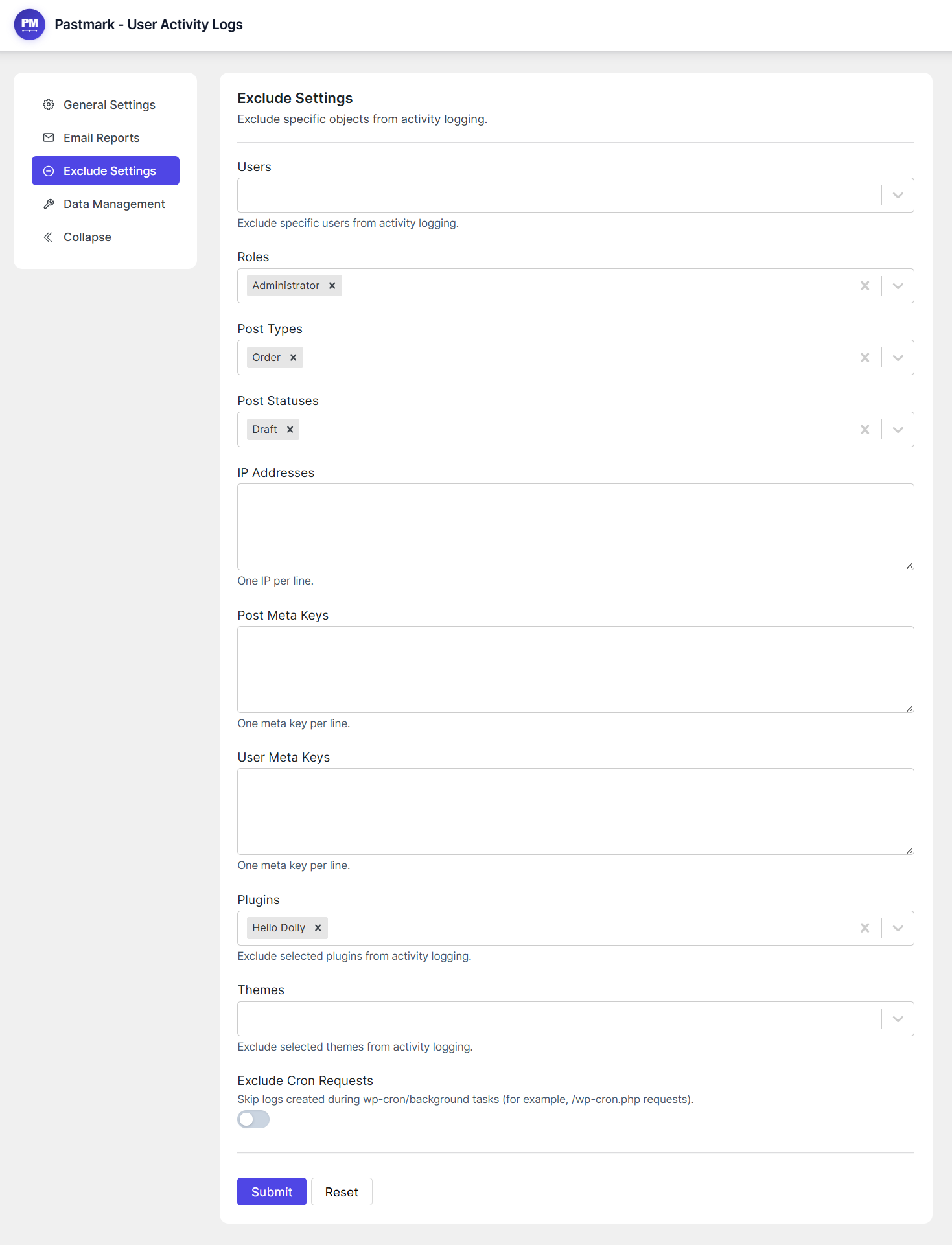
- Exclude specific users, roles, or IP addresses from being logged.
- Exclude specific post types, statuses, plugins, themes, menus, or widgets.
- Exclude custom post meta and user meta fields.
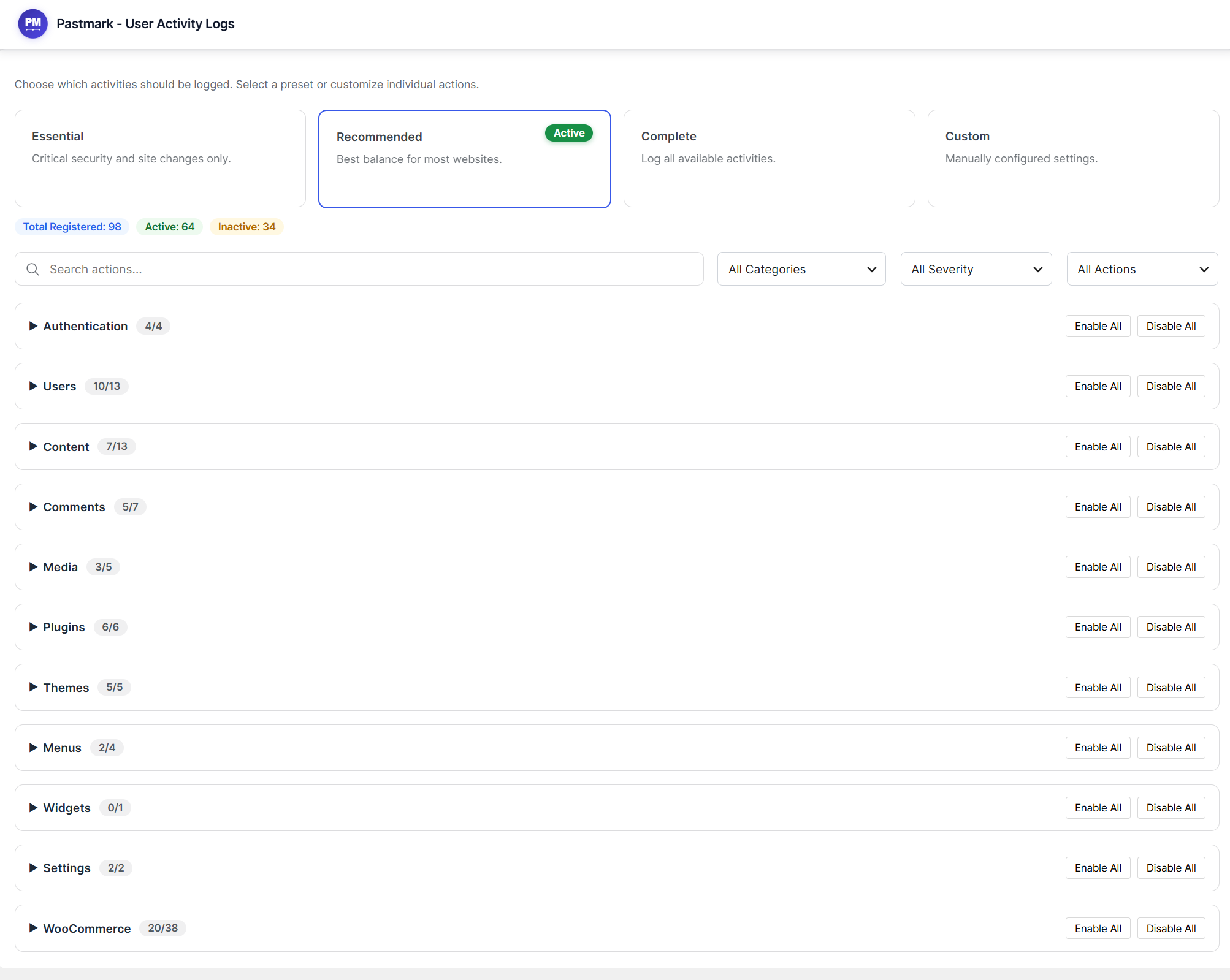
- Choose from Essential, Recommended, or Complete event presets, or enable individual events yourself.
Privacy & security by design
- Activity logs are only accessible to administrators (
manage_optionscapability). - Sensitive values such as passwords, tokens, and API keys are automatically detected and masked before they’re stored in the log.
- Optionally anonymize stored IP addresses from the Security & Privacy settings.
- Integrates with WordPress’s built-in Personal Data Export and Erase Personal Data tools, so Pastmark-collected data is included in GDPR data requests.
- Does not send any data to external servers — everything stays on your site.
Built for developers
- A public
pastmark_log_event()function and a REST API endpoint let other plugins, themes, or automation tools log their own custom events into Pastmark’s activity log, through the same validation and exclusion rules as every built-in event.
Other Plugins By Us
- BugTrace – Debug Log Tool: A minimalist debugging companion for WordPress. View and download your debug log, toggle
WP_DEBUG,WP_DEBUG_LOG,WP_DEBUG_DISPLAY, andSCRIPT_DEBUGwithout editingwp-config.php, and inspect server info,wp-config.php,.htaccess, and PHP info — all from your dashboard.
Contribute
Pastmark is an open-source project. You can view the full sources (unminified JS) and contribute to the project on GitHub: Click here
External Services
This plugin does not connect to external services for its functionalities.
Installation
- Upload the
pastmarkfolder to the/wp-content/plugins/directory, or install the plugin through the WordPress plugins screen directly. - Activate the plugin through the “Plugins” screen in WordPress.
- Visit the “Pastmark” menu in wp-admin to view and configure activity logs.
Using The WordPress Dashboard
- Navigate to the ‘Add New’ in the plugins dashboard
- Search for Pastmark Activity Log
- Click ‘Install Now’
- Activate the plugin in the plugin dashboard
Uploading in WordPress Dashboard
- Download
pastmark.zipfrom this page - Navigate to the ‘Add New’ in the plugins dashboard
- Navigate to the ‘Upload’ area
- Select
pastmark.zipfrom your computer - Click ‘Install Now’
- Activate the plugin in the plugin dashboard
Using FTP
- Download
pastmark.zipfrom this page - Extract the
pastmarkdirectory to your computer - Upload the
pastmarkdirectory to the/wp-content/plugins/directory - Activate the plugin in the plugin dashboard
Frequently asked questions
What does Pastmark actually log?
By default Pastmark logs authentication events (logins, logouts, failed logins), content changes (posts, pages, custom post types, comments, media), user account changes, menu and widget changes, plugin and theme activity, and core WordPress settings changes. You can choose an Essential, Recommended, or Complete preset, or select individual events to log from the Events screen.
Where are the logs stored?
Logs are stored in a dedicated database table created by the plugin, separate from the WordPress options and post tables.
Does this plugin slow down my site?
Logging runs on standard WordPress action and filter hooks and writes to a dedicated table, so the impact on page load times is minimal.
Does Pastmark work with WooCommerce?
Yes. When WooCommerce is active, Pastmark automatically starts logging your store in real depth — no extra setup required. That includes orders and their individual line items (products, fees, coupons, taxes, shipping, refunds), full product field-level edits, product categories/tags/global attributes, coupon lifecycle and depth fields, customer self-service address changes, and every store setting, payment gateway, and tax setting change. This is 167 of the 173 live WooCommerce events tracked by WP Activity Log, a leading competitor, formally confirmed by reading its own installed source…
Can I control how long logs are kept?
Yes. Pastmark can automatically delete log entries older than a period you choose (in days, months, or years) so your database doesn’t grow indefinitely. Automatic cleanup can also be turned off if you want to keep logs indefinitely.
Can I exclude certain users, roles, or IP addresses from being logged?
Yes. The Exclude settings let you leave out specific users, roles, IP addresses, post types, post statuses, plugins, themes, menus, widgets, and even specific post meta or user meta keys.
Does Pastmark ever store passwords or other sensitive data in the log?
No. Pastmark automatically detects common sensitive fields — passwords, tokens, API keys, and similar values — and masks them before the log entry is stored.
Can I anonymize IP addresses or limit failed login attempts?
Yes. The Security & Privacy settings let you anonymize stored IP addresses and configure how repeated failed login attempts from the same user and IP are throttled, instead of logging every single attempt.
Can other plugins or automation tools log their own events to Pastmark?
Yes. Pastmark provides a pastmark_log_event() function and a REST API endpoint so other plugins, themes, or external tools can log their own custom events, using the same exclusion rules and validation as Pastmark’s built-in events. See the developer documentation on GitHub for details.
Can I get email reports of site activity?
Yes. Pastmark can send daily and/or weekly email summaries of site activity to the recipients you configure, so you don’t have to log in to check the dashboard.
Who can view the activity logs?
Only users with the manage_options capability (administrators, by default) can access the Pastmark dashboard, settings, and event logs.
Is Pastmark GDPR-friendly?
Pastmark does not send any data to external services — all logs stay in your site’s own database. Pastmark also hooks into WordPress’s built-in “Export Personal Data” and “Erase Personal Data” privacy tools, so any Pastmark data tied to a user is included when you handle a data request.
What happens to the logs if I deactivate the plugin?
Logs are preserved when the plugin is deactivated. Uninstalling the plugin removes the stored logs.
Changelog
1.0.5 (16 September 2026)
- New: Easy Digital Downloads integration — download (product), order/payment, and discount-code lifecycle logging.
- New: WooCommerce store settings, payment gateway, and tax settings logging — every individual setting change, correctly labeled with a before/after value.
- New: WooCommerce product category, tag, and global attribute depth — slug, parent, display-type, and rename changes, plus full tag and global attribute lifecycle.
- New: WooCommerce order line-item logging — products, fees, coupons, taxes, and shipping lines added, removed, or changed on an order, plus reversed refund lines.
- New: WooCommerce coupon depth — discount type, expiry date, usage limits, usage restrictions, description, and visibility changes.
- New: WooCommerce customer self-service billing and shipping address change logging (My Account).
1.0.4 (5 September 2026)
- New: The Activity Logs list now shows a “N new events” banner above the log list when new events arrive, letting you refresh to load them without leaving the page.
- New: Toggle the Activity Logs list between Default and Compact row spacing, in both Table and Timeline view.
- New: TablePress integration.
- New: bbPress integration.
- New: WP 2FA integration.
- New: Ultimate Member integration.
- New: Wordfence integration.
- New: Tutor LMS integration.
1.0.3 (30 August 2026)
- New: Advanced Custom Fields (ACF) integration.
- New: WPForms integration, with expanded event coverage.
- New: Gravity Forms integration, with expanded event coverage.
- New: Yoast SEO integration.
- New: RankMath integration.
- New: Redirection integration.
- Fixed: The Activity Logs page’s Severity filter could never select “Critical” or “Debug”, and its Integration filter couldn’t filter by ACF, WPForms, or Gravity Forms, even though the underlying data always supported it.
1.0.2 (25 August 2026)
- New: Public Logging API — a
pastmark_log_event()function and a writable REST endpoint let other plugins, themes, or automation tools log their own custom events into Pastmark’s activity log. - New: Security & Privacy settings — anonymize stored IP addresses and configure failed-login throttling window and threshold.
- New: Failed login attempts from the same user and IP address are now throttled, collapsing repeated attempts into a single, continuously updated log entry instead of one row per attempt.
- New: Sensitive values such as passwords, tokens, and API keys are now automatically detected and masked before being stored in log details.
- New: Large post and comment content edits now store a compact diff instead of duplicating the full content twice, reducing database size for big edits. Small edits are stored exactly as before.
- Improved: Activity Logs Timeline view now shows a severity badge for every severity level, not just “Warning”.
- Improved: The dashboard now shows a clear error message with a retry option if activity data fails to load, instead of silently appearing empty.
1.0.1 (22 August 2026)
- New: Activity Logs (list and detail views) now show a direct link to the object each event relates to — the edited post, order, or user.
- New: Filter activity logs by Actor Type (human, system, scheduled, or AI agent) and by Integration (Core or WooCommerce).
- New: Events likely triggered by an AI agent or automation tool are now heuristically detected, flagged with a badge, and filterable.
- Improved: WooCommerce order edits now log the actual before/after change to the order total.
- Improved: WooCommerce refunds now log real before/after refund amounts instead of an empty diff.
- Fixed: A duplicate “Order edited” event no longer appears immediately after placing a new WooCommerce order.
- Fixed: Deactivating the plugin now properly clears its scheduled cron events.
- Fixed: Uninstalling with “Remove data on uninstall” enabled now also removes the event log level setting, instead of leaving it behind.
1.0.0 (16 August 2026)
- Initial release.
Screenshots

For developers
Is this your plugin? Show off the numbers.
Add a live badge to your site, docs or GitHub README. It updates on its own — no account needed.
Best Pastmark alternatives
All Activity Log plugins →





FAQ
Pastmark: quick answers
Straight answers, pulled from live WordPress.org data.
Live data from WordPress.org · checked Oct 8, 2026
Is Pastmark free?
Yes. Pastmark is free to download and use from the official WordPress.org plugin directory.
Is Pastmark safe to use in 2026?
Pastmark is a solid plugin choice in 2026, with a few things worth checking first. Was last updated 3 weeks ago, and scores 64/100 on our health check.
How many websites use Pastmark?
Pastmark is active on <10 WordPress websites and has been downloaded 361 times since it launched in August 2026. It was downloaded 123 times in the last 30 days.
Does Pastmark work with WordPress 7.1?
Yes. The developer has tested Pastmark up to WordPress 7.1.3, the latest release. It requires WordPress 6.2 or newer.
What PHP version does Pastmark need?
Pastmark requires PHP 7.4 or higher. Most hosts run PHP 8.x today, so it works on any modern WordPress hosting.
When was Pastmark last updated?
The latest version, 1.0.5, was released on September 16, 2026 (3 weeks ago).
Who makes Pastmark?
Pastmark is developed and maintained by Nikhil G.
What are the best alternatives to Pastmark?
The most popular alternatives to Pastmark are WP Activity Log (300K+ installs), Activity Log (200K+ installs) and Stream (70K+ installs).
Powered by PageForge
Want thousands of pages that rank like these? Build them in an afternoon.
This directory runs on the same engine as PageForge. Turn any spreadsheet, CSV or API into thousands of fast, SEO-ready WordPress pages — with schema, internal links and AI-written copy baked in.
- CSV, Google Sheets & API data sources
- AI content, schema & internal links per page
- Works with Elementor, Gutenberg, Yoast & Rank Math
- Free on WordPress.org — no credit card


