


Panorama Block – immerse visitors in 360 degree views
Lightweight 360 degree panorama viewer block for Gutenberg – display panoramic images and videos with auto-rotation, zoom, and playback controls

Solid choice
Panorama Block is a solid plugin choice in 2026, with a few things worth checking first. It runs on 700+ sites, is rated 5/5 and was last updated 7 days ago, and scores 77/100 on our health check.
- Actively developed — last update 7 days ago
- Tested with the latest WordPress (7.1)
- Small user base (700+ active installs)
- Very few reviews so far
How does it stack up?
Side-by-side on installs, updates, ratings & support



Daily downloads
Download spikes usually follow a new release — each site that auto-updates counts as a download.
Rankings
Where Panorama Block stands todayWordPress.org search rankings
Live position in the plugin search, top 100| Keyword | Position |
|---|---|
| 360 degree | #1 |
| block | >100 |
| image video viewer | #33 |
| panorama | #3 |
| panoramic | #2 |
Version adoption
Share of active sites per release.
Rating breakdown
★★★★★★★★★★ 5 from 1 reviews
About Panorama Block
From the official readme · v1.2.1Description
Let visitors look around in every direction – display immersive 360-degree panoramic images and videos on your site within a few clicks.
Image Panorama Demo (Free) | Video Panorama Demo (Free) | Advanced Panorama Demos (Pro) | Pricing
Why Panorama Block?
Panorama Block is a lightweight 360-degree panorama viewer Gutenberg block that lets you display panoramic images and videos on your website within a few clicks. It supports a variety of panoramic files such as .png, .jpeg, .mp4, and more, with spherical texture projections powered by WebGL/Three.js.
The plugin is very easy to use – anyone can configure the viewer without any technical knowledge. Turn on auto-rotation to keep visitors engaged, set the rotation speed right inside the editor, and decide whether viewers can pan, zoom, and drag the scene themselves.
Free Features
- Spherical 360° View: Spherical texture projections powered by WebGL/Three.js.
- Image & Video Support: Panoramic images (PNG, JPEG) and video formats (MP4, WebM).
- Auto-Rotation: Keeps visitors engaged by panning views automatically.
- Speed Control: Set custom rotation speed dynamically inside the editor.
- Toggle Viewer Controls: Show or hide user controls for manual panning, zooming, and dragging.
- Autoplay, Mute & Loop: Custom playback settings for 360-degree video configurations.
- Uninstall Data Clean-up: Safe option to delete settings from the database upon deletion.
Pro Version – Panorama Viewer Pro
Looking for advanced features like interactive Virtual Tours with multi-scene support, markers and custom hotspots, Google Street View, and WooCommerce integration? Panorama Viewer Pro includes all features of the free Panorama Block plugin, plus these powerful tools to create immersive experiences.
How to Use Panorama Block – Quick Start
- Install and activate the Panorama Block plugin.
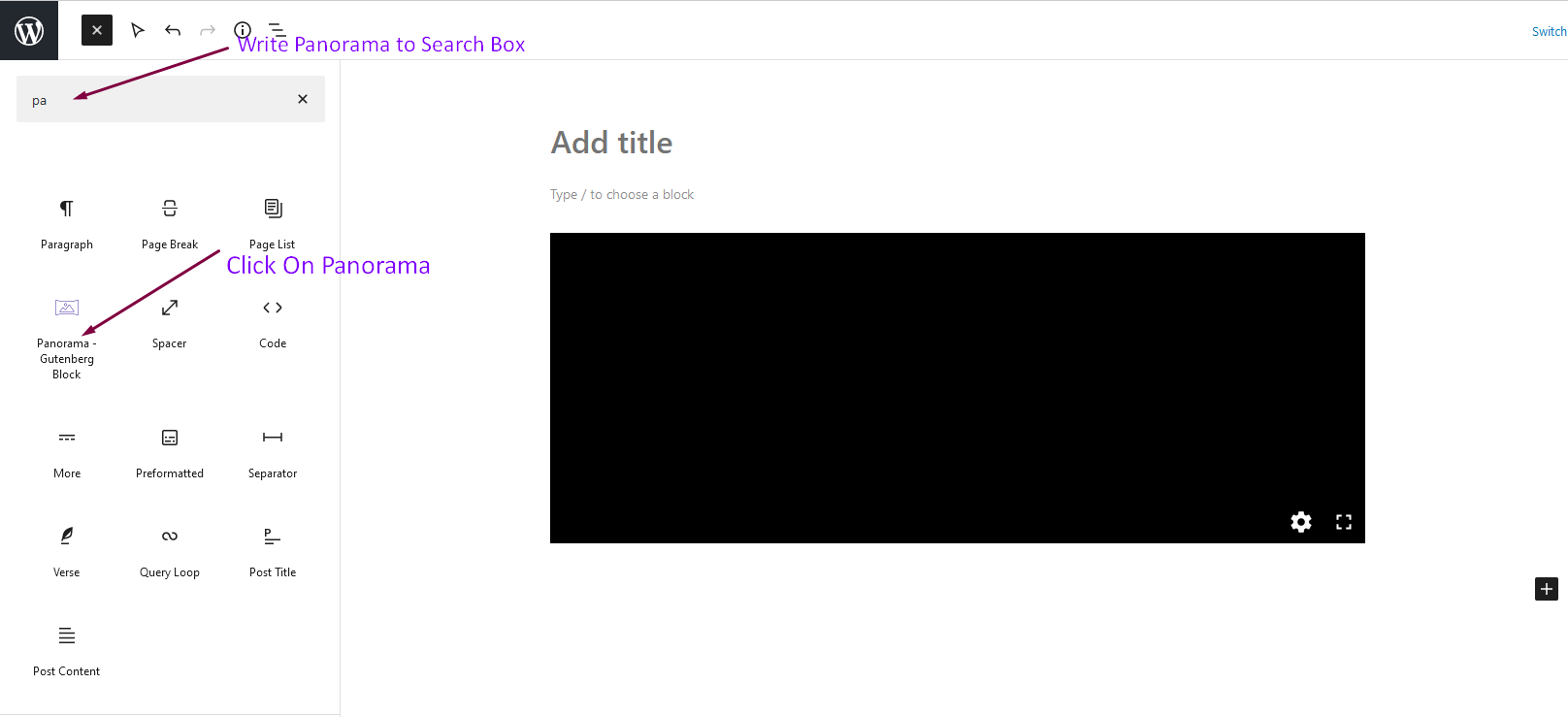
- In the Gutenberg editor, search for Panorama Block and add it to any post or page.
- Select your panoramic image or video from the media library.
- Configure auto-rotation, speed, viewer controls, and playback settings from the right-side sidebar.
- Publish – your 360-degree view is live!
Use Cases
- Real Estate & Interiors: Let prospects explore rooms and properties in 360 degrees.
- Travel & Tourism: Showcase destinations and landscapes with immersive panoramas.
- Hotels & Venues: Present event spaces and facilities from every angle.
- 360 Video Content: Embed panoramic videos with autoplay, mute, and loop options.
Source Code
You can find the source code, report bugs, and contribute to the development of this plugin on our GitHub repository:
Panorama Block on GitHub
Third-Party Libraries
bpl-tools
- Source / GitHub: https://github.com/bPlugins/bpl-tools
- License: GPL-2.0-or-later – https://www.gnu.org/licenses/gpl-2.0.html
- Purpose: Shared utility library providing admin dashboard components and common Gutenberg editor controls.
- External Services: The library may connect to bPlugins, WordPress.org, and Freemius services for product data and checkout functionality. See full details: https://github.com/bPlugins/bpl-tools#external-requests–why-they-are-made
Installation
From your WordPress dashboard (recommended):
- Go to Plugins → Add New.
- Search for “Panorama Block”.
- Click Install Now, then Activate.
- In the Gutenberg editor, search for Panorama Block and click to add the block.
Manual installation:
- Download the Panorama Block plugin (.zip file).
- In your admin area, go to Plugins → Add New → Upload Plugin, choose the
panorama-block.zipfile, and click Install Now. - Activate the plugin through the Plugins menu in WordPress.
Frequently asked questions
Is Panorama Block free?
Yes, Panorama Block is a free Gutenberg block plugin. A premium version, Panorama Viewer Pro, adds virtual tours, hotspots, Google Street View, and WooCommerce integration.
Which file formats does Panorama Block support?
It supports panoramic images such as PNG and JPEG, and panoramic video formats such as MP4 and WebM.
Can I display 360-degree videos as well as images?
Yes. The block supports both panoramic images and panoramic videos, with autoplay, mute, and loop playback settings.
Can the panorama rotate automatically?
Yes. Auto-rotation is built in, and you can set a custom rotation speed dynamically inside the editor.
Does it work with any WordPress theme?
Yes, it works with any standard WordPress theme.
Can I change block settings?
Yes, you can change block settings from the Gutenberg block editor’s right sidebar, including viewer controls for panning, zooming, and dragging.
How many times can I reuse the block?
You can use the block an unlimited number of times across posts and pages.
Where can I get support?
You can post your questions on the support forum here
Where do I report security bugs found in this plugin?
Please report security bugs found in the source code of the Panorama Block plugin through the Patchstack Vulnerability Disclosure Program. The Patchstack team will assist you with verification, CVE assignment, and notify the developers of this plugin.
Changelog
1.2.1 – 8 July, 2026
- Improved: Updated readme documentation with Live Demo and Premium upgrade links.
- Added: Added WordPress Playground Integration with blueprint configuration.
1.2.0 – 14 June, 2026
- Added: Added modern settings and welcome dashboard panel.
- Added: Added data cleanup option on uninstall.
- Added: Added automated release zip packaging configuration.
- Added: Added automatic dashboard redirect on plugin activation.
- Fixed: Resolved Gutenberg editor crash under apiVersion 3.
- Fixed: Resolved block selection and dragging rotation conflicts in block editor.
- Fixed: Resolved phpcs and WordPress VIP checker warnings.
1.1.1 – 6 May 25
- Fixed: Fix InlineMedia in settings panel.
1.1.0 – 16 April 25
- Fixed: Fix Autorotate speed issue and customize settings panel.
1.0.5 – 9 Mar 24
- Fixed: Fix live url issue.
1.0.4
- Improved: Performance
Screenshots


For developers
Is this your plugin? Show off the numbers.
Add a live badge to your site, docs or GitHub README. It updates on its own — no account needed.
Best Panorama Block alternatives
All 360 degree plugins →

FAQ
Panorama Block: quick answers
Straight answers, pulled from live WordPress.org data.
Live data from WordPress.org · checked Oct 10, 2026
Is Panorama Block free?
Yes. Panorama Block is free to download and use from the official WordPress.org plugin directory.
Is Panorama Block safe to use in 2026?
Panorama Block is a solid plugin choice in 2026, with a few things worth checking first. It runs on 700+ sites, is rated 5/5 and was last updated 7 days ago, and scores 77/100 on our health check.
How many websites use Panorama Block?
Panorama Block is active on 700+ WordPress websites and has been downloaded 12,363 times since it launched in December 2021. It was downloaded 443 times in the last 30 days.
Does Panorama Block work with WordPress 7.1?
Yes. The developer has tested Panorama Block up to WordPress 7.1.3, the latest release. It requires WordPress 6.5 or newer.
What PHP version does Panorama Block need?
Panorama Block requires PHP 7.1 or higher. Most hosts run PHP 8.x today, so it works on any modern WordPress hosting.
When was Panorama Block last updated?
The latest version, 1.2.1, was released on October 3, 2026 (7 days ago).
Who makes Panorama Block?
Panorama Block is developed and maintained by bPlugins.
What are the best alternatives to Panorama Block?
The most popular alternatives to Panorama Block are Panorama (2K+ installs), 360 Javascript Viewer (1K+ installs) and Advanced Panorama 360 Viewer (60+ installs).
Powered by PageForge
Want thousands of pages that rank like these? Build them in an afternoon.
This directory runs on the same engine as PageForge. Turn any spreadsheet, CSV or API into thousands of fast, SEO-ready WordPress pages — with schema, internal links and AI-written copy baked in.
- CSV, Google Sheets & API data sources
- AI content, schema & internal links per page
- Works with Elementor, Gutenberg, Yoast & Rank Math
- Free on WordPress.org — no credit card


