


ONLYOFFICE Docs
ONLYOFFICE Docs plugin allows users to edit and view office documents from WordPress using ONLYOFFICE Docs.

Consider an alternative
ONLYOFFICE Docs shows warning signs in 2026 — compare the alternatives below before installing. It runs on 100+ sites and was last updated 1 year ago, and scores 34/100 on our health check.
- Small user base (100+ active installs)
- Very few reviews so far
- No update in over a year
- Only tested up to WordPress 6.8 (latest is 7.1)
How does it stack up?
Side-by-side on installs, updates, ratings & support



Daily downloads
Download spikes usually follow a new release — each site that auto-updates counts as a download.
Rankings
Where ONLYOFFICE Docs stands todayWordPress.org search rankings
Live position in the plugin search, top 100| Keyword | Position |
|---|---|
| collaboration | >100 |
| document | >100 |
| editor | >100 |
| office | >100 |
| onlyoffice | #1 |
Version adoption
Share of active sites per release.
About ONLYOFFICE Docs
From the official readme · v2.3.0Description
ONLYOFFICE Docs plugin allows WordPress administrators to open documents, spreadsheets, and presentations for collaborative editing using ONLYOFFICE Docs (online document editors). In published posts, the editors are visible to all WordPress site visitors (both authorized and unauthorized) in the Embedded mode only.
Editing files uploaded to WordPress
All uploaded files from the Media section will appear on the ONLYOFFICE Docs -> Files page. The editor opens in the same tab by clicking on the file name. Users with administrator rights are able to co-edit documents. All the changes are saved in the same file.
Creating a post
When creating a post, you can add the ONLYOFFICE Docs element (block) and then upload a new file or select one from the Media Library. The added file will be displayed as the ONLYOFFICE logo with the file name in the currently edited post. After the post is published (when you press the Publish or Update button), your WordPress site visitors will have access to this file for viewing in the Embedded mode.
Frequently asked questions
What should I know before using the plugin?
You need to have ONLYOFFICE Document Server installed. You can install free Community version or scalable Enterprise Edition.
How to configure the plugin?
Go to WordPress administrative dashboard -> ONLYOFFICE Docs -> Settings. Specify the URL of the installed ONLYOFFICE Document Server and the Secret key. Please note: Starting from version 7.2 of ONLYOFFICE Docs, JWT is enabled by default and the secret key is generated automatically to restrict the access to ONLYOFFICE Docs and for security reasons and data integrity. Specify your own secret key in the WordPress administrative configuration. In the ONLYOFFICE Docs config file, specify the same secret key and enable the validation.
What collaborative features do the editors provide?
You can co-author documents using real-time or paragraph-locking co-eding modes, Track Changes, comments, and built-in chat.
Changelog
2.3.0
- improved security for /download and /callback api endpoitns
2.2.0
- fixed xss vulnerabilities in onlyoffice-docs page component
2.0.0
- multisite support
- stub for onlyoffice-wordpress-block that displays error information if the document server is not accessible or the file is not found
- settings for onlyoffice block (width, height, align, show open in onlyoffice button)
- button copy link to editor, in the table with files
- ability to insert a link to the editor on the page
- access for an anonymous user, open the document for viewing in the editor if the document is attached to a public post
- filling pdf
- editor url
- displaying the onlyoffice-wordpress-block component in the Gutenberg editor
- remove filling for oform
- supported formats updated
1.1.0
- extended list of supported formats
- support docxf and oform formats
- support for the connector to work in conjunction with the plugin “Force Lowercase URLs” (https://wordpress.org/plugins/force-lowercase-urls)
- setting authorization header
- compatible with classic editor TinyMCE
- Link to docs cloud
1.0.2
- fixed issues for the marketplace release
1.0.1
- fixed issues for the marketplace release
Screenshots


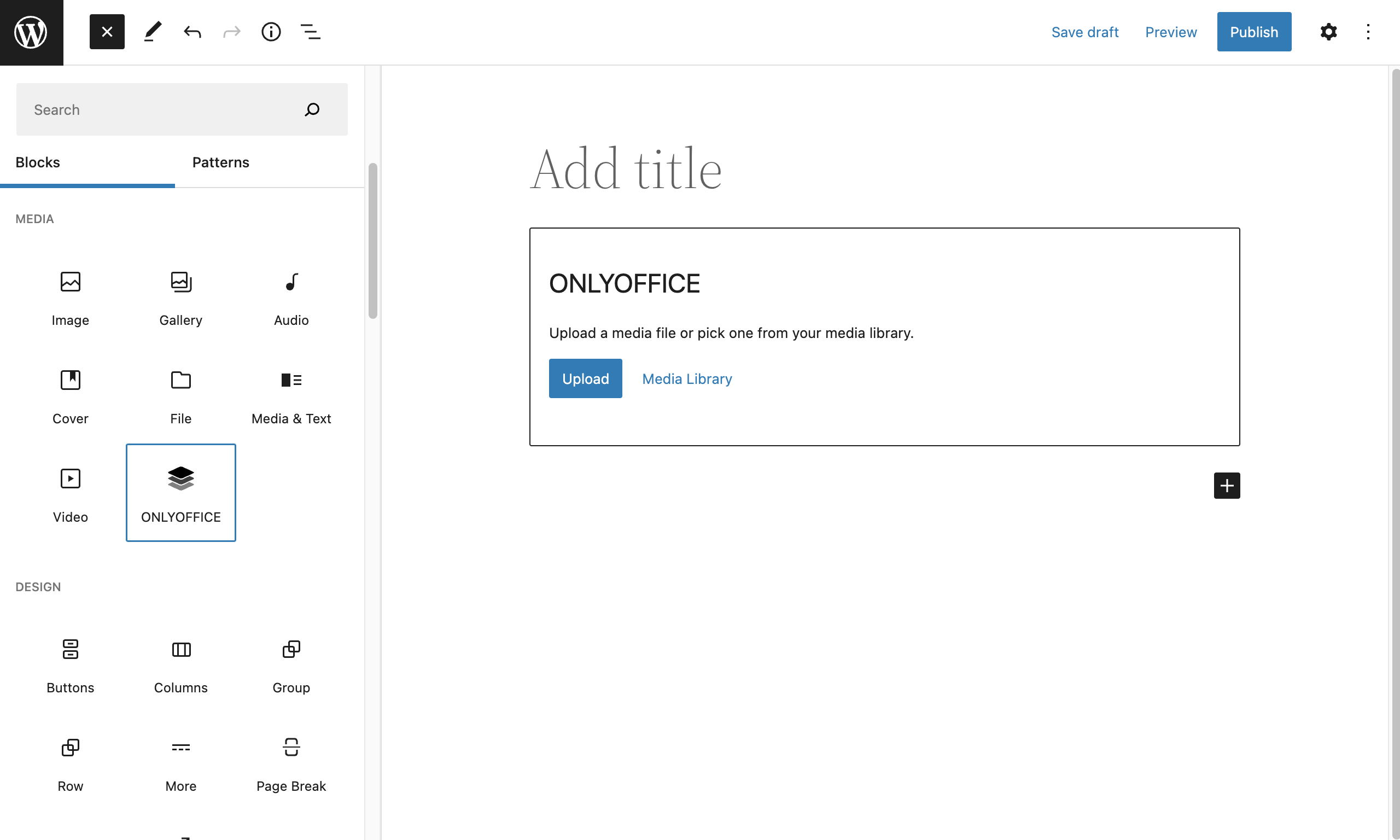


For developers
Is this your plugin? Show off the numbers.
Add a live badge to your site, docs or GitHub README. It updates on its own — no account needed.
Best ONLYOFFICE Docs alternatives
All collaboration plugins →




FAQ
ONLYOFFICE Docs: quick answers
Straight answers, pulled from live WordPress.org data.
Live data from WordPress.org · checked Oct 17, 2026
Is ONLYOFFICE Docs free?
Yes. ONLYOFFICE Docs is free to download and use from the official WordPress.org plugin directory.
Is ONLYOFFICE Docs safe to use in 2026?
ONLYOFFICE Docs shows warning signs in 2026 — compare the alternatives below before installing. It runs on 100+ sites and was last updated 1 year ago, and scores 34/100 on our health check.
How many websites use ONLYOFFICE Docs?
ONLYOFFICE Docs is active on 100+ WordPress websites and has been downloaded 6,598 times since it launched in May 2022. It was downloaded 162 times in the last 30 days.
Does ONLYOFFICE Docs work with WordPress 7.1?
ONLYOFFICE Docs is officially tested up to WordPress 6.8.11, while the latest release is 7.1.3. It may still work, but try it on a staging site first.
What PHP version does ONLYOFFICE Docs need?
ONLYOFFICE Docs requires PHP 7.4 or higher. Most hosts run PHP 8.x today, so it works on any modern WordPress hosting.
When was ONLYOFFICE Docs last updated?
The latest version, 2.3.0, was released on July 25, 2025 (1 year ago).
Who makes ONLYOFFICE Docs?
ONLYOFFICE Docs is developed and maintained by onlyoffice.
What are the best alternatives to ONLYOFFICE Docs?
The most popular alternatives to ONLYOFFICE Docs are BuddyPress Docs (6K+ installs), Peter's Post Notes (3K+ installs) and WP Document Revisions (2K+ installs).
Powered by PageForge
Want thousands of pages that rank like these? Build them in an afternoon.
This directory runs on the same engine as PageForge. Turn any spreadsheet, CSV or API into thousands of fast, SEO-ready WordPress pages — with schema, internal links and AI-written copy baked in.
- CSV, Google Sheets & API data sources
- AI content, schema & internal links per page
- Works with Elementor, Gutenberg, Yoast & Rank Math
- Free on WordPress.org — no credit card


