


Webvizio
The Ultimate Visual Feedback, Collaboration & Productivity Tool for Web Professionals.

Safe pick
Yes — Webvizio is a safe, well-maintained plugin to use in 2026. It runs on 100+ sites, is rated 5/5 and was last updated 1 week ago, and scores 80/100 on our health check.
- Actively developed — last update 1 week ago
- Tested with the latest WordPress (7.1)
- Small user base (100+ active installs)
How does it stack up?
Side-by-side on installs, updates, ratings & support



Daily downloads
Download spikes usually follow a new release — each site that auto-updates counts as a download.
Rankings
Where Webvizio stands todayWordPress.org search rankings
Live position in the plugin search, top 100| Keyword | Position |
|---|---|
| bug-tracking | #57 |
| collaboration | #36 |
| project management | #56 |
| visual feedback | #27 |
| website feedback | #63 |
Version adoption
Share of active sites per release.
Rating breakdown
★★★★★★★★★★ 5 from 7 reviews
About Webvizio
From the official readme · v1.0.6Description
The Ultimate Visual Feedback, Collaboration & Productivity Tool for Web Professionals.
What is Webvizio?
Webvizio is an advanced visual collaboration and project management tool tailored for web developers, digital agencies, and freelancers.
🌐 Designed to streamline the web development process, Webvizio enables teams to provide real-time feedback directly on live websites, ensuring efficient communication and clear instructions.
By eliminating the chaos of scattered feedback and lengthy email threads, Webvizio enhances productivity, fosters team collaboration, and helps deliver high-quality web projects on time.
🔄 This tool integrates seamlessly with popular project management and communication platforms like Trello, ClickUp, Jira, and Slack, centralizing all project-related activities and communications.
🌟 Why Should You Use Webvizio?
Webvizio is essential for improving website project management. It centralizes feedback, reduces the need for multiple tools, and speeds up project completion.
By eliminating the constant back-and-forth of traditional communication methods, Webvizio enhances productivity and client satisfaction. It’s designed to help you manage complex projects effortlessly, ensuring every team member is on the same page.
Webvizio offers a free trial and three paid plans (Starter, Advanced, Enterprise) to fit different team sizes and budgets.
❓ Here is a detailed comparison of our plans: https://webvizio.com/pricing/
Benefits of Using Webvizio:
- 🎨 Visual Collaboration: Leave visual feedback for your colleagues and manage tasks for your WordPress site development.
- 📈 Enhanced Productivity: By centralizing feedback and project management, teams can work more efficiently and reduce the time spent on back-and-forth communications.
- 🧩 Improved Collaboration: Real-time updates and visual annotations make it easier for team members to stay on the same page.
- 🔗 Connected Teams: With Webvizio, you can assign tasks to your team, but also to other departments and executives.
- 🔄 Flexible Integration: Webvizio works seamlessly with other tools, making it easy to integrate into existing workflows.
- 📅 Enhanced Project Management: Integrate with project management tools to streamline workflows.
- 💬 Improved Client Communication: Facilitate direct, real-time interactions with clients and team members.
- 🏆 Higher Quality Projects: Clear and organized feedback helps ensure that all aspects of the web development process are addressed promptly and accurately.
👨💻 Who Is It For? 👨💻
Webvizio is the ideal solution for any team looking to improve their web development process, enhance communication, and deliver high-quality projects efficiently.
Whether you are a freelancer, a small agency, or a large team, Webvizio offers the tools you need to succeed, and improve overall project management.
The Webvizio WordPress plugin is designed for a wide range of professionals involved in website development and management.
👨💻 Here’s who can benefit: Web Developers; Web Designers; Project Managers; Digital Agencies; Freelancers; Content Creators; E-commerce Teams; QA Teams.
❓ Choose the right plan: https://webvizio.com/pricing/
Webvizio Integrations Available:
Webvizio integrates seamlessly with several popular productivity tools to enhance your workflow:
- 📋 Trello: Enhance project management efficiency with seamless integration.
- ✅ ClickUp: Boost productivity with integrated task tracking.
- 🐛 Jira: Streamline bug tracking and issue management.
- 🔄 Zapier: Automate workflows across platforms.
- 🔄 Pabbly: Efficiently exchange data with other apps.
- 🔔 Slack: Receive real-time notifications in your preferred channels.
- 🌐 Webhooks: Build custom integrations with any application by utilizing webhooks to send new requests, update statuses, change urgencies, and more! You can link various services, such as Telegram, Discord, or any other platform that supports webhooks.
Integrations Coming Soon:
We are constantly working to expand our integration capabilities. Upcoming integrations include:
- 📅 Asana: Centralize project management efforts.
- 🎨 Figma: Transfer Figma design files to Webvizio with one click and collaborate on them seamlessly.
Plugin Description
The Webvizio WordPress Plugin enhances the functionality of the Webvizio service for WordPress-based websites.
❗ Please note that it is not a standalone product but an essential addition to Webvizio. It ensures accurate content display, faster loading speeds, and secure access to password-protected pages within the Webvizio platform.
To use the plugin, you must have a live Webvizio account — you can create one at app.webvizio.com/register
You can learn more about Webvizio at webvizio.com.
All user interaction is performed through the Webvizio interface, and all user data is stored on Webvizio servers, so before you sign up, please read Webvizio\’s Terms of Service and Privacy Policy.
This integration improves the overall efficiency and collaboration of your web development projects, making communication across your team more effective.
⚙️ Whether you’re a developer, project manager, or part of a digital agency, this plugin will streamline your workflow within the Webvizio ecosystem. Here is the installation guide: https://webvizio.com/help-center/wordpress-plugin/
Detailed Plugin Features
✅ Accurate Content Display
The plugin ensures that all your site content is displayed accurately within Webvizio, addressing common issues like incorrect display or missing page elements. This feature guarantees a professional and seamless viewing experience.
🔒 Access to Password-Protected Pages
The plugin allows you to efficiently work with hidden or password-protected pages on your website within the Webvizio platform. This ensures sensitive information remains secure while still being accessible to authorized Webvizio users.
You can select a user within your site to be connected to Webvizio. After this, all Webvizio users who open the project will automatically be logged into the account of the connected user and have access to all the pages available to that WordPress user, except for the admin panel pages.
❗Important: For security reasons, we advise against connecting users with the administrator role to Webvizio. The optimal approach is to create a dedicated user account on your site specifically for Webvizio integration.
⚡ Increased Loading Speed
By directly utilizing your website’s resources, the plugin significantly boosts tab loading speeds. Webvizio no longer creates a copy of your website page for display; instead, it uses your website directly. This ensures that the loading speed is only limited by your site’s inherent performance.
How to Get Started?
Webvizio is a robust visual collaboration tool tailored for web development. It simplifies the process of collecting feedback, managing tasks, and enhancing project management.
To get started, install the Webvizio plugin on your WordPress site and connect it to your Webvizio account. This connection will unlock powerful features that will make website development smoother and more efficient.
❓ Here is a step-by-step guide with a detailed explanation: https://webvizio.com/help-center/wordpress-plugin/
Screenshots


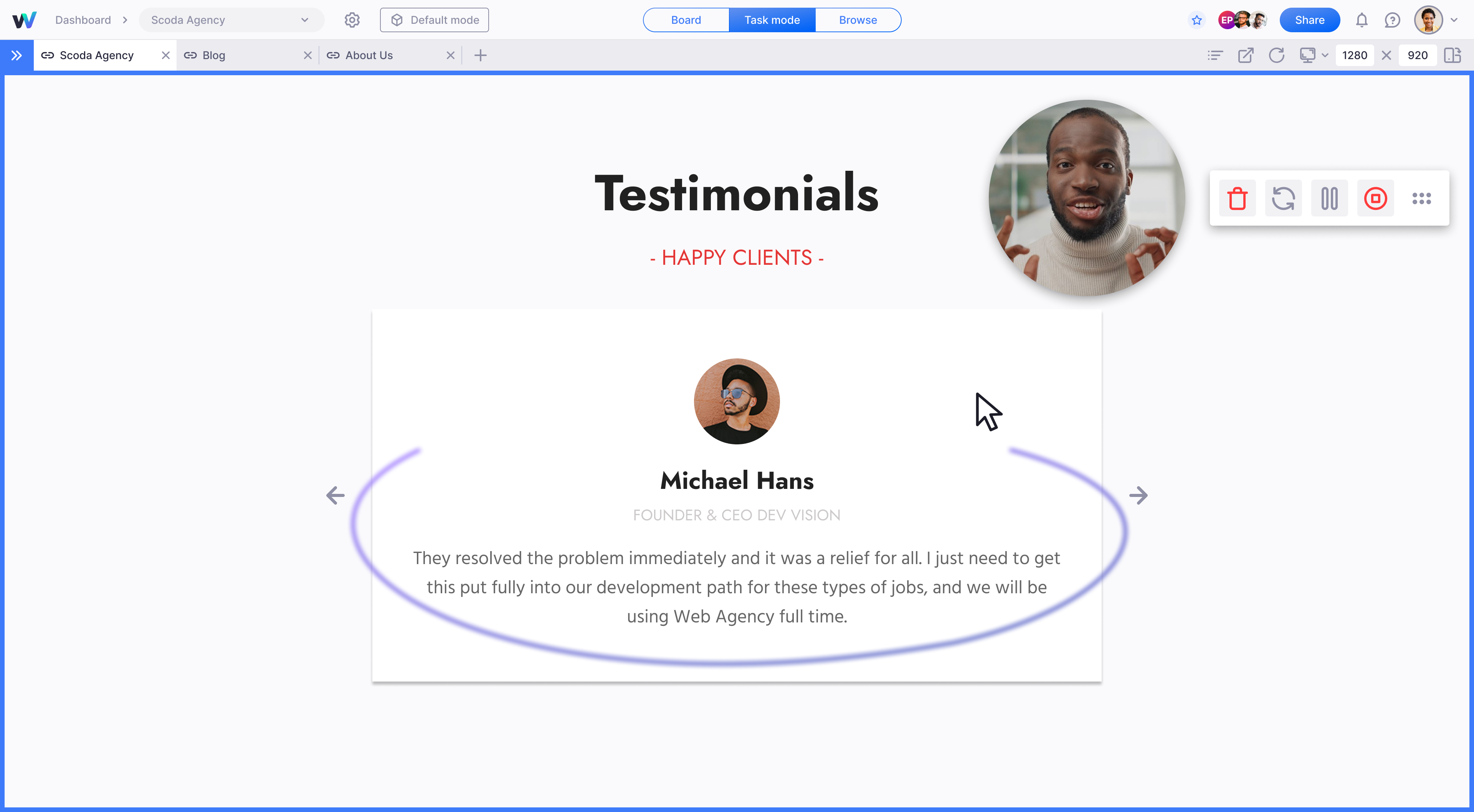


For developers
Is this your plugin? Show off the numbers.
Add a live badge to your site, docs or GitHub README. It updates on its own — no account needed.
Best Webvizio alternatives
All bug-tracking plugins →





FAQ
Webvizio: quick answers
Straight answers, pulled from live WordPress.org data.
Source: WordPress.org
Is Webvizio free?
Yes. Webvizio is free to download and use from the official WordPress.org plugin directory.
Is Webvizio safe to use in 2026?
Yes — Webvizio is a safe, well-maintained plugin to use in 2026. It runs on 100+ sites, is rated 5/5 and was last updated 1 week ago, and scores 80/100 on our health check.
How many websites use Webvizio?
Webvizio is active on 100+ WordPress websites and has been downloaded 2,643 times since it launched in September 2024. It was downloaded 373 times in the last 30 days.
Does Webvizio work with WordPress 7.1?
Yes. The developer has tested Webvizio up to WordPress 7.1.5, the latest release. It requires WordPress 5.7.0 or newer.
What PHP version does Webvizio need?
Webvizio requires PHP 7.2 or higher. Most hosts run PHP 8.x today, so it works on any modern WordPress hosting.
When was Webvizio last updated?
The latest version, 1.0.6, was released on November 10, 2026 (1 week ago).
Who makes Webvizio?
Webvizio is developed and maintained by Alex Malashkevych.
What are the best alternatives to Webvizio?
The most popular alternatives to Webvizio are Marker.io (4K+ installs), BugHerd (2K+ installs) and Userback (1K+ installs).
Powered by PageForge
One template and a spreadsheet. A real page for every search.
PageForge turns each row of a CSV into a WordPress page with its own title, URL, SEO fields and schema, built on the layout you already designed. Free on WordPress.org.
- CSV and XLSX, plus Google Sheets on Professional and Enterprise
- Its own title, URL, SEO fields and schema for every page
- Works with the block editor, Elementor, Divi and Avada
- Free on WordPress.org, no credit card