


OMS QuietAdmin
A role-scoped client workspace with site status, quick actions, support and care reports—while administrators retain the full WordPress view.

Solid choice
OMS QuietAdmin is a solid plugin choice in 2026, with a few things worth checking first. Was last updated 4 weeks ago, and scores 64/100 on our health check.
- Actively developed — last update 4 weeks ago
- Tested with the latest WordPress (7.1)
- Small user base (<10 active installs)
- Very few reviews so far
- Needs PHP 8.2 or newer
How does it stack up?
Side-by-side on installs, updates, ratings & support



Daily downloads
Download spikes usually follow a new release — each site that auto-updates counts as a download.
Rankings
Where OMS QuietAdmin stands todayWordPress.org search rankings
Live position in the plugin search, top 100| Keyword | Position |
|---|---|
| admin | >100 |
| agency | >100 |
| care report | >100 |
| client dashboard | >100 |
| maintenance | >100 |
About OMS QuietAdmin
From the official readme · v0.9.5Description
OMS QuietAdmin turns the WordPress backend of your clients into a calm interface. Instead of only hiding things, it answers the question the client really has: “Is my website safe – and do I need to do anything?”
Unlike a general-purpose admin-notice suppressor, OMS QuietAdmin is a complete, role-scoped agency-to-client workspace. It combines a verifiable maintenance status, care history, guided quick actions, support requests, a dedicated client role and an agency preview. Notice filtering is only one optional part of that workflow. It applies only to the dedicated client view or an administrator’s temporary Ghost Mode preview; administrators retain the normal WordPress dashboard and all notices.
For the client
- Status light: a card with a traffic light based on real checks (SSL, PHP version, pending updates, backup age, failed maintenance tasks, plugins or themes paused after a fatal error) and the time of the last check. As long as no check has run, the card is neutral. Signals that cannot be determined are not counted as OK.
- Care message: a short maintenance note, optionally with the agency name.
- Quick actions: tiles such as “Write a new blog post”, “Upload gallery / images” or “Change contact details”.
- I need help: one button with a built-in form (AJAX, honeypot, rate limit), a mailto link or an external helpdesk URL.
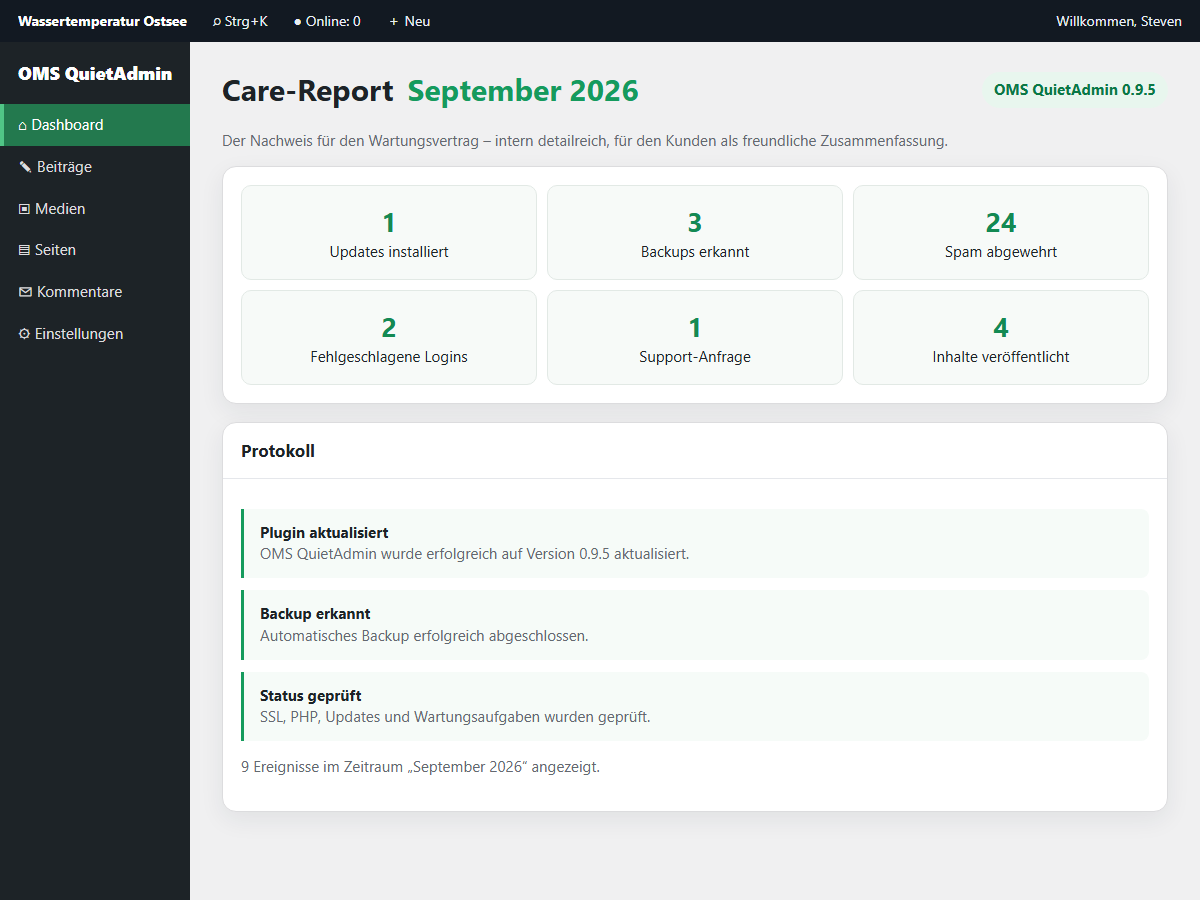
- Our service for you: a widget with the key figures of the last month.
- No panic messages: update bubbles, plugin nags, promotional notices and Site Health warnings are suppressed. Success and error messages stay visible.
- Privacy-friendly login protection: repeated failed logins are temporarily blocked. Only short-lived keyed hashes are kept for throttling; raw IP addresses and attempted user names are not stored.
For the agency
- Ghost Mode: switch between the full admin view and the client view with an admin bar switch or
Alt+Q, without logging out. - Menu whitelist: choose which areas and submenus the client sees. This controls what is shown; it is a usability feature, not an access control.
- Care reports: figures for updates, backups, spam, recorded failed logins and support requests as a dashboard widget and an admin page.
- Custom role: “Client (OMS QuietAdmin)” with an allowlist of capabilities (no plugin, theme, user or options management).
- REST endpoints:
/quietadmin/v1/status,/reportand/check.
OMS QuietAdmin Pro (premium version)
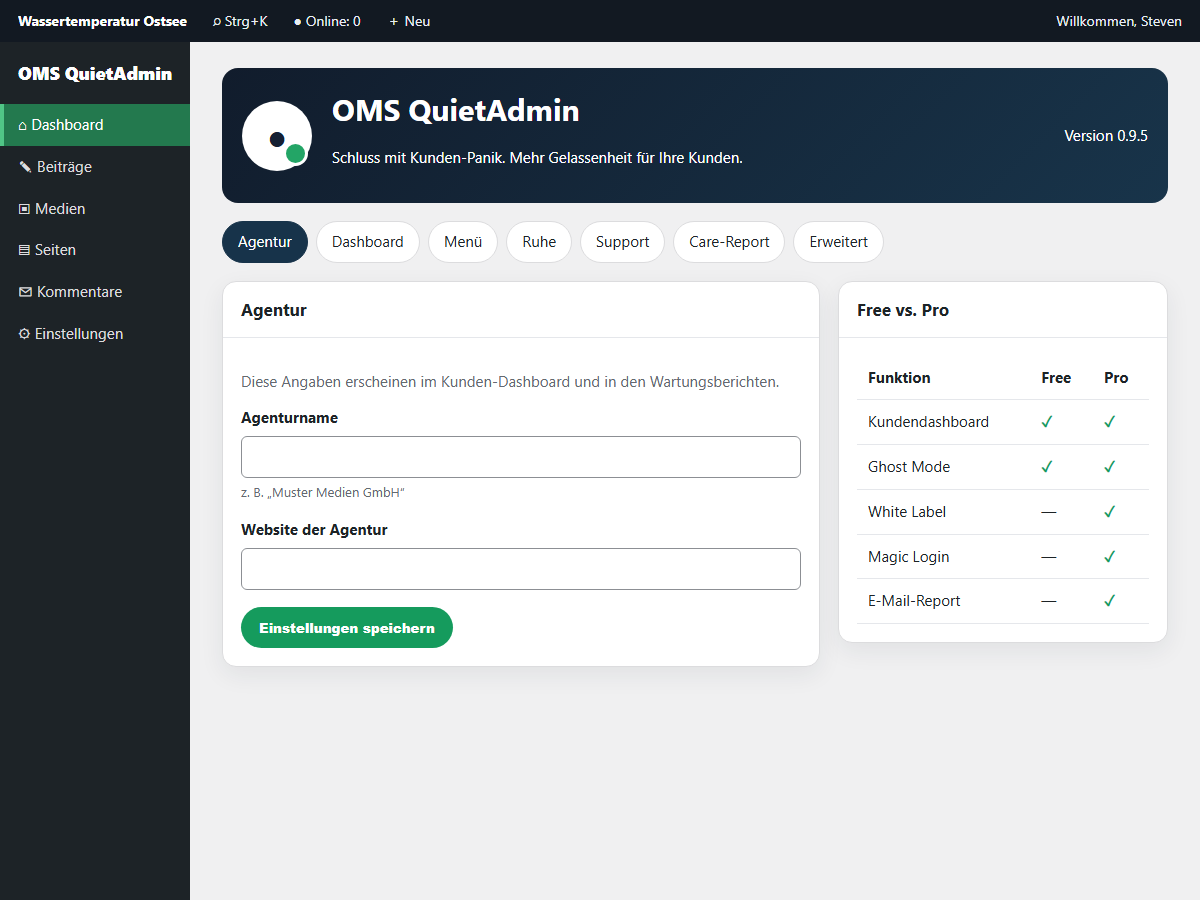
OMS QuietAdmin Pro is the premium version of this plugin for agencies that manage many client sites. It contains everything in the free plugin and adds:
- White label: your logo, colors, login page and agency name throughout
- Magic Login: work in a client account without a password, time-limited and logged
- Care report by email, automatically every month
- Custom quick actions
- External monitoring status via REST
- Settings export and import to roll out one setup to every client site
Everything described above works without Pro. The free plugin contains no locked features. When you install and activate OMS QuietAdmin Pro, the free version is deactivated automatically and is not needed any more.
Privacy
OMS QuietAdmin keeps a care log in its own database table (maintenance events, counters, support requests) and stores the time of each client’s last login as user meta. Failed login attempts are only counted. Login throttling uses keyed hashes of the submitted account name and IP address that expire after 15 minutes; raw IP addresses and attempted user names are not stored by default. Log entries are deleted automatically after 180 days (filter quietadmin_log_retention_days). The plugin suggests text for your privacy policy and integrates with the WordPress personal data exporter and eraser. Support messages are sent by email and are not stored on the website.
Extension points (selection)
quietadmin_quick_actions– register custom quick actionsquietadmin_menu_whitelist– change the menu whitelistquietadmin_is_client_mode– switch the client view on or offquietadmin_report_metrics/quietadmin_report_highlights– add report figuresquietadmin_status_level– let external monitoring set the statusquietadmin_status_checks– add your own check signalsquietadmin_backup_completed(action) – report a completed backup from any backup toolquietadmin_failure(action) – report a failed maintenance task, e.g.do_action( 'quietadmin_failure', 'backup_failed', 'Backup failed' )quietadmin_keep_notice– decide whether an admin notice stays visiblequietadmin_support_mail– adjust the support email before sendingquietadmin_log_retention_days– change how long the care log is keptquietadmin_settings_tabs,quietadmin_default_options,quietadmin_sanitize_options– extend the settings page
Installation
- Upload the
oms-quietadminfolder to/wp-content/plugins/or install the ZIP via Plugins → Add New → Upload Plugin. - Activate the plugin.
- Under Settings → OMS QuietAdmin enter the agency name, choose the visible menu items and set the support channel.
- Create a user with the role Client (OMS QuietAdmin).
- Check the result with Ghost Mode (
Alt+Q) or in a private window.
Changelog
White label, Magic Login, email reports and other agency features are now part of the paid OMS QuietAdmin Pro version.
0.9.5
- Compatibility: dynamic notice-suppression CSS now uses the WordPress enqueue API.
- Changed: settings and care reports now live under the standard WordPress Settings menu.
- Changed: bundled translation catalogs were removed from the WordPress.org package; translations are provided through translate.wordpress.org.
- Improved: the role-scoped client-workspace purpose and administrator safeguards are documented more clearly.
0.9.4
- Changed: the public plugin name is now OMS QuietAdmin and the WordPress.org slug and text domain are
oms-quietadmin. - Compatibility: internal hooks, options, database data and the
/quietadmin/v1/REST namespace remain unchanged.
0.9.3
- Improved: the settings screen now starts with a responsive OMS QuietAdmin brand header.
- Fix: incomplete update-cache data can no longer produce a green status.
- Fix: update tracking ignores installations and translations, avoids automatic-update double counts, and counts every component in bulk updates.
- Fix: the latest-update notice now uses successful core, plugin or theme updates only.
- Fix: restored frontend Ghost Mode assets, fixed-window support throttling, mbstring fallback and contact-page lookup from 0.9.2.
- Improved: PHP 8.2 is required and PHP 8.4 is the recommended status threshold.
0.9.2
- New: privacy-friendly login throttling blocks repeated failed attempts without storing raw IP addresses or attempted user names.
- Security: Magic Login now requires a separate HttpOnly, one-time return proof before an administrator session can be restored.
- Improved: activating the premium package reliably deactivates the WordPress.org Free build first.
0.9.1
- New: “Get Pro” and “Documentation” links in the plugin list.
- Improved: calmer settings page (card layout, pill tabs, clearer form fields) with a sidebar: Free vs. Pro comparison, getting started, status and Pro box.
- Fix: no fatal error when Free and Pro are active at the same time (notice instead).
- Fix: Plugin Check findings; the free version no longer bundles third-party SDK code.
0.9.0
- New: first public release candidate.
- New: agency features (white label, Magic Login, email reports, custom quick actions, external monitoring, settings export/import) are part of the premium version OMS QuietAdmin Pro. Free settings are kept.
- New: extension hooks for add-ons (
quietadmin_settings_tabs,quietadmin_default_options,quietadmin_sanitize_options,quietadmin_capabilities_mapand others). - Improved: setup guidance on the settings page; privacy policy text.
- Improved: all code comments and strings are English; complete German translation (
de_DE) included.
Screenshots

For developers
Is this your plugin? Show off the numbers.
Add a live badge to your site, docs or GitHub README. It updates on its own — no account needed.
Best OMS QuietAdmin alternatives
All admin plugins →




FAQ
OMS QuietAdmin: quick answers
Straight answers, pulled from live WordPress.org data.
Source: WordPress.org
Is OMS QuietAdmin free?
Yes. OMS QuietAdmin is free to download and use from the official WordPress.org plugin directory.
Is OMS QuietAdmin safe to use in 2026?
OMS QuietAdmin is a solid plugin choice in 2026, with a few things worth checking first. Was last updated 4 weeks ago, and scores 64/100 on our health check.
How many websites use OMS QuietAdmin?
OMS QuietAdmin is active on <10 WordPress websites and has been downloaded 186 times since it launched in October 2026. It was downloaded 195 times in the last 30 days.
Does OMS QuietAdmin work with WordPress 7.1?
Yes. The developer has tested OMS QuietAdmin up to WordPress 7.1.5, the latest release. It requires WordPress 6.0 or newer.
What PHP version does OMS QuietAdmin need?
OMS QuietAdmin requires PHP 8.2 or higher. Most hosts run PHP 8.x today, so it works on any modern WordPress hosting.
When was OMS QuietAdmin last updated?
The latest version, 0.9.5, was released on October 27, 2026 (4 weeks ago).
Who makes OMS QuietAdmin?
OMS QuietAdmin is developed and maintained by stewn.
What are the best alternatives to OMS QuietAdmin?
The most popular alternatives to OMS QuietAdmin are Loginizer (1M+ installs), Redux Framework (900K+ installs) and Admin Menu Editor (300K+ installs).
Powered by PageForge
One template and a spreadsheet. A real page for every search.
PageForge turns each row of a CSV into a WordPress page with its own title, URL, SEO fields and schema, built on the layout you already designed. Free on WordPress.org.
- CSV and XLSX, plus Google Sheets on Professional and Enterprise
- Its own title, URL, SEO fields and schema for every page
- Works with the block editor, Elementor, Divi and Avada
- Free on WordPress.org, no credit card