


oik-nivo-slider
[nivo] shortcode for the responsive jQuery "Nivo slider" for posts, pages, attachments and custom post types using oik

Consider an alternative
oik-nivo-slider shows warning signs in 2026 — compare the alternatives below before installing. It runs on 100+ sites, is rated 2.4/5 and was last updated 1 year ago, and scores 36/100 on our health check.
- Small user base (100+ active installs)
- Low rating so far — 2.4/5 from only 5 reviews
- No update in over a year
- Only tested up to WordPress 6.8 (latest is 7.1)
How does it stack up?
Side-by-side on installs, updates, ratings & support


Daily downloads
Download spikes usually follow a new release — each site that auto-updates counts as a download.
Rankings
Where oik-nivo-slider stands todayWordPress.org search rankings
Live position in the plugin search, top 100| Keyword | Position |
|---|---|
| jquery | >100 |
| nivo | #4 |
| oik | #5 |
| shortcode | >100 |
| slider | >100 |
Version adoption
Share of active sites per release.
Rating breakdown
★★★★★★★★★★ 2.4 from 5 reviews
About oik-nivo-slider
From the official readme · v1.17.0Description
[nivo] shortcode for the jQuery Nivo slider; “The Most Awesome jQuery Image Slider”; reputed to be the world’s most popular jQuery image slider.
New feature in nivo v1.17.0
- Added the Nivo slider block ( oik-nivo-slider/nivo ).
Features of jQuery Nivo 3.2
- Flexible slider
- 16 transition effects
- 4 responsive slider themes
- Built in directional and control navigation
- Thumbnail image navigation
See also Nivo Slider for more information about the jQuery Nivo code.
Features of the oik nivo slider WordPress plugin
- [nivo] lazy smart shortcode
- Nivo slider block
- Displays attached images
- Displays images attached to related content
- Profile for nivo slider settings
- Display slideshows with/without links
- Display slideshows with/without captions
- Displays slideshows with HTML captions, using the format= parameter
- Transition effect can be defined in the shortcode
- Supports custom links to your content
- Supports jQuery Nivo 3.2 for responsive sliders
- nivo slider can be put into any part of your website: content, header, footer and sidebar text widgets
- 1 additional responsive slider theme
- Supports jQuery Nivo 2.7.1 for backward compatibility
- 4 additional themes for jQuery Nivo 2.7.1
- Works with existing content, does not add its own custom post type
- Uses the oik plugin’s shortcode API for lazy smart shortcodes
- The [nivo] shortcode is interchangeable with other oik shortcodes such as [bw_images], [bw_thumbs] or [bw_pages]
- Supports display of images from a NextGEN gallery, using a “special post type” of nggallery.
- Supports display of a plugin’s screenshots
- Supports display of images with fancybox
Note: oik-nivo-slider is dependent upon the oik plugin.
You can activate it but it will not function correctly unless the pre-requisite version of oik is also activated.
Download oik from
oik download
Further reading
If you want to read more about the oik plugins then please visit the
oik plugin
“the oik plugin – for often included key-information”
Installation
- Upload the contents of the oik-nivo-slider plugin to the `/wp-content/plugins/oik-nivo-slider’ directory
- Activate the oik-nivo-slider plugin through the ‘Plugins’ menu in WordPress
- Whenever you want to produce a Nivo slider use the [nivo] shortcode or the Nivo slider block.
Note: oik-nivo-slider is dependent upon the oik plugin. You can activate it but it will not work unless oik is also activated.
Download oik from
oik download
Frequently asked questions
Installation
Upload the contents of the oik-nivo-slider plugin to the `/wp-content/plugins/oik-nivo-slider’ directory Activate the oik-nivo-slider plugin through the ‘Plugins’ menu in WordPress Whenever you want to produce a Nivo slider use the [nivo] shortcode. Note: oik-nivo-slider is dependent upon the oik plugin. You can activate it but it will not work unless oik is also activated. Download oik from oik download
What is the simplest syntax for the [nivo] shortcode?
If you simply want to show all the attached images to a page, post or custom post type then use [nivo]
I typed [nivo] and got [nivo] back
You need to activate both the oik-nivo-slider plugin and the oik base plugin. The [nivo] shortcode only becomes functional when [oik] is loaded.
My images do not appear in the slider
The most common fixes to this problem are: Don’t insert the images that you want in the slideshow into the page; just upload media and save changes. The slider requires jQuery. Check that your theme files contain calls to wp_head() and wp_footer().
What are the parameters to the [nivo] shortcode?
The basic parameters that control the display of the Nivo slider are: [nivo theme="default|bar|dark|light|oik|orman|pascal|default271|oik271 - Theme for the slideshow" link="y|n|file|full - Link the images to the target post/page or media file" caption="y|n - Display the image title as the caption" ribbon="y|n - Display the ribbon, if the theme supports it (version 271 only)" thumbnail="full|thumbnail|medium|large|nnn|wxh - image size" class="|classes - CSS classes" thumbs="|n|y - thumbnail navigation"…
How do I make the images link to my content?
There are three methods. Use the oik custom link URL field Build the slideshow from images attached to related content Use the format= parameter
Use the oik custom link URL field
If your slide show is created from attached images then use the oik custom image link URL field in the Add Media dialog to set the target for the link.
Images attached to related content
Alternatively build the slideshow dynamically from images attached to related content. Use the post_type parameter to specify the content type and either the post_parent parameter for hierarchical content types or category for posts or other selection criteria for other content types [nivo post_type=”post_type – Post type to display” post_parent=”|ID – Parent ID to use if not current post” ]
Use the format= parameter
[nivo format=”L” ] [nivo format="T/C" ]
What is the FULL syntax for the [nivo] shortcode
[nivo post_type=”attachment|post_type|special:value – Post type to display” theme=”default|custom|bar|dark|light|oik|orman|pascal|default271|oik271 – Theme for the slideshow” class=”|classes – CSS classes” link=”y|n|file|full – Link the images to the target post/page or media file” caption=”y|n – Display the image title as the caption” ribbon=”y|n – Display the ribbon, if the theme supports it” thumbnail=”full|thumbnail|medium|large|nnn|wxh – image size” thumbs=”|n| y – Thumbnail navigation” nav=”|n| y – Control navigation” pause=”|pause – Pause time in milli seconds” manual=”|n| y – Manual…
Do I have to remember all those parameters?
NO. You can enable the oik TinyMCE shortcode or quicktag buttons. See oik options > Buttons. When editing a post/page with TinyMCE or the HTML editor click on the shortcode button to see a list of ALL enabled shortcodes and get syntax help, where available.
What’s OIK and why do I need it?
The oik Nivo slider is developed using the OIK (Often Included Key Information) API (Application Programming Interface). If you don’t have the OIK plugin installed and activated then the Nivo slider shortcode won’t work. Specifically, the code is dependent upon bw_get_posts() to obtain the list of attachments, posts, pages or custom post types which populate the slider and bw_thumbnail() to select the image to display when it’s not an attached image.
I can’t see some of the images in my slideshow
The default image size is thumbnail=full. At present the bw_thumbnail() function will only return an image for a particular post id when there is an attached image; it won’t find the featured image. As a workaround either specify the thumbnail parameter as small,medium,large or your preferred size (e.g. 150×100) OR ensure that the image you want to display is attached to the post OR exclude the post from the list ( exclude=id1,id2 )
Do I need to make my images the same size?
NO, not any more. If you use any one of the five themes associated with jQuery Nivo version 3.1 then the images can be different sizes. Warning: you might not like the results though.
Can I control the slideshow transitions?
YES. Use the Nivo slider settings page.
Can I provide my own themeing?
This is planned for a future version.
Can I put the [nivo] shortcode in my sidebar?
YES. You can use the [nivo] shortcode in sidebars, headers and footers by using a text widget. It’s just like entering the shortcode into a post, page or custom post type. Remember you may need to set the post_parent parameter to control which posts are loaded.
Can I code the shortcode into header.php?
Not directly. In order to get the shortcode to expand you need to wrap it in some php. One way of achieving this is to code
Which version of the jQuery Nivo slider code is needed?
The plugin includes multiple versions of the FREE jQuery Nivo slider from Dev7 Studios * Version 3.2 is the latest version producing responsive slideshows. * oik-nivo-slider continues to support the themes for version 2.7.1: default271, orman, pascal and oik271
Does it support version 3.2 of the jQuery Nivo slider?
YES… from oik-nivo-slider version 1.9
Changelog
Now delivers the Nivo slider block.
= 1.17.0=
* Added: Add oik-nivo-slider/nivo block,[github bobbingwide oik-nivo-slider issues 14]
* Changed: Update tests for PHPUnit 10 and 11,[github bobbingwide oik-nivo-slider issues 15]
* Tested: With WordPress 6.8.1 and WordPress Multisite
* Tested: With PHP 8.3 and PHP 8.4
* Tested: With PHPUnit 9, 10 & 11
Screenshots
![Nivo slider - default theme [nivo]](https://ps.w.org/oik-nivo-slider/trunk/screenshot-1.jpg?rev=3305868)
![Nivo slider - bar theme [nivo theme=bar]](https://ps.w.org/oik-nivo-slider/trunk/screenshot-2.jpg?rev=3305868)
![Nivo slider - dark theme [nivo theme=dark]](https://ps.w.org/oik-nivo-slider/trunk/screenshot-3.jpg?rev=3305868)
![Nivo slider - light theme [nivo theme=light]](https://ps.w.org/oik-nivo-slider/trunk/screenshot-4.jpg?rev=3305868)
![Nivo slider - oik theme - not hovered over [nivo theme=oik ]](https://ps.w.org/oik-nivo-slider/trunk/screenshot-5.jpg?rev=3305868)

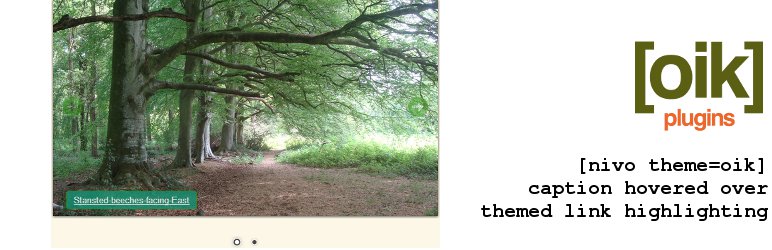
![Nivo slider - default271 theme [nivo theme=default271]](https://ps.w.org/oik-nivo-slider/trunk/screenshot-8.jpg?rev=3305868)
![Nivo slider - orman theme [nivo theme=orman]](https://ps.w.org/oik-nivo-slider/trunk/screenshot-9.jpg?rev=3305868)
For developers
Is this your plugin? Show off the numbers.
Add a live badge to your site, docs or GitHub README. It updates on its own — no account needed.
Best oik-nivo-slider alternatives
All jquery plugins →





FAQ
oik-nivo-slider: quick answers
Straight answers, pulled from live WordPress.org data.
Live data from WordPress.org · checked Oct 1, 2026
Is oik-nivo-slider free?
Yes. oik-nivo-slider is free to download and use from the official WordPress.org plugin directory.
Is oik-nivo-slider safe to use in 2026?
oik-nivo-slider shows warning signs in 2026 — compare the alternatives below before installing. It runs on 100+ sites, is rated 2.4/5 and was last updated 1 year ago, and scores 36/100 on our health check.
How many websites use oik-nivo-slider?
oik-nivo-slider is active on 100+ WordPress websites and has been downloaded 100,110 times since it launched in April 2012. It was downloaded 137 times in the last 30 days.
Does oik-nivo-slider work with WordPress 7.1?
oik-nivo-slider is officially tested up to WordPress 6.8.10, while the latest release is 7.1.2. It may still work, but try it on a staging site first.
When was oik-nivo-slider last updated?
The latest version, 1.17.0, was released on June 3, 2025 (1 year ago).
Who makes oik-nivo-slider?
oik-nivo-slider is developed and maintained by bobbingwide.
What are the best alternatives to oik-nivo-slider?
The most popular alternatives to oik-nivo-slider are Animate It! (20K+ installs), jQuery Updater (20K+ installs) and Use Google Libraries (10K+ installs).
Powered by PageForge
Want thousands of pages that rank like these? Build them in an afternoon.
This directory runs on the same engine as PageForge. Turn any spreadsheet, CSV or API into thousands of fast, SEO-ready WordPress pages — with schema, internal links and AI-written copy baked in.
- CSV, Google Sheets & API data sources
- AI content, schema & internal links per page
- Works with Elementor, Gutenberg, Yoast & Rank Math
- Free on WordPress.org — no credit card


