


Nova Blocks by Pixelgrade
A collection of distinctive Gutenberg blocks, committed to making your site shine like a newborn star.

Solid choice
Nova Blocks by Pixelgrade is a solid plugin choice in 2026, with a few things worth checking first. It runs on 800+ sites and was last updated 2 days ago, and scores 70/100 on our health check.
- Actively developed — last update 2 days ago
- Tested with the latest WordPress (7.1)
- Momentum — downloads up 20.3% vs the previous 30 days
- Small user base (800+ active installs)
- Very few reviews so far
How does it stack up?
Side-by-side on installs, updates, ratings & support



Daily downloads
Download spikes usually follow a new release — each site that auto-updates counts as a download.
Rankings
Where Nova Blocks by Pixelgrade stands todayWordPress.org search rankings
Live position in the plugin search, top 100| Keyword | Position |
|---|---|
| blocks | >100 |
| full-site-editing | #92 |
| gutenberg | >100 |
| gutenberg blocks | >100 |
| page builder | >100 |
Version adoption
Share of active sites per release.
About Nova Blocks by Pixelgrade
From the official readme · v2.7.2Description
Nova Blocks is a collection of distinctive Gutenberg blocks, committed to making your site shine like a newborn star. It is taking a design-driven approach to help you made the right decisions and showcase your content in the best shape.
Positioning
Clear and obvious, exciting and not afraid to take risks, distinctive, forward thinking.
- Obvious, not confusing
- Exciting, not dull
- Distinctive, not common
Principles
- Decisions not options
- Purpose-driven
- Distinctive
- Cross-themes oriented
Tested with the following WordPress themes:
- Julia LT by Pixelgrade
- Rosa LT by Pixelgrade
- Felt LT by Pixelgrade
- Twenty Nineteen by WordPress team
- Storefront by Automattic
- Osteria by Pixelgrade
Made with love by Pixelgrade
Privacy & External Services
Nova Blocks relies on one external service to deliver its curated block-pattern library.
Pixelgrade Cloud (cloud.pixelgrade.com)
To provide curated block patterns in the editor inserter, the plugin fetches block-pattern
assets from Pixelgrade Cloud. This request is made from WordPress admin/editor contexts,
not from ordinary frontend page loads, and the response is cached locally.
When fetching block patterns, the plugin sends: your site URL, whether the site uses SSL,
your WordPress version, the Nova Blocks version, the Style Manager version when present,
and your active theme’s slug, stylesheet slug, name, URI, version, and text domain. No
personal data about your site’s visitors is sent or collected, and the plugin does not
load any tracking or analytics scripts for this feature.
- Service: Pixelgrade Cloud
- Provider: Pixelgrade — https://pixelgrade.com
- Privacy Policy: https://pixelgrade.com/privacy/
Contributing
The proposed value of Open Source is that by freely sharing the code with the community, others can use, improve and contribute back to it.
It’s great if you’re willing to use your skills, knowledge, and experience to help further refine this project with your own improvements. We really appreciate it and you’re 💯 welcome to submit an issue or pull request on any topic.
How can you help?
- Discovered an issue? Please report it here.
- Fixed a bug? Send a pull request.
- Need a feature? Propose it here.
- Have you made something great? Share it with us.
Translations
You can translate Nova Blocks on translate.wordpress.org.
Credits
Unless otherwise specified, all the plugins files, scripts and images are licensed under GNU General Public License v2 or later.
The Nova Blocks plugin bundles the following third-party resources:
- jQuery Bully plugin Copyright (c) 2016 Pixelgrade – License: MIT
- jQuery Slick plugin Copyright (c) 2017 Ken Wheeler – License: MIT
- jQuery Velocity plugin Copyright (c) 2014-2017 Julian Shapiro – License: MIT
- JS Cookie Copyright (c) 2018 Klaus Hartl, Fagner Brack, GitHub Contributors – License: MIT
Installation
Installing “Nova Blocks” can be done either by searching for “Nova Blocks” via the Plugins → Add New screen in your WordPress dashboard, or by using the following steps:
- Download the plugin via WordPress.org.
- Upload the ZIP file through the
Plugins → Add New → Uploadscreen in your WordPress dashboard. - Activate the plugin through the
Pluginsmenu in WordPress.
Frequently asked questions
Can I use the Nova Blocks with my own theme?
Yes! The editor blocks in Nova Blocks are build to inherit your theme style as much as possible.
Is Nova Blocks free?
Yes! Nova Block’s core features are free to use.
Changelog
2.7.2
- Fix: post-format cards (Quote, Image and similar) in a Cards Collection no longer repeat the collection’s title, subtitle, description or buttons. They show only their own content, with the byline above the media when the collection places it there.
- Fix: a stacked card’s image now covers the card in Original and Fit to Row grids instead of showing letterbox bars.
2.7.1
- Fix: a page template saved in the Site Editor now lays out Post Content like the default template, so paragraphs no longer shrink to a narrow strip on the front end and in the editor.
- Fix: the Post Meta Discuss link no longer points to a missing anchor on posts without comments. It jumps to the comment form while comments are open, and hides when they are closed.
- Improved: with the theme’s page transitions, Nova Blocks scripts are set up once per page and released when you leave it. Pages no longer do more work with every navigation, and the header keeps the same colors as a fresh page load.
- Developer: the header exposes
window.novablocks.header.refresh()anddestroy(), and jQuery Bully gets$.fn.bully.destroy(), so themes can re-initialize them after swapping page content.
2.7.0
- New: Header Mobile Branding setting. Show the logo in the mobile bar, below it, or below it and folding into the bar as you scroll. The masthead below the bar paints its own background and keeps its spacing.
- New: the navigation’s call-to-action item now shows in the mobile header bar.
- New: each Logo block can choose whether to show the site title and tagline, image logos can be as large as the fitted wordmark, and header rows can show their own Color Signal background above the fold.
- New: Content Inset now sets the reading column in Sidecar layouts and scales down on narrow screens. The Small rail no longer depends on it. Sites that never saved Content Inset look the same as before.
- New: an optional divider rule between Sidecar content and its rail.
- New: Post Title and Post Featured Image get the “Extend over sidebar” control, so a Wide post header can line up beside a rail.
- New: Cards Collections get a Fit to Row media box and Media Alignment for mixed image ratios, can take a core border drawn on each card, and can turn off the card dropcap, which now follows the collection’s style.
- New: Action and Light surface Color Signal tiles. Action buttons follow the brand color when you switch palettes.
- New: lined separators get a Rule Weight control (1 to 4 px).
- New: Post Meta’s Discuss link can point to core Comments, with Avatar size and alignment controls.
- Improved: Post Content and Groups keep the content width you set as their reading measure, including beside a rail.
- Improved: aligned images and pull-outs stack below the text on phones and tablets instead of squeezing it into a narrow strip.
- Improved: Quote cards size text-only quotes to the quote instead of the screen height, and keep the quote’s links, emphasis and paragraph typography.
- Improved: comment dates, links, hints and the comment form use the quiet-text color instead of dimming with opacity, so they stay readable (4.5:1 contrast).
- Improved: navigation drawers and social icons follow the header’s Color Signal colors.
- Improved: Logo block images are sized to the header logo height, so browsers stop downloading the full-size logo.
- Improved: Group and Columns Content Top/Bottom Spacing goes up to 6 steps in half-step increments, and the spacing also renders for content that was never saved in the editor.
- Improved: active filter chips list each value separately with aligned remove buttons, and compact Search and Filters controls line up below the mobile breakpoint.
- Improved: Edit Mode shows the stored design in the inspector and toolbar.
- Fix: “Prevent duplicate posts” no longer makes Query Loop pagination offer empty pages.
- Fix: a Button’s own Color Palette choice is no longer overwritten by its parent on the frontend.
- Fix: Cards Collections no longer mark the editor as having unsaved changes every time it loads.
- Fix: Query Loops and card lists inside a grid column no longer overflow the column between 1024 and 1280 px.
- Fix: a page without rails no longer reserves empty rail space.
- Fix: separators placed directly in Post Content no longer collapse to zero width.
- Fix: Text wrap Around/Extend no longer removes an image’s left or right placement in post content.
- Fix: a colored Group’s padding no longer doubles up in plain Groups nested inside it.
- Fix: archive-type templates are no longer shifted and clipped in the Site Editor.
- Fix: paragraphs with legacy font sizes stay valid when the editor rebuilds them.
- Fix: Food Menus saved with Nova Blocks 2.0.4 or earlier open in the editor again without “Attempt Block Recovery”.
- Fix: block stylesheets are versioned by their own files, so CSS-only updates reach visitors reliably.
- Developer:
wp pixelgrade blocks describenow reports the Color Signal attributes and the Group and Columns spacing attributes. - Developer: the editor source no longer depends on lodash.
2.6.6
- Improved: Align compact full-width Search toolbars, mobile Filters buttons, and result summaries to the design-system content rail and spacing rhythm.
- Fix: Do not count internal pagination state as an active filter in the mobile Filters badge.
2.6.5
- New: Let Search facets fill their available width and let live result summaries use content-specific singular and plural labels.
- Improved: Keep full-width Search facets usable on compact screens and prevent plugin search minimums from overlapping mobile filter controls.
2.6.4
- New: Add optional mobile filter panels with active counts, live result summaries, and native clear actions for Pixelgrade Filters.
- Improved: Keep filter panels keyboard-accessible, use 48-pixel mobile targets, and give generated form controls stable accessible names.
Screenshots
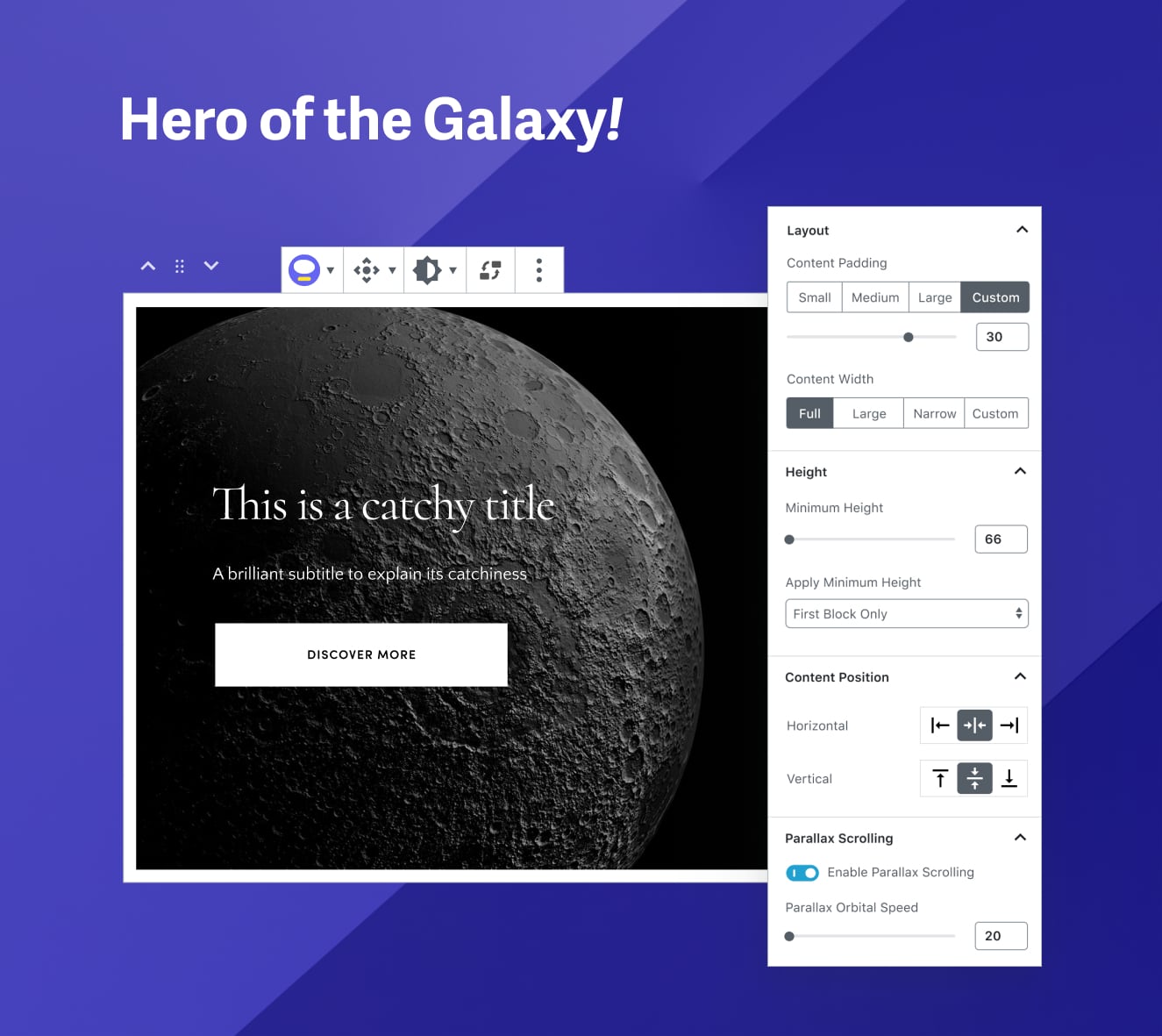


For developers
Is this your plugin? Show off the numbers.
Add a live badge to your site, docs or GitHub README. It updates on its own — no account needed.
Best Nova Blocks by Pixelgrade alternatives
All blocks plugins →





FAQ
Nova Blocks by Pixelgrade: quick answers
Straight answers, pulled from live WordPress.org data.
Live data from WordPress.org · checked Sep 30, 2026
Is Nova Blocks by Pixelgrade free?
Yes. Nova Blocks by Pixelgrade is free to download and use from the official WordPress.org plugin directory.
Is Nova Blocks by Pixelgrade safe to use in 2026?
Nova Blocks by Pixelgrade is a solid plugin choice in 2026, with a few things worth checking first. It runs on 800+ sites and was last updated 2 days ago, and scores 70/100 on our health check.
How many websites use Nova Blocks by Pixelgrade?
Nova Blocks by Pixelgrade is active on 800+ WordPress websites and has been downloaded 50,872 times since it launched in July 2019. It was downloaded 1,492 times in the last 30 days.
Does Nova Blocks by Pixelgrade work with WordPress 7.1?
Yes. The developer has tested Nova Blocks by Pixelgrade up to WordPress 7.1.2, the latest release. It requires WordPress 7.0 or newer.
What PHP version does Nova Blocks by Pixelgrade need?
Nova Blocks by Pixelgrade requires PHP 7.4 or higher. Most hosts run PHP 8.x today, so it works on any modern WordPress hosting.
When was Nova Blocks by Pixelgrade last updated?
The latest version, 2.7.2, was released on September 28, 2026 (2 days ago).
Who makes Nova Blocks by Pixelgrade?
Nova Blocks by Pixelgrade is developed and maintained by pixelgrade.
What are the best alternatives to Nova Blocks by Pixelgrade?
The most popular alternatives to Nova Blocks by Pixelgrade are Spectra Legacy (1M+ installs), Kadence Blocks (600K+ installs) and Extendify (500K+ installs).
Powered by PageForge
Want thousands of pages that rank like these? Build them in an afternoon.
This directory runs on the same engine as PageForge. Turn any spreadsheet, CSV or API into thousands of fast, SEO-ready WordPress pages — with schema, internal links and AI-written copy baked in.
- CSV, Google Sheets & API data sources
- AI content, schema & internal links per page
- Works with Elementor, Gutenberg, Yoast & Rank Math
- Free on WordPress.org — no credit card


