


NicheRoute Unlimited Bulk Comment Delete
Delete a chosen number of WordPress comments or all matching comments in safe, cancellable AJAX batches.

Use with caution
NicheRoute Unlimited Bulk Comme… works, but test it on a staging site before relying on it in 2026. Was last updated 3 months ago, and scores 55/100 on our health check.
- Small user base (<10 active installs)
- Very few reviews so far
How does it stack up?
Side-by-side on installs, updates, ratings & support



Daily downloads
Download spikes usually follow a new release — each site that auto-updates counts as a download.
Rankings
Where NicheRoute Unlimited Bulk C… stands todayWordPress.org search rankings
Live position in the plugin search, top 100| Keyword | Position |
|---|---|
| bulk delete | >100 |
| comment cleanup | >100 |
| comments | >100 |
| moderation | >100 |
| spam comments | >100 |
About NicheRoute Unlimited Bulk Comment Delete
From the official readme · v1.1.0Description
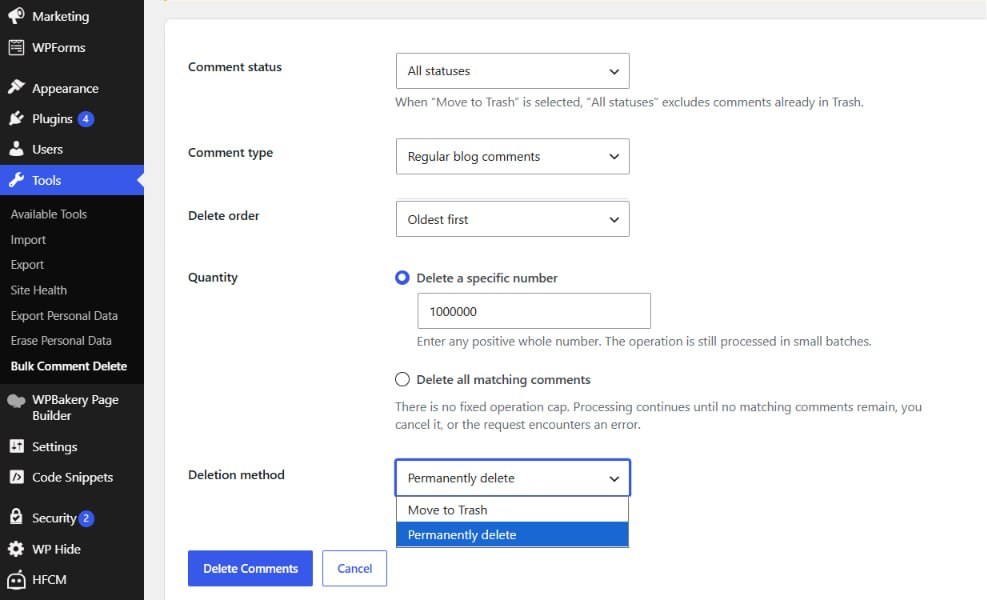
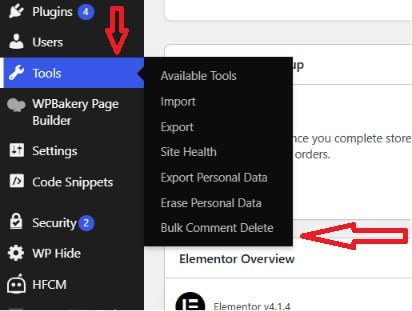
NicheRoute Unlimited Bulk Comment Delete adds a focused cleanup screen under Tools > Bulk Comment Delete.
Choose comment status, comment type, deletion order, quantity, and whether comments should be moved to Trash or permanently deleted. The plugin processes comments through WordPress APIs in small AJAX batches to reduce timeout risk and preserve standard comment hooks.
Features:
- Delete a specific number of comments with no fixed operation cap.
- Delete all comments matching the selected filters.
- Process comments in small, sequential AJAX batches.
- Filter by approved, pending, spam, trash, or all statuses.
- Target regular comments, pingbacks and trackbacks, or all comment types.
- Process oldest or newest comments first.
- Move comments to Trash or permanently delete them.
- Cancel an operation between AJAX batches.
- Capability checks, nonce verification, input validation, and output escaping.
- No settings, analytics, tracking, or external service connections.
For very large operations, keep the browser tab open until processing completes. Always create a database backup before permanently deleting comments.
Privacy
The plugin does not collect, store, transmit, or share personal data. It does not connect to external services.
Installation
- In WordPress, go to Plugins > Add New > Upload Plugin.
- Upload the plugin ZIP file and activate it.
- Go to Tools > Bulk Comment Delete.
- Select the filters, quantity, and deletion method.
- Click Delete Comments and confirm the operation.
Frequently asked questions
Is there a maximum number of comments per operation?
No fixed operation cap is imposed. You can enter any positive whole number or choose Delete all matching comments. Comments are processed in smaller requests to reduce server timeout risk.
Must I keep the browser page open?
Yes. The browser sends each deletion batch. Closing or refreshing the page stops the operation after the current request.
Does the plugin use direct database deletion queries?
No. It queries matching comment IDs and deletes each comment through WordPress comment APIs so standard hooks and comment counts are handled by WordPress.
Can I undo a permanent deletion?
No. Create a database backup first. Comments moved to Trash can normally be restored from the WordPress Comments screen until Trash is emptied.
What happens if a comment cannot be deleted?
The plugin records the failure, skips that comment during the current operation, and continues where possible. If an unusually large number of comments fail, processing stops and reports the issue to prevent an endless loop.
Changelog
1.1.0
- Added an unlimited “Delete all matching comments” mode.
- Removed the 1,000-comment operation cap.
- Added support for any positive whole-number quantity.
- Improved failure handling for long-running operations.
- Improved accessibility and JavaScript translation support.
- Updated metadata and documentation for WordPress.org submission.
1.0.0
- Initial release.
Screenshots
For developers
Is this your plugin? Show off the numbers.
Add a live badge to your site, docs or GitHub README. It updates on its own — no account needed.
Best NicheRoute Unlimited Bulk Com… alternatives
All bulk delete plugins →





FAQ
NicheRoute Unlimited Bulk Comment D…: quick answers
Straight answers, pulled from live WordPress.org data.
Live data from WordPress.org · checked Sep 29, 2026
Is NicheRoute Unlimited Bulk Comme… free?
Yes. NicheRoute Unlimited Bulk Comme… is free to download and use from the official WordPress.org plugin directory.
Is NicheRoute Unlimited Bulk Comme… safe to use in 2026?
NicheRoute Unlimited Bulk Comme… works, but test it on a staging site before relying on it in 2026. Was last updated 3 months ago, and scores 55/100 on our health check.
How many websites use NicheRoute Unlimited Bulk Comme…?
NicheRoute Unlimited Bulk Comme… is active on <10 WordPress websites and has been downloaded 180 times since it launched in July 2026. It was downloaded 58 times in the last 30 days.
Does NicheRoute Unlimited Bulk Comme… work with WordPress 7.1?
NicheRoute Unlimited Bulk Comme… is officially tested up to WordPress 7.0.6, while the latest release is 7.1.2. It may still work, but try it on a staging site first.
What PHP version does NicheRoute Unlimited Bulk Comme… need?
NicheRoute Unlimited Bulk Comme… requires PHP 7.4 or higher. Most hosts run PHP 8.x today, so it works on any modern WordPress hosting.
When was NicheRoute Unlimited Bulk Comme… last updated?
The latest version, 1.1.0, was released on July 15, 2026 (3 months ago).
Who makes NicheRoute Unlimited Bulk Comme…?
NicheRoute Unlimited Bulk Comme… is developed and maintained by nicheroute.
What are the best alternatives to NicheRoute Unlimited Bulk Comme…?
The most popular alternatives to NicheRoute Unlimited Bulk Comme… are WP Bulk Delete (90K+ installs), BEAR (30K+ installs) and Bulk Delete (30K+ installs).
Powered by PageForge
Want thousands of pages that rank like these? Build them in an afternoon.
This directory runs on the same engine as PageForge. Turn any spreadsheet, CSV or API into thousands of fast, SEO-ready WordPress pages — with schema, internal links and AI-written copy baked in.
- CSV, Google Sheets & API data sources
- AI content, schema & internal links per page
- Works with Elementor, Gutenberg, Yoast & Rank Math
- Free on WordPress.org — no credit card


