


Ni WooCommerce Payment Gateway Charges
Ni WooCommerce Payment Gateway Charges lets you add an extra charge, fee, or surcharge to any WooCommerce payment method at checkout. Pass on processing costs, encourage customers toward lower-cost payment methods, or…

Solid choice
Ni WooCommerce Payment Gateway… is a solid plugin choice in 2026, with a few things worth checking first. It runs on 100+ sites, is rated 5/5 and was last updated 6 days ago, and scores 75/100 on our health check.
- Actively developed — last update 6 days ago
- Tested with the latest WordPress (7.1)
- Small user base (100+ active installs)
- Very few reviews so far
How does it stack up?
Side-by-side on installs, updates, ratings & support



Daily downloads
Download spikes usually follow a new release — each site that auto-updates counts as a download.
Rankings
Where Ni WooCommerce Payment Gate… stands todayWordPress.org search rankings
Live position in the plugin search, top 100| Keyword | Position |
|---|---|
| checkout fees | #57 |
| extra charges | #4 |
| HPOS Compatible | #13 |
| payment gateway surcharge | #4 |
| woocommerce payment gateway fees | #40 |
Version adoption
Share of active sites per release.
Rating breakdown
★★★★★★★★★★ 5 from 4 reviews
About Ni WooCommerce Payment Gateway Charges
From the official readme · v1.7.0Description
WooCommerce Payment Gateway Fees, Made Simple
Ni WooCommerce Payment Gateway Charges lets you add an extra charge, fee, or surcharge to any WooCommerce payment method at checkout. Pass on processing costs, encourage customers toward lower-cost payment methods, or charge a convenience fee for cash on delivery — all configurable per gateway, with no coding required. Works with the built-in offline gateways (“Direct bank transfer / BACS,” “Check payments,” “Cash on delivery”) as well as any custom or third-party payment gateway active on your store.
Set the extra charge as either a Fixed Amount or a Percentage of the order total, independently for every payment gateway, from one convenient screen.
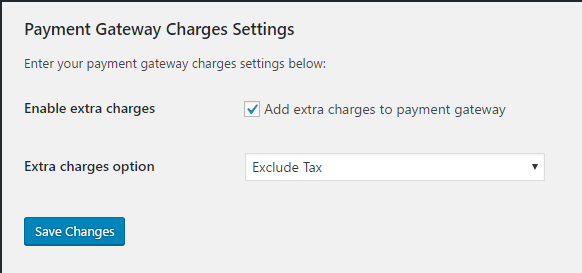
Turn the feature on or off instantly with the “Enable Extra Charges” setting, and choose whether the fee is taxable via the “Extra Charges Option” (Include Tax / Exclude Tax).
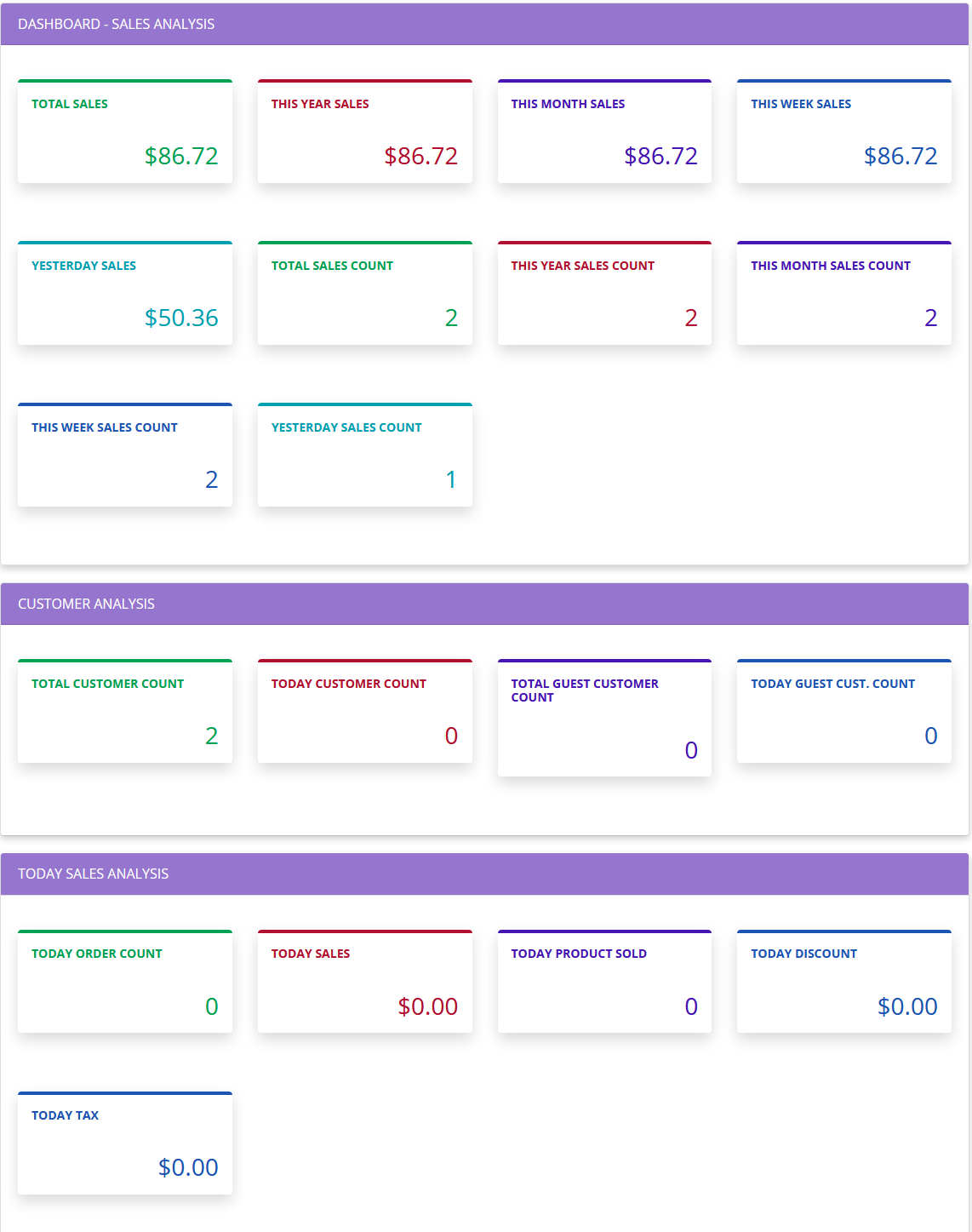
A built-in sales dashboard gives you an at-a-glance view of orders, revenue by payment gateway, top customers, and top countries — and is fully compatible with WooCommerce HPOS (High-Performance Order Storage) as well as legacy (post-based) order storage.
Key Features
- Add a fixed or percentage extra charge / surcharge for each payment gateway individually.
- One unified settings table to configure extra charges for every active payment gateway, with values pre-filled from existing settings.
- Works with WooCommerce core offline gateways and any custom payment gateway.
- Option to make the extra charge taxable (include tax) or tax-exempt (exclude tax).
- Enable or disable the extra-charges feature at any time with one setting.
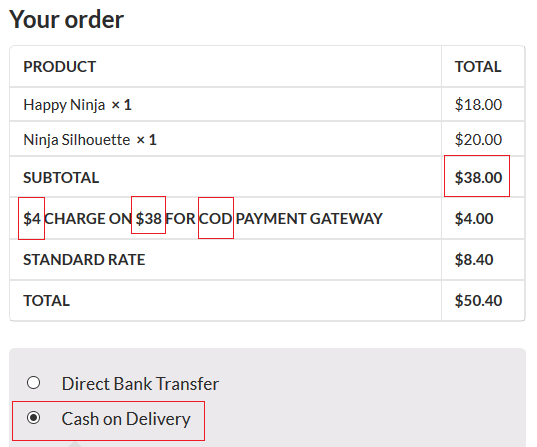
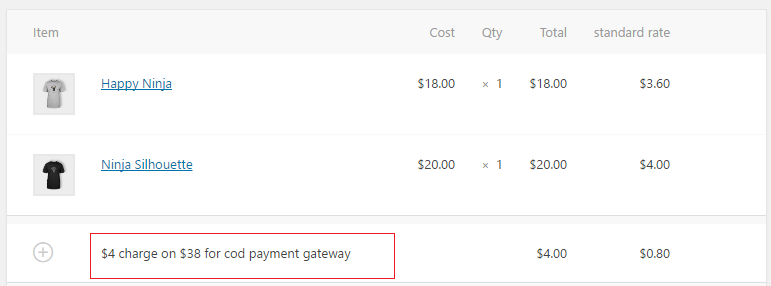
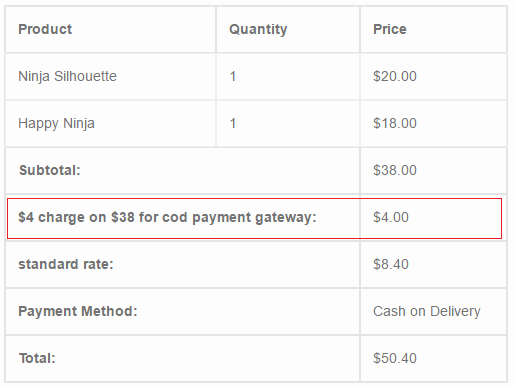
- Extra charges/fees appear as a line item in the cart, checkout, order emails, and the WooCommerce admin order screen.
- Sales dashboard: total/periodic sales, order status breakdown, payment gateway report, top customers, top countries, and stock overview.
- Compatible with WooCommerce HPOS (custom order tables) and legacy post-based order storage.
Support/Feedback Email/New Requirement
- We are open to your suggestions and feedback – Thank you for using or trying out one of our plugins
- support@naziinfotech.com
Disclaimer
It is not responsible for any harm or wrong doing this Plugin may cause. Users are fully responsible for their own use. This Plugin is to be used WITHOUT warranty.
Installation
- Use the WordPress plugin installer or upload files to the WordPress plugin directory.
- Activate the Ni WooCommerce Payment Gateway Charges plugin from the admin panel.
- Find the “Payment” menu in the WordPress admin sidebar, then go to Setting to configure extra charges for each payment gateway.
Frequently asked questions
Where can I get help?
Click on the support tab or email support@naziinfotech.com
Do you customize this plugin?
Yes, as per requirement we can customize this plugin.
Is this plugin compatible with WooCommerce HPOS (High-Performance Order Storage)?
Yes. The plugin declares HPOS compatibility and works correctly whether your store uses HPOS (custom order tables) or legacy, post-based order storage — including the sales dashboard reports.
Where do I set the extra charge for each payment gateway?
Go to Payment > Setting in the WordPress admin and use the “Extra Charges by Payment Gateway” table to set a fixed amount or percentage for each active gateway in one place.
Changelog
Adds WooCommerce HPOS compatibility and a new unified Extra Charges settings table. Recommended update for all users, especially stores running WooCommerce HPOS.
version 1.7.0 -03-October-2026
- Added: Full WooCommerce HPOS (High-Performance Order Storage) compatibility, including a dual-mode dashboard that works correctly under both HPOS and legacy order storage.
- Added: Declared HPOS (“custom_order_tables”) compatibility with WooCommerce.
- Added: Unified “Extra Charges by Payment Gateway” settings table listing every active gateway in one place, pre-filled from existing settings.
- Fixed: Extra Charges fields now save correctly on payment gateways whose settings screen uses WooCommerce’s newer React-based rendering.
- Fixed: Dashboard yearly sales report could include non-order data; stock report threshold comparison bug corrected.
- Fixed: Settings page save handler now verifies a nonce and user capability.
- Tested: Compatible With WooCommerce 11.1.0
- Tested: Compatible With WordPress 7.1.2
version 1.6.0 -24-March-2024
- Fixed: Security issue
- Tested: Compatible With WooCommerce 8.7.0
- Tested: Compatible With WordPress 6.4.3
version 1.5.9 -23-November-2023
- Tested: Compatible With WooCommerce 8.3.1
- Tested: Compatible With WordPress 6.4.1
version 1.5.8 -09-May-2023
- Tested: Compatible With WooCommerce 7.6.1
- Tested: Compatible With WordPress 6.2
- Added: Added payment tab link to setting page
version 1.5.7 -02-March-2023
- Tested: Compatible With WooCommerce 7.4.1
version 1.5.6 -20-January-2023
- Tested: Compatible With WooCommerce 7.3.0
- Tested: Compatible With WordPress 6.1.1
Screenshots

For developers
Is this your plugin? Show off the numbers.
Add a live badge to your site, docs or GitHub README. It updates on its own — no account needed.
Best Ni WooCommerce Payment Gatewa… alternatives
All checkout fees plugins →

FAQ
Ni WooCommerce Payment Gateway Char…: quick answers
Straight answers, pulled from live WordPress.org data.
Live data from WordPress.org · checked Oct 9, 2026
Is Ni WooCommerce Payment Gateway… free?
Yes. Ni WooCommerce Payment Gateway… is free to download and use from the official WordPress.org plugin directory.
Is Ni WooCommerce Payment Gateway… safe to use in 2026?
Ni WooCommerce Payment Gateway… is a solid plugin choice in 2026, with a few things worth checking first. It runs on 100+ sites, is rated 5/5 and was last updated 6 days ago, and scores 75/100 on our health check.
How many websites use Ni WooCommerce Payment Gateway…?
Ni WooCommerce Payment Gateway… is active on 100+ WordPress websites and has been downloaded 8,769 times since it launched in November 2016. It was downloaded 298 times in the last 30 days.
Does Ni WooCommerce Payment Gateway… work with WordPress 7.1?
Yes. The developer has tested Ni WooCommerce Payment Gateway… up to WordPress 7.1.3, the latest release. It requires WordPress 5.0 or newer.
What PHP version does Ni WooCommerce Payment Gateway… need?
Ni WooCommerce Payment Gateway… requires PHP 7.0 or higher. Most hosts run PHP 8.x today, so it works on any modern WordPress hosting.
When was Ni WooCommerce Payment Gateway… last updated?
The latest version, 1.7.0, was released on October 3, 2026 (6 days ago).
Who makes Ni WooCommerce Payment Gateway…?
Ni WooCommerce Payment Gateway… is developed and maintained by Anzar Ahmed.
What are the best alternatives to Ni WooCommerce Payment Gateway…?
The most popular alternatives to Ni WooCommerce Payment Gateway… are Product Fees for WooCommerce (50+ installs), Packing Charge (40+ installs) and Flexible Extra Fees Manager… (10+ installs).
Powered by PageForge
Want thousands of pages that rank like these? Build them in an afternoon.
This directory runs on the same engine as PageForge. Turn any spreadsheet, CSV or API into thousands of fast, SEO-ready WordPress pages — with schema, internal links and AI-written copy baked in.
- CSV, Google Sheets & API data sources
- AI content, schema & internal links per page
- Works with Elementor, Gutenberg, Yoast & Rank Math
- Free on WordPress.org — no credit card


