



MySpeakingPage by Author Media
A WordPress plugin built specifically to help professional public speakers get more speaking gigs.

Consider an alternative
MySpeakingPage by Author Media shows warning signs in 2026 — compare the alternatives below before installing. It runs on 20+ sites and was last updated 7 years ago, and scores 24/100 on our health check.
- Small user base (20+ active installs)
- Very few reviews so far
- No update in 7 years
- Only tested up to WordPress 5.2 (latest is 7.1)
How does it stack up?
Side-by-side on installs, updates, ratings & support


Daily downloads
Download spikes usually follow a new release — each site that auto-updates counts as a download.
Rankings
Where MySpeakingPage by Author Me… stands todayWordPress.org search rankings
Live position in the plugin search, top 100| Keyword | Position |
|---|---|
| about me | >100 |
| audio | >100 |
| bio | >100 |
| public speaking | #78 |
| speaking | >100 |
Version adoption
Share of active sites per release.
About MySpeakingPage by Author Media
From the official readme · v1.0.9Description
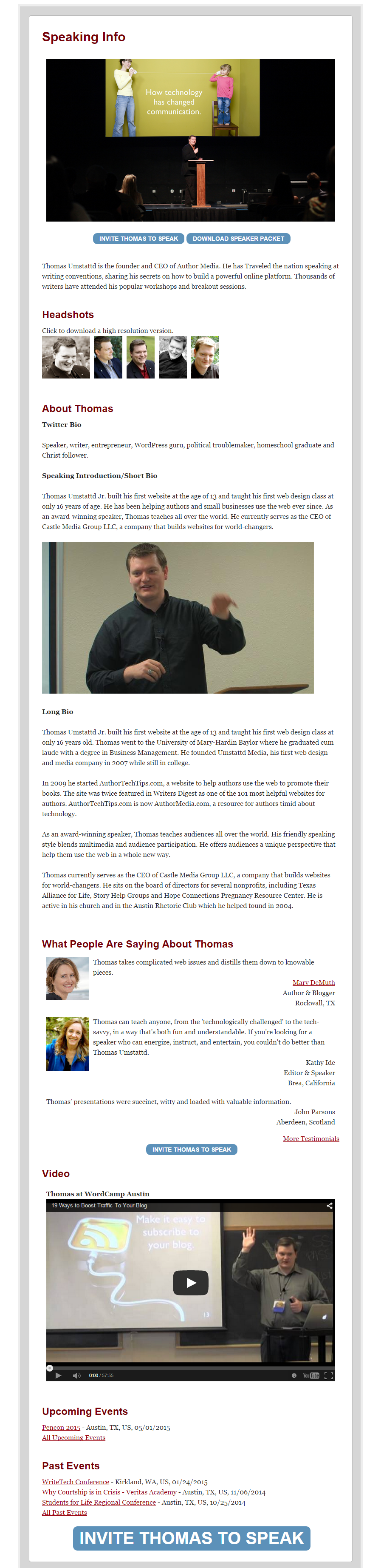
MySpeakingPage helps you quickly create a professional speaking page that will help you get more gigs by showing off your expertise, testimonials, and more.
You can find a live demo of MySpeakingPage in action here.
Features
Customizable “Book To Speak” Button
Make it easy for event planners to book you with MySpeakingPage’ customizable “call to action” button. You pick the text (“Invite Liz to Speak”) and where the button goes (www.example.com/form).
YouTube & Vimeo Integration
Show off samples of your speaking in style. Don’t have a promo video for your speaking yet? No problem. You can easily substitute a photo (an action image of you speaking in front of an audience works best).
Speakers Bureau Integration
Do you have an agency who handles your bookings for you? No problem. MySpeakingPage can integrate with your speakers bureau website.
High Resolution Headshots & Bio
The two things every event planner asks for you to email them are your photo and your bio. MySpeakingPage puts those often-requested items on a silver platter. No email required. You can even show off high resolution versions of your headshots that may not fit in an email.
Great Looking Testimonials
MySpeakingPage makes it easy to add testimonials. It also makes those testimonials look great with optional photos, titles and more.
All-Around Easy Audio Samples
Do you have some recordings of talks you would like to share? Just click “add audio sample” and MySpeakingPage will handle the rest for you. MSP creates a special audio player where your visitors can listen with a click. Easy for you. Easy for your visitors.
MySpeakingEvents Integration
If you have MySpeakingEvents installed, you can easily show off both upcoming events and past events right there on your speaking page.
Mobile Responsive
MySpeakingPage is 100% mobile responsive.
Installation
Repository Crossload Method (Recommended)
- In your WordPress Dashboard go to Plugins -> Add New -> Search
- Search for “MySpeakingPage”
- Click “Install”
- Click “Activate” under the the plugin on the ‘Plugins’ menu in WordPress.
- Follow the on-screen instructions.
Zip Upload Method
- Download the myspeakingpage.zip from the WordPress plugin repository.
- In your WordPress Dashboard go to Plugins -> Add New -> Upload
- Select choose file, select myspeakingpage.zip and click “install now”
- Click “Activate” under the the plugin on the ‘Plugins’ menu in WordPress.
Old Fashioned FTP Method (Advanced Users Only)
- Download the myspeakingpage.zip from the WordPress plugin repository.
- Open the zip to a directory named myeventtbale. This should happen automatically by double clicking the zip file.
- Upload the myspeakingpage directory to the /wp-content/plugins/ directory of your site, using your favorite FTP client.
- Click “Activate” under the the plugin on the ‘Plugins’ menu in WordPress.
Changelog
1.0.9
- Updated supported WordPress version.
1.0.8
- Improved display of location data for events shown on speaking page.
1.0.7
- Fixed an issue that caused the Book Blurb editor to not function properly with certain Screen Options configurations
1.0.6
- Fixed an issue with Divi theme integration that was interfering with the display of other pages in certain cases
1.0.5
- Fixed an issue with Divi theme integration that was preventing detection of the theme in certain cases
1.0.4
- Added basic integration with Divi theme to improve display quality
Screenshots
For developers
Is this your plugin? Show off the numbers.
Add a live badge to your site, docs or GitHub README. It updates on its own — no account needed.
Best MySpeakingPage by Author Media alternatives
All about me plugins →





FAQ
MySpeakingPage by Author Media: quick answers
Straight answers, pulled from live WordPress.org data.
Live data from WordPress.org · checked Oct 1, 2026
Is MySpeakingPage by Author Media free?
Yes. MySpeakingPage by Author Media is free to download and use from the official WordPress.org plugin directory.
Is MySpeakingPage by Author Media safe to use in 2026?
MySpeakingPage by Author Media shows warning signs in 2026 — compare the alternatives below before installing. It runs on 20+ sites and was last updated 7 years ago, and scores 24/100 on our health check.
How many websites use MySpeakingPage by Author Media?
MySpeakingPage by Author Media is active on 20+ WordPress websites and has been downloaded 4,177 times since it launched in March 2015. It was downloaded 98 times in the last 30 days.
Does MySpeakingPage by Author Media work with WordPress 7.1?
MySpeakingPage by Author Media is officially tested up to WordPress 5.2.28, while the latest release is 7.1.2. It may still work, but try it on a staging site first.
When was MySpeakingPage by Author Media last updated?
The latest version, 1.0.9, was released on July 3, 2019 (7 years ago).
Who makes MySpeakingPage by Author Media?
MySpeakingPage by Author Media is developed and maintained by zookatron.
What are the best alternatives to MySpeakingPage by Author Media?
The most popular alternatives to MySpeakingPage by Author Media are WDV About Me Widget (800+ installs), Easy Profile Widget (400+ installs) and Kantbtrue about me (300+ installs).
Powered by PageForge
Want thousands of pages that rank like these? Build them in an afternoon.
This directory runs on the same engine as PageForge. Turn any spreadsheet, CSV or API into thousands of fast, SEO-ready WordPress pages — with schema, internal links and AI-written copy baked in.
- CSV, Google Sheets & API data sources
- AI content, schema & internal links per page
- Works with Elementor, Gutenberg, Yoast & Rank Math
- Free on WordPress.org — no credit card


