



My Eyes Are Up Here
A fantastic new plugin that helps you control how WordPress generates thumbnails.

Use with caution
My Eyes Are Up Here works, but test it on a staging site before relying on it in 2026. It runs on 2K+ sites, is rated 5/5 and was last updated 4 years ago, and scores 45/100 on our health check.
- Loved by users — 5/5 from 32 reviews
- No update in 3 years
- Only tested up to WordPress 6.0 (latest is 7.1)
How does it stack up?
Side-by-side on installs, updates, ratings & support



Daily downloads
Download spikes usually follow a new release — each site that auto-updates counts as a download.
Rankings
Where My Eyes Are Up Here stands todayWordPress.org search rankings
Live position in the plugin search, top 100| Keyword | Position |
|---|---|
| featured image | >100 |
| image | >100 |
| image editing | >100 |
| thumbnails | >100 |
Version adoption
Share of active sites per release.
Rating breakdown
★★★★★★★★★★ 5 from 32 reviews
About My Eyes Are Up Here
From the official readme · v1.1.11Description
What is it?
A fantastic new plugin that helps you control how WordPress generates thumbnails.
Why use it?
When WordPress automatically generates thumbnails, it sometimes doesn’t crop them in a way that is suitable for the image you’ve uploaded. If your image isn’t the correct format, and let’s face it, you never know what images people are uploading – you’ll run the risk of a badly cropped image. Not good.
If you have a full portrait image of a person that you’ve uploaded, but you need the image to appear landscape, you’re in trouble! WordPress will centre the image so that you end up with person’s crotch. Not good. Or let’s say you have a landscape image, with a person’s face on the right hand side, but you need it to display in a square thumbnail. You’ll end up with half a face as WordPress centres the image.
What does the plugin do?
You can control how you want your WordPress thumbnails to appear on your website. Regardless of the image format you upload, you can either use the automatic face detector or if you want even more control, you can manually add hotspots.
How do I use it?
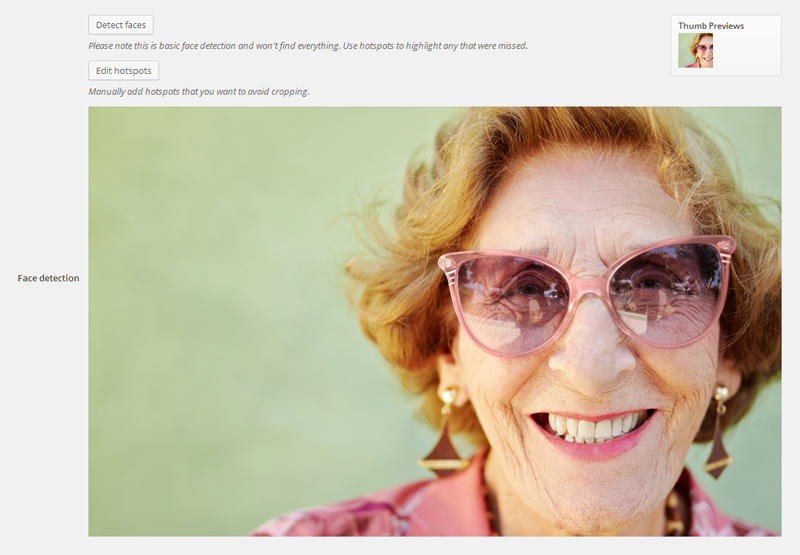
Navigate to your media library then click on the image you want to edit. Use the detect faces or edit hotspots option to edit your image. You’ll see thumbnail previews when you’ve applied these edits, when you’re happy hit update. Simple.
Usage
- Once the plugin is activated, navigate to your ‘Media Library’.
- Click on the image you want to edit to bring up your ‘Edit Media’ options.
- You should now be able to see extra image editing options, below the ‘Description’ box.
- By clicking ‘Detect faces’ or ‘Add hotspots’ you can now start to edit your image thumbnails.
- If you click the ‘Detect faces’ button, it will centre the crop using an average of all the faces it finds.
- Please note this is basic face detection and won’t find everything.
- You can click and create 1 or several hotspots to centre the crop of your thumbnails, if ‘Detect faces’ doesn’t work.
- If you’re happy with your ‘Thumb Previews’ hit save, and you’re done. Simple.
Installation
The install
- You can install the plugin using the auto-install tool from the WordPress back-end.
- To manually install, upload the folder
/myeyesareuphere/to/wp-content/plugins/directory. - Activate the plugin through the ‘Plugins’ menu in WordPress
Frequently asked questions
What happens when there are multiple hotspots/faces detected?
This will crop the image to get as many hotspots in the thumbnail as possible or crop around the center of the hotspots if not.
How do I report a problem?
You can email us at cases@interconnectit.fogbugz.com with “My Eyes Are Up Here” in the subject and the following information: What browser and version is this problem occurring with? What WordPress version are you using? What version of My Eyes Are Up Here are you using? Are there any errors in the javascript console? Chrome and Firefox: ctrl + shift + j (Win) or alt + cmd + j (Mac) Internet Explorer: F12 and click on ‘Script’ then ‘Console’ What are the steps you used to produce this problem?
Changelog
No longer runs on non image media
1.1.10
- Update “tested up to” value
1.1.9
- Fix the js error for WP Customizer
1.1.8
- Remove deprecated jQuery methods
1.1.7
- Remove PHP warnings
- Add composer support
1.1.6
- Prevent hotspots from being placed outside edges of image
1.1.5
- AS3CF compatibility
Screenshots



For developers
Is this your plugin? Show off the numbers.
Add a live badge to your site, docs or GitHub README. It updates on its own — no account needed.
Best My Eyes Are Up Here alternatives
All featured image plugins →




FAQ
My Eyes Are Up Here: quick answers
Straight answers, pulled from live WordPress.org data.
Live data from WordPress.org · checked Sep 26, 2026
Is My Eyes Are Up Here free?
Yes. My Eyes Are Up Here is free to download and use from the official WordPress.org plugin directory.
Is My Eyes Are Up Here safe to use in 2026?
My Eyes Are Up Here works, but test it on a staging site before relying on it in 2026. It runs on 2K+ sites, is rated 5/5 and was last updated 4 years ago, and scores 45/100 on our health check.
How many websites use My Eyes Are Up Here?
My Eyes Are Up Here is active on 2K+ WordPress websites and has been downloaded 177,301 times since it launched in September 2014. It was downloaded 628 times in the last 30 days.
Does My Eyes Are Up Here work with WordPress 7.1?
My Eyes Are Up Here is officially tested up to WordPress 6.0.16, while the latest release is 7.1.2. It may still work, but try it on a staging site first.
When was My Eyes Are Up Here last updated?
The latest version, 1.1.11, was released on September 29, 2022 (4 years ago).
Who makes My Eyes Are Up Here?
My Eyes Are Up Here is developed and maintained by interconnectit.
What are the best alternatives to My Eyes Are Up Here?
The most popular alternatives to My Eyes Are Up Here are Recent Posts Widget With Th… (100K+ installs), Quick Featured Images (50K+ installs) and Auto Featured Image (Auto P… (40K+ installs).
Powered by PageForge
Want thousands of pages that rank like these? Build them in an afternoon.
This directory runs on the same engine as PageForge. Turn any spreadsheet, CSV or API into thousands of fast, SEO-ready WordPress pages — with schema, internal links and AI-written copy baked in.
- CSV, Google Sheets & API data sources
- AI content, schema & internal links per page
- Works with Elementor, Gutenberg, Yoast & Rank Math
- Free on WordPress.org — no credit card


