


MIVAQ Cardwall for WooCommerce
Stop card testing, bot checkouts and fake orders in WooCommerce. Browser checks, rate limits, block lists and risk scoring. No API key.

Solid choice
MIVAQ Cardwall for WooCommerce is a solid plugin choice in 2026, with a few things worth checking first. Was last updated 3 weeks ago, and scores 64/100 on our health check.
- Actively developed — last update 3 weeks ago
- Tested with the latest WordPress (7.1)
- Small user base (<10 active installs)
- Very few reviews so far
How does it stack up?
Side-by-side on installs, updates, ratings & support



Daily downloads
Download spikes usually follow a new release — each site that auto-updates counts as a download.
Rankings
Where MIVAQ Cardwall for WooComme… stands todayWordPress.org search rankings
Live position in the plugin search, top 100| Keyword | Position |
|---|---|
| anti-spam | >100 |
| card-testing | >100 |
| fake orders | >100 |
| fraud prevention | >100 |
| woocommerce | >100 |
About MIVAQ Cardwall for WooCommerce
From the official readme · v1.0.0Description
Fake orders cost money. Card testing bots run hundreds of stolen cards through your checkout, your payment gateway charges a fee for every attempt, and too many declines can get your account reviewed or closed. Spam orders fill your order list and waste your time.
MIVAQ Cardwall stops these orders before they reach your payment gateway, while real customers check out exactly as before. Everything runs on your own server. There is no account to create, no API key and no outside service.
MIVAQ Cardwall is an independent plugin by MIVAQ. It is not affiliated with or endorsed by WooCommerce or Automattic.
What it does
Stops bot checkouts
- Browser verification: real browsers receive a signed pass from a tiny script. Scripts that post orders straight to your checkout or the Store API are refused.
- Minimum time before ordering: orders sent faster than a person can type are refused.
- Hidden bot trap: an invisible field on the classic checkout that only bots fill in.
Stops card testing
- Rate limits per IP address and per email address.
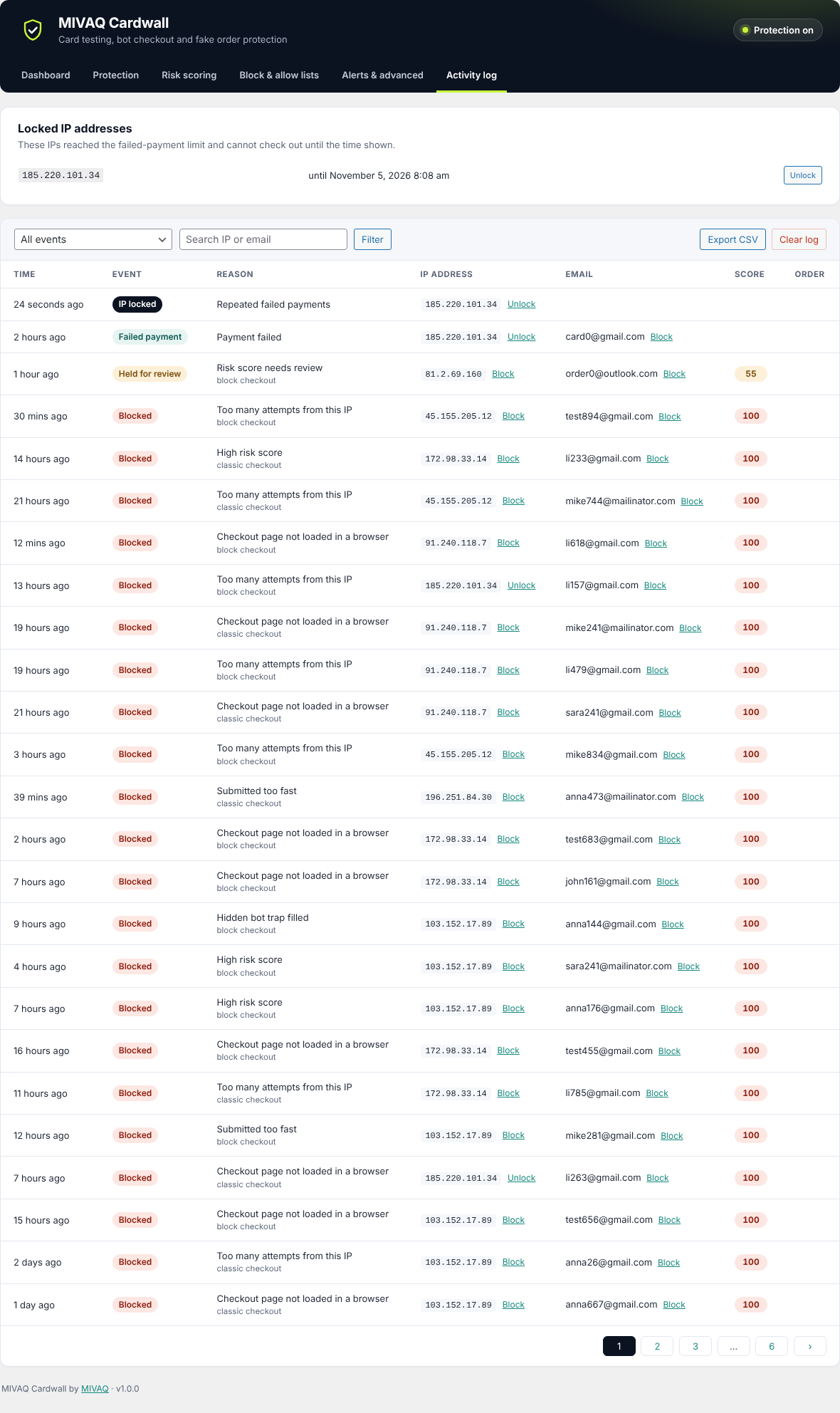
- Failed-payment lockout: an IP that keeps failing payments is locked out of checkout for a time you choose.
- Minimum guest order total: card testers love the cheapest item in your store.
- Attack mode: when many suspicious checkouts or failed payments arrive at once, limits tighten automatically, more orders are held for review and you get an email.
Risk scoring for every order
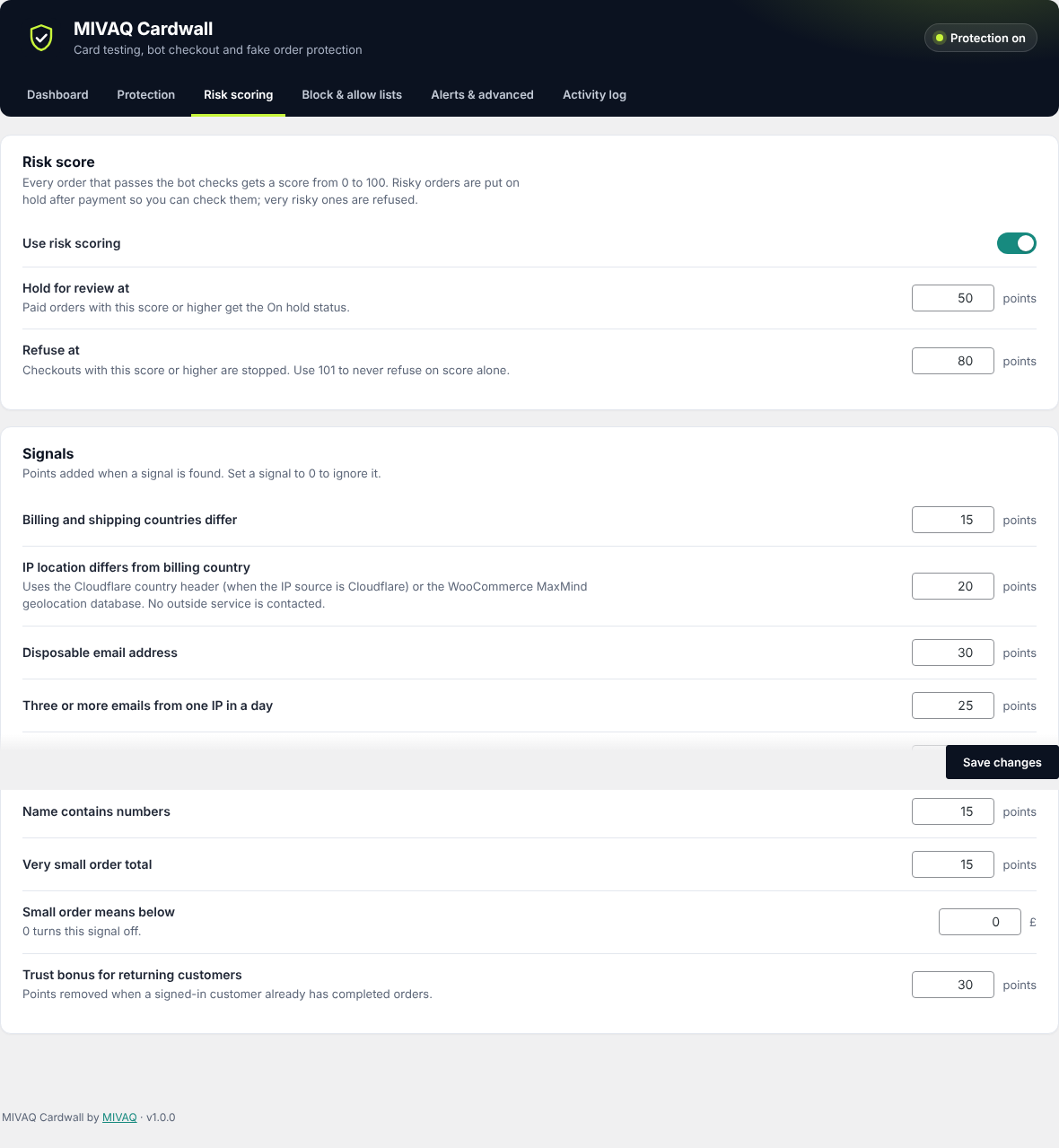
Each order gets a score from 0 to 100 based on clear signals: billing and shipping countries that differ, IP location that differs from the billing country, disposable email addresses, many emails from one IP, recent failed payments, numbers in the name and very small totals. Signed-in returning customers get a trust bonus.
- Orders above the review score are placed On hold after payment so you can check them.
- Orders above the refuse score are stopped.
- Every signal has its own weight you can change.
- A Risk column in the orders list and a Fraud check box on each order show the score and the reasons.
Block and allow lists
Block email addresses, email domains (with wildcards), IP addresses and ranges (CIDR), phone numbers and countries. Allow trusted customers and IPs to skip every check. Block an IP or email in one click from the order screen or the activity log.
Clear dashboard and activity log
See blocked checkouts, held orders, failed payments and locked IPs at a glance, with a 14-day chart, top reasons and the most active blocked IPs. The activity log can be filtered, searched and exported to CSV.
Safe to try
- Monitor mode logs what would be blocked without stopping any order.
- Ready-made presets: Relaxed, Balanced and Strict.
- Shop managers and allowed customers are never blocked.
Works with
- Classic checkout and the block-based Cart and Checkout
- High-Performance Order Storage (HPOS)
- Any payment gateway, including Stripe, PayPal, Square and cash on delivery
- Sites behind Cloudflare or a proxy (choose where the visitor IP comes from)
- Full-page caching, because the verification pass is requested by the browser
Need hands-on help?
If fake orders keep coming, the team at MIVAQ can investigate your store and set up the right protection. Get in touch.
Privacy
To protect the store, this plugin processes the IP address, email address, phone number, billing and shipping country and order total of each checkout. Blocked and flagged checkouts are stored in a security log on your own server, which is deleted automatically after the number of days you choose (30 by default). The plugin adds suggested text to your privacy policy and supports the WordPress personal data export and erase tools.
The plugin sets two first-party cookies, mvcw_session and mvcw_stamp, which confirm that the store was opened in a web browser. They contain only timestamps and a signature, no personal data, and expire after 12 hours at most.
No data is sent to the plugin author or to any third party.
Installation
- In your dashboard go to Plugins > Add New Plugin and search for “MIVAQ Cardwall”, or upload the plugin zip file.
- Activate the plugin. WooCommerce must be active.
- Open WooCommerce > MIVAQ Cardwall. Balanced protection is already on.
- If your site is behind Cloudflare or another proxy, set the IP source under Alerts & advanced.
Screenshots



For developers
Is this your plugin? Show off the numbers.
Add a live badge to your site, docs or GitHub README. It updates on its own — no account needed.
Best MIVAQ Cardwall for WooCommerce alternatives
All anti-spam plugins →




FAQ
MIVAQ Cardwall for WooCommerce: quick answers
Straight answers, pulled from live WordPress.org data.
Source: WordPress.org
Is MIVAQ Cardwall for WooCommerce free?
Yes. MIVAQ Cardwall for WooCommerce is free to download and use from the official WordPress.org plugin directory.
Is MIVAQ Cardwall for WooCommerce safe to use in 2026?
MIVAQ Cardwall for WooCommerce is a solid plugin choice in 2026, with a few things worth checking first. Was last updated 3 weeks ago, and scores 64/100 on our health check.
How many websites use MIVAQ Cardwall for WooCommerce?
MIVAQ Cardwall for WooCommerce is active on <10 WordPress websites and has been downloaded 399 times since it launched in November 2026. It was downloaded 400 times in the last 30 days.
Does MIVAQ Cardwall for WooCommerce work with WordPress 7.1?
Yes. The developer has tested MIVAQ Cardwall for WooCommerce up to WordPress 7.1.5, the latest release. It requires WordPress 6.5 or newer.
What PHP version does MIVAQ Cardwall for WooCommerce need?
MIVAQ Cardwall for WooCommerce requires PHP 7.4 or higher. Most hosts run PHP 8.x today, so it works on any modern WordPress hosting.
When was MIVAQ Cardwall for WooCommerce last updated?
The latest version, 1.0.0, was released on November 5, 2026 (3 weeks ago).
Who makes MIVAQ Cardwall for WooCommerce?
MIVAQ Cardwall for WooCommerce is developed and maintained by MIVAQ Plugins.
What are the best alternatives to MIVAQ Cardwall for WooCommerce?
The most popular alternatives to MIVAQ Cardwall for WooCommerce are Akismet Anti-spam: Spam Pro… (5M+ installs), Antispam Bee (700K+ installs) and WP Armour (400K+ installs).
Powered by PageForge
One template and a spreadsheet. A real page for every search.
PageForge turns each row of a CSV into a WordPress page with its own title, URL, SEO fields and schema, built on the layout you already designed. Free on WordPress.org.
- CSV and XLSX, plus Google Sheets on Professional and Enterprise
- Its own title, URL, SEO fields and schema for every page
- Works with the block editor, Elementor, Divi and Avada
- Free on WordPress.org, no credit card