



Group chat for WordPress – Minnit Chat
Cloud-based chat using your WordPress accounts. Minnit uses SSO to allow you and your WordPress users to communicate with one another.

Solid choice
Group chat for WordPress is a solid plugin choice in 2026, with a few things worth checking first. It runs on 500+ sites, is rated 4.1/5 and was last updated 4 days ago, and scores 78/100 on our health check.
- Actively developed — last update 4 days ago
- Tested with the latest WordPress (7.1)
- Small user base (500+ active installs)
How does it stack up?
Side-by-side on installs, updates, ratings & support



Daily downloads
Download spikes usually follow a new release — each site that auto-updates counts as a download.
Rankings
Where Group chat for WordPress stands todayWordPress.org search rankings
Live position in the plugin search, top 100| Keyword | Position |
|---|---|
| chat | #38 |
| chat group | #4 |
| chatbox | #4 |
| chatroom | #1 |
| group chat | #4 |
Version adoption
Share of active sites per release.
Rating breakdown
★★★★★★★★★★ 4.1 from 8 reviews
About Group chat for WordPress – Minnit Chat
From the official readme · v4.1.7Description
Minnit Chat is an easy-to-use group chat service. You can appoint moderators to watch over your chat, customize the look and feel of your chat, and increase engagement by having your users be able to talk to one another in real time!
Configure the chatroom to use Single Sign-On, and users who load the chat will automatically be logged in using their WordPress accounts. No need for additional sign-ups, onboarding, or any other steps — your users can get chatting right away!
Many other features can be enabled or disabled, including support for sending GIFs, uploading files, direct messaging between users, and more.
Get started in minutes and get chatting with Minnit!
Installation
Once this plugin is installed, you will be able to add a Minnit Chat to any post or page using the editor. Simply create a new block, scroll down to “Embeds”, and then select “Minnit Chat”. Enter your chat name, and you’re all set!
Want a site-wide icon? No problem. Simply go to the Settings section of your WordPress admin panel, and then select Minnit Chat. Once you enter a chat name and customize the color/position, the icon will appear on every page on your site, so your users can instantly start chatting.
Frequently asked questions
How many users can join my chat?
Up to 20 users can connect at once on the Free tier. If you expect more users, you can consider subscribing to a monthly or annual subscription.
Can I change the background or colors?
Yes. These options and more are available via “Chat Settings” from within your chatroom itself. Upload a background image, change the color scheme, set up light or dark mode, and more.
Can I ban users from the chat, or remove messages?
Yes. Clicking a user will allow you to ban them. You can also tap and hold a message, or click the three dots next to it, to delete an individual message.
Can I appoint moderators?
Yes. Moderators can ban users and remove messages, but you retain full control and are able to add or remove moderators as desired.
Does this increase my server costs or bandwidth?
No. The chat and content within are hosted on our servers; messages are not stored on your server, and connections are not established with your server.
Can users use their existing accounts to chat?
Yes. Set up Single Sign-On within the plugin settings to get started. Once configured, users will be able to chat right away using their same name and photo (if present) from your WordPress site.
Changelog
4.1.7
Minor bug fixes.
4.1.6
-
Adds support for configuring the types of data used with SSO.
-
Adds support for requiring username input if you’d prefer users to enter a username instead of using their WordPress username.
-
Also fixed various minor bugs.
4.1.5
Minor bug fixes.
4.1.4
Adds support for configuring which nickname is used in the chat: You can now select whether to use a user’s WordPress Nickname or Display Name.
4.1.3
Minor bug fixes.
4.1.2
Various bug fixes where LocalStorage is used to store user credentials.
Screenshots
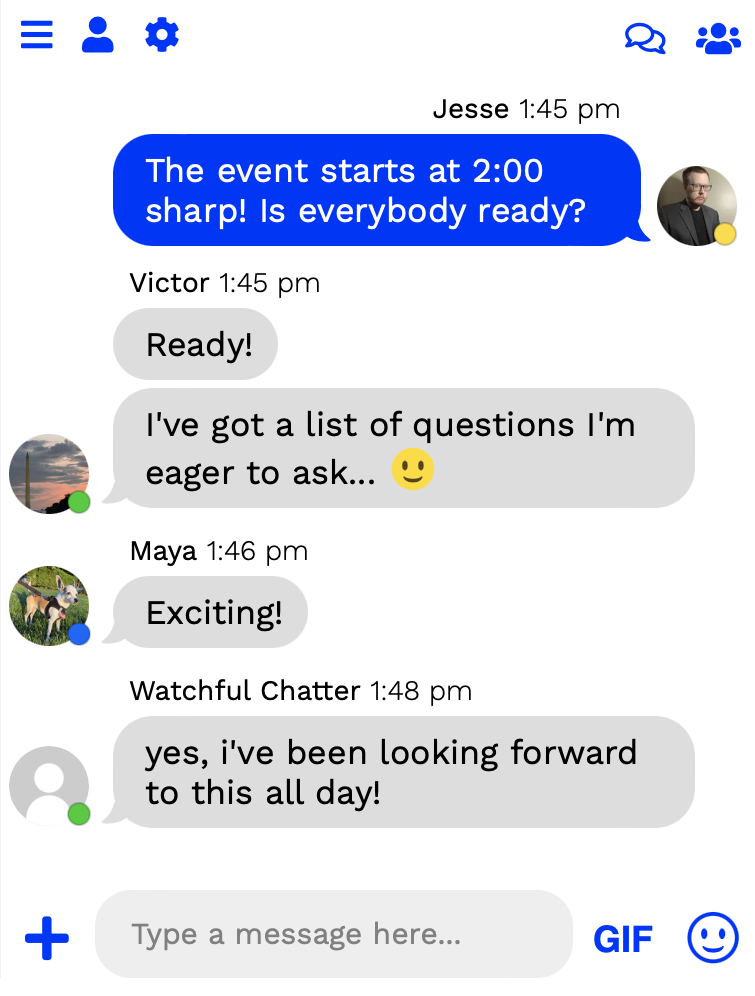


For developers
Is this your plugin? Show off the numbers.
Add a live badge to your site, docs or GitHub README. It updates on its own — no account needed.
Best Group chat for WordPress alternatives
All chat plugins →





FAQ
Group chat for WordPress: quick answers
Straight answers, pulled from live WordPress.org data.
Live data from WordPress.org · checked Oct 8, 2026
Is Group chat for WordPress free?
Yes. Group chat for WordPress is free to download and use from the official WordPress.org plugin directory.
Is Group chat for WordPress safe to use in 2026?
Group chat for WordPress is a solid plugin choice in 2026, with a few things worth checking first. It runs on 500+ sites, is rated 4.1/5 and was last updated 4 days ago, and scores 78/100 on our health check.
How many websites use Group chat for WordPress?
Group chat for WordPress is active on 500+ WordPress websites and has been downloaded 38,686 times since it launched in August 2017. It was downloaded 751 times in the last 30 days.
Does Group chat for WordPress work with WordPress 7.1?
Yes. The developer has tested Group chat for WordPress up to WordPress 7.1.3, the latest release. It requires WordPress 3.4 or newer.
When was Group chat for WordPress last updated?
The latest version, 4.1.7, was released on October 4, 2026 (4 days ago).
Who makes Group chat for WordPress?
Group chat for WordPress is developed and maintained by minnitchat.
What are the best alternatives to Group chat for WordPress?
The most popular alternatives to Group chat for WordPress are Joinchat (700K+ installs), Floating Chat Widget: Conta… (300K+ installs) and Tidio (70K+ installs).
Powered by PageForge
Want thousands of pages that rank like these? Build them in an afternoon.
This directory runs on the same engine as PageForge. Turn any spreadsheet, CSV or API into thousands of fast, SEO-ready WordPress pages — with schema, internal links and AI-written copy baked in.
- CSV, Google Sheets & API data sources
- AI content, schema & internal links per page
- Works with Elementor, Gutenberg, Yoast & Rank Math
- Free on WordPress.org — no credit card


