



MenuPilot – Preview-First Menu Import & Export
Safely import and export WordPress navigation menus with a preview-first workflow. Review and map menus before importing.

Consider an alternative
MenuPilot shows warning signs in 2026 — compare the alternatives below before installing. It runs on 10+ sites and was last updated 7 months ago, and scores 38/100 on our health check.
- Small user base (10+ active installs)
- Very few reviews so far
- Only tested up to WordPress 6.9 (latest is 7.1)
How does it stack up?
Side-by-side on installs, updates, ratings & support



Daily downloads
Download spikes usually follow a new release — each site that auto-updates counts as a download.
Rankings
Where MenuPilot stands todayWordPress.org search rankings
Live position in the plugin search, top 100| Keyword | Position |
|---|---|
| import-export | >100 |
| menus | >100 |
| migration | >100 |
| navigation | >100 |
Version adoption
Share of active sites per release.
About MenuPilot
From the official readme · v1.0.20Description
MenuPilot is a focused menu import and export plugin designed to help you move one menu at a time between WordPress sites with confidence.
Unlike basic import tools, MenuPilot shows you exactly what will happen before anything is imported. You can review the menu structure, see which items match existing content, resolve missing items, and proceed only when everything is clear.
This makes MenuPilot ideal for moving menus from staging to production, local development to live sites, or between similar environments — without overwriting existing menus or breaking links silently.
What MenuPilot Does
- Exports a single navigation menu as a JSON file
- Imports a menu as a new menu (never overwrites existing menus)
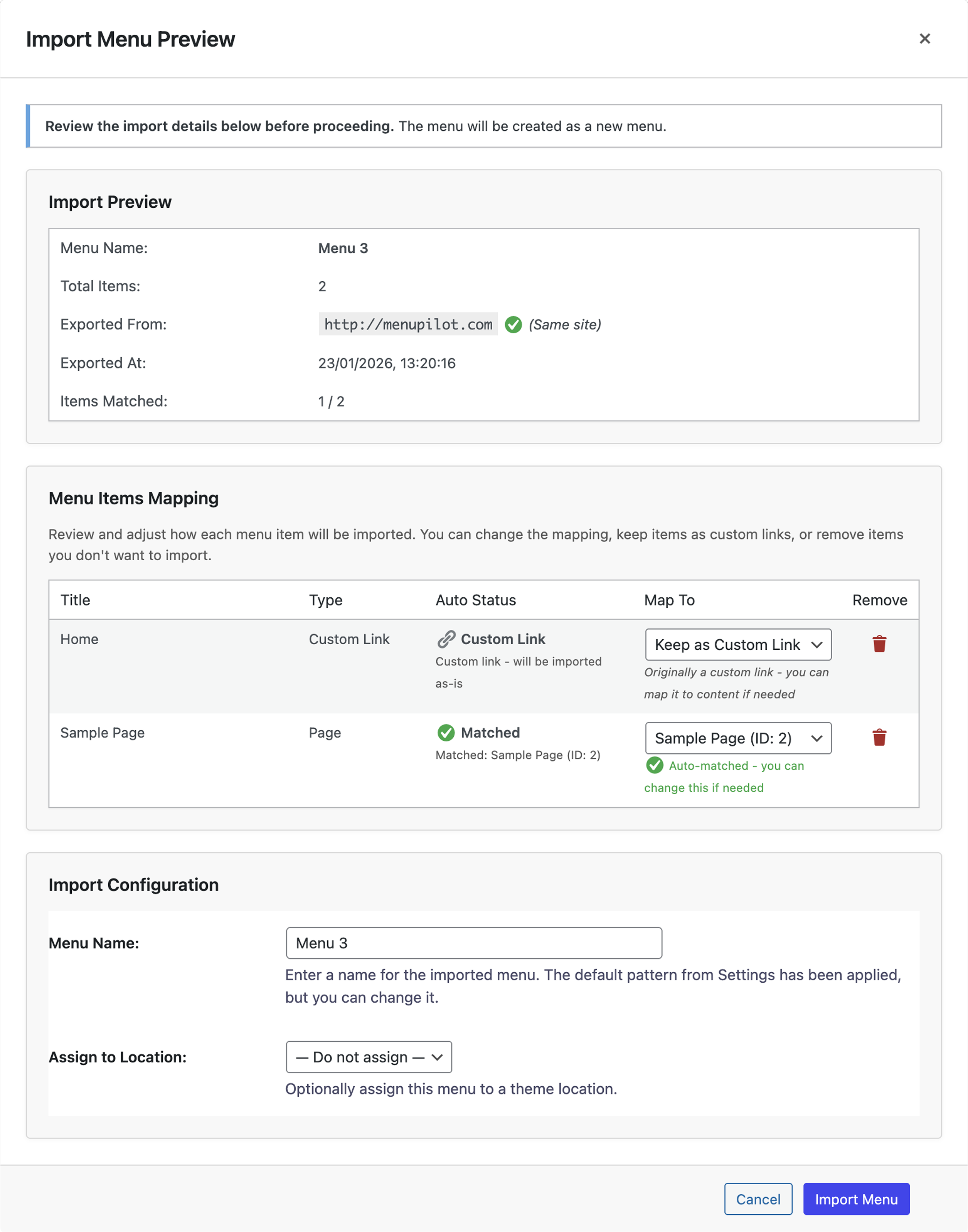
- Provides a full preview and mapping screen before import
- Intelligently matches menu items to existing content
- Preserves menu hierarchy, order, and metadata
- Replaces source site URLs with destination site URLs automatically
- Creates automatic backups before menu updates and imports
- Logs all import and export actions for accountability
What MenuPilot Does Not Support
- Multisite — Each subsite is managed independently; cross-site menu copying is not supported
- Bulk export/import — MenuPilot handles one menu at a time by design
- Mega menu metadata — Custom fields added by mega menu plugins are not preserved
- WP-CLI — No command-line interface; all operations are performed in the admin UI
- Scheduled/automated imports — Imports are triggered manually; no cron or automation support
- Media files — Images referenced in menu items are not bundled in exports
- Non-standard menu item types — Only core WordPress types (post, page, taxonomy, custom link) are supported
Features
- Backup & Restore:
- Automatic backups before every menu update and import
- Manual backup creation from the Menus page
- One-click restore to any previous backup
- Export backups as JSON for portability
- Configurable backup limit (Backup Settings tab)
- Import/Export History Logs:
- Dedicated History page under MenuPilot menu
- Logs who, when, and what for every import/export
- Download logs as JSON or plain text
- Clear history with confirmation
- Export individual menus (JSON format)
- Import one menu at a time as a new menu
- Preview screen before import showing:
- Menu name
- Total menu items
- Source site URL
- Export timestamp
- Matched and unmatched items
- Intelligent auto-matching of menu items using:
- Post type + slug
- Taxonomy + slug
- Normalized custom links
- Manual mapping override per menu item
- Clear warnings for:
- Missing pages, posts, or taxonomies
- Items converted to custom links
- Theme location availability
- Automatic home URL replacement during import
- Preserves:
- Menu hierarchy
- Menu order
- CSS classes
- Link attributes (target, rel)
- Descriptions
- Visual import progress and clear success/error messages
- Native WordPress admin UI (no custom frameworks)
Requirements
- WordPress 5.8 or higher
- PHP 7.4 or higher
- Classic WordPress menu system
Configuration
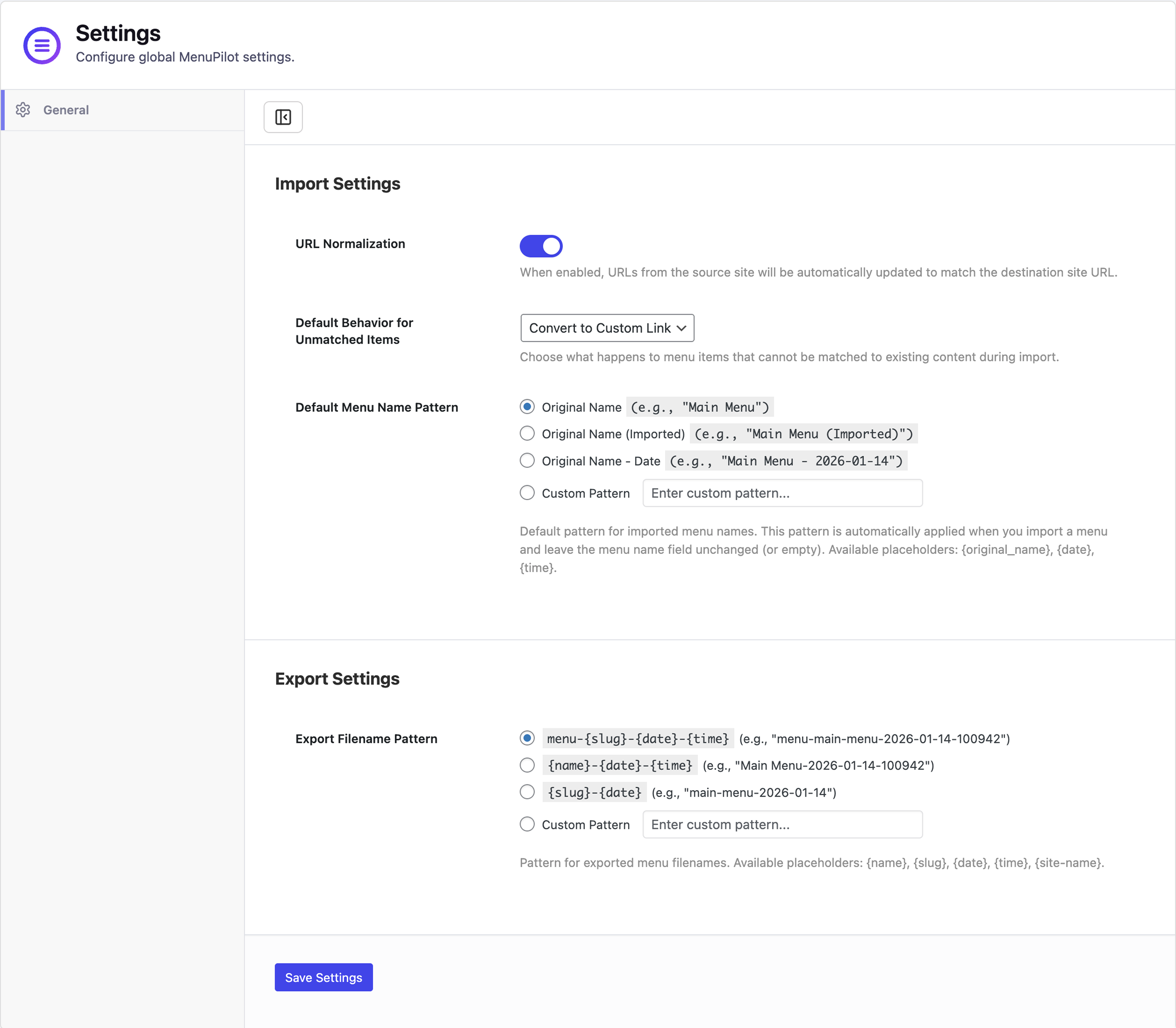
MenuPilot requires no configuration to start using. Once activated, you can immediately export and import menus.
Optional: Go to MenuPilot → Settings and open the Backup tab to configure the maximum number of backups to keep per menu (default: 5).
Usage
Backup & Restore
- When editing a menu, scroll to the MenuPilot Backup & Restore section below the menu form.
- Use the Backup tab to create manual backups, restore previous versions, or export backups as JSON.
- Use the Import tab to import a previously exported backup JSON file.
- Backups are also created automatically before every menu save and before every import.
History Logs
- Navigate to MenuPilot → History in the WordPress admin.
- View all import and export actions with user, timestamp, menu name, and outcome.
- Use the Filter button to narrow results by date range or user.
- Download logs as JSON or plain text for record-keeping or auditing.
- Use Clear History to remove all log entries (with confirmation). Export first if you need a backup.
Exporting a Menu
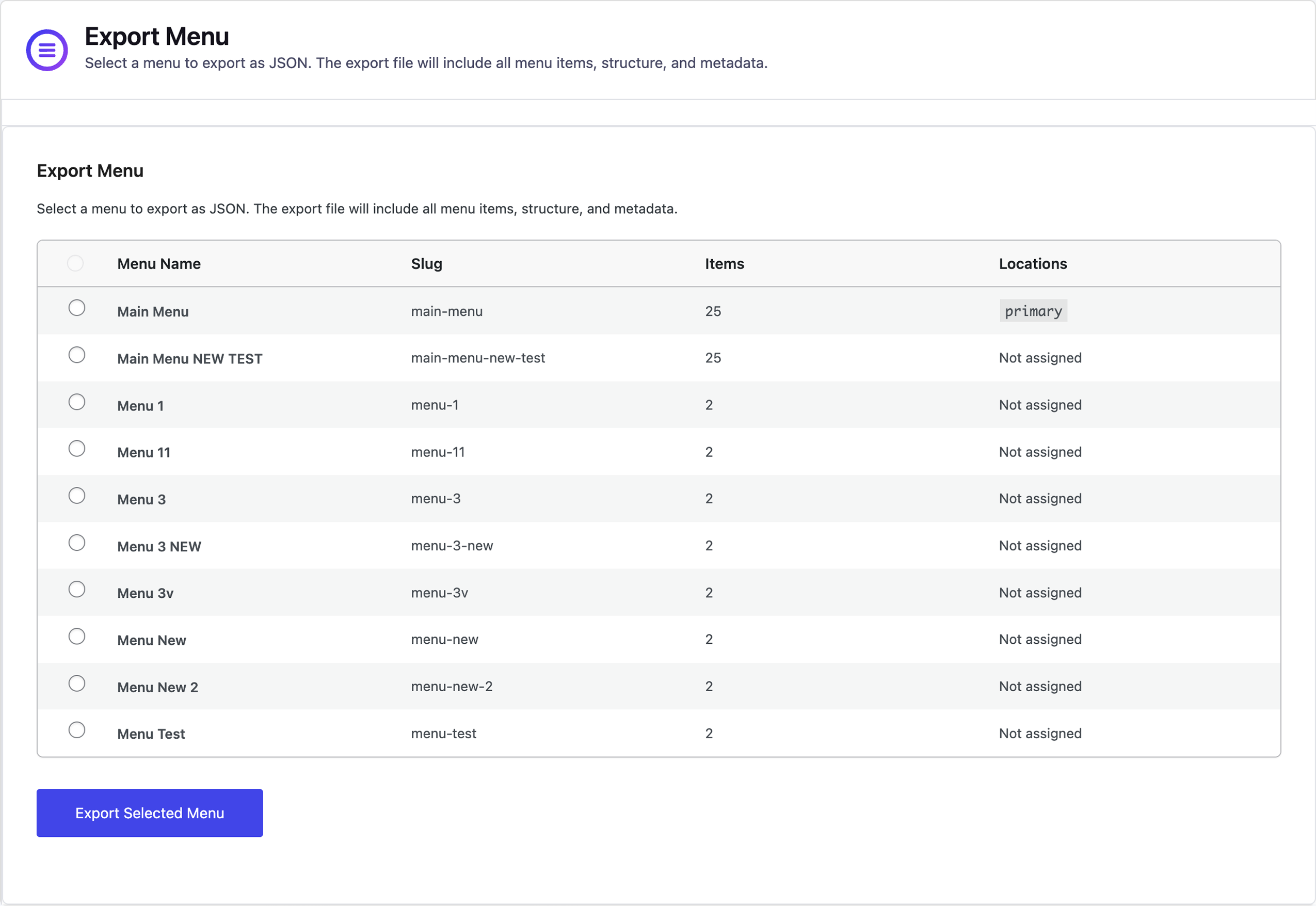
- Navigate to MenuPilot → Export Menu in the WordPress admin.
- Select the menu you want to export from the dropdown.
- Click the “Export Menu” button.
- A JSON file will be downloaded to your computer.
- Save this file for importing to another site.
Importing a Menu
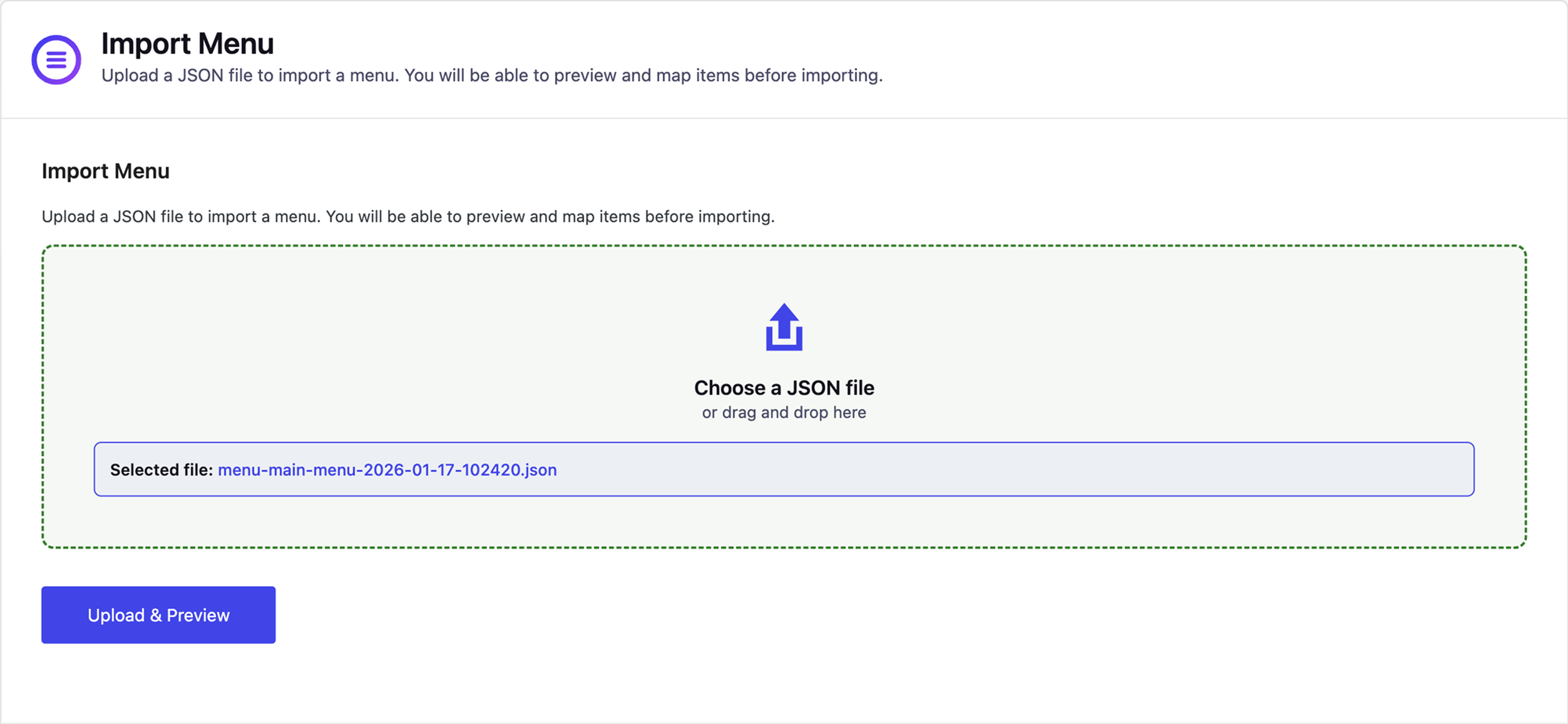
- Navigate to MenuPilot → Import Menu in the WordPress admin.
- Click “Choose File” and select a previously exported JSON file.
- Click “Upload & Preview” to see what will be imported.
- Review the preview screen:
- Check menu name (you can edit it)
- Review matched and unmatched items
- Manually map items if needed
- Remove items you don’t want to import
- Optionally assign the menu to a theme location
- Click “Import Menu” to complete the import.
- The menu will be created as a new menu (existing menus are never overwritten).
Important Notes
- MenuPilot always imports menus as new menus – it never overwrites existing menus.
- Always review the preview screen before importing to ensure items are matched correctly.
- Unmatched items will be converted to custom links automatically.
- You can manually map items to different content using the “Map To” dropdown in the preview.
Installation
- Upload the plugin files to
/wp-content/plugins/menupilot, or install via the WordPress Plugins screen. - Activate the plugin through the “Plugins” screen.
- Go to MenuPilot in the WordPress admin menu to access the plugin.
Frequently asked questions
Does MenuPilot overwrite existing menus?
No. MenuPilot always imports menus as new menus. Existing menus are never overwritten.
Can I preview changes before importing?
Yes. MenuPilot shows a detailed preview screen before import, including matched and unmatched items. Nothing is imported until you confirm.
What happens if a menu item cannot be matched?
Unmatched items are clearly shown in the preview. You can manually map them to existing content or explicitly keep them as custom links.
Does MenuPilot support multisite?
Multisite support is not currently available, but may be added in future versions.
Does MenuPilot support XML imports or bulk exports?
No. MenuPilot supports JSON format only and exports one menu at a time.
When are backups created?
Backups are created automatically before every menu update (including native menu edits) and before every import. You can also create manual backups from the Backup section on the Menus page.
Where can I view import and export history?
Go to MenuPilot → History to view all import and export actions. You can filter by date and user, and download logs as JSON or plain text.
Changelog
*
1.0.13
*
1.0.5
- Fixed: backup tab now correctly shows only backups for the selected menu (was showing all menus’ backups combined)
- Fixed: backup stats now reflect the current menu’s count only, not the total across all menus
- Fixed: restore, delete, and delete-all backup actions now use the plugin’s confirm modal instead of the browser’s native confirm dialog
- Improved: backup list now loads user data in a single batch query (eliminates N+1 database queries)
1.0.4
- Backups are now stored in a dedicated
wp_menupilot_backupsdatabase table instead ofwp_options, eliminating serialized blob bloat and improving query performance - Auto-backup on menu save now correctly captures the state after WordPress finishes processing all item changes (adds, updates, deletes)
- Fixed: restoring an older backup after restoring a newer one now correctly removes items that were deleted between saves
- Removed unused frontend stylesheet and script — MenuPilot is admin-only and ships no frontend assets
- Existing backups stored in
wp_optionsare automatically migrated to the new table on first admin page load after update
1.0.3
- Backup & Restore: automatic backups before menu updates and imports
- Manual backup creation, one-click restore, and export backups as JSON
- Backup Settings tab to configure maximum backups per menu
- Import/Export History Logs: dedicated History page with filter and download (JSON/plain text)
1.0.2
- UI improvements and bug fixes
1.0.0
- Initial release
- Menu export (JSON)
- Preview-first menu import with intelligent matching
- Manual mapping and clear import feedback
Screenshots
For developers
Is this your plugin? Show off the numbers.
Add a live badge to your site, docs or GitHub README. It updates on its own — no account needed.
Best MenuPilot alternatives
All import-export plugins →



FAQ
MenuPilot: quick answers
Straight answers, pulled from live WordPress.org data.
Live data from WordPress.org · checked Oct 14, 2026
Is MenuPilot free?
Yes. MenuPilot is free to download and use from the official WordPress.org plugin directory.
Is MenuPilot safe to use in 2026?
MenuPilot shows warning signs in 2026 — compare the alternatives below before installing. It runs on 10+ sites and was last updated 7 months ago, and scores 38/100 on our health check.
How many websites use MenuPilot?
MenuPilot is active on 10+ WordPress websites and has been downloaded 1,003 times since it launched in January 2026. It was downloaded 62 times in the last 30 days.
Does MenuPilot work with WordPress 7.1?
MenuPilot is officially tested up to WordPress 6.9.10, while the latest release is 7.1.3. It may still work, but try it on a staging site first.
What PHP version does MenuPilot need?
MenuPilot requires PHP 7.4 or higher. Most hosts run PHP 8.x today, so it works on any modern WordPress hosting.
When was MenuPilot last updated?
The latest version, 1.0.20, was released on March 15, 2026 (7 months ago).
Who makes MenuPilot?
MenuPilot is developed and maintained by Mayank Majeji.
What are the best alternatives to MenuPilot?
The most popular alternatives to MenuPilot are Export and Import Users and… (60K+ installs), WP Ultimate CSV Importer (20K+ installs) and LearnPress (5K+ installs).
Powered by PageForge
Want thousands of pages that rank like these? Build them in an afternoon.
This directory runs on the same engine as PageForge. Turn any spreadsheet, CSV or API into thousands of fast, SEO-ready WordPress pages — with schema, internal links and AI-written copy baked in.
- CSV, Google Sheets & API data sources
- AI content, schema & internal links per page
- Works with Elementor, Gutenberg, Yoast & Rank Math
- Free on WordPress.org — no credit card


