



Export and Import Users and Customers
Import and export WordPress users and WooCommerce customers using CSV. Migrate to your new site without any data loss.

Safe pick
Yes — Export and Import Users and Cus… is a safe, well-maintained plugin to use in 2026. It runs on 60K+ sites, is rated 4.8/5 and was last updated 1 month ago, and scores 83/100 on our health check.
- Proven at scale on 60K+ active sites
- Loved by users — 4.8/5 from 442 reviews
- Tested with the latest WordPress (7.1)
How does it stack up?
Side-by-side on installs, updates, ratings & supportDaily downloads
Download spikes usually follow a new release — each site that auto-updates counts as a download.
Rankings
Where Export and Import Users and… stands todayWordPress.org search rankings
Live position in the plugin search, top 100| Keyword | Position |
|---|---|
| export customers | #1 |
| Export Users to CSV | #2 |
| import customers | #2 |
| import users from csv | #3 |
| import-export | #7 |
Version adoption
Share of active sites per release.
Rating breakdown
★★★★★★★★★★ 4.8 from 442 reviews
About Export and Import Users and Customers
From the official readme · v2.7.5Description
Import and export WordPress users and WooCommerce customers using CSV. Migrate to your new site without any data loss.
Top-Rated WordPress User Import Export Plugin
The most-rated WordPress User Import Export plugin ever! Easily import and export WordPress users and WooCommerce customers with this powerful plugin. Whether you’re moving users between websites or backing up customer data, it ensures a smooth, hassle-free migration without any data loss. Ideal for quick and reliable site transfers.
You can import or export user/customer data using CSV files. This helps effortlessly migrate or update user data on your website. No more manually adding each user or customer one by one. Just migrate or update everything in one go!
Key Features of WordPress User Import Export Plugin
🔸 Filter by User Roles, Email, and Date Range – Import or export user/customer data based on user roles, user email, and date range of when the users were added to the system.
🔸 Batch Export/Import – Process large amounts of user data efficiently in batches.
🔸 Retain User Passwords – Preserve existing user passwords when migrating to a new website.
🔸 Field Mapping & Transformation – Map and transform fields while you import WooCommerce customers or user data.
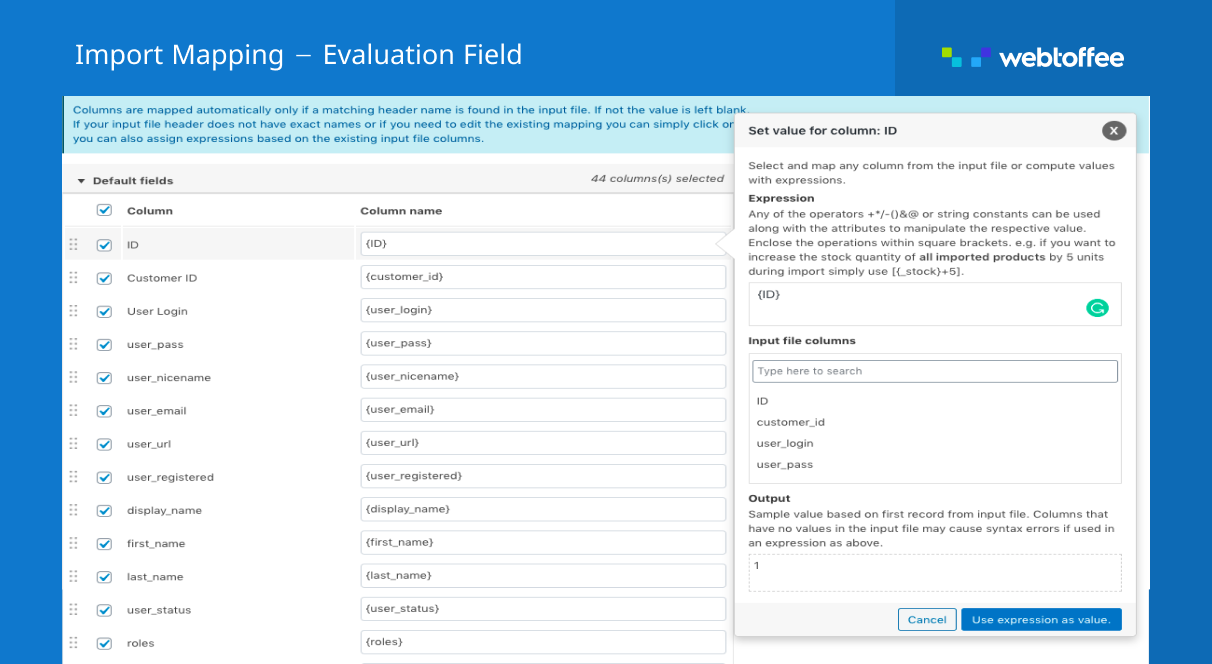
🔸 Bulk Data Modification – Modify user data in bulk using Evaluation Fields during user import.
🔸 Export Guest Users – Include data of WooCommerce guest customers (users who bought products from the site without creating an account)
🔸 Export Specific Users – Search by username or email while exporting with auto-suggestions of email addresses and names in user export data fields for quick filtering.
✅ Tested OK with WordPress 7.1
✅ Tested OK with WooCommerce 11.0.1
✅ Tested OK with PHP 8.3
How Does WordPress User Import Export Plugin Work?
This WordPress user import export plugin uses CSV (Comma-Separated Values) files as input. You must create a import user CSV file and enter the user details in a structured format. (refer to this sample CSV) This is to match each field of the user CSV import file to the appropriate user fields in WordPress.
For example, the user_email field gets mapped to the User Email. Otherwise, the admin needs to manually map the user CSV import fields.
📌 Note – For the WordPress user import and export plugin to work correctly, you must map the headers of all the columns correctly and ensure that all of the fields you enter are in the correct format.
You can create the import user CSV from scratch or export the user CSV using the same plugin. Use any spreadsheet program, such as Microsoft Excel, OpenOffice, LibreOffice, or Google Spreadsheets, to create and edit your CSV file. Save this file in UTF-8 encoding with extension .csv.
After entering all details about users in a spreadsheet, you can bulk import users to WordPress. With this user export plugin, you can also export and download user details as a CSV file.
Need Help?
🟢 Check out our WordPress Users & WooCommerce Customers Import Export Plugin – User Guide.
✅ Contact our support.
Watch the video to get started with the WordPress user export and import plugin.
Why Choose WebToffee User Export Import Plugin?
WebToffee creates quality WordPress/WooCommerce plugins that are easy to use and customize. We are proud to have millions of customers actively using our plugins across the globe.
Hear It From Our Users
danielepais (@danielepais) ⭐⭐⭐⭐⭐
Great tool, especially if you need to select a batch of users and some account details but not all; with this plugin, you can filter what to output on your comma-separated CSV file.Allan Klinbail (@aklinbai) ⭐⭐⭐⭐⭐
After working for a couple of months on a new site from scratch, I didn’t want to have to issue password resets for all users.
This allowed me to move them all easily and simply.benlumi (@benlumi) ⭐⭐⭐⭐⭐
I transferred all my customers to my new website in no time and without any stress. Many options are available to do the job.
Perfect! Thank you 😀
Import Export WordPress Users & WooCommerce Customers Hassle-free: Go Premium for Advanced Features
✅ Import/Export WordPress Users & WooCommerce Customers – Quickly move or back up users and customers between websites without losing any data. Every transfer is smooth and secure.
✅ Supports multiple file formats like CSV, XML, and Excel (XLS, XLSX) – Choose from various file formats for maximum flexibility. Import or export users data in the format that suits your workflow.
✅ Export by User Roles or Multiple Roles – Select specific roles or multiple roles to filter which users are exported. Tailor your export files to include only what you need.
✅ Advanced User Export Filters – Use filters like user role, email, date range, offset/limit, guest users and ascending/descending sort order. Quickly narrow down and control your exported data set.
✅ Map & Transform Fields on User Import – Match incoming fields with WordPress user fields and modify values as needed. Ensures correct data structure when you import WooCommerce customers.
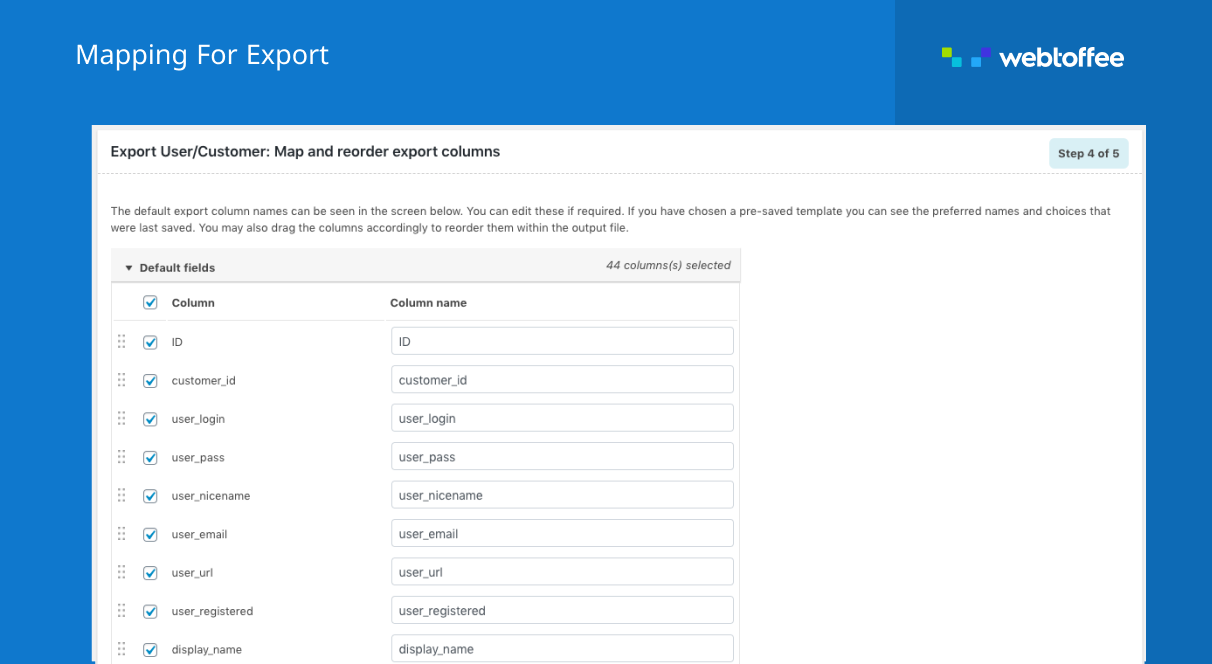
✅ Map & Transform Fields on Export – Customize how fields appear while you export WooCommerce customers. Add flexibility and relevance to your exported data format.
✅ Dynamic Field Updates via Evaluation Fields – Apply conditions to change values of the fields when you import WooCommerce customers using Evaluation Fields. Automate complex data transformations on the fly.
✅ Export Custom & Hidden User Meta – Include hidden fields and user meta along with standard user data. No need for additional tools to extract custom user export data.
✅ Update or Skip Existing Customers – Choose whether to update existing users or skip them during user import. Prevents duplication and ensures clean migrations.
✅ Bulk Update User Data – Quickly modify existing user or customer data in bulk. Perfect for bulk edits, corrections, or role changes.
✅ Send or Skip Import Emails – Send email notifications to users automatically during data migration to keep them informed. A great way to maintain transparency and build trust during large user imports.
✅ WPML Compatible – Supports multilingual stores with full WPML integration. Import/export user data in multiple languages with ease.
✅ Scheduled FTP Import/Export via Cron – Import and export users/customers to/from a remote server via FTP in scheduled time intervals with Cron Job. Perfect for automated, recurring import/export tasks.
✅ Import from URL or Google Sheets – Import user data directly from public URLs and Google Sheets. Simplifies remote user import management without file uploads.
✅ Seamless Compatibility with Third-Party Plugins – Fully supports major third-party WordPress plugins like BuddyPress, ACF, Ultimate Member, and more ensuring smooth data handling and integrity across your plugin ecosystem.
✅ 99% Customer Satisfaction Rate – Backed by a responsive, expert support team users love. Get timely help whenever you need it.
✅ 30-Day Money-Back Guarantee – Try the WordPress user import plugin risk-free with our 30-day refund policy. Your satisfaction is always our priority.Please visit Import Export WordPress Users & WooCommerce Customers for more details.
Export WordPress Users and WooCommerce Customers to CSV
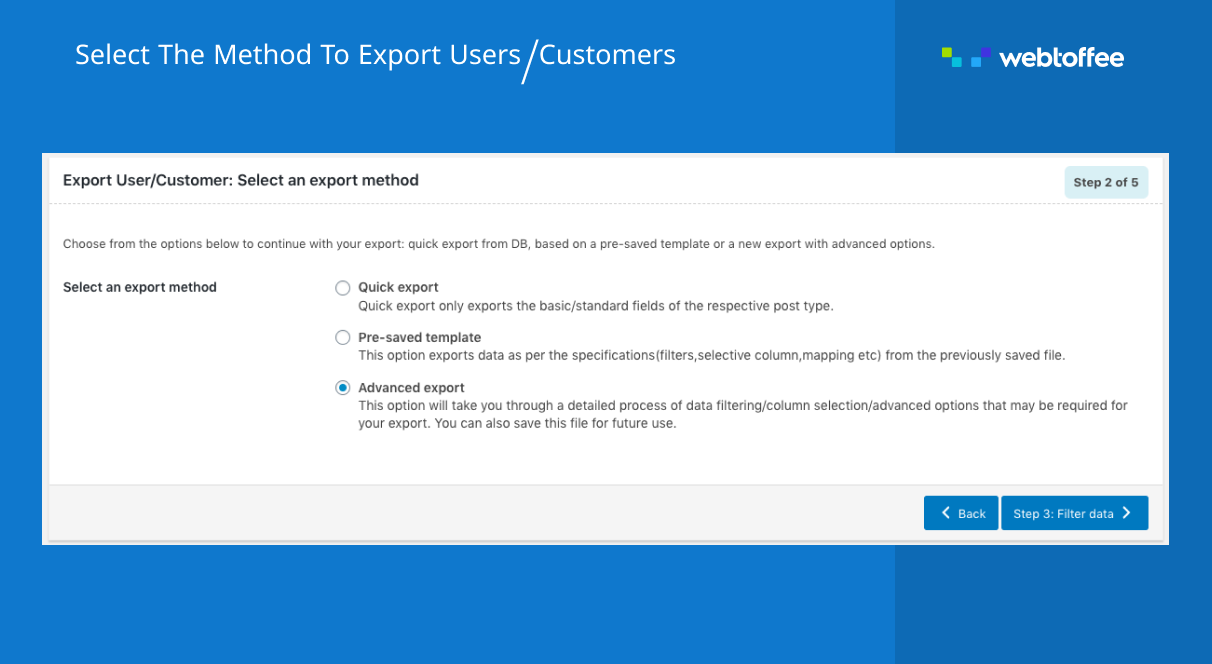
This WordPress user export plugin enables you to export WordPress users and WooCommerce customers to a CSV file. You can use this user export CSV file to migrate users and export WooCommerce customers to another website with the Import users functionality of this plugin.
If you have hundreds, even thousands, of WordPress users, the export users option in this WordPress export user plugin helps to save your effort and time of manually adding the user data.
You can bulk export user data to a user export CSV file with multiple powerful filters such as user roles, date ranges, etc.
Import WordPress Users and WooCommerce Customers from CSV
With this WordPress user import plugin, you can easily import hundreds or thousands of WordPress users and WooCommerce customers to your website using a CSV file. The plugin lets you bulk import or merge (update existing users) on your WordPress website, making user and WooCommerce customer import seamless and efficient.
The WordPress import users plugin also has the option to send an email to the users and customers whenever the admin imports/updates users’ details. It will retain the user passwords and securely migrate them to another website.
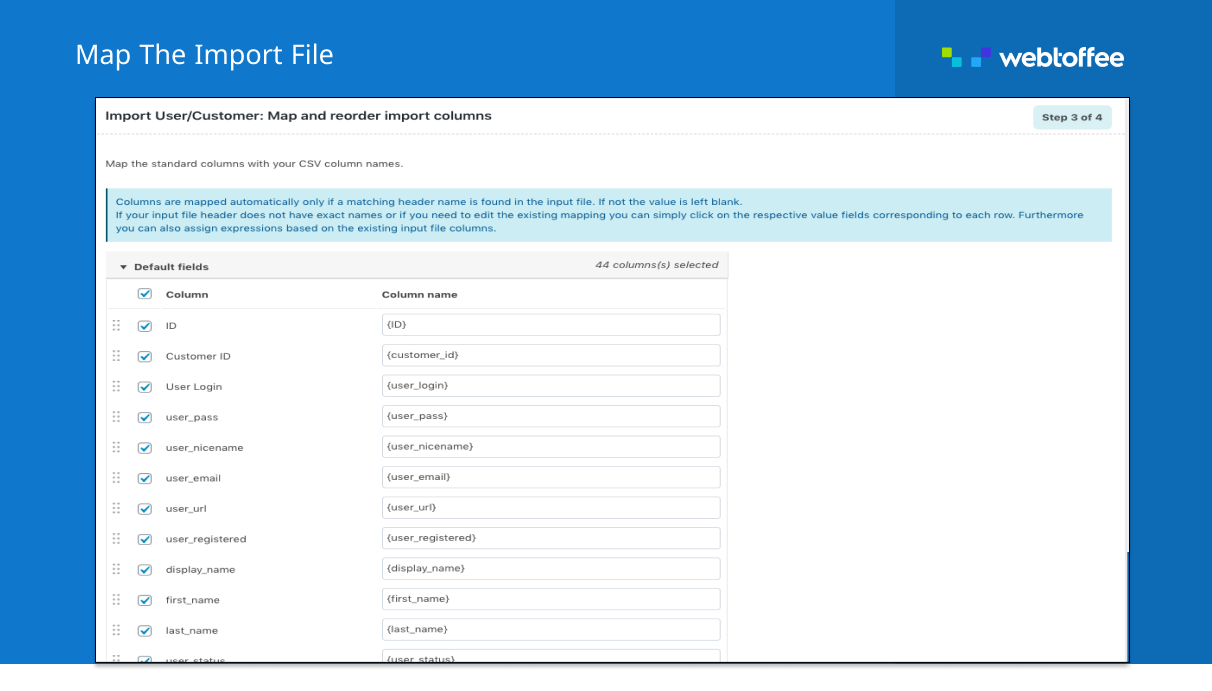
You can map your import columns to the appropriate WordPress data to import or merge user details. You can also import WordPress users data from a variety of sources, such as an uploaded CSV file on FTP (Premium), a locally saved CSV file on your computer, or from a URL, Google sheet, etc. This flexibility makes it especially useful when you need to import customer CSV files from different platforms.
To import WordPress users and import WooCommerce customers data to your website:
- Create a CSV file from scratch using any spreadsheet program, such as Microsoft Excel, OpenOffice, LibreOffice, or Google Spreadsheets.
- Fill in user details in a tabular format with properly labeled columns.
- Save this file with the extension ‘.csv’.
- After entering all details about WordPress users in the spreadsheet, you can import users or customers to your website.
Connection to feedback.webtoffee.com
This plugin connects to feedback.webtoffee.com for collecting feedback when the plugin is deactivated.
See our Privacy Policy and Terms & Conditions for details on data collection and usage.
Plugin Updates
For every update of the plugin, you will be notified of the installed plugins page. You can directly update the plugin from your dashboard. We recommend that you keep the latest version of the plugin so that you can avail of the new functionalities and security features.
Installation
Minimum Requirements
- PHP Version: 5.6 or later
- WordPress version: 3.0 or later
- WooCommerce version: 3.0 or later
Steps to Install the Plugin
To install the plugin, follow the below steps:
Step 1: Log in to your WordPress dashboard.
Step 2: Navigate to Plugins and select Add New.
Step 3: From the search box, type “Import export WordPress users” or “Import export WooCommerce customers” and click Search Plugins.
Step 4: Once you find the Import Export WordPress Users and WooCommerce Customers plugin by WebToffee, click on Install Now.
Step 5: After installation, click Activate to activate the plugin.
You can also install the plugin by downloading the zip file from the plugin page on WordPress.org. Then upload the file directly from your WordPress dashboard, or using an FTP application.
Frequently asked questions
Does this plugin export users to excel?
This plugin exports user data to CSV which can be opened with Excel and saved as an Excel file.
Does this plugin support multiple roles?
Yes. You can export import users along with multiple user roles.
Does this plugin export WooCommerce customer data?
Yes, you can export WooCommerce customer data.
Does this export users with passwords?
Yes. This plugin will export users with passwords.
Does this import users with their passwords?
Yes. This plugin will import users with the password, so users can use the same old password in the imported site as well.
Does this plugin support WooCommerce customer order CSV export?
No. You may want to use Order Export & Order Import for WooCommerce for this purpose.
Do Import Export WordPress Users support Multisite?
Yes, the plugin supports exporting users from each sub-sites of the multisite network.
Does this plugin export custom data fields?
This version of the plugin does not support the import or export of user custom data fields. It is one of our premium features. Please have a look at the premium version of the plugin to export and import custom metadata fields.
Can this plugin update existing user data?
Yes, you can update the existing user data by setting the option: ‘If the user exists in the store’ to ‘Update’ in the Advanced options during import.
Imported customers are not listed under WooCommerce customers
Please refer the article on how to refresh WooCommerce customers list.
Changelog
[Compatibility] - Tested OK with WordPress 7.1 [Compatibility] – Tested OK with WooCommerce 11.0.1 [Update] - Translation updates [Fix] - Fixed export fatal on PHP 8+ when "wc_last_active" or "last_update" meta was a date string.
2.7.5 2026-08-18
- [Compatibility] – Tested OK with WordPress 7.1
- [Compatibility] – Tested OK with WooCommerce 11.0.1
- [Update] – Translation updates
- [Fix] – Fixed export fatal on PHP 8+ when “wc_last_active” or “last_update” meta was a date string.
Screenshots



For developers
Is this your plugin? Show off the numbers.
Add a live badge to your site, docs or GitHub README. It updates on its own — no account needed.
Best Export and Import Users and C… alternatives
All export customers plugins →| Rank | Plugin | Active installs |
|---|---|---|
| 2 |
 All Woocommerce Export
Export WooCommerce Orders, products and Customers into Excel. Supports all Excel format…
All Woocommerce Export
Export WooCommerce Orders, products and Customers into Excel. Supports all Excel format…
|
100+ |
| 3 |
 All Users Filter
Filter, sort, and export WordPress users to CSV using powerful UI-driven meta queries…
All Users Filter
Filter, sort, and export WordPress users to CSV using powerful UI-driven meta queries…
|
10+ |
FAQ
Export and Import Users and Custome…: quick answers
Straight answers, pulled from live WordPress.org data.
Live data from WordPress.org · checked Sep 26, 2026
Is Export and Import Users and Cus… free?
Yes. Export and Import Users and Cus… is free to download and use from the official WordPress.org plugin directory. The developer also sells premium add-ons or a Pro version with extra features.
Is Export and Import Users and Cus… safe to use in 2026?
Yes — Export and Import Users and Cus… is a safe, well-maintained plugin to use in 2026. It runs on 60K+ sites, is rated 4.8/5 and was last updated 1 month ago, and scores 83/100 on our health check.
How many websites use Export and Import Users and Cus…?
Export and Import Users and Cus… is active on 60K+ WordPress websites and has been downloaded 3,135,895 times since it launched in October 2016. It was downloaded 15,518 times in the last 30 days.
Does Export and Import Users and Cus… work with WordPress 7.1?
Yes. The developer has tested Export and Import Users and Cus… up to WordPress 7.1.2, the latest release. It requires WordPress 3.0.1 or newer.
What PHP version does Export and Import Users and Cus… need?
Export and Import Users and Cus… requires PHP 5.6 or higher. Most hosts run PHP 8.x today, so it works on any modern WordPress hosting.
When was Export and Import Users and Cus… last updated?
The latest version, 2.7.5, was released on August 18, 2026 (1 month ago).
Who makes Export and Import Users and Cus…?
Export and Import Users and Cus… is developed and maintained by WebToffee.
What are the best alternatives to Export and Import Users and Cus…?
The most popular alternatives to Export and Import Users and Cus… are All Woocommerce Export (100+ installs) and All Users Filter (10+ installs).
Powered by PageForge
Want thousands of pages that rank like these? Build them in an afternoon.
This directory runs on the same engine as PageForge. Turn any spreadsheet, CSV or API into thousands of fast, SEO-ready WordPress pages — with schema, internal links and AI-written copy baked in.
- CSV, Google Sheets & API data sources
- AI content, schema & internal links per page
- Works with Elementor, Gutenberg, Yoast & Rank Math
- Free on WordPress.org — no credit card


