



MenuMaster – Interactive Mobile-First Restaurant Menu Plugin for WooCommerce
MenuMaster transforms the way customers interact with your restaurant menu by making it digital, visually engaging, and accessible anytime, anywhere. With QR code integration, you can replace outdated physical menus…

Use with caution
MenuMaster works, but test it on a staging site before relying on it in 2026. It runs on 50+ sites, is rated 5/5 and was last updated 9 months ago, and scores 47/100 on our health check.
- Small user base (50+ active installs)
- Very few reviews so far
- Only tested up to WordPress 6.8 (latest is 7.1)
How does it stack up?
Side-by-side on installs, updates, ratings & support



Daily downloads
Download spikes usually follow a new release — each site that auto-updates counts as a download.
Rankings
Where MenuMaster stands todayWordPress.org search rankings
Live position in the plugin search, top 100| Keyword | Position |
|---|---|
| café menu | #8 |
| digital menu | #34 |
| food menu | #25 |
| restaurant | #33 |
| restaurant menu | #16 |
Version adoption
Share of active sites per release.
Rating breakdown
★★★★★★★★★★ 5 from 2 reviews
About MenuMaster
From the official readme · v1.0.2Description
Plugin Demo | View Documentation
MenuMaster transforms the way customers interact with your restaurant menu by making it digital, visually engaging, and accessible anytime, anywhere. With QR code integration, you can replace outdated physical menus with a sleek, mobile-first design that offers a seamless and modern dining experience.
Customers can easily browse your restaurant menu and explore daily specials. With promotional tags, filters, and search functionality, you can influence customers’ choices to help them find their perfect dish. This intuitive navigation ensures a satisfying dining journey while keeping your offerings at their fingertips.
Not only does this approach simplify how customers view your restaurant menu, but it also enhances your restaurant’s online visibility. Share your menu link directly on Google Business Profile or Instagram Bio, attracting more customers to explore your offerings. With the ability to highlight menu items, update daily specials, and feature seasonal dishes instantly, you can improve the Average Order Value (AOV), driving revenue for your business.
Why MenuMaster is Perfect for You and Your Customers?
-
For Restaurant/Café Visitors:
Customers scan a QR code on their table to view the restaurant menu on their phones. They can explore today’s specials, browse categories, or search for dishes effortlessly. Your menu link can also be shared online, increasing visibility on platforms like Google and Instagram. -
For Restaurant Managers:
Quickly update menus, highlight special offers, and add tags or filters for preferences without any technical skills. Keep your menu fresh and easy to manage. -
For Agencies & Developers:
Use bulk import and one-click setup to integrate menus into client websites with WooCommerce compatibility. Save time while delivering professional, customized solutions.
Why Choose MenuMaster?
-
Mobile-First Design:
Your menu adapts beautifully to smartphones, tablets, and desktops—no additional customization needed. -
Visually Appealing Menu Design:
Create menus with visually stunning designs that make your dishes irresistible while providing clear and concise content to help customers make informed choices. -
Custom Filters (Veg/Non-Veg/Egg/Offer) and Search:
Allow customers to filter items based on dietary preferences or explore Today’s Specials, Combos, or Daily Offers, or directly search for a specific item. -
Floating Menu Navigation:
Make browsing a breeze with sticky category navigation for quick and easy access to menu sections. -
WooCommerce Bulk Import:
Save hours by importing your menu directly from WooCommerce with a single click. Get started with our [Sample CSV file]. -
Automatic QR Code Generation:
Generate and share QR codes instantly to let your customers access menus effortlessly on their phones. -
Shortcode-Based Menus:
Use simple shortcodes to display menus anywhere on your site. Options include menu display, search, and category navigation.
💬 Bonus Tip:
Want your restaurant website to chat with customers like a real host?
Add AI BotKit — a free WordPress chatbot that can answer FAQs, suggest dishes, and support guests automatically.
Shortcodes
Menu Display: [menu_master_display]
Categories Listing/Floating Menu: [menu_master_category_listing]
Menu Search: [menu_master_search]
Menu Filters: [menu_master_filters}
How to Use the MenuMaster Restaurant Menu Plugin?
-
Install and Activate
Download MenuMaster from WordPress.org and activate it in one click. -
Import Menu Items
Add menu items via WooCommerce bulk import or manually create them. [Link]
[Sample CSV] -
Create Your Menu in a Single Click
Use Elementor or Gutenberg to design and style your menu effortlessly.[Link] -
Generate QR Codes
Instantly create QR codes for customers to access the menu on their phones. -
Go Live
Publish your menu and let customers enjoy a seamless browsing experience.[Link]
Third-Party API Services
This plugin utilizes the following third-party API service(s):
-
QuickChart: This Service is used to generate QR codes for menu pages.
- Documentation: [https://quickchart.io/documentation/]
- Privacy Policy: [https://about.mappls.com/about/privacy-policy]
-
Tally Feedback Form: This service is used for feedback collection.
- Privacy Policy: [https://tally.so/help/terms-and-privacy]
Need Help? We’ve Got You Covered!
- Support Email: Contact@reachsy.io
- Documentation: Visit our knowledge base for detailed guides.
- Inquiries: Reach out via our contact form.
Installation
- Upload the plugin files to the
/wp-content/plugins/restaurant-menu-plugin/directory or install via WordPress plugins screen. - Activate the plugin through the ‘Plugins’ screen in WordPress.
- Navigate to the plugin settings to configure and start adding menu items via WooCommerce.
Frequently asked questions
Q: Do I need WooCommerce to use MenuMaster?
A. Yes, WooCommerce is required as MenuMaster utilizes its product system to create and manage menu items.
Q: How do I set up a menu with MenuMaster?
A. Simply import menu items via WooCommerce’s bulk importer or add them manually, create a menu page, and customize the layout using the settings menu. [Link]
Q: Can I use MenuMaster for free?
A. Yes, MenuMaster is free to use and available for download from WordPress.org.
Q: Can customers filter items based on their preferences?
A. Yes, MenuMaster includes dietary filters, allowing customers to sort menu items by categories or tags like vegetarian, non-vegetarian, or combos. [Link]
Q: How does QR code integration work?
A. MenuMaster automatically generates a QR code linked to your menu, making it easy for customers to scan and access your menu on their devices. [Link]
Q: Is MenuMaster mobile-friendly?
A. Absolutely! MenuMaster is designed with a mobile-first approach to ensure optimal viewing and usability on any device.
Q: Can I customize the menu layout?
A. Yes, you can adjust colors, layouts, and filters directly from the plugin’s settings to match your branding. [Link]
Q: Is technical support available?
A. Yes, detailed documentation and support are available to help you with installation, setup, and troubleshooting.[Link]
Q: How do I display the menu on my website?
A. You can use shortcodes to embed the menu on any page or design the menu page using Elementor or Gutenberg with MenuMaster’s integrated features.
Changelog
1.0.2
- Fix – Read more button for product description
1.0.1
- Tested Up to latest version of WordPress
1.0.0
- Initial release with bulk import, QR code integration, shortcode display, and WooCommerce syncing.
Screenshots
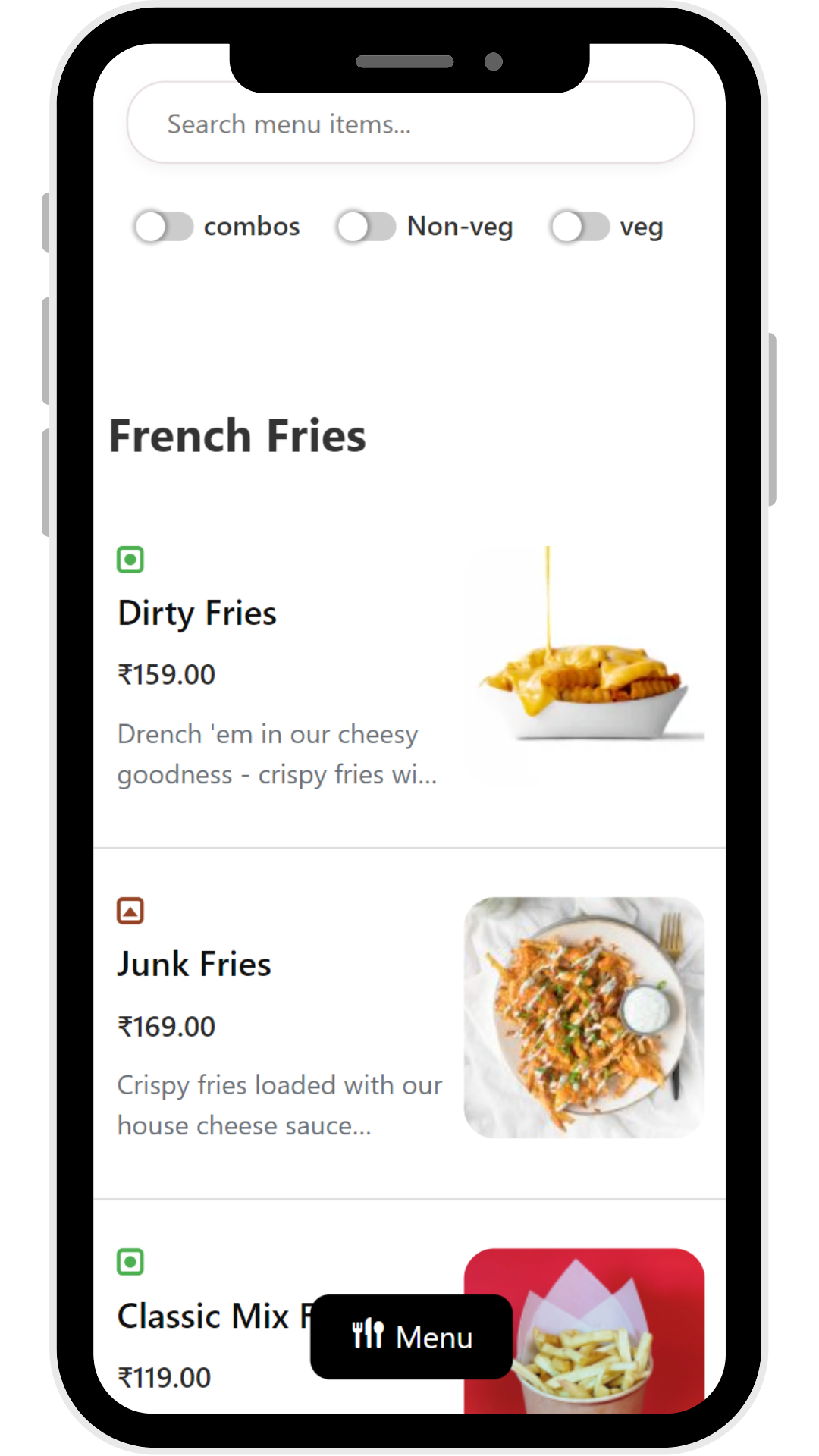


For developers
Is this your plugin? Show off the numbers.
Add a live badge to your site, docs or GitHub README. It updates on its own — no account needed.
Best MenuMaster alternatives
All café menu plugins →

FAQ
MenuMaster: quick answers
Straight answers, pulled from live WordPress.org data.
Live data from WordPress.org · checked Oct 4, 2026
Is MenuMaster free?
Yes. MenuMaster is free to download and use from the official WordPress.org plugin directory.
Is MenuMaster safe to use in 2026?
MenuMaster works, but test it on a staging site before relying on it in 2026. It runs on 50+ sites, is rated 5/5 and was last updated 9 months ago, and scores 47/100 on our health check.
How many websites use MenuMaster?
MenuMaster is active on 50+ WordPress websites and has been downloaded 1,843 times since it launched in December 2024. It was downloaded 146 times in the last 30 days.
Does MenuMaster work with WordPress 7.1?
MenuMaster is officially tested up to WordPress 6.8.10, while the latest release is 7.1.2. It may still work, but try it on a staging site first.
When was MenuMaster last updated?
The latest version, 1.0.2, was released on December 30, 2025 (9 months ago).
Who makes MenuMaster?
MenuMaster is developed and maintained by WisdmLabs.
What are the best alternatives to MenuMaster?
The most popular alternatives to MenuMaster are Restaurant Menu and Food Or… (2K+ installs), Restaurant Menu Manager (100+ installs) and Elegance Menu (60+ installs).
Powered by PageForge
Want thousands of pages that rank like these? Build them in an afternoon.
This directory runs on the same engine as PageForge. Turn any spreadsheet, CSV or API into thousands of fast, SEO-ready WordPress pages — with schema, internal links and AI-written copy baked in.
- CSV, Google Sheets & API data sources
- AI content, schema & internal links per page
- Works with Elementor, Gutenberg, Yoast & Rank Math
- Free on WordPress.org — no credit card


