



Elegance Menu
Elegant Menu plugin designed to display for a variety of businesses, including restaurants, cafes, fast food outlets, coffee houses, salons, and more.

Use with caution
Elegance Menu works, but test it on a staging site before relying on it in 2026. It runs on 60+ sites, is rated 4.4/5 and was last updated 10 months ago, and scores 50/100 on our health check.
- Small user base (60+ active installs)
- Only tested up to WordPress 6.9 (latest is 7.1)
How does it stack up?
Side-by-side on installs, updates, ratings & support



Daily downloads
Download spikes usually follow a new release — each site that auto-updates counts as a download.
Rankings
Where Elegance Menu stands todayWordPress.org search rankings
Live position in the plugin search, top 100| Keyword | Position |
|---|---|
| café menu | #5 |
| food menu | #21 |
| responsive menu | #87 |
| restaurant menu | #30 |
| salon menu | #6 |
Version adoption
Share of active sites per release.
Rating breakdown
★★★★★★★★★★ 4.4 from 7 reviews
About Elegance Menu
From the official readme · v1.9.1Description
👉 Plugin Demo | Documentation 👈
The Elegance Menu is an amazing tool for WordPress websites.It’s like a special menu that you can use in different parts of your site, like pages, posts, and even in the new Gutenberg editor. It’s made with the latest web technology, HTML5, and CSS3, which makes it look nice.
One cool thing about this menu is that you can easily add it wherever you want using a shortcode.So, if you want to show all your menu items, just add the shortcode, and boom, there it is! Or, if you prefer, you can display only certain categories of items at once.
Lots of different businesses can benefit from this plugin, like restaurants, pubs, salons, and hotels. It helps them showcase their offerings in a stylish and organized way on their websites.
🏆 Multiple Layouts
- With Elegance Menu, you have lots of different layouts to choose from for your menu items, so you can make your menus stand out. You can organize your menus by category, and there are plenty of options to customize how they look. Plus, for each category, you have multiple layout choices.
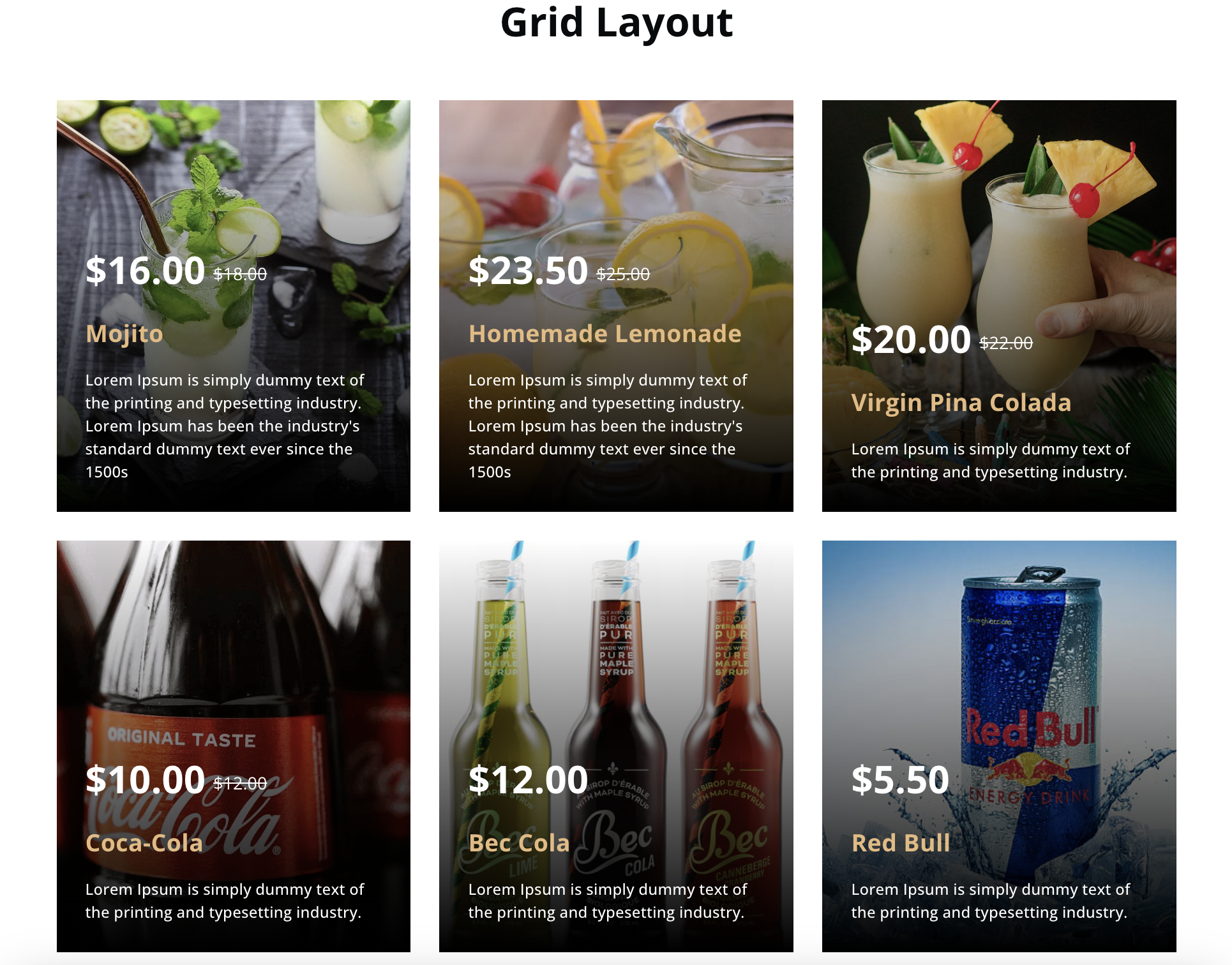
- Elegance Menu also lets you display your menus in a tidy grid format, and you can even add a filter option so users can easily find what they’re looking for.
🏆 Features
This is an awesome plugin for WordPress that helps you create a beautiful menu for your restaurant or café website. It’s perfect for showcasing your food and drinks in a really attractive way. You can add mouth-watering designs and give detailed descriptions of your menu items, plus some extra cool features.
- Fully Responsive
- Display All items, Multiple or Single Categories in a Page/ Post
- Multiple ShortCode
- Multiple layouts
- Use the same plugin for multiple business
- More than 10 currency support
- Support Elegance Menu CPT in REST API with custom fields
Fully Translatable
- POT files included (/languages/)
🏆 Shortcode Generator
You can generate Unlimited shortcodes by following 4 simple steps.
👉 Layout: To create shortcodes, the initial step is selecting a layout. You have the freedom to pick from various layout choices.
👉 Category: You can select multiple/single categories based on the chosen layout.
👉 Name: The title of the section, it is usally post title.
👉 Tagline: The tagline of the section which will be displayed above the title.
ShortCode Settings
- Display All Items:
[elegance-menu id=120 layout="layout-3" name="Restaurant Menu 3" tagline="Favorite Items"] - Display Multi Category:
[elegance-menu id=120 layout="layout-3" category="4,3,6,2" name="Restaurant Menu 3" tagline="Favorite Items"] - Display Single Category:
[elegance-menu id=102 layout="layout-3" category="4" name="Hair Salon Pricelist 2" tagline="Best Price List"]
ShortCode Parameters
- category = Catgory id (only integer)
- id = Post ID
- layout = Design Layout
- name = Post Name
- tagline = Tag Line
For Use Template PHP File :-
<?php echo do_shortcode('[elegance-menu id=102 layout="layout-3" category="4" name="Hair Salon Pricelist 2" tagline="Best Price List"]'); ?>
Need Any Help?
- For any bug, support or suggestion please mail us at
info@impacttechlab.com.
Installation
- The Elegance Menu plugin is a zip file. After purchasing the version you will get a download link in your purchase receipt email with which you can acquire the plugin files.
- After the download, you’ll find the files in the zip folder on your computer. You then need to install elegance-menu.zip. Once you download the zip file. Please follow the following steps to install the “Elegance Menu” version.
- Go to your WordPress website Dashboard.
- Navigate to Plugins > Add New.
- Now check the options on the top right beside “Add Plugins” for the “Upload Plugins” option.
- Once you click the “Upload Plugin” button, you will get the plugin upload option from your computer. Now select the “elegance-menu.zip” file from your computer and click on the “Install Now” button.
- After the installation and activation of the version, you will get the plugin on your website like in the window below.
Requirements
- WordPress version: >= 4
- PHP version: >= 5.2.4
Frequently asked questions
How to Use Food menu
Go to Elegance menu > Add New Go to page or post editor insert shortcode. Display All Items: [elegance-menu id=120 layout="layout-3" name="Restaurant Menu 3" tagline="Favorite Items"] Display Multi Category: [elegance-menu id=120 layout="layout-3" category="4,3,6,2" name="Restaurant Menu 3" tagline="Favorite Items"] Display Single Category: [elegance-menu id=102 layout="layout-3" category="4" name="Hair Salon Pricelist 2" tagline="Best Price List"] category = Catgory id (only integer) id = Post ID layout = Design Layout name = Post Name tagline = Tag Line
Elegance menu offer endpoint to connect and create post using WordPress API
Endpoint URL – https://your-site/wp-json/wp/v2/elegance-menu/ Here are the custom meta box names to use in the POST method when creating a post via the REST API. elegance_menu_price – for adding regular price elegance_menu_sale_price – for adding sale price elegance_menu_note – for adding any extra note for this menu item elegance_menu_status – for adding menu status (activate or deactivate)
Need Any Help?
Please mail us at info@impacttechlab.com
Changelog
1.9.1
- Fixed security issues.
1.9
- Fixed minor issues.
1.8
- Change doc and demo URLs.
1.7
- Enabled custom fields into WordPress REST API to access in GET, POST methods.
- Endpoint URL –
https://your-site/wp-json/wp/v2/elegance-menu/
1.6
- plugin post type allows access from the wordpress api.
1.5
- Include additional currencies and enhance compatibility for version 6.7.
Screenshots


For developers
Is this your plugin? Show off the numbers.
Add a live badge to your site, docs or GitHub README. It updates on its own — no account needed.
Best Elegance Menu alternatives
All café menu plugins →

FAQ
Elegance Menu: quick answers
Straight answers, pulled from live WordPress.org data.
Live data from WordPress.org · checked Oct 4, 2026
Is Elegance Menu free?
Yes. Elegance Menu is free to download and use from the official WordPress.org plugin directory.
Is Elegance Menu safe to use in 2026?
Elegance Menu works, but test it on a staging site before relying on it in 2026. It runs on 60+ sites, is rated 4.4/5 and was last updated 10 months ago, and scores 50/100 on our health check.
How many websites use Elegance Menu?
Elegance Menu is active on 60+ WordPress websites and has been downloaded 3,075 times since it launched in May 2024. It was downloaded 232 times in the last 30 days.
Does Elegance Menu work with WordPress 7.1?
Elegance Menu is officially tested up to WordPress 6.9.9, while the latest release is 7.1.2. It may still work, but try it on a staging site first.
When was Elegance Menu last updated?
The latest version, 1.9.1, was released on December 3, 2025 (10 months ago).
Who makes Elegance Menu?
Elegance Menu is developed and maintained by impacttechlab.
What are the best alternatives to Elegance Menu?
The most popular alternatives to Elegance Menu are Restaurant Menu and Food Or… (2K+ installs), Restaurant Menu Manager (100+ installs) and MenuMaster (50+ installs).
Powered by PageForge
Want thousands of pages that rank like these? Build them in an afternoon.
This directory runs on the same engine as PageForge. Turn any spreadsheet, CSV or API into thousands of fast, SEO-ready WordPress pages — with schema, internal links and AI-written copy baked in.
- CSV, Google Sheets & API data sources
- AI content, schema & internal links per page
- Works with Elementor, Gutenberg, Yoast & Rank Math
- Free on WordPress.org — no credit card


