


Mass Resizer
Mass Resizer is a lightweight but powerful plugin for bulk image optimization. It resizes large images, converts them to WebP, replaces them across posts/pages, and safely manages media files without risking broken…

Use with caution
Mass Resizer works, but test it on a staging site before relying on it in 2026. It runs on 50+ sites, is rated 5/5 and was last updated 12 months ago, and scores 47/100 on our health check.
- Small user base (50+ active installs)
- Very few reviews so far
- Only tested up to WordPress 6.9 (latest is 7.1)
How does it stack up?
Side-by-side on installs, updates, ratings & supportDaily downloads
Download spikes usually follow a new release — each site that auto-updates counts as a download.
Rankings
Where Mass Resizer stands todayWordPress.org search rankings
Live position in the plugin search, top 100| Keyword | Position |
|---|---|
| bulk optimization | >100 |
| image compression | >100 |
| image resize | >100 |
| media | >100 |
| webp | >100 |
Version adoption
Share of active sites per release.
Rating breakdown
★★★★★★★★★★ 5 from 1 reviews
About Mass Resizer
From the official readme · v2.10.93Description
Mass Resizer is a lightweight but powerful plugin for bulk image optimization.
It resizes large images, converts them to WebP, replaces them across posts/pages, and safely manages media files without risking broken content.
Key Features
Bulk Image Resize
• Automatically resizes images to a maximum width/height
• Maintains aspect ratio (no cropping, unless enabled)
• Skips small images to reduce unnecessary processing
Safe WebP Conversion
• Converts JPEG/PNG to modern WebP format
• Inherits original image metadata (alt, caption, description)
• Creates proper attachment entries with parent relations
• Preserves titles and SEO attributes
Safe Replace Mode
• Replaces all occurrences of images in posts and pages
• Updates featured images as well
• Multiple registered sizes are replaced (full + intermediate sizes)
Safe Delete Mode
To prevent content breakage, original images are deleted only when both conditions are met:
1. Replace Old Images = enabled
2. Crop = disabled
If delete was requested in unsafe configuration, the plugin logs a warning and ignores the deletion.
Admin Statistics + Logs
After each run, the plugin displays a detailed summary:
• Images cropped
• Images converted to WebP
• Pages updated
• Originals deleted
• Total completed operations
All warnings (missing files, unsupported types, editor errors) are logged and shown to the administrator.
Automatic Server Capability Detection
The plugin checks whether your server supports:
• JPEG editing
• WebP conversion
Unsupported features are automatically disabled with an explanation.
Fully Internationalized (i18n)
All dynamic strings include translator comments, following WordPress.org standards.
Installation
- Upload the
mass-resizerfolder to/wp-content/plugins/. - Activate the plugin via Plugins → Installed Plugins.
- Open Mass Resizer in the WordPress dashboard and configure your desired options.
- Use the Media Library bulk actions to process selected images.
Changelog
Important update: enhanced security, metadata preservation, i18n cleanup, safer delete logic, and better logs.
2.10.93 (10.12.2025)
-
Security & safety
– Added strict sanitization for all numeric options.
– Added hard upper limit for image dimensions.
– Improved safe-delete logic (deletes originals only when safe). -
Stability & UX
– Added detailed admin report with full statistics after processing.
– Improved error logging (missing files, unsupported types, editor failures).
– Implemented automatic image/WebP capability detection with clear notices. -
Compatibility
– Improved i18n: translators comments added for all placeholder strings.
– Code refined to meet WordPress.org standards.
– WebP attachments now inherit alt text, caption, and description from the original image.
2.9.207 (29.12.2024)
- Security improvements and minor fixes.
2.9.201 (11.11.2024)
- Added support for replacing featured images.
- General optimization and bug fixes.
2.9.200 (10.11.2024)
- Added multilingual interface (RU/EN).
- Introduced logging system with admin notices.
- UI improvements and better compatibility with WordPress themes.
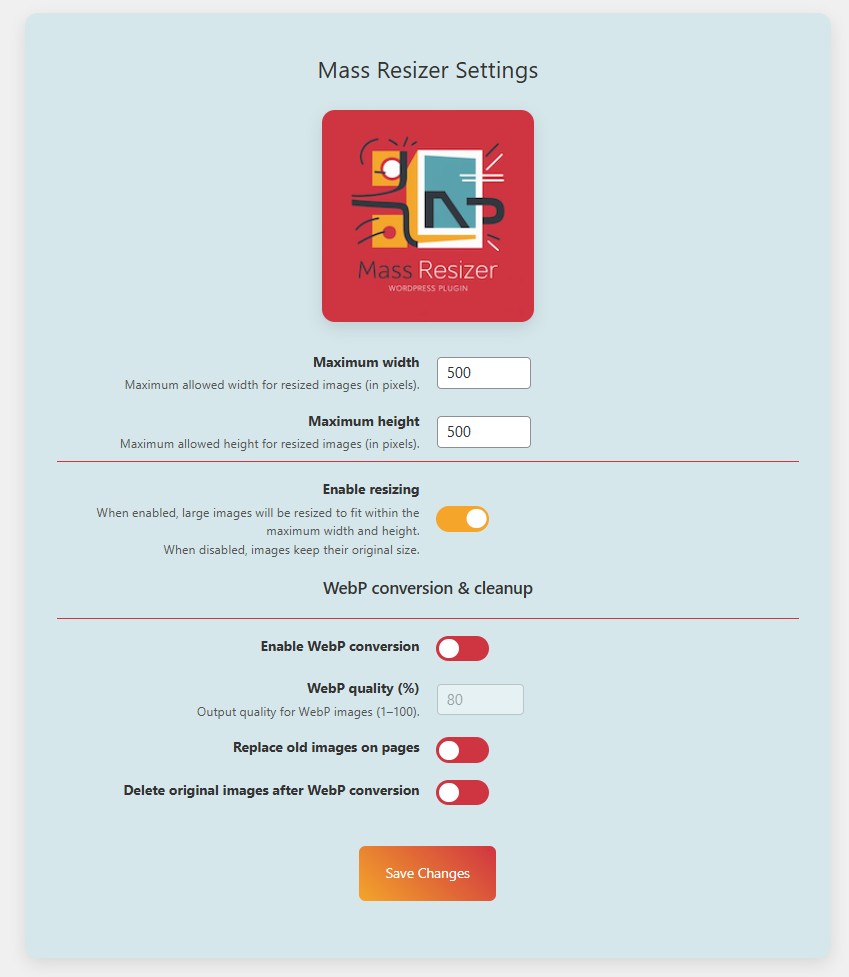
Screenshots
For developers
Is this your plugin? Show off the numbers.
Add a live badge to your site, docs or GitHub README. It updates on its own — no account needed.
Best Mass Resizer alternatives
All bulk optimization plugins →| Rank | Plugin | Active installs |
|---|---|---|
| 2 |
 Devnirob Image Optimizer
Compress WordPress images in bulk, convert Media Library files to AVIF or WebP, track… |
<10 |
FAQ
Mass Resizer: quick answers
Straight answers, pulled from live WordPress.org data.
Source: WordPress.org
Is Mass Resizer free?
Yes. Mass Resizer is free to download and use from the official WordPress.org plugin directory.
Is Mass Resizer safe to use in 2026?
Mass Resizer works, but test it on a staging site before relying on it in 2026. It runs on 50+ sites, is rated 5/5 and was last updated 12 months ago, and scores 47/100 on our health check.
How many websites use Mass Resizer?
Mass Resizer is active on 50+ WordPress websites and has been downloaded 1,436 times since it launched in December 2024. It was downloaded 145 times in the last 30 days.
Does Mass Resizer work with WordPress 7.1?
Mass Resizer is officially tested up to WordPress 6.9.12, while the latest release is 7.1.5. It may still work, but try it on a staging site first.
What PHP version does Mass Resizer need?
Mass Resizer requires PHP 7.4 or higher. Most hosts run PHP 8.x today, so it works on any modern WordPress hosting.
When was Mass Resizer last updated?
The latest version, 2.10.93, was released on December 10, 2025 (12 months ago).
Who makes Mass Resizer?
Mass Resizer is developed and maintained by Stan Furtovsky.
What are the best alternatives to Mass Resizer?
The most popular alternatives to Mass Resizer are Devnirob Image Optimizer (<10 installs).
Powered by PageForge
One template and a spreadsheet. A real page for every search.
PageForge turns each row of a CSV into a WordPress page with its own title, URL, SEO fields and schema, built on the layout you already designed. Free on WordPress.org.
- CSV and XLSX, plus Google Sheets on Professional and Enterprise
- Its own title, URL, SEO fields and schema for every page
- Works with the block editor, Elementor, Divi and Avada
- Free on WordPress.org, no credit card