


Martial Arts Club Manager
Complete management system for martial arts clubs including member management, class scheduling, and attendance tracking. Requires WooCommerce.

Use with caution
Martial Arts Club Manager works, but test it on a staging site before relying on it in 2026. Was last updated 1 month ago, and scores 55/100 on our health check.
- Small user base (<10 active installs)
- Very few reviews so far
- Needs PHP 8.1 or newer
How does it stack up?
Side-by-side on installs, updates, ratings & support



Daily downloads
Download spikes usually follow a new release — each site that auto-updates counts as a download.
Rankings
Where Martial Arts Club Manager stands todayWordPress.org search rankings
Live position in the plugin search, top 100| Keyword | Position |
|---|---|
| attendance | #60 |
| class-management | >100 |
| karate | #4 |
| martial arts | #3 |
| membership | >100 |
About Martial Arts Club Manager
From the official readme · v1.0.356Description
Martial Arts Club Manager is a comprehensive WordPress plugin designed specifically for martial arts club owners, dojo managers, and gym operators who need a professional system to manage their students, classes, and operations.
Who Is This Plugin For?
- Karate dojos and martial arts schools
- Taekwondo, Judo, Jiu-Jitsu, and other martial arts clubs
- Fitness centers offering martial arts classes
- Sports clubs needing member and class management
- Any organization requiring attendance tracking and membership management
Free Features
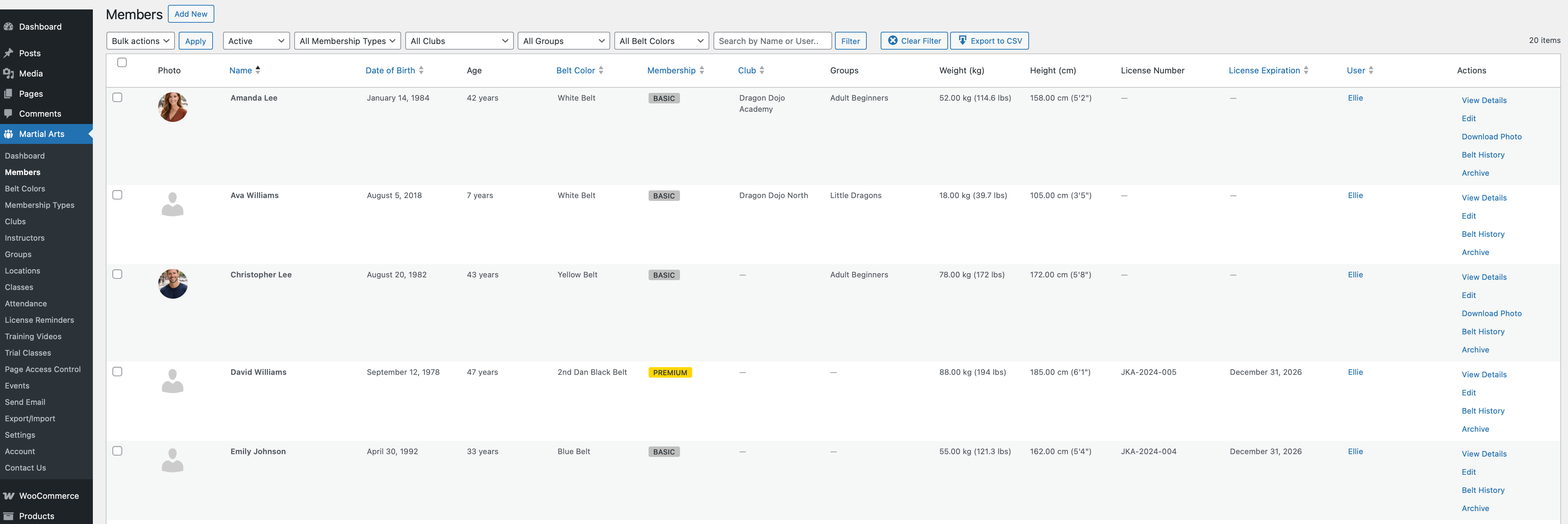
Member Management
* Add unlimited members to user accounts
* Detailed member profiles with photo, belt color, weight, height
* Basic membership type management
* Member status management (active/inactive)
* Date of birth and personal information tracking
* Export member data to CSV
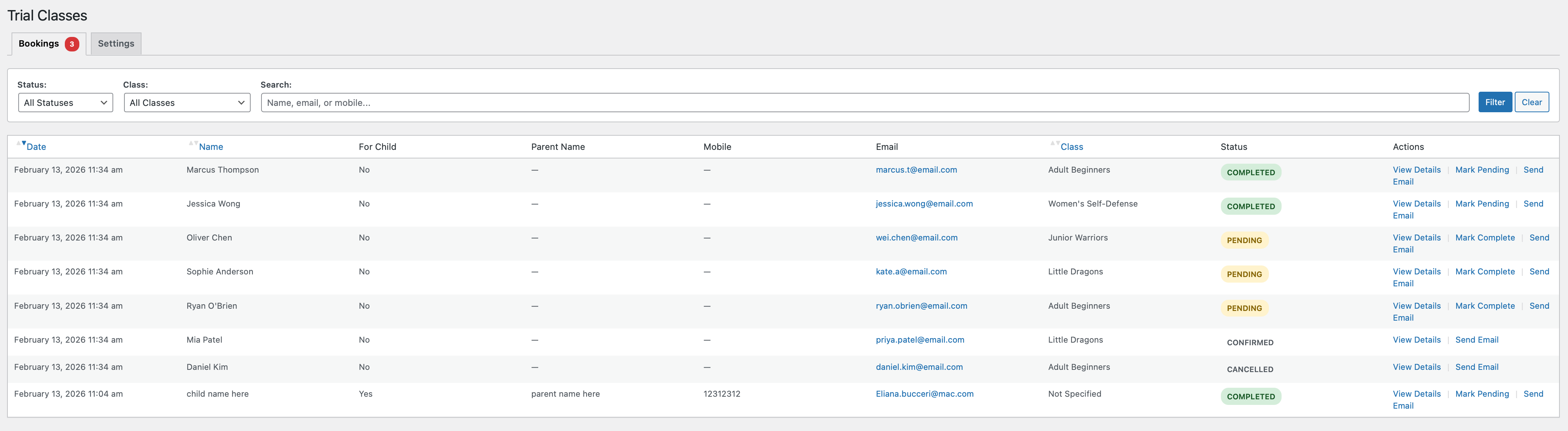
Trial Class Booking
* Public booking form for prospective students
* Admin notification emails with applicant details
* Customizable success messages
* Manage trial bookings from admin panel
* Convert trial students to members easily
WooCommerce Integration
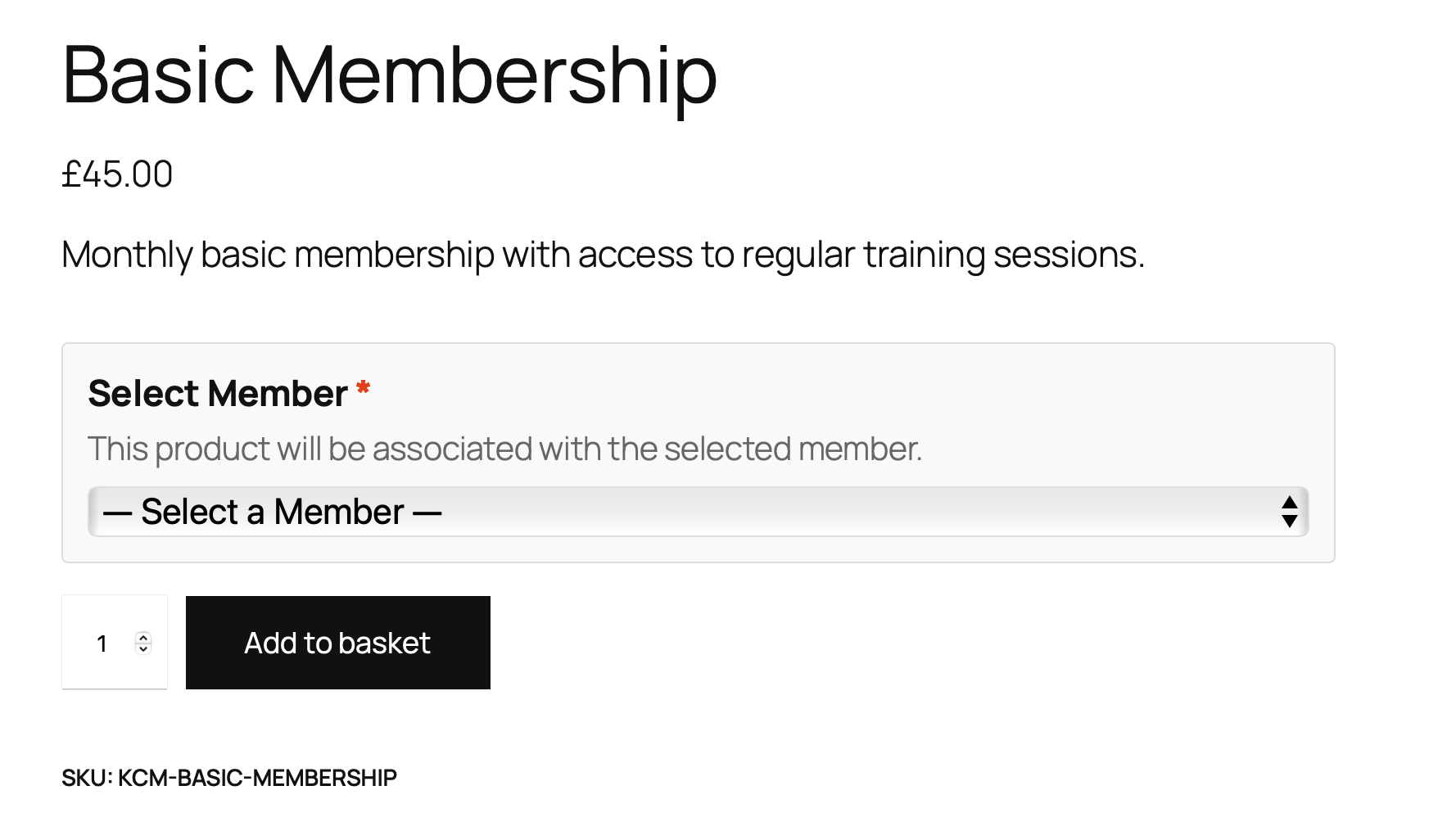
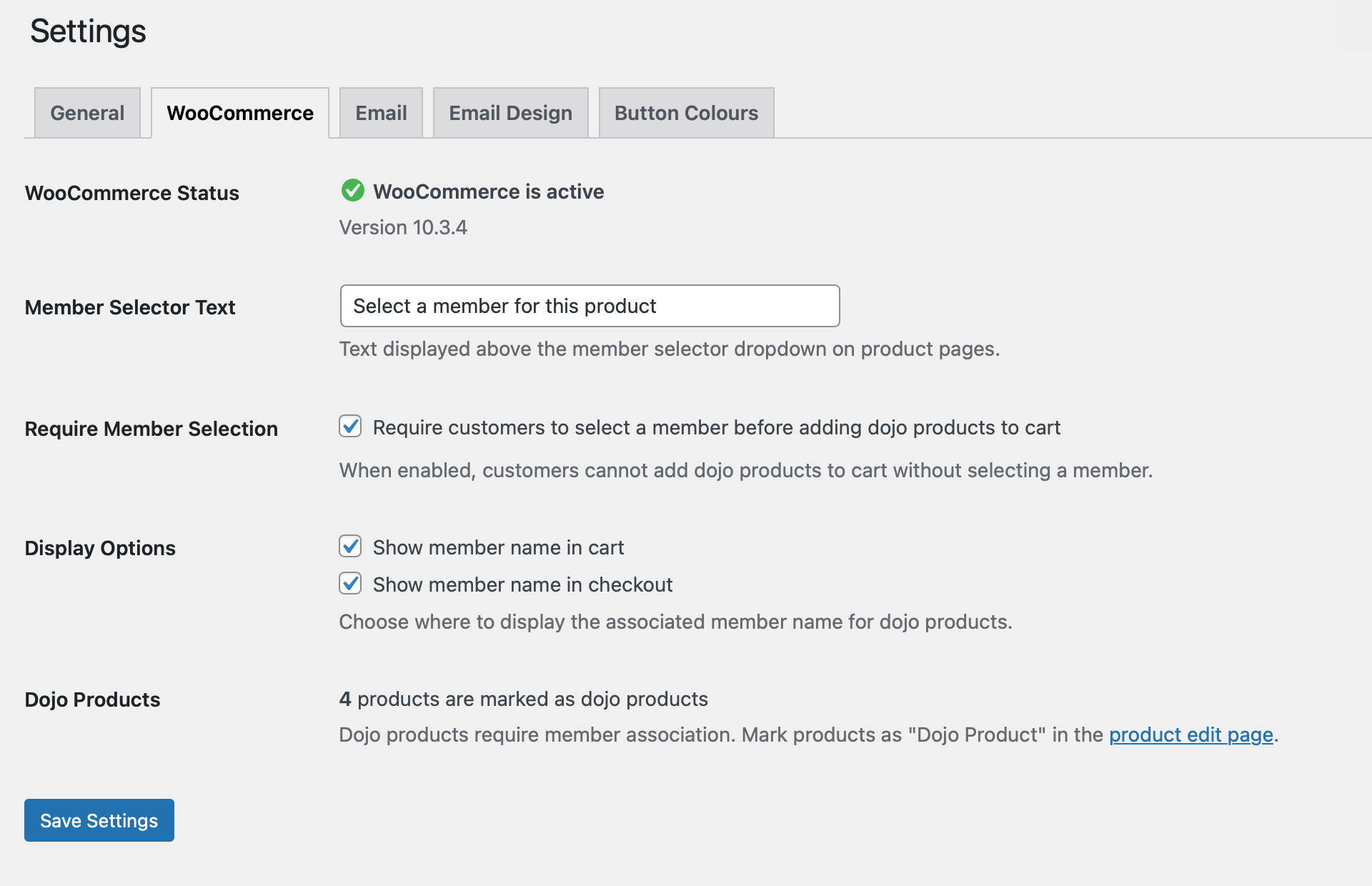
* Associate members with product purchases
* Mark products as “dojo products” requiring member selection
* Display member information in cart and checkout
* Seamless integration with WooCommerce workflows
Admin Dashboard (Basic)
* Member list with sorting and filtering
* Belt distribution analytics
* Membership type breakdown
* Recent members view
* Recent trial bookings
* Settings and customization
Frontend Member Area
* View and edit member profiles
* Upload member photos
* Manage personal information
* Access member cards
Pro Features (Premium License)
Advanced Member Management
* Multi-club support for franchise operations
* Group assignments for organizing students
* License expiration tracking with automated reminders
* Belt grading history tracking
* Club and group filtering in member lists
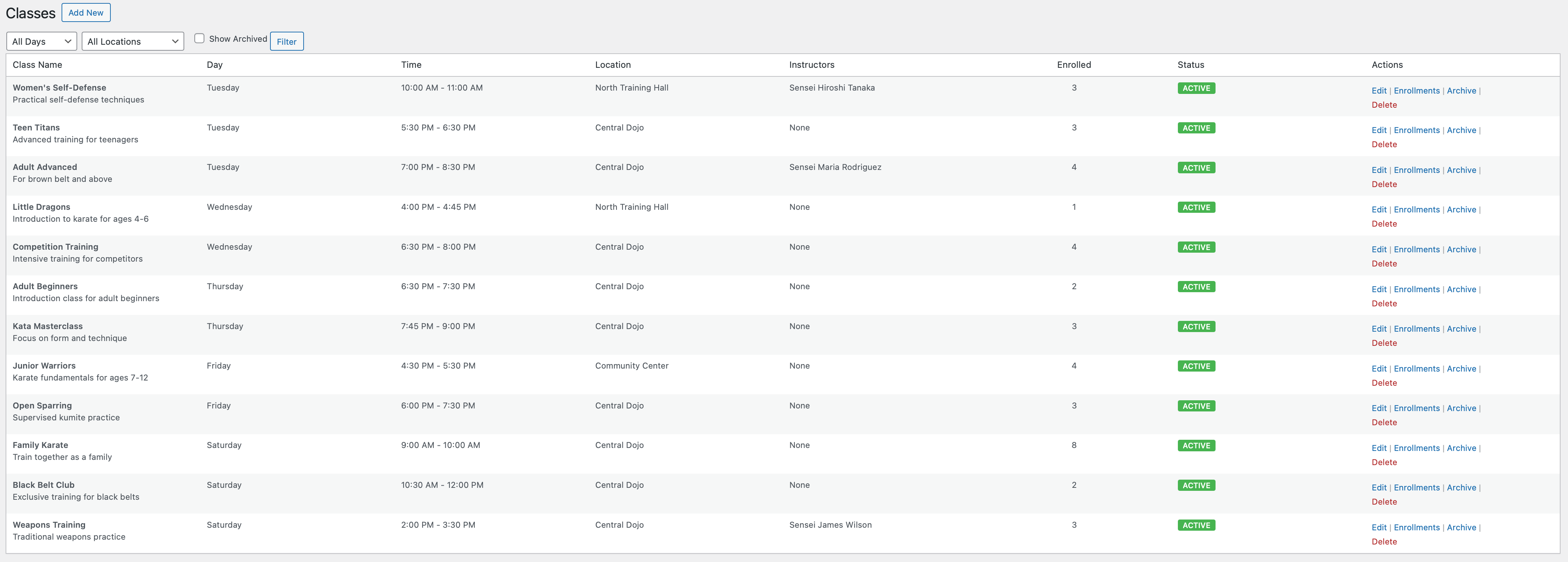
Class Scheduling & Management 🔒
* Create and manage unlimited classes
* Schedule classes by day, time, and location
* Multiple location support
* Assign groups to specific classes
* Enroll members in classes
* Class capacity management
* Archive old classes while preserving history
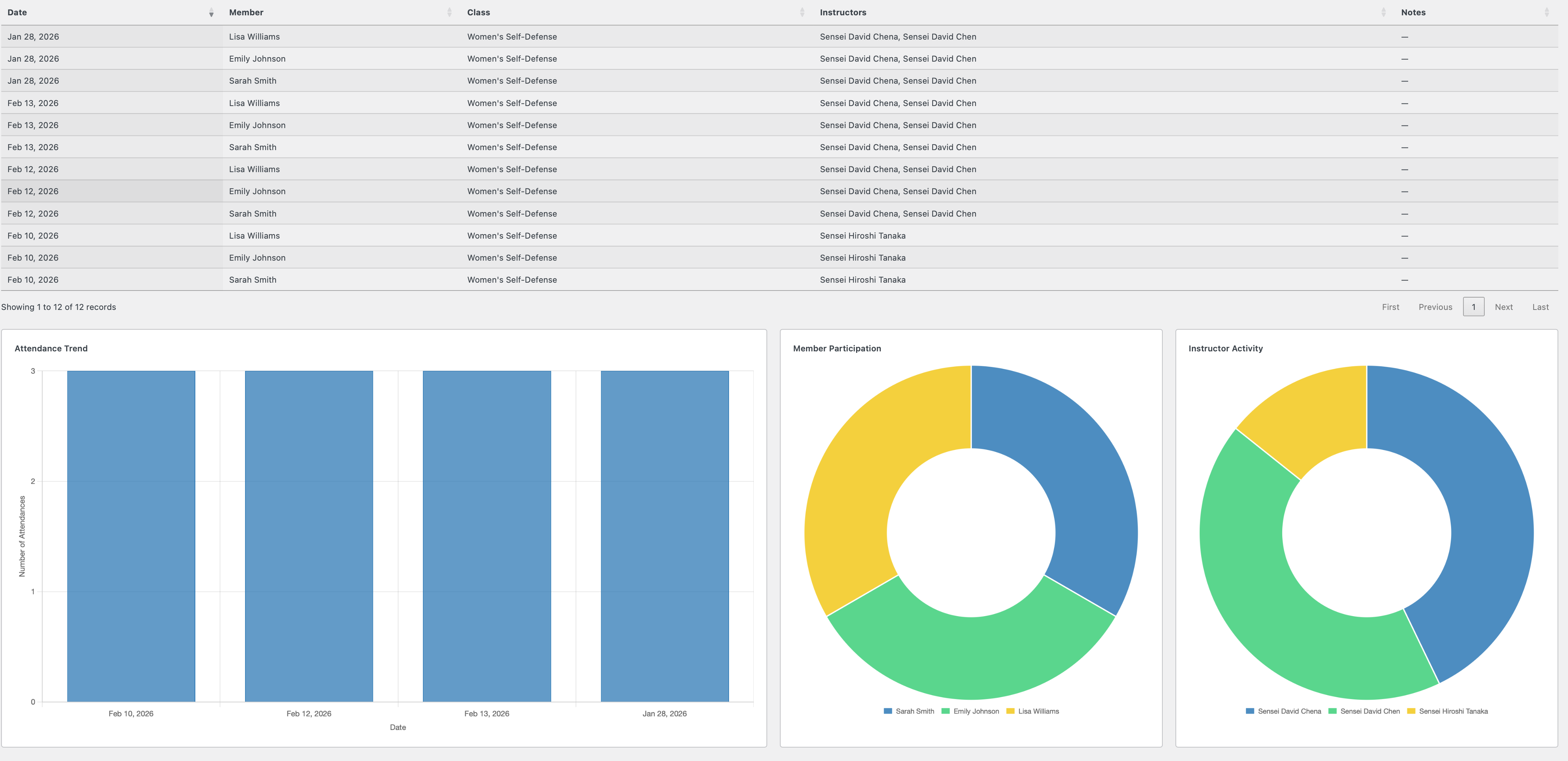
Attendance Tracking 🔒
* Quick attendance recording for each class
* View and modify historical attendance records
* Comprehensive attendance reports
* Export attendance data to CSV
* Filter by class, member, or date range
* Attendance trends analytics (6 months)
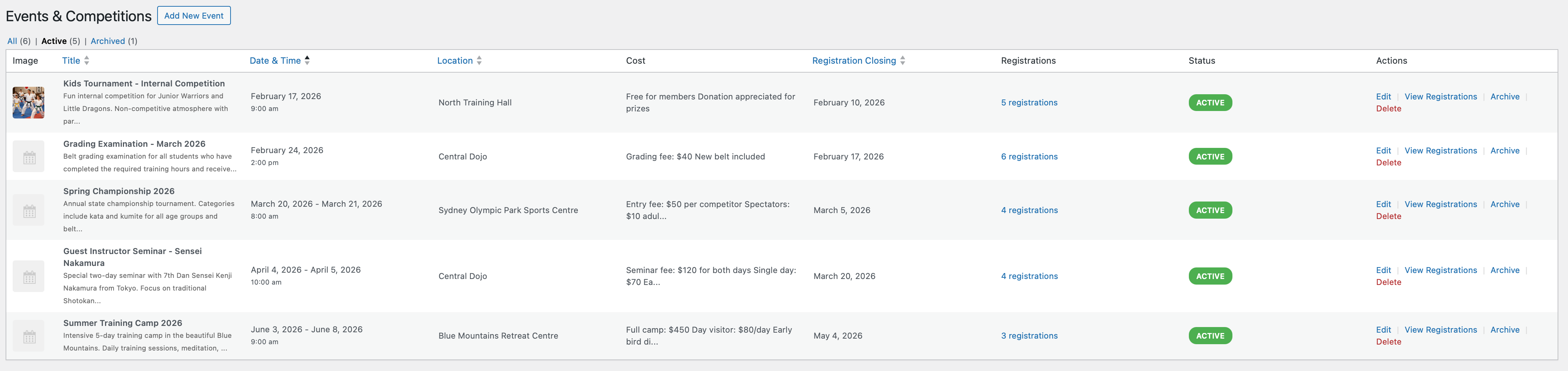
Events Management 🔒
* Create and manage martial arts events (tournaments, seminars, gradings)
* Multiple member registration per event
* Registration closing dates
* Event status tracking (upcoming, ongoing, completed)
* Email notifications for registrations
* Export event registrations to CSV
* Archive events when complete
* Member event history tracking
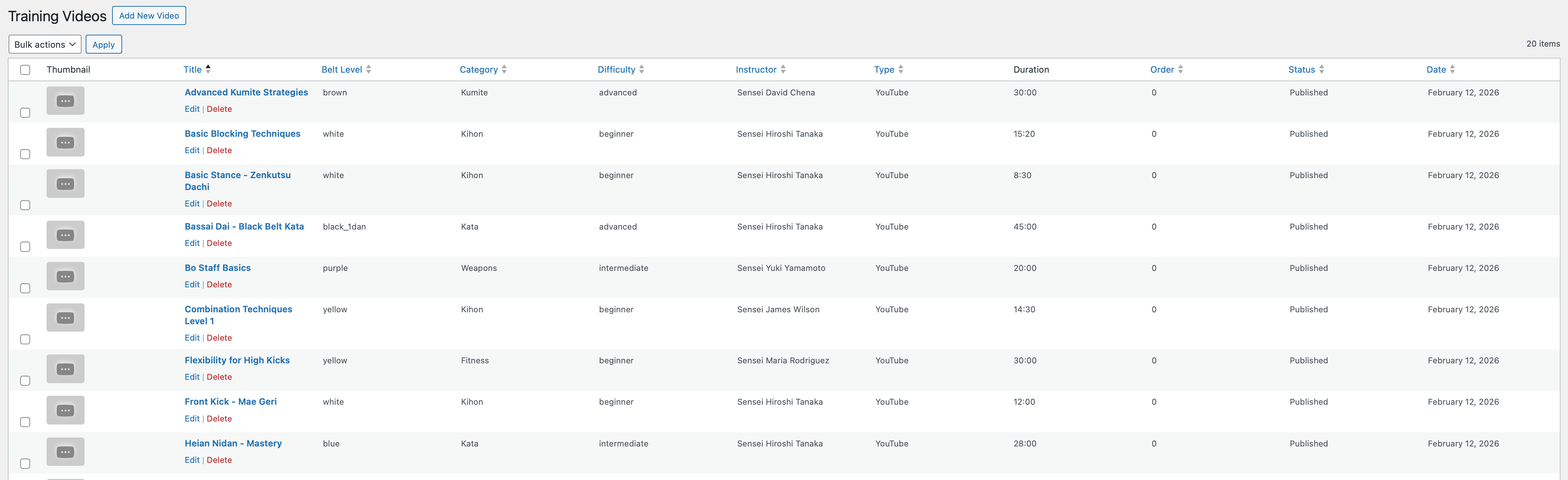
Training Videos 🔒
* Organize training videos by belt level
* Filter videos by category, difficulty, and instructor
* Restrict access based on membership type
* Video thumbnail and description support
* YouTube and Vimeo integration
* Progress tracking
Communication Tools 🔒
* Send bulk emails to all members or filtered groups
* Filter recipients by membership type, group, or status
* Email preview before sending
* Customizable email templates with header/footer
* Button color customization for branded emails
Page Access Control 🔒
* Restrict pages to logged-in users only
* Set membership-level restrictions
* Create premium content areas
* Custom redirect rules
Enhanced Dashboard 🔒
* Active classes statistics
* Monthly attendance overview
* Upcoming events widget
* Expiring licenses alerts
* Attendance trends chart
* Advanced analytics
Requirements
This plugin requires WooCommerce to be installed and active. WooCommerce is used for handling product purchases and member associations during checkout.
Language Support
- Fully internationalized and translation-ready
- Text domain: martial-arts-club-manager
- POT file included for translators
Documentation
Comprehensive user documentation is included with the plugin and accessible from the admin dashboard.
REST API
The plugin exposes a REST API under the macm/v1 namespace at /wp-json/macm/v1/.
Authentication: Two methods are supported:
1. Application Passwords (WordPress 5.6+): HTTP Basic Auth with username:application_password. Generate under Users → Your Profile → Application Passwords.
2. Bearer Token Auth (v1.0.333+): POST to /auth/login with username/password to receive an access token (24h) and refresh token (30 days). Send Authorization: Bearer <token> on subsequent requests. Refresh via /auth/refresh. Logout via /auth/logout. HTTPS is required.
Free endpoints:
* GET /auth/site-info — No auth required. Returns site name, plugin version, premium status, timezone.
* POST /auth/verify — Application Password required. Verifies credentials, returns user roles and linked member IDs.
* POST /auth/login — No auth required. Returns access token, refresh token, and user profile.
* POST /auth/refresh — No auth required. Exchanges refresh token for a new token pair.
* POST /auth/logout — Bearer token required. Invalidates session; supports all_devices: true.
Premium endpoints:
All premium endpoints require an active premium license. They cover:
* Members (self-service view + admin CRUD)
* Classes (list, create, update, archive)
* Attendance (record, batch, delete)
* Events (create, update, register, cancel)
* Trial Bookings (create, update, convert to member)
* Offline Sync (batch attendance sync with conflict resolution)
* Push Notifications (register/deregister Expo push tokens)
* Kiosk (activate device, member lookup, check-in)
Full endpoint documentation and a Postman collection are included in the postman/ folder of the plugin.
Support
For support and questions, please visit the WordPress.org support forums for this plugin.
For bug reports, please include:
* WordPress version
* WooCommerce version
* PHP version
* Description of the issue
* Steps to reproduce
Credits
Martial Arts Club Manager is developed and maintained by madebyeli.com.
Privacy Policy
Martial Arts Club Manager stores member information in your WordPress database. This information includes:
* Member names and contact details
* Date of birth
* Belt colors and membership information
* Attendance records
* Event registrations
* Trial booking requests
All data is stored locally on your WordPress installation. The plugin does not send any data to external servers. You are responsible for complying with privacy laws (GDPR, CCPA, etc.) in your jurisdiction.
Third-Party Services
This plugin integrates with:
* WooCommerce (required) – For product purchases and checkout
* YouTube/Vimeo (optional) – For embedding training videos (if you use the training videos feature)
When using training videos with embedded YouTube or Vimeo content, those platforms may collect data according to their privacy policies. Please review YouTube and Vimeo privacy policies if you use this feature.
Installation
Automatic Installation
- Log in to your WordPress admin panel
- Go to Plugins > Add New
- Search for “Martial Arts Club Manager”
- Click “Install Now” and then “Activate”
- Important: Ensure WooCommerce is installed and active first
Manual Installation
- Download the plugin ZIP file
- Log in to your WordPress admin panel
- Go to Plugins > Add New > Upload Plugin
- Click “Choose File” and select the downloaded ZIP
- Click “Install Now” and then “Activate”
- Important: Ensure WooCommerce is installed and active first
After Activation
- Go to “Martial Arts Club” in the WordPress admin menu
- Visit Settings to configure your preferences
- Set up your first members under “Members”
- Create your class schedule under “Classes”
- Start tracking attendance!
Configuration Steps
Step 1: Configure Basic Settings
* Navigate to Martial Arts Club → Settings
* Set your date and time formats
* Configure email settings (from name, from email)
* Customize button colors for frontend forms
Step 2: Set Up Configuration Entities
* Add Belt Colors (white, yellow, green, blue, brown, black, etc.)
* Add Locations where classes are held
* Add Groups to organize members (beginners, intermediate, advanced, etc.)
* Add Membership Types if using custom types beyond Premium/Basic
Step 3: Add Members
* Go to Martial Arts Club → Members
* Click “Add Member”
* Fill in member details (name, DOB, belt color, group, etc.)
* Upload member photo (optional)
* Assign membership type
Step 4: Create Class Schedule
* Go to Martial Arts Club → Classes
* Click “Add Class”
* Set class name, day, time, and location
* Assign which groups can attend
* Save the class
Step 5: Enroll Members in Classes
* Go to Martial Arts Club → Classes
* Click “Enroll” for a specific class
* Select members to enroll using checkboxes
* Save enrollments
Step 6: Set Up WooCommerce Products (Optional)
* Go to Products in WooCommerce
* Edit any product that should require member association
* Check “Is Dojo Product” in the product data section
* When customers purchase, they’ll select which member the product is for
Frequently asked questions
Does this plugin require WooCommerce?
Yes, absolutely. Martial Arts Club Manager requires WooCommerce to be installed and active. WooCommerce handles the product purchase workflows and member associations during checkout.
Can I use this without WooCommerce?
No. If WooCommerce is not active, the plugin will automatically deactivate and display a notice. WooCommerce is a core dependency for this plugin’s functionality.
How many members can I add?
There is no limit. You can add as many members as your club needs.
Can multiple members share one user account?
Yes! This is actually the recommended approach. Parents can have one user account and add all their children as members. Each member has their own profile, attendance tracking, and class enrollments.
How do I track attendance?
Attendance tracking is a premium feature. Go to Martial Arts Club → Attendance in the admin menu. Select a class and date, check the members who attended, and save. You can also edit historical attendance records. Requires premium license.
Can I export attendance data?
Yes, with a premium license. Go to Martial Arts Club → Reports and select your filters (class, date range, member). Click “Export CSV” to download attendance data in spreadsheet format. Requires premium license.
What membership types are included?
The plugin doesn’t create any default membership types. You have complete flexibility to create your own custom membership types that match your club’s needs (e.g., Monthly, Quarterly, Annual, Student, Family, etc.). Create and manage membership types under Martial Arts Club → Settings → Membership Types.
How do training videos work?
Training videos are a premium feature. Add videos under Martial Arts Club → Training Videos, set the belt level, category, and difficulty, then embed YouTube or Vimeo URLs. Videos can be restricted to Premium members only. Users access videos via a frontend page. Requires premium license.
Can I organize members into groups?
Yes, with a premium license! Groups are perfect for organizing members by skill level (beginners, intermediate, advanced) or age (kids, teens, adults). Create groups under Martial Arts Club → Settings → Groups, then assign members to groups in their profiles. Requires premium license.
How do events work?
Events are a premium feature for special occasions like tournaments, seminars, belt gradings, or workshops. Create an event under Martial Arts Club → Events, set the date and registration closing date. Users can register multiple members for events. You’ll receive email notifications for each registration. Requires premium license.
Can parents register their kids for events?
Yes, with a premium license! When a user clicks “Register” on an event, they see a list of all their members with checkboxes. They can select one or multiple members to register for the event. Requires premium license.
What happens when I delete the plugin?
When you uninstall (delete) the plugin through WordPress, all plugin data is permanently removed including database tables, member information, attendance records, and settings. This cannot be undone. If you only deactivate the plugin, all data is preserved.
Is there a pro version?
Yes! The plugin offers both free and premium versions. The free version includes essential member management, trial bookings, and basic dashboard features. The premium version unlocks advanced features like class scheduling, attendance tracking, events management, training videos, bulk emails, and more. Upgrade to Pro directly from your WordPress dashboard.
Where can I get support?
For support, please use the WordPress.org support forums. Check the documentation included with the plugin first – it’s accessible from Martial Arts Club → Documentation in your admin panel.
Can I customize the button colors?
Yes! Go to Martial Arts Club → Settings → Button Colours. You can set gradient colors for all frontend buttons (trial booking, member area, etc.) to match your branding.
How do I set up the trial class booking form?
The trial booking form is automatically created when you activate the plugin. A page called “Trial Class Booking” is added to your site. Share this page with prospective students, and you’ll receive email notifications when someone books a trial.
Changelog
Fixes class times displaying an hour or more out on the Class Register, Member Area, trial booking pages and kiosk for any site not set to UTC — a class saved as 6:00 PM now shows as 6:00 PM everywhere. Also verified against WordPress 7.1. Your existing classes and records are unchanged; only the display was affected. Recommended for all users.
1.0.356 (2026-08-27)
This release also contains everything from 1.0.354 and 1.0.355, which were prepared but never published separately — if you are updating from 1.0.353, all of the below is new to you.
- Fixed: Class times displayed an hour or more out on the Class Register, Member Area, trial booking pages and kiosk whenever your site was not set to UTC. A class saved as 6:00 PM now shows as 6:00 PM everywhere. Your existing classes are unchanged — only the display was affected
- Fixed: Dates and times recorded by the plugin (member joined, attendance taken, booking received) could be saved an hour or more out on some hosting, because they were stamped by the database server’s clock rather than your site’s. All new timestamps now use your WordPress timezone
- Fixed: The Recent Attendance “Time” column on the dashboard showed 12:00 AM on every row instead of the actual sign-in time
- Fixed: The Recent Trial Bookings time on the dashboard could show the wrong hour on some hosting
- Fixed: A class scheduled inside the hour the clocks skip forward on a daylight-saving change could never be picked up by the kiosk
- Compatibility: Verified against WordPress 7.1 final
- Fixed: Plugin admin styles and scripts no longer load on screens the plugin does not own — they previously loaded on every wp-admin page, including the post editor
- Fixed: Row actions (Edit, Trash, View) in WordPress’s own Posts, Pages, Users and Plugins lists are no longer forced permanently visible by this plugin — they hover as WordPress intends again. Inside the plugin’s own screens they stay visible as before
- Fixed: Styling on the Belt Colours, License Reminders and Members pages could fail to load, leaving those screens looking unformatted
- Improved: Member photos now accept WebP, so pictures from newer phones work, and the file type is checked from the file itself rather than what the browser reports
- Improved: One consistent rule for every date and time in the plugin, protected by automated tests so it cannot drift again
- Improved: The media library is no longer loaded on admin pages that never use it, and database maintenance checks no longer run while rendering admin notices
- Note: existing records are untouched and display exactly as before; only newly saved dates use the corrected clock
- Note: if your timezone is set to a “UTC+1” style offset under Settings > General, consider switching to a city such as London or New York so daylight saving is handled for you
1.0.353 (2026-07-30)
- Added: Members “By User” view (FREE) — a new tab on the Members screen that groups members under their user account, with a per-user “select all” and bulk actions: Set Active/Inactive, Change membership, Assign belt, Send email, and Export selected to CSV (Assign group and Enroll in class are premium)
- Added: Per-member row actions in the By User view — View Details, Edit, Download Photo, Print Card, and Archive/Activate (Belt History on premium), matching the flat members list
- Added: Group and Club filters plus Group and Club columns in the By User view (premium)
- Added: WooCommerce compatibility declarations for High-Performance Order Storage (HPOS / custom order tables) and Cart/Checkout Blocks — clears the “incompatible with currently enabled WooCommerce features” admin notice
- Fixed: Order product-member association tracking now uses WooCommerce order CRUD (HPOS-safe) instead of order post meta
- Improved: Syllabus PDF attachments are clickable and open in a new tab in the editor; a new PDFs column on the syllabus list shows attachments at a glance (premium)
- Improved: Members filter bar and bulk-action toolbar layout, and button icon alignment across the Members and Belt History screens
- Improved: Per-requirement instructor notes on the Syllabus Progress screen — notes are preserved when a sign-off is cleared (premium)
- Fixed: Class times no longer shift by the timezone offset in the schedule grid
- Fixed: Syllabus tables are created on upgrade for installs that first activated before the syllabus feature existed (premium)
1.0.352 (2026-06-10)
- Added: Syllabi and Syllabus Progress in Export/Import — syllabi export with their nested requirements and PDF references (JSON and CSV), and member sign-off progress is matched back by belt colour and requirement title on import (premium)
- Added: “Download PDFs (ZIP)” on the Syllabus list — bundles every PDF attached to every syllabus into a single archive, organised one folder per belt (premium)
- Fixed: Import dispatch now includes syllabus progress, so sign-offs are restored alongside the syllabi they belong to (premium)
1.0.351 (2026-06-07)
- Added: Syllabus & Grading Progress system (premium) — publish grading requirements per belt, each with a description and an optional video (picked from your training video library or pasted as a URL) or PDF attachment
- Added: Syllabus Progress sign-off screen — instructors tick off individual requirements per member, and the system records who signed off and when (premium)
- Added:
[macm_syllabus]shortcode — members see their own grading requirements in a per-belt accordion with read-only completion markers (premium) - Added: Three member display modes for the syllabus — “Show all belts”, “Up to current grade”, or “Up to next grade” (premium)
- Added: Reusable member View Details modal, now also opened by clicking a member’s name in the event registrations list
- Fixed: Modal centring and overlay behaviour across admin screens
1.0.350 (2026-05-30)
- Added: QR Code Sign-In System (premium) — members view, regenerate, and download a permanent personal QR code from the Member Area, and admins can regenerate any member’s token from the member edit screen
- Added: Kiosk “Scan QR” mode — one scan resolves the member and the class currently in session and marks attendance, with no class picker, member search, or PIN
- Added: The printed membership card now includes the member’s QR code
- Added: REST API endpoints for Bookings and Instructor Availability, including self-service
/me/routes for members and instructors - Changed: Minimum PHP requirement raised to 8.1 (required by the QR code library)
- Fixed: Kiosk scanner falls back to the front camera when no rear camera is available, and repeated scans of the same code no longer flood the roster
1.0.348 (2026-05-09)
- Added: REST API endpoints for Instructors — list, create, update, soft delete and restore, photo upload, and class assignment
- Added: Self-service REST endpoints so an instructor can manage their own profile, photo, and classes
- Added:
manage_macm_instructorscapability - Fixed: Bearer tokens now grant access to admin REST endpoints
- Fixed: Attendance, event, and trial REST handlers corrected to match the database schema
- Added: Member photo upload through the WordPress media library via the REST API
Screenshots
For developers
Is this your plugin? Show off the numbers.
Add a live badge to your site, docs or GitHub README. It updates on its own — no account needed.
Best Martial Arts Club Manager alternatives
All attendance plugins →





FAQ
Martial Arts Club Manager: quick answers
Straight answers, pulled from live WordPress.org data.
Live data from WordPress.org · checked Sep 30, 2026
Is Martial Arts Club Manager free?
Yes. Martial Arts Club Manager is free to download and use from the official WordPress.org plugin directory.
Is Martial Arts Club Manager safe to use in 2026?
Martial Arts Club Manager works, but test it on a staging site before relying on it in 2026. Was last updated 1 month ago, and scores 55/100 on our health check.
How many websites use Martial Arts Club Manager?
Martial Arts Club Manager is active on <10 WordPress websites and has been downloaded 1,061 times since it launched in January 2026. It was downloaded 94 times in the last 30 days.
Does Martial Arts Club Manager work with WordPress 7.1?
Martial Arts Club Manager is officially tested up to WordPress 7.0.6, while the latest release is 7.1.2. It may still work, but try it on a staging site first.
What PHP version does Martial Arts Club Manager need?
Martial Arts Club Manager requires PHP 8.1 or higher. Most hosts run PHP 8.x today, so it works on any modern WordPress hosting.
When was Martial Arts Club Manager last updated?
The latest version, 1.0.356, was released on August 27, 2026 (1 month ago).
Who makes Martial Arts Club Manager?
Martial Arts Club Manager is developed and maintained by madebyeli.
What are the best alternatives to Martial Arts Club Manager?
The most popular alternatives to Martial Arts Club Manager are Attendance Manager (700+ installs), HR Management Lite (200+ installs) and Clock In Portal- Staff & At… (200+ installs).
Powered by PageForge
Want thousands of pages that rank like these? Build them in an afternoon.
This directory runs on the same engine as PageForge. Turn any spreadsheet, CSV or API into thousands of fast, SEO-ready WordPress pages — with schema, internal links and AI-written copy baked in.
- CSV, Google Sheets & API data sources
- AI content, schema & internal links per page
- Works with Elementor, Gutenberg, Yoast & Rank Math
- Free on WordPress.org — no credit card


