



Markdown Comment Block
Add markdown inspired comments to posts that render only within the block editor.

Consider an alternative
Markdown Comment Block shows warning signs in 2026 — compare the alternatives below before installing. It runs on 300+ sites, is rated 5/5 and was last updated 2 years ago, and scores 33/100 on our health check.
- Small user base (300+ active installs)
- Very few reviews so far
- No update in 2 years
- Only tested up to WordPress 6.6 (latest is 7.1)
How does it stack up?
Side-by-side on installs, updates, ratings & support



Daily downloads
Download spikes usually follow a new release — each site that auto-updates counts as a download.
Rankings
Where Markdown Comment Block stands todayWordPress.org search rankings
Live position in the plugin search, top 100| Keyword | Position |
|---|---|
| block | >100 |
| blocks | >100 |
| comments | >100 |
| gutenberg | >100 |
| markdown | #55 |
Version adoption
Share of active sites per release.
Rating breakdown
★★★★★★★★★★ 5 from 1 reviews
About Markdown Comment Block
From the official readme · v1.0.0Description
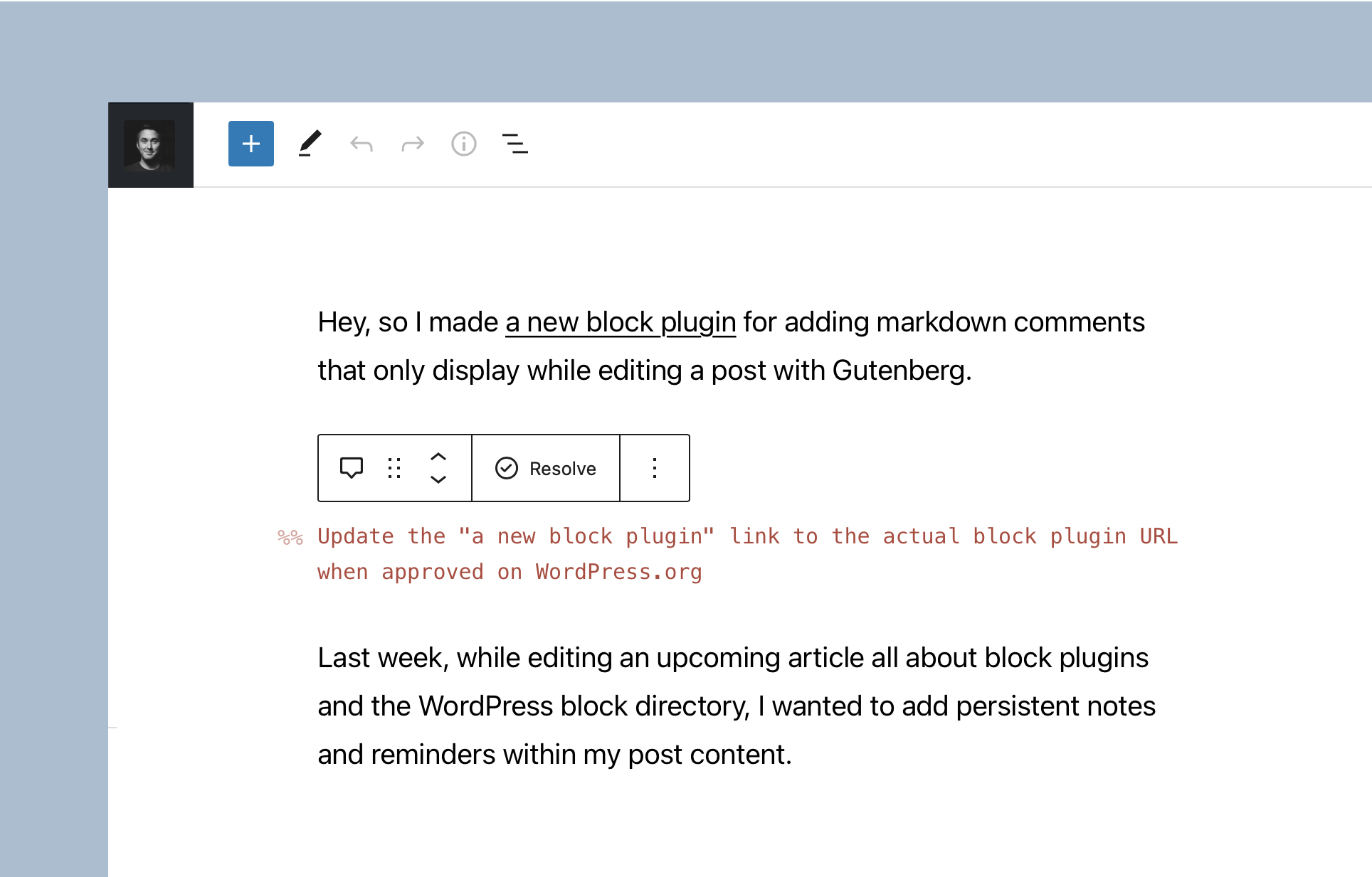
Comments that only render in the block editor
I honestly enjoy drafting articles either locally in Ulysses, or on my blog using the Iceberg Editor. While I do love Iceberg, once I publish an article I typically bring back the default Gutenberg experience — thus removing any comments I previously added.
Having the ability to add, and keep, any relevant editing comments within my posts, without rendering them on the front-end, means that I am freed up to mentally jot any idea down without thinking about it. It is simply natural and convenient.
Learn more about Markdown Comment →
What’s interesting about Markdown Comment:
1. Editor only
The block only renders within the editor. For developers reading this, that means there’s no save function. I don’t want my unfinished ideas, reminders, and notes rendered within my post – even if they’re hidden by CSS.
2. Helpful block transforms
I added a couple transforms, to and from headings and paragraphs, and a raw shortcut when you type %% and hit the [space] key. This lets me quickly add comments, and even convert whole paragraphs or headings to a comment.
3. Easily resolve comments
To support that path towards simplicity, I wanted a method to quickly resolve — i.e. banish — a comment entirely. So, I added a toolbar control to quickly resolve the comment, removing the block entirely.
4. No rich text support
Comments need to have minimal impact on editing, and feel as natural as possible. That’s why there are no typical RichText controls (although you can still bold, italicize and add hyperlinks). And while you can change the color of the comment — there are no other typographic controls.
5. Entirely CSS Variable ready
Global styles and full site editing are opening the door for themes to be heavily powered by CSS variables. Blocks should be designed with that same mentality, which is exactly what I did here. I added simple CSS variables with fallbacks that are the default values. To further theme the comment, there’s no need to override any styles with classes, just write a few CSS variables.
Installation
- Upload the
markdown-comment-blockfolder to your/wp-content/plugins/directory or alternatively upload the markdown-comment-block.zip file via the plugin page of WordPress by clicking ‘Add New’ and selecting the zip from your local computer. - Activate the plugin through the ‘Plugins’ menu in WordPress.
- Search for the block within the Gutenberg block editor.
Frequently asked questions
Can the Markdown Comment block be used with my theme?
Yes! If you’re using Gutenberg (i.e. the block editor) on your site, you should have no issues with the block. It’s relatively simple to modify the CSS variables to tweak the comment styling if you’d like — learn more here.
Where can I send feedback or ideas?
Please reach out via the official plugin support forum.
Who’s Rich Tabor?
As a WordPress entrepreneur, designer and developer all wrapped up in one, @richard_tabor is recognized as one of the top leaders in this post-Gutenberg era of WordPress. His design chops have topped the 2018 Automattic Design Awards and led him to found CoBlocks – a top-notch set of page builder blocks and tools for Gutenberg, ThemeBeans – a premier WordPress theme shop and Iceberg – a markdown editor for Gutenberg.
Changelog
1.0.0
- Set default control for text color
0.1.8
- Add block.json to registerBlockType
0.1.7
- WordPress 5.9 support
- Ensure text color is properly applied
0.1.6
- Resolve package error
0.1.5
- Improve styling to work with theme.json
- Add example theme.json file for themes to leverage
0.1.3
- Tweak block title
- Tweak styles
Screenshots

For developers
Is this your plugin? Show off the numbers.
Add a live badge to your site, docs or GitHub README. It updates on its own — no account needed.
Best Markdown Comment Block alternatives
All block plugins →





FAQ
Markdown Comment Block: quick answers
Straight answers, pulled from live WordPress.org data.
Live data from WordPress.org · checked Oct 8, 2026
Is Markdown Comment Block free?
Yes. Markdown Comment Block is free to download and use from the official WordPress.org plugin directory.
Is Markdown Comment Block safe to use in 2026?
Markdown Comment Block shows warning signs in 2026 — compare the alternatives below before installing. It runs on 300+ sites, is rated 5/5 and was last updated 2 years ago, and scores 33/100 on our health check.
How many websites use Markdown Comment Block?
Markdown Comment Block is active on 300+ WordPress websites and has been downloaded 11,411 times since it launched in June 2021. It was downloaded 335 times in the last 30 days.
Does Markdown Comment Block work with WordPress 7.1?
Markdown Comment Block is officially tested up to WordPress 6.6.10, while the latest release is 7.1.3. It may still work, but try it on a staging site first.
What PHP version does Markdown Comment Block need?
Markdown Comment Block requires PHP 7.0 or higher. Most hosts run PHP 8.x today, so it works on any modern WordPress hosting.
When was Markdown Comment Block last updated?
The latest version, 1.0.0, was released on July 14, 2024 (2 years ago).
Who makes Markdown Comment Block?
Markdown Comment Block is developed and maintained by Rich Tabor.
What are the best alternatives to Markdown Comment Block?
The most popular alternatives to Markdown Comment Block are Spectra Legacy (1M+ installs), Breadcrumb NavXT (800K+ installs) and PDF Embedder (300K+ installs).
Powered by PageForge
Want thousands of pages that rank like these? Build them in an afternoon.
This directory runs on the same engine as PageForge. Turn any spreadsheet, CSV or API into thousands of fast, SEO-ready WordPress pages — with schema, internal links and AI-written copy baked in.
- CSV, Google Sheets & API data sources
- AI content, schema & internal links per page
- Works with Elementor, Gutenberg, Yoast & Rank Math
- Free on WordPress.org — no credit card


