



Mark New Posts
Highlight unread posts on your blog.

Consider an alternative
Mark New Posts shows warning signs in 2026 — compare the alternatives below before installing. It runs on 500+ sites, is rated 4.8/5 and was last updated 2 years ago, and scores 41/100 on our health check.
- Small user base (500+ active installs)
- No update in over a year
- Only tested up to WordPress 6.7 (latest is 7.1)
How does it stack up?
Side-by-side on installs, updates, ratings & support


Daily downloads
Download spikes usually follow a new release — each site that auto-updates counts as a download.
Rankings
Where Mark New Posts stands todayWordPress.org search rankings
Live position in the plugin search, top 100| Keyword | Position |
|---|---|
| Highlight | >100 |
| New posts | #93 |
| unread | #27 |
| unread posts | #4 |
Version adoption
Share of active sites per release.
Rating breakdown
★★★★★★★★★★ 4.8 from 12 reviews
About Mark New Posts
From the official readme · v7.6Description
Highlight unread posts on your blog.
Key features:
- Works right out of the box
- Uses cookies, no authorization required
- 4 different types of markers for highlighting posts (a “new” text label,
an orange circle, etc.) - Customizable background color for unread post titles
There’s a setting to determine when a post should be considered read. You can pick one of the following:
- after it was opened
- after it was displayed in the post list
- after opening any page of the blog
Functions available for theme developers:
- mnp_is_new_post($post) – check if a post is unread
- mnp_new_posts_count($query) – get unread posts count
Frequently asked questions
1. How can I check that the plugin works?
Install and activate the plugin; Open your blog’s main page; Add a new post to your blog; Open the main page once again. An orange circle should appear to the left of the new post’s title.
2. Is it possible to highlight all the posts published in a recent few days for new visitors?
Yes. Just set these two options: * “A post only stays highlighted for N days after publishing” -> set the amount of days * “Show all existing posts as new to new visitors” -> check
3. The plugin is exploding my page’s markup. How to fix it?
Try to enable the option “Check page markup before displaying a marker” (plugin options, advanced settings).
4. What do I need the mnp_is_new_post() and mnp_new_posts_count() functions for?
These two functions may be useful for developing WordPress themes. mnp_is_new_post($post) Returns true if a specific post is unread, otherwise false. Parameters: $post (optional) – post ID or object. mnp_new_posts_count($query) Returns the total number of unread posts, optionally filtered. Parameters: $query (optional) – WP_Query query string. Example: echo mnp_new_posts_count('cat=1'); This will show the number of unread posts in category with id = 1.
Changelog
7.6
- Fixed security issue: possibility for non-admin users to update plugin’s settings. Thanks to Aiden for reporting.
7.5.2
- Fixed possible bug in the “Use JS” mode with posts not getting marked at all
7.5.1
- Fixed: “Allow outside the post list” option makes markup appear in admin post list
7.5.0
- “Allow outside the post list” option
- Cosmetic: fixed some of the texts on the settings page
7.4.0
- Fixed a conflict with Buddypress. I hope now we can be buddies again. Thanks a lot to teeboy4real and r-a-y!
- Improved performance
- If you’ve read this far AND if you like this plugin, why not give it a nice review? It would be lovely!
7.3.2
- Fixed a conflict with WPForms plugin. A message “Notice: is_404 was called incorrectly” appeared when trying to open the Settings page of WPForms.
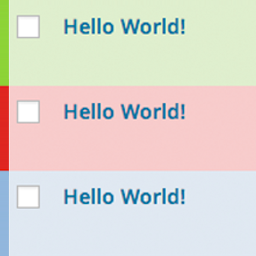
Screenshots


For developers
Is this your plugin? Show off the numbers.
Add a live badge to your site, docs or GitHub README. It updates on its own — no account needed.
Best Mark New Posts alternatives
All Highlight plugins →





FAQ
Mark New Posts: quick answers
Straight answers, pulled from live WordPress.org data.
Live data from WordPress.org · checked Sep 29, 2026
Is Mark New Posts free?
Yes. Mark New Posts is free to download and use from the official WordPress.org plugin directory.
Is Mark New Posts safe to use in 2026?
Mark New Posts shows warning signs in 2026 — compare the alternatives below before installing. It runs on 500+ sites, is rated 4.8/5 and was last updated 2 years ago, and scores 41/100 on our health check.
How many websites use Mark New Posts?
Mark New Posts is active on 500+ WordPress websites and has been downloaded 14,657 times since it launched in May 2015. It was downloaded 126 times in the last 30 days.
Does Mark New Posts work with WordPress 7.1?
Mark New Posts is officially tested up to WordPress 6.7.9, while the latest release is 7.1.2. It may still work, but try it on a staging site first.
When was Mark New Posts last updated?
The latest version, 7.6, was released on December 6, 2024 (2 years ago).
Who makes Mark New Posts?
Mark New Posts is developed and maintained by i.lychkov.
What are the best alternatives to Mark New Posts?
The most popular alternatives to Mark New Posts are String locator (100K+ installs), Highlighting Code Block (10K+ installs) and Highlight Search Terms (6K+ installs).
Powered by PageForge
Want thousands of pages that rank like these? Build them in an afternoon.
This directory runs on the same engine as PageForge. Turn any spreadsheet, CSV or API into thousands of fast, SEO-ready WordPress pages — with schema, internal links and AI-written copy baked in.
- CSV, Google Sheets & API data sources
- AI content, schema & internal links per page
- Works with Elementor, Gutenberg, Yoast & Rank Math
- Free on WordPress.org — no credit card


